Duplicator Pro is one of the most reliable WordPress plugins for website migration, backup, cloning, and restoration. For anyone managing a WordPress site, these tasks are not occasional technical extras. They are part of core website maintenance. At some point, most website owners need to move a site to a new hosting provider, create a backup before updating plugins, build a staging copy for testing, or duplicate an existing site structure for a new project. Without the right plugin, these processes can become stressful, technical, and risky.
A WordPress website is made up of many moving parts. It includes themes, plugins, uploads, media files, configuration files, and a database containing posts, pages, settings, users, and metadata. Manually moving all of this from one server to another usually involves exporting the database, downloading files, uploading them to a new server, updating configuration files, and checking for path or domain mismatches. Even experienced users can run into issues during this process. A broken database import, missing file, or incorrect server setting can make the site inaccessible.
Duplicator Pro is designed to simplify that complexity. Instead of migrating or backing up a site piece by piece, the plugin packages the website into a deployable archive with an installer. That means you can create a full copy of the site, move it, restore it, or store it safely as a backup. This is useful not only for migrations, but also for routine site protection and workflow efficiency.
The Pro version becomes especially valuable for professionals and businesses. Agencies can use it to migrate client sites quickly. Freelancers can duplicate starter websites for new projects. Business owners can automate backups and store them in remote cloud services. eCommerce sites can create backup routines before major changes. In each case, Duplicator Pro reduces the technical burden and lowers the risk of costly mistakes.
In this article, we will look closely at what Duplicator Pro is, how it works, its key features, the practical benefits it offers, how to install it properly, and why buying it from Pluginpro.org can be a smart choice for WordPress users who want premium backup and migration tools at a lower cost.
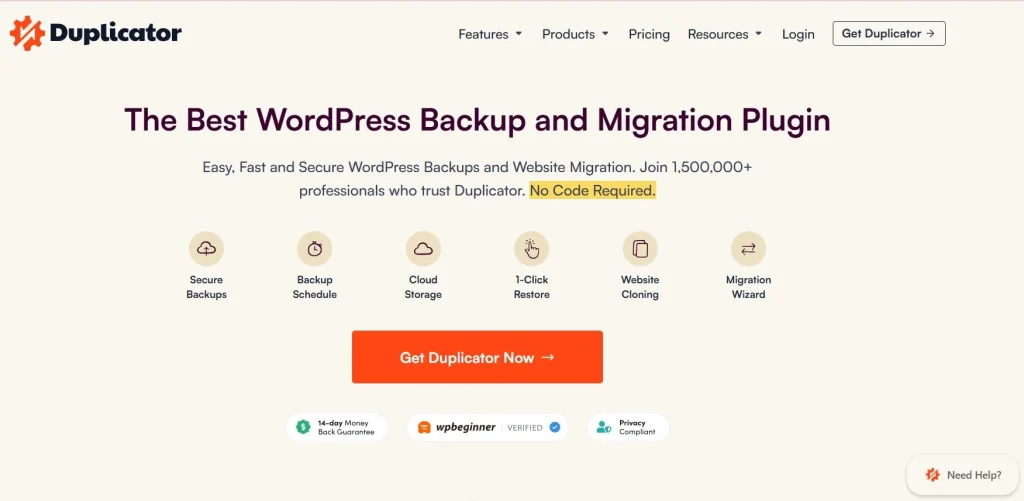
What is Duplicator Pro?
Duplicator Pro is a premium WordPress plugin built to handle website migration, backup creation, cloning, and restoration. In simple terms, it allows you to make a complete copy of a WordPress website and then move or restore that copy wherever you need it.
The plugin works by creating a package of your WordPress site. That package typically includes the files and database required to rebuild the website elsewhere. Once the package is created, you can download it, store it remotely, or use it for migration. The included installer helps restore the website without requiring a manual rebuild from scratch. This is what makes Duplicator Pro so useful: it turns a technically complex process into a much more manageable workflow.
For example, imagine that you want to move your site from one hosting provider to another. Normally, you would need to export the database, move the files through FTP, create a new database on the new host, update configuration details, and then fix any URL or path inconsistencies. With Duplicator Pro, the process is much more streamlined. You create a package, upload it to the new server, run the installer, and let the plugin handle the heavy lifting.
Another common use case is site cloning. Agencies and freelancers often build websites based on repeatable structures. If you have a well-designed starter site with your preferred theme, plugins, and settings, Duplicator Pro makes it easier to clone that setup for new projects. This can save many hours of repetitive setup work.
Backups are another major reason people use Duplicator Pro. A backup is one of the most important safety tools for any website. If a plugin update breaks your site, your server fails, your site is hacked, or a user deletes something important, a current backup can save you from major damage. Duplicator Pro helps automate that protection with scheduled backups and remote storage options.
The plugin is also useful for staging and development workflows. Before making major changes to a live site, many professionals create a staging copy where updates can be tested safely. Duplicator Pro makes it easier to create and deploy those copies without manually rebuilding the environment.
Overall, Duplicator Pro is more than just a backup plugin. It is a website portability and recovery tool. It gives WordPress users a safer, faster, and more professional way to manage website movement and protection.
Key Features of Duplicator Pro
Duplicator Pro includes a strong set of features that make it valuable for website owners, developers, agencies, and IT-focused users. Below are the most important features and how they help in real-world situations.
- Full website migration and cloning
Duplicator Pro allows you to migrate an entire WordPress site from one server or domain to another. This includes website files, themes, plugins, uploads, and the database. That is useful when switching hosting providers, moving from a local environment to a live server, or duplicating a completed website for a new project. For example, a freelancer who creates service business websites can build one polished base version and clone it for future clients instead of rebuilding the same structure each time. - Complete site backup creation
The plugin allows you to create full site backups, which is one of the most important maintenance functions in WordPress. A complete backup gives you a restore point if something goes wrong. This matters because updates, hosting issues, malware, and user mistakes can all damage a website unexpectedly. A business owner updating WooCommerce, changing themes, or installing a new major plugin can create a backup first and restore quickly if the site breaks. - Scheduled backups for automation
Manual backups are useful, but they are easy to forget. Duplicator Pro solves this by allowing scheduled backups. You can define how often backups should run, which helps create a more reliable recovery plan. A busy website owner may not remember to back up the site before every change, but an automated daily or weekly schedule ensures recent copies are always available. - Cloud storage integration
One of the biggest strengths of Duplicator Pro is remote storage support. Keeping backups only on the same server as the live site is risky. If the server fails or is compromised, your backup may be lost too. Duplicator Pro supports storing backups in cloud services, which adds a layer of protection. This is especially useful for agencies and businesses that want off-site recovery options. - Large site support
Many free migration tools struggle with large websites, especially those with many media files, products, or database records. Duplicator Pro is built to handle larger sites more effectively. This is important for eCommerce stores, course platforms, membership websites, and media-heavy business sites where a standard lightweight backup approach may not be enough. - Easy installer-based restoration
Instead of manually recreating a WordPress environment, the plugin provides an installer that helps deploy the site package more easily. This installer reduces technical friction during migration or restoration. For example, if a site crashes after a failed update, restoring through a guided process is far easier than manually rebuilding the database and re-uploading files. - Custom backup filters
Not every backup needs to include everything. Duplicator Pro gives users the ability to exclude certain files, folders, or tables when needed. This is helpful when large caches, temporary files, or unnecessary logs would make backups heavier than necessary. Developers working on staging environments, for example, may exclude content that does not need to be duplicated. - Multisite support
WordPress multisite installations are more complex than standard single-site setups. Duplicator Pro supports multisite workflows, which is valuable for organizations or agencies managing multiple connected sites under one WordPress network. This makes the plugin more flexible for professional environments where standard backup tools may not be enough. - Disaster recovery readiness
A good backup system is not just about storage. It is about recovery. Duplicator Pro helps users prepare for worst-case situations by giving them deployable copies of their site that can be restored when needed. This matters because recovery speed often determines how damaging a site outage becomes. An online store that loses access for even a few hours can lose revenue and trust, so rapid restoration is essential. - Better workflow for agencies and developers
Agencies and developers often need to move sites between local environments, staging servers, and production hosting. Duplicator Pro helps streamline this workflow. Instead of setting everything up manually in each environment, they can package and redeploy more efficiently. This improves consistency and reduces setup time across multiple projects.
Benefits of Using Duplicator Pro
Using Duplicator Pro offers several important benefits for WordPress users. One of the biggest is peace of mind. Knowing that your site can be backed up and restored gives you more confidence when making changes. Without a backup system, even small updates can feel risky. With Duplicator Pro, you have a safety net.
Another major benefit is time savings. Manual migrations and restorations can take a long time, especially for users without strong technical backgrounds. The plugin reduces that workload by packaging the site into a more portable format and simplifying deployment. This is especially valuable for freelancers and agencies working with multiple sites, where efficiency directly affects profitability.
Duplicator Pro also reduces operational risk. Websites can fail for many reasons: plugin conflicts, server errors, malware infections, broken updates, accidental deletions, and more. A recent backup reduces the impact of these problems dramatically. Instead of starting from zero or relying on incomplete hosting backups, you can restore a controlled copy of the site.
There is also a scalability benefit. As a website grows, so do the risks and maintenance demands. A small brochure site may tolerate occasional manual handling, but a larger business site or WooCommerce store needs stronger backup discipline. Duplicator Pro supports that growth by making more robust backup and migration workflows possible.
For agencies and developers, the plugin improves standardization. When you can reliably clone, package, and deploy websites, it becomes easier to create repeatable systems. This leads to faster launches, more predictable migrations, and smoother client handoffs. A developer moving a completed site from staging to production, for example, benefits greatly from a tool that handles the database and file transport cleanly.
Another benefit is independence from hosting limitations. Some hosts provide backups, but those backups may be limited, difficult to access, or incomplete for your specific needs. Duplicator Pro gives users more control over how and where backups are created, stored, and restored. That level of control is important if the website is business-critical.
How to Install Duplicator Pro
Installing Duplicator Pro is usually straightforward, but after installation, it is important to test the workflow so you know the plugin is ready when you need it.
Install via WordPress Dashboard
The easiest way is through the WordPress admin panel. Log in to your dashboard and go to the Plugins section. Click Add New, then choose Upload Plugin. Select the Duplicator Pro ZIP file from your computer and click Install Now.
Once installation is complete, click Activate. After activation, you should see the Duplicator Pro menu in your dashboard. The next step is to review the settings and create your first backup package. This initial test is important because you want to confirm that the plugin works properly before relying on it during an emergency.
A practical first step is to create a full site package and download it locally. If you use cloud storage, configure that as well so backups are stored off-site. Then review the schedule options and decide whether daily, weekly, or event-based backups make the most sense for your website. A content blog might use weekly backups, while a WooCommerce store may need more frequent ones.
Manual Installation
Manual installation is useful if you prefer FTP or server-side file management. Download the plugin file, extract it if needed, and upload the Duplicator Pro folder to the /wp-content/plugins/ directory on your server using FTP or your hosting file manager.
Then log in to the WordPress dashboard, open Plugins, find Duplicator Pro, and click Activate. After activation, go through the same process of reviewing settings and testing package creation.
No matter which installation method you use, the most important step is post-installation testing. Create a package, verify that it finishes successfully, and make sure your storage settings are working. A backup plugin only becomes truly useful when you know it can create recoverable packages reliably.
Why Buy Duplicator Pro at Pluginpro.org
Buying Duplicator Pro at Pluginpro.org can be a practical option for WordPress users who want premium migration and backup functionality at a lower cost. One of the most obvious reasons is price. Premium WordPress tools can become expensive, especially if you manage multiple sites or run an agency with many client projects. Pluginpro.org can reduce that cost significantly, with savings that may reach up to 95%.
Another important advantage is access to 100% clean files. This matters a great deal for a plugin like Duplicator Pro because backup and migration tools are deeply connected to the structure of your website. You want files that are safe, stable, and reliable so you can trust the plugin in critical moments.
Unlimited website usage is also a strong benefit, particularly for freelancers, developers, and agencies. Official licensing may restrict the number of sites where the plugin can be used, which becomes costly over time. Pluginpro.org offers more flexibility for users who need the same tool across multiple WordPress projects.
Easy updates add another layer of value. Backup and migration plugins need to stay compatible with WordPress core, server environments, PHP versions, and other plugins. Having an accessible update path helps reduce long-term compatibility issues and keeps the plugin effective.
Secure downloads also improve convenience. Instead of searching through unreliable sources, users can obtain the plugin from a platform focused on WordPress plugin access. That saves time and can make deployment easier for professionals with multiple active sites.
For users who want premium backup and migration features without full official pricing, Pluginpro.org offers a useful mix of affordability, practicality, and convenience.
Conclusion
Duplicator Pro is one of the most useful WordPress plugins for anyone serious about website migration, backup, cloning, and recovery. It takes complex technical tasks and turns them into a more manageable workflow, which is valuable for business owners, developers, freelancers, and agencies alike.
Its strengths are especially clear in three areas: migration, protection, and efficiency. It helps move sites between hosts or domains, creates restorable backups that protect against failure, and speeds up workflows for people managing multiple WordPress environments. Whether you are safeguarding a live business site, duplicating a project structure, or preparing for recovery after a site issue, Duplicator Pro provides a strong solution.
The Pro version adds real practical value through features like scheduled backups, cloud storage, support for larger websites, and improved deployment workflows. These features make it much more than a simple export tool. It becomes part of a professional WordPress maintenance strategy.
Installation is straightforward, but the real benefit comes from building a reliable routine around it. Once set up properly, Duplicator Pro can become one of the most important safety tools in your WordPress stack. When combined with the pricing and access advantages available at Pluginpro.org, it becomes an even more attractive choice for users who want dependable premium functionality without overspending.