
Creating visually engaging and user-friendly forms is a critical part of modern website design. Whether you are collecting leads, managing registrations, or building contact forms, the way your forms look and function can directly impact user engagement and conversion rates. Standard forms often appear plain and lack visual cues, which can make them less intuitive for users. This is where Field Icons Gravity Forms becomes a valuable enhancement for WordPress users.
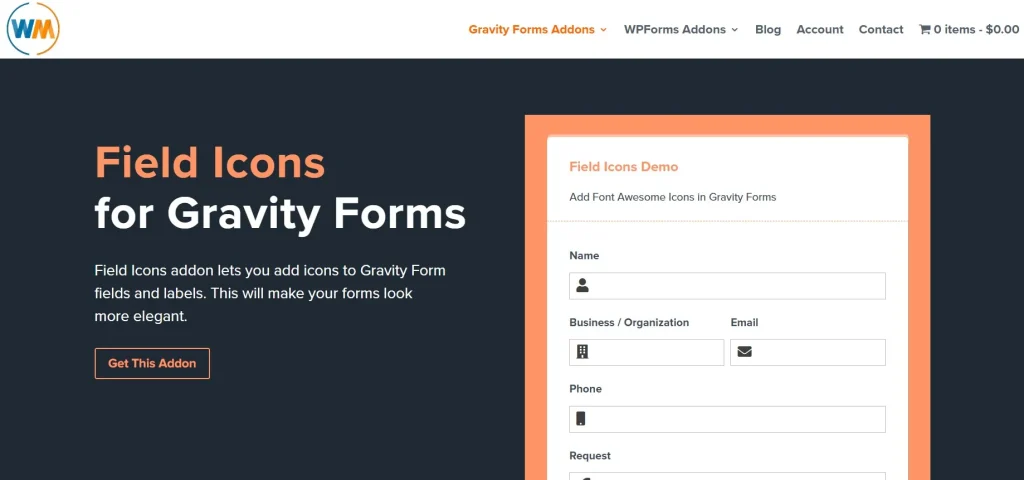
Field Icons Gravity Forms is a specialized add-on designed to extend the capabilities of Gravity Forms by allowing you to add icons to form fields. These icons serve as visual indicators that help users quickly understand the purpose of each field, improving usability and overall form experience. Instead of relying solely on labels and placeholders, you can enhance clarity through recognizable symbols such as email icons, phone icons, or user icons.
For businesses and marketers, this plugin plays a strategic role in optimizing conversion-focused forms. A well-designed form not only looks professional but also reduces friction during the user journey. For example, when users immediately recognize a field’s purpose through an icon, they are more likely to complete the form without confusion or hesitation.
In this article, we will explore Field Icons Gravity Forms in detail, including what it is, its key features, practical benefits, installation process, and why purchasing it from Pluginpro.org is a smart choice for WordPress users.
What is Field Icons Gravity Forms?
Field Icons Gravity Forms is a WordPress add-on that enhances the functionality of Gravity Forms by allowing users to add customizable icons to individual form fields. Instead of relying solely on text labels, this plugin introduces a visual layer that improves form usability and aesthetics.
At its core, the plugin integrates seamlessly with the Gravity Forms interface. Once installed, users can assign icons to different field types directly within the form editor. These icons can be positioned in various ways, such as inside the input field, before the label, or alongside the field, depending on design preferences.
This plugin is particularly useful for websites that prioritize user experience and conversion optimization. For instance, an eCommerce website collecting customer information can use icons to guide users through the checkout process. Similarly, a service-based business can use icons in contact forms to make fields more intuitive and visually appealing.
Field Icons Gravity Forms is suitable for:
- Marketers who want to increase form conversion rates
- Designers looking to enhance UI/UX without custom coding
- Agencies building client websites with polished form interfaces
- Businesses collecting leads, registrations, or inquiries
In real-world scenarios, adding icons can significantly reduce user confusion. For example, a phone icon next to a contact number field instantly communicates what information is required. This reduces cognitive load and speeds up form completion.
Overall, Field Icons Gravity Forms is a simple yet powerful enhancement that transforms basic forms into visually guided, user-friendly interfaces.
Key Features of Field Icons Gravity Forms
Field Icons Gravity Forms offers a range of features designed to improve both functionality and design. Below are the most important features that make this plugin a valuable addition to any Gravity Forms setup.
Easy Icon Integration
- The plugin allows you to add icons to any form field directly from the Gravity Forms editor. This means you do not need to write custom code or use additional design tools. The integration is seamless, making it accessible even for beginners.
- Users can select icons from built-in libraries such as Font Awesome or upload custom icons to match their brand identity. This flexibility ensures that your forms maintain a consistent visual style across your website.
- The process is intuitive, requiring only a few clicks to assign icons to fields. This reduces setup time and allows you to focus on optimizing your forms rather than dealing with technical complexities.
Flexible Icon Placement
- Field Icons Gravity Forms provides multiple placement options for icons, including inside the input field, before the label, or after the label. This allows you to choose the layout that best fits your design.
- The positioning options are particularly useful for creating modern form layouts that align with current UI/UX trends. For example, placing icons inside input fields creates a clean and minimalist appearance.
- This flexibility ensures compatibility with different themes and page builders, allowing you to maintain design consistency across your website.
Custom Styling Options
- The plugin includes styling controls that allow you to customize the size, color, and alignment of icons. This ensures that the icons blend seamlessly with your website’s overall design.
- You can adjust icon styles to match your brand colors, creating a cohesive visual identity. This is especially important for businesses that prioritize branding and professionalism.
- Advanced users can also apply custom CSS for more detailed styling, enabling complete control over the appearance of form icons.
Compatibility with Gravity Forms Fields
- Field Icons Gravity Forms supports a wide range of field types, including text fields, email fields, phone fields, dropdowns, and more. This ensures that you can add icons to virtually any part of your form.
- The plugin works seamlessly with existing Gravity Forms features, meaning you do not need to modify your current forms to use it. This makes it easy to enhance existing forms without rebuilding them.
- Compatibility extends to complex forms with conditional logic, ensuring that icons display correctly even in dynamic form scenarios.
Improved User Experience
- By adding visual cues, the plugin significantly improves the usability of forms. Users can quickly identify the purpose of each field, reducing confusion and errors.
- This feature is particularly beneficial for mobile users, who often rely on visual elements for quick navigation. Icons help streamline the form-filling process on smaller screens.
- Improved user experience leads to higher completion rates, making this feature valuable for lead generation and conversion optimization.
Lightweight and Performance-Friendly
- Field Icons Gravity Forms is designed to be lightweight, ensuring that it does not negatively impact website performance. This is crucial for maintaining fast loading times.
- The plugin uses optimized code and minimal resources, making it suitable for high-traffic websites that require consistent performance.
- It is also compatible with caching and optimization plugins, allowing you to maintain optimal site speed while enhancing your forms.
Benefits of Using Field Icons Gravity Forms
One of the most significant benefits of using Field Icons Gravity Forms is improved form clarity. By incorporating visual elements, users can quickly understand what information is required, reducing the likelihood of errors and incomplete submissions. This is particularly useful for complex forms with multiple fields.
Another key benefit is enhanced user experience. Forms that include icons are more visually appealing and easier to navigate, which can lead to higher engagement rates. For example, a registration form with clear visual indicators can guide users step by step, making the process feel more intuitive.
From a marketing perspective, this plugin can contribute to higher conversion rates. When users encounter a form that is easy to understand and visually organized, they are more likely to complete it. This can result in more leads, sign-ups, or inquiries for your business.
Field Icons Gravity Forms also helps maintain brand consistency. By customizing icons to match your brand colors and style, you can create a cohesive design that reinforces your brand identity across all touchpoints.
Additionally, the plugin saves time and resources. Instead of hiring a developer to create custom form designs, you can achieve professional results using this plugin. This makes it a cost-effective solution for businesses of all sizes.
How to Install Field Icons Gravity Forms
Installing Field Icons Gravity Forms is a straightforward process. Below are the steps for both dashboard and manual installation methods.
Install via WordPress Dashboard
First, log in to your WordPress admin panel and navigate to the “Plugins” section. Click on “Add New” and then select “Upload Plugin.”
Upload the Field Icons Gravity Forms plugin file that you have downloaded. Once the upload is complete, click “Install Now” and then activate the plugin.
After activation, go to the Gravity Forms editor. You will see new options for adding icons to fields. From here, you can start customizing your forms by assigning icons to different fields.
Manual Installation
For manual installation, extract the plugin file on your computer. Then, use an FTP client to upload the plugin folder to the “wp-content/plugins” directory on your server.
Once the upload is complete, log in to your WordPress dashboard and navigate to “Plugins.” Locate Field Icons Gravity Forms in the list and click “Activate.”
After activation, configure the plugin settings and begin adding icons to your forms.
Additional Setup Tips
After installation, it is recommended to test your forms to ensure that icons display correctly across different devices. You should also optimize icon sizes and colors to match your website’s design.
If you are using caching plugins, clear your cache after making changes to ensure that updates are visible to users. This helps maintain a consistent user experience.
Why Buy Field Icons Gravity Forms at Pluginpro.org
Purchasing Field Icons Gravity Forms from Pluginpro.org offers several advantages that make it a smart investment for WordPress users.
One of the biggest benefits is cost savings. You can save up to 95% compared to the original price, making it an affordable option for freelancers, agencies, and small businesses. This allows you to access premium functionality without exceeding your budget.
Pluginpro.org provides 100% clean files, ensuring that the plugin is free from malware or malicious code. This is essential for maintaining website security and protecting user data.
Another advantage is unlimited website usage. Unlike many premium plugins that limit usage to a single site, Pluginpro.org allows you to use Field Icons Gravity Forms on multiple websites. This is particularly beneficial for agencies managing multiple client projects.
The platform also offers easy updates, ensuring that your plugin remains compatible with the latest WordPress and Gravity Forms versions. This helps maintain long-term stability and performance.
Finally, Pluginpro.org ensures secure downloads, giving you peace of mind when accessing your files. The platform is designed to provide reliable and safe products, making it a trusted source for WordPress plugins.
Conclusion
Field Icons Gravity Forms is a powerful add-on that enhances the functionality and design of Gravity Forms by adding visual icons to form fields. It improves user experience, increases form clarity, and contributes to higher conversion rates.
With features such as flexible icon placement, custom styling, and seamless integration, the plugin provides a practical solution for creating professional and user-friendly forms. Its lightweight design ensures that performance remains unaffected, making it suitable for all types of websites.
By purchasing from Pluginpro.org, you can enjoy significant cost savings, secure downloads, and unlimited usage, making it an excellent choice for anyone looking to upgrade their forms.
If you want to create more engaging and effective forms, Field Icons Gravity Forms is a solution worth considering.



