Themify Event is a powerful WordPress plugin designed to help users create, manage, and showcase events directly on their websites. Themify Event enables businesses, organizations, and individuals to display event listings in a structured, visually appealing way while maintaining full control over scheduling, categorization, and presentation. Whether you are managing conferences, workshops, concerts, or local meetups, this plugin provides a streamlined solution for event management.
In practice, handling events manually through blog posts or static pages quickly becomes inefficient. There is no structured way to organize dates, locations, or recurring schedules, which leads to a poor user experience. Themify Event solves this by introducing a dedicated system for event management, allowing users to create dynamic listings that are easy to navigate and update.
For agencies and developers, this plugin reduces the need for custom coding. Instead of building event systems from scratch, they can configure Themify Event and focus on design and user experience. For business owners, it offers a practical way to promote events and keep audiences informed without relying on third-party platforms.
Another key advantage is flexibility. Themify Event supports different event types and layouts, making it suitable for a wide range of industries. From educational institutions to entertainment businesses, users can adapt the plugin to match their specific needs.
From a workflow perspective, it allows teams to manage events centrally while presenting them in a clear and engaging format for visitors.
In real-world operations, this centralization reduces communication gaps between departments. Marketing teams can promote events while administrators update schedules, all within the same system. This alignment improves efficiency and ensures that information remains consistent across the website.
What is Themify Event?
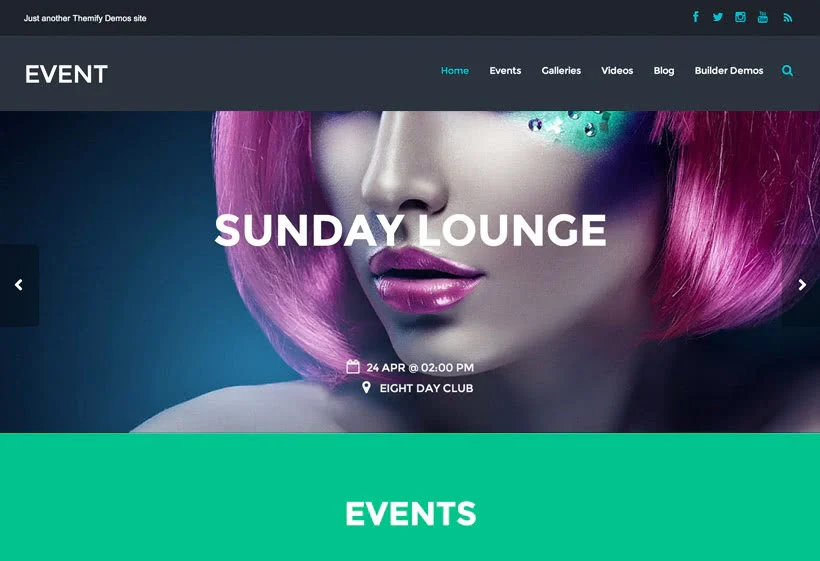
Themify Event is a WordPress plugin that allows users to create and manage event listings with structured data such as date, time, location, and event details. It integrates with the Themify ecosystem and works seamlessly with compatible themes, providing a consistent design and functionality.
A clear definition would be: Themify Event is an event management plugin that enables users to create, organize, and display events with dynamic layouts and scheduling features.
The plugin works by introducing custom event post types. Each event can include specific details such as start date, end date, venue, and description. These events can then be displayed using various layouts, including lists, grids, or calendars.
Who should use Themify Event?
- Event organizers and planners
- Businesses hosting regular events
- Educational institutions
- Agencies building event websites
- Community platforms and clubs
In real-world scenarios, a training center can use Themify Event to list upcoming courses and workshops. Visitors can browse events, check schedules, and register interest.
Another example involves entertainment businesses. A concert organizer can display upcoming shows with dates and locations, allowing users to stay informed and plan attendance.
Themify Event is particularly useful for users who need a structured and scalable way to manage events without relying on external tools.
Additionally, the plugin supports multi-role workflows. Different team members can manage events, update details, or create new listings without interfering with other parts of the website, making it suitable for organizations with distributed responsibilities.
Key Features of Themify Event
- Custom Event Post Types
Themify Event introduces a dedicated system for managing events separately from standard posts.
For example, each event can include structured fields such as date, time, and venue.
This improves organization and ensures consistency across all event listings.
In practice, administrators can manage large numbers of events efficiently.
It also enables bulk updates, allowing teams to adjust multiple events quickly when schedules change. - Flexible Event Layouts
The plugin offers multiple display options, including list, grid, and calendar views.
This allows users to present events in a way that suits their audience.
For instance, a calendar layout is ideal for recurring events, while a grid layout works well for promotional displays.
In marketing campaigns, grid layouts can highlight featured events visually to attract more attention. - Recurring Event Support
Users can create recurring events without duplicating entries.
This is particularly useful for weekly classes, monthly meetups, or regular workshops.
It reduces manual work and ensures accurate scheduling.
For example, a yoga studio can schedule weekly sessions in advance, saving time and reducing administrative effort. - Advanced Filtering and Categorization
Events can be categorized and filtered based on type, location, or date.
This allows visitors to find relevant events quickly.
For example, users can filter events by category such as workshops, seminars, or conferences.
This improves user experience and helps visitors navigate large event databases efficiently. - Integration with Themify Builder
Themify Event works seamlessly with Themify Builder, enabling drag-and-drop customization.
This allows users to design event pages visually without coding.
In real workflows, this speeds up page creation and updates.
Design teams can quickly adjust layouts based on campaign needs. - Responsive Design
Event listings are optimized for all devices, ensuring a smooth experience for mobile and desktop users.
This improves accessibility and engagement.
Mobile users can easily browse and register for events without usability issues. - SEO-Friendly Structure
Events are displayed with clean URLs and structured data, improving search engine visibility.
This helps attract organic traffic to event pages.
For example, event listings can rank for location-based search queries. - Regular Updates and Compatibility
The plugin is maintained to ensure compatibility with WordPress updates and Themify themes.
This ensures stable performance over time.
Users can rely on consistent functionality without technical disruptions.
Benefits of Using Themify Event
One of the main benefits of using Themify Event is improved organization. Instead of managing events through unstructured posts, users can rely on a dedicated system that keeps all event data consistent and easy to manage.
Another key advantage is time efficiency. Creating recurring events or updating schedules becomes much faster compared to manual methods. This is particularly useful for organizations that host events regularly.
From a cost-saving perspective, Themify Event reduces the need for custom development. Businesses do not need to hire developers to build event management systems, which can save significant expenses.
In real-world scenarios, an agency building event websites can use Themify Event to standardize workflows. This reduces development time and allows the agency to deliver projects faster. For example, instead of building custom event systems for each client, they can reuse the plugin’s structure.
Another benefit is improved marketing efficiency. Event pages can be optimized for SEO and shared across multiple channels, increasing visibility and attendance. Businesses can promote events more effectively using structured listings.
User experience also improves. Visitors can easily browse events, filter results, and access relevant information. This increases engagement and attendance rates.
Additionally, the plugin supports scalability. As event listings grow, the system maintains performance and organization, making it suitable for long-term use.
Real Use Cases of Themify Event
Themify Event is widely used by educational institutions. Schools and training centers can list courses, workshops, and seminars with detailed schedules. Students can easily browse and plan attendance.
Event organizers use the plugin to manage conferences and exhibitions. By displaying event details clearly, they can attract more participants and improve communication.
Agencies use Themify Event to build event-focused websites for clients. For example, a music festival website can display lineups, schedules, and locations in an organized format.
Freelancers can use the plugin to create event pages for small businesses. This reduces development time and provides a professional solution without custom coding.
Another practical scenario involves fitness centers. Gyms can list classes such as yoga or training sessions, allowing members to view schedules and plan their visits.
Startups can use Themify Event to promote product launches or community events. By creating structured listings, they can increase visibility and engagement.
Additionally, non-profit organizations can use the plugin to manage charity events, fundraisers, and volunteer activities. This helps improve participation and outreach.
A further example involves coworking spaces. These spaces often host networking events, workshops, and seminars. Themify Event allows them to manage all activities in one place, improving communication with members.
How to Install Themify Event
Installing Themify Event is a straightforward process.
First, download the plugin ZIP file from your purchase source.
Next, log in to your WordPress dashboard. Navigate to Plugins, click Add New, and select Upload Plugin.
Upload the ZIP file, click Install Now, and then Activate the plugin.
After activation, configure the plugin settings. Set up event categories, layouts, and display options.
If using Themify Builder, integrate it with the plugin to customize event pages visually.
Create your first event by adding details such as date, time, and location.
Then, configure recurring events if needed. This allows you to automate scheduling for regular activities.
Finally, test your website to ensure that event listings display correctly and filters work as expected.
In practice, this setup process can be completed quickly, allowing users to start managing events immediately.
Why Buy Themify Event at Pluginpro.org
Buying Themify Event at Pluginpro.org offers significant advantages, especially for users managing multiple websites or client projects.
One of the biggest benefits is cost savings. Premium plugins like Themify Event often require separate licenses for each website. Pluginpro.org provides access at a much lower cost, allowing users to save up to 95 percent.
For example, an agency building event websites for multiple clients would normally need to purchase separate licenses. By using Pluginpro.org, the agency can deploy the plugin across all projects without additional costs, improving profit margins.
Another advantage is unlimited website usage. Freelancers and agencies can use the plugin on multiple websites without restrictions. This flexibility is essential for scaling operations.
Pluginpro.org also ensures clean and secure files. This reduces the risk of malware or corrupted installations, which can affect website performance and security.
From a workflow perspective, having immediate access to the plugin simplifies project execution. Teams can start building event systems without delays caused by licensing or budget constraints.
Another cost-saving scenario involves long-term operations. Traditional licenses often require annual renewals, which increase expenses over time. By using Pluginpro.org, users can avoid recurring fees and allocate resources to marketing or development.
For instance, a freelancer can use the savings to invest in SEO campaigns, driving more traffic to client websites. Agencies can reinvest savings into improving service offerings or expanding their team.
Additionally, Pluginpro.org allows users to experiment with multiple projects without worrying about licensing costs. This is particularly useful for agencies testing new service ideas or building demo websites.
In real-world terms, this means faster project delivery, reduced overhead, and more flexibility in managing multiple clients simultaneously.
Is Themify Event Worth It?
Yes, Themify Event is worth it for users who need a reliable and flexible event management solution.
For event organizers, it provides a structured way to manage and display events, improving efficiency and user experience.
Agencies benefit from standardized workflows, allowing them to deliver event websites faster and more consistently. This increases productivity and profitability.
Business owners gain control over their event listings, reducing reliance on external platforms or developers. This leads to lower operational costs and faster updates.
A practical scenario involves a company hosting regular workshops. By using Themify Event, they can manage schedules, update listings, and attract participants without manual effort.
Another example is a community platform organizing local meetups. The plugin allows them to centralize event information, making it easier for users to stay informed and participate.
Themify Event is best suited for users who want a scalable, cost-effective, and integrated solution for managing events within WordPress.
Conclusion
Themify Event is a comprehensive plugin that simplifies the process of managing and displaying events on WordPress websites. It combines flexibility, performance, and ease of use in a single solution.
From educational institutions to event organizers and businesses, Themify Event supports a wide range of use cases. Its structured approach improves organization and enhances user experience.
What makes it particularly valuable is its ability to replace complex systems with a simple, integrated solution. Users can focus on promoting events rather than managing technical details.
Beyond initial setup, the plugin supports long-term scalability. As event needs grow, users can expand their listings and features without rebuilding their system.
For anyone looking to create a professional event management platform, Themify Event provides a practical, scalable, and cost-effective solution that supports both immediate needs and future growth.