Managing customer data efficiently is one of the most important aspects of running a successful WooCommerce store. While WooCommerce provides basic user management tools, many store owners quickly realize that the default system lacks advanced features for analyzing and organizing customer information.
This is where WooCommerce Customers Manager becomes an extremely valuable solution. The plugin expands WooCommerce’s default capabilities and gives store administrators a powerful interface to monitor customer activity, track purchases, and manage user information more effectively.
Instead of navigating through multiple order pages and user profiles, store owners can access a centralized dashboard that displays valuable insights about their customers. This makes it easier to understand buying behavior, identify loyal customers, and improve marketing strategies.
Whether you operate a small online shop or manage a large WooCommerce marketplace, a professional customer management system can significantly improve efficiency and decision-making.
Introduction to the Plugin
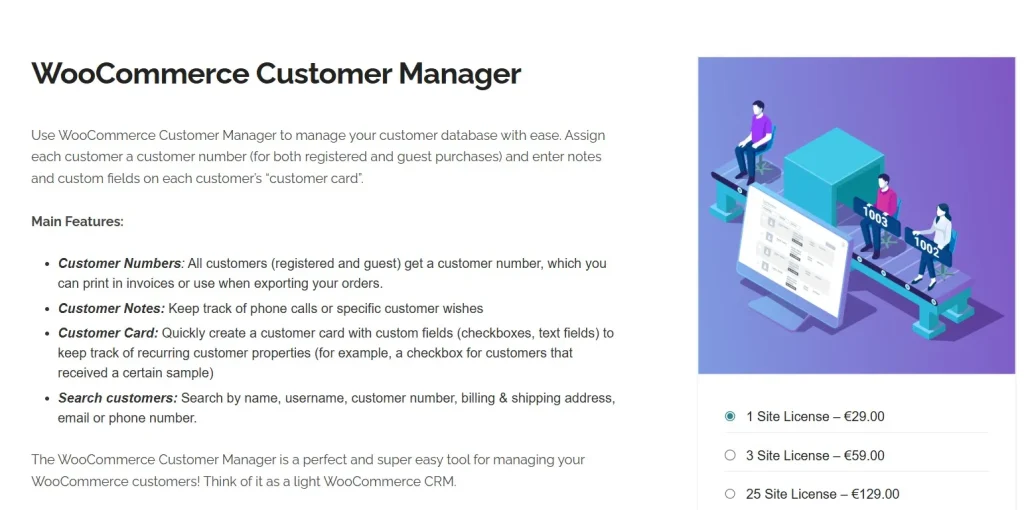
WooCommerce Customers Manager is an advanced WordPress plugin designed to improve how store owners handle customer information within WooCommerce.
It provides a complete management dashboard that allows administrators to analyze customer activity, track order history, and organize users based on various criteria. Instead of using the limited tools available in default WooCommerce, the plugin transforms your store into a more powerful customer management environment.
By installing WooCommerce Customers Manager, store owners gain access to detailed insights about their audience. This helps businesses better understand purchasing behavior and build stronger relationships with customers.
The plugin is especially useful for online stores that want to optimize their marketing campaigns, improve customer segmentation, and simplify the process of managing large customer databases.
Why Customer Management Matters for WooCommerce Stores
As an online store grows, the number of registered users and completed orders increases rapidly. Managing hundreds or even thousands of customers without the right tools can become complicated and time-consuming.
A dedicated customer management plugin helps solve these problems by organizing all relevant information in one place. With tools like WooCommerce Customers Manager, store owners can analyze customer data more efficiently and identify important trends.
For example, you can quickly discover which customers spend the most, which users are inactive, or which buyers frequently return to make purchases. These insights allow businesses to create more targeted promotions and improve overall customer experience.
Key Features
Advanced Customer Dashboard
One of the most valuable features offered by WooCommerce Customers Manager is its dedicated customer dashboard. Instead of browsing through WordPress user lists, administrators can access a clear overview of all registered customers in a structured table.
The dashboard displays essential information such as:
- Customer name and email
- Registration date
- Number of orders
- Total spending
- Most recent purchase
This overview helps store owners quickly identify high-value customers and monitor activity trends.
Detailed Customer Profiles
Each user profile includes comprehensive information that helps administrators better understand individual buyers.
Within the profile page, you can view:
- Billing and shipping addresses
- Complete purchase history
- Total amount spent
- Order frequency
- Account registration details
This level of detail makes it much easier to analyze customer behavior and provide personalized services.
Purchase History Tracking
Another powerful feature included in WooCommerce Customers Manager is the ability to view detailed purchase histories for every customer.
Administrators can quickly see:
- Products purchased
- Order values
- Order frequency
- Total revenue generated by each user
These insights allow store owners to identify loyal customers and create targeted marketing campaigns.
Advanced Customer Filtering
Customer segmentation is essential for effective marketing strategies. The plugin includes powerful filtering options that allow administrators to sort and group customers using multiple criteria.
Filters can include:
- Total amount spent
- Number of orders
- Last purchase date
- Customer location
- Registration date
With these filters, businesses can easily build specific customer segments for promotions or email marketing campaigns.
Customer Data Export
Exporting customer data is often necessary for marketing analysis or integration with other business tools. The plugin allows administrators to export customer information quickly in CSV format.
Exported data may include:
- Customer names
- Email addresses
- Order totals
- Purchase history
- Customer locations
This feature makes it easier to integrate WooCommerce data with external platforms such as email marketing services or CRM systems.
Bulk Customer Management
Handling large numbers of customers manually can be inefficient. To solve this issue, the plugin includes bulk management tools that allow administrators to perform actions on multiple users simultaneously.
Examples of bulk actions include:
- Exporting selected customers
- Updating user roles
- Managing groups of customers
- Organizing customer segments
These tools save time and make customer administration far more efficient.
How to Install the Plugin
Installing the plugin on your WooCommerce store is simple and takes only a few minutes.
Step 1 – Download the Plugin
After purchasing the plugin from Pluginpro.org, download the ZIP installation file to your computer.
Step 2 – Upload to WordPress
Log in to your WordPress dashboard and navigate to:
Plugins → Add New → Upload Plugin
Select the downloaded ZIP file and click Install Now.
Step 3 – Activate the Plugin
Once installation is complete, click Activate Plugin to enable it.
Step 4 – Configure Settings
After activation, a new menu will appear in your WordPress dashboard where you can configure customer management settings and customize how information is displayed.
Benefits for WooCommerce Store Owners
Using a professional customer management plugin can greatly improve the efficiency of running an online store.
Some of the main advantages include:
Better Customer Insights
Store owners gain deeper insights into purchasing behavior and customer preferences.
Improved Marketing Campaigns
With advanced segmentation tools, businesses can create more effective email campaigns and promotional offers.
Increased Customer Retention
By identifying loyal buyers and inactive users, businesses can design strategies that encourage repeat purchases.
Faster Store Administration
Instead of searching through multiple WooCommerce menus, administrators can access all customer data from a centralized interface.
Why Buy from Pluginpro.org
If you want to download this premium plugin at the best price, Pluginpro.org offers an excellent solution for WooCommerce store owners.
Save Up to 95% of Your Budget
Premium WooCommerce plugins can be expensive. Pluginpro.org allows you to access the same functionality while saving up to 95% compared to the original price.
100% Clean Code
All plugins available on Pluginpro.org are thoroughly checked to ensure they are:
- Virus-free
- Malware-free
- Safe to install
- Unmodified from the original core files
Unlimited Website Usage
Unlike official licenses that limit installations, plugins downloaded from Pluginpro.org can be used on unlimited websites, making them perfect for developers and agencies.
Easy Updates
Keeping your plugins updated is important for compatibility and security. Pluginpro.org provides easy access to updated versions whenever they are available.
Final Thoughts
Effective customer management plays a critical role in the success of any WooCommerce store. As your online business grows, having the right tools to analyze and organize customer data becomes increasingly important.
A dedicated solution like WooCommerce Customers Manager helps store owners track user activity, analyze purchase behavior, and build stronger relationships with their customers.
With features such as advanced filtering, detailed profiles, purchase tracking, and data export, this plugin transforms the way WooCommerce stores manage their customer base.
By purchasing the plugin from Pluginpro.org, you can access premium functionality while saving money, using it on unlimited websites, and enjoying clean, secure code.