
WPMU DEV Branda Pro is a comprehensive WordPress white labeling plugin designed to help developers, agencies, and website owners fully customize the branding and user experience of WordPress dashboards and interfaces. It allows you to replace default WordPress elements with your own brand identity, creating a more professional and cohesive experience for clients and users.
For many businesses, especially agencies managing client websites, the default WordPress backend can feel generic and inconsistent with their brand. WPMU DEV Branda Pro solves this by giving complete control over logos, colors, login screens, emails, and dashboard elements. Instead of exposing clients to the standard WordPress environment, businesses can present a polished, branded interface.
In practice, a web agency can replace the WordPress logo with their own, customize the login page to match a client’s branding, and remove unnecessary menu items to simplify the user experience. This not only improves professionalism but also reduces confusion for non-technical users.
Another important factor is perception. When clients log into a branded dashboard, they see a tailored system rather than a generic CMS. This strengthens brand authority and creates a more premium service experience.
As businesses scale and manage more websites, maintaining consistent branding across projects becomes increasingly important. WPMU DEV Branda Pro provides a structured way to standardize that process while reducing manual customization work.
Beyond aesthetics, the plugin also enhances usability. By customizing menus and hiding irrelevant features, businesses can create a simplified interface tailored to specific user roles. This reduces errors and improves efficiency for clients who may not be familiar with WordPress.
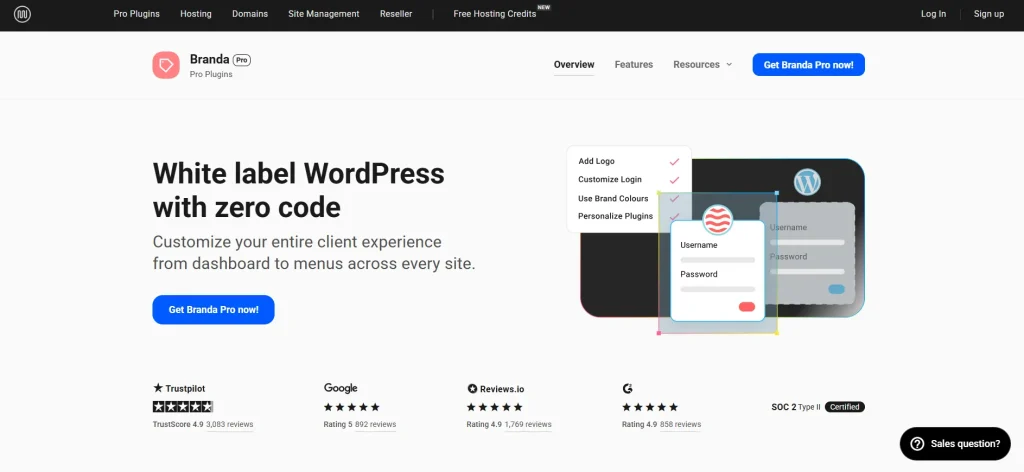
What is WPMU DEV Branda Pro?
WPMU DEV Branda Pro is a white label and customization plugin for WordPress that allows full control over the appearance and behavior of the WordPress dashboard and frontend elements. It is designed to replace default WordPress branding with custom visuals and tailored user experiences.
At its core, the plugin functions as a branding and interface management tool. Instead of relying on WordPress defaults, users can modify nearly every visual and functional element of the platform.
This makes it particularly useful for agencies, freelancers, and businesses offering website services. By customizing the backend, they can deliver a more professional and client-friendly experience.
For example, an agency managing multiple client websites can standardize branding across all dashboards. Each client sees a customized interface that reflects the agency’s identity rather than WordPress itself.
Another common use case involves membership sites or internal platforms. Businesses can create a fully branded user environment, ensuring consistency from login to daily usage.
One of the key strengths of WPMU DEV Branda Pro is its modular approach. Users can enable or disable specific features depending on their needs, avoiding unnecessary complexity.
In real-world workflows, this flexibility allows developers to implement branding changes quickly without modifying code. Instead of editing theme files or creating custom plugins, everything can be managed through a centralized interface.
Another important aspect is user experience control. By customizing dashboards and menus, businesses can guide users toward specific actions while removing distractions. This is especially valuable for clients who only need access to certain features.
Key Features of WPMU DEV Branda Pro
- White Label WordPress Branding
WPMU DEV Branda Pro allows you to replace WordPress branding with your own logos, colors, and identity.
For example, an agency can display its logo in the dashboard and login screen, creating a consistent brand experience.
In practice, this helps position the agency as the primary service provider rather than exposing the underlying CMS. - Custom Login Screen Design
The plugin enables full customization of the WordPress login page, including background images, logos, and styles.
A business can design a login page that matches its website branding, improving visual consistency.
This also enhances trust, as users interact with a familiar interface instead of a generic login page. - Dashboard Customization
Users can modify dashboard widgets, remove unnecessary elements, and create a cleaner interface.
For example, a developer can remove technical widgets and display only essential information for clients.
This reduces confusion and improves usability for non-technical users. - Admin Menu Management
The plugin allows control over which menu items are visible to different user roles.
A freelancer can hide advanced settings from clients while keeping them accessible for administrators.
This prevents accidental changes and improves workflow efficiency. - Custom Email Branding
All WordPress system emails can be customized to match your brand identity.
For instance, password reset emails can include your logo and brand colors.
This ensures consistent communication and reinforces branding. - Maintenance Mode and Coming Soon Pages
WPMU DEV Branda Pro includes tools to create branded maintenance or coming soon pages.
Businesses can display professional placeholders while building or updating websites.
This maintains credibility during development phases. - Custom CSS and Design Control
The plugin allows advanced users to apply custom CSS for deeper customization.
This provides flexibility for developers who want precise control over design elements.
It bridges the gap between no-code customization and advanced development. - Role-Based Customization
Different user roles can have different experiences within the dashboard.
For example, editors may see a simplified interface, while administrators retain full control.
This improves usability and reduces the risk of errors. - Multisite Support
WPMU DEV Branda Pro supports WordPress multisite environments, allowing centralized branding control.
Agencies managing multiple sites can apply consistent branding across all installations.
This saves time and ensures uniformity. - Frontend Branding Options
The plugin extends customization beyond the backend to frontend elements such as error pages and system messages.
This ensures that users experience consistent branding throughout the entire website.
Benefits of Using WPMU DEV Branda Pro
WPMU DEV Branda Pro enhances professionalism by transforming the default WordPress experience into a fully branded environment. Instead of presenting clients with a generic dashboard, businesses can deliver a tailored interface that reflects their identity.
One major benefit is improved client perception. When clients interact with a customized dashboard, they view the service as more premium and specialized. This can justify higher pricing and strengthen long-term relationships.
Another advantage is workflow efficiency. By simplifying the dashboard and removing unnecessary elements, users can focus on essential tasks. This reduces confusion and minimizes the risk of mistakes.
In real-world scenarios, agencies often spend time explaining how to use WordPress. With a customized interface, the learning curve becomes much shorter, saving time for both developers and clients.
A clear cost-saving scenario emerges when considering support requests. By limiting access to complex settings and providing a simplified interface, businesses can reduce the number of client inquiries and troubleshooting sessions.
Another practical benefit is scalability. Agencies managing dozens of websites can apply consistent branding across all projects without repeating manual customization work. This significantly reduces setup time for new clients.
Real Use Cases of WPMU DEV Branda Pro
A web design agency can use WPMU DEV Branda Pro to deliver fully branded dashboards for clients. Each client logs into a system that reflects the agency’s identity, creating a seamless experience.
Freelancers managing small business websites can simplify the dashboard by hiding unnecessary features. Clients can focus on updating content without worrying about technical settings.
Membership sites can use the plugin to create a branded user environment. Users interact with a consistent interface from login to daily usage.
Another example is an internal company portal built on WordPress. Employees can access a customized dashboard that aligns with company branding, improving usability and consistency.
A practical scenario involves SaaS-like platforms built on WordPress. By using WPMU DEV Branda Pro, developers can create a product-like experience where users never see WordPress branding, making the platform feel more proprietary.
Another strong use case is for agencies offering maintenance packages. By branding dashboards and emails, they reinforce their presence even after project delivery, increasing client retention.
How to Install WPMU DEV Branda Pro
Installing WPMU DEV Branda Pro is a simple process that can be completed quickly.
First, download the plugin file from your source. Make sure you have the correct version compatible with your WordPress setup.
Next, log in to your WordPress dashboard and navigate to the Plugins section. Click on “Add New,” then select “Upload Plugin.” Upload the file and click “Install Now.”
After installation, activate the plugin. A new Branda menu will appear in your dashboard, giving access to all customization options.
The next step is configuration. Start by customizing basic branding elements such as logos, colors, and login screen design. Then move on to dashboard and menu customization.
You can also configure email templates and maintenance pages based on your needs. This ensures that all aspects of your website reflect your brand identity.
Before going live, test the user experience for different roles. This helps ensure that each user type sees the appropriate interface and functionality.
In practice, it is recommended to create a standard branding template that can be reused across projects. This saves time when setting up new websites.
Another useful approach is to gradually implement customization. Start with essential branding changes, then refine advanced settings as needed. This prevents overwhelming users during the transition.
Why Buy WPMU DEV Branda Pro at Pluginpro.org
Buying WPMU DEV Branda Pro at Pluginpro.org provides a cost-effective solution for accessing premium branding tools without high subscription fees.
One of the main advantages is significant cost savings. Official subscriptions can be expensive, especially for agencies managing multiple websites. Pluginpro.org offers access at a much lower cost.
For example, an agency working with multiple clients would typically need ongoing subscriptions to maintain access. By using Pluginpro.org, they can reduce recurring expenses while still delivering high-quality customization.
Another key benefit is unlimited usage. Users can apply the plugin across multiple websites without additional licensing costs. This is particularly valuable for developers and agencies handling numerous projects.
In a real-world scenario, a freelancer can include white labeling as part of their service package without increasing project costs. This improves competitiveness and allows them to offer more value to clients.
Security is also a priority. Pluginpro.org provides clean and verified files, ensuring that the plugin functions correctly without hidden risks.
Additionally, updates are easily accessible. Users can keep their websites up to date without dealing with complex subscription systems.
A strong cost-saving scenario appears when agencies scale their operations. Instead of paying increasing subscription fees as the number of clients grows, they can maintain a stable cost structure while expanding their services.
Another practical example involves startups building multiple internal platforms. By accessing the plugin through Pluginpro.org, they can maintain consistent branding across projects without exceeding their budget.
Is WPMU DEV Branda Pro Worth It?
Yes, WPMU DEV Branda Pro is worth it for agencies, freelancers, and businesses that want full control over WordPress branding and user experience.
It is especially useful for professionals managing client websites who want to deliver a polished and customized interface. By removing WordPress branding, they can position their services as more premium.
For example, an agency offering website design services can use the plugin to create a fully branded dashboard, improving client perception and satisfaction.
From a cost perspective, the plugin provides strong value by reducing the need for custom development and ongoing support. Businesses can achieve advanced customization without writing code.
Another clear scenario involves reducing support costs. By simplifying the user interface and guiding clients toward essential features, businesses can minimize confusion and lower the number of support requests.
Conclusion
WPMU DEV Branda Pro is a powerful tool for customizing and branding WordPress websites. It transforms the default dashboard into a tailored experience that aligns with business identity.
Its flexibility allows users to control both design and functionality, making it suitable for a wide range of use cases. From agencies to internal platforms, the plugin adapts to different needs.
By improving user experience, reducing complexity, and enhancing branding, it delivers both practical and strategic benefits.
For businesses looking to create a professional and consistent WordPress environment, WPMU DEV Branda Pro offers a scalable and efficient solution.



