
In the world of professional WordPress development, modifying your parent theme directly is a major mistake. If you want to tweak your GoStore electronics shop without losing your changes during the next update, you need GoStore Child. This lightweight addition ensures your custom code remains “future-proof” while keeping your site fast and secure in 2026.
When you get GoStore Child from Pluginpro.org, you’re following industry best practices for a fraction of the cost—saving 95% of your budget while gaining the freedom to build a truly unique brand.
Introduce GoStore Child Theme
GoStore Child is a dependent theme designed to work exclusively with the GoStore – Elementor WooCommerce WordPress Theme. It acts as a protective layer over your site’s main engine.
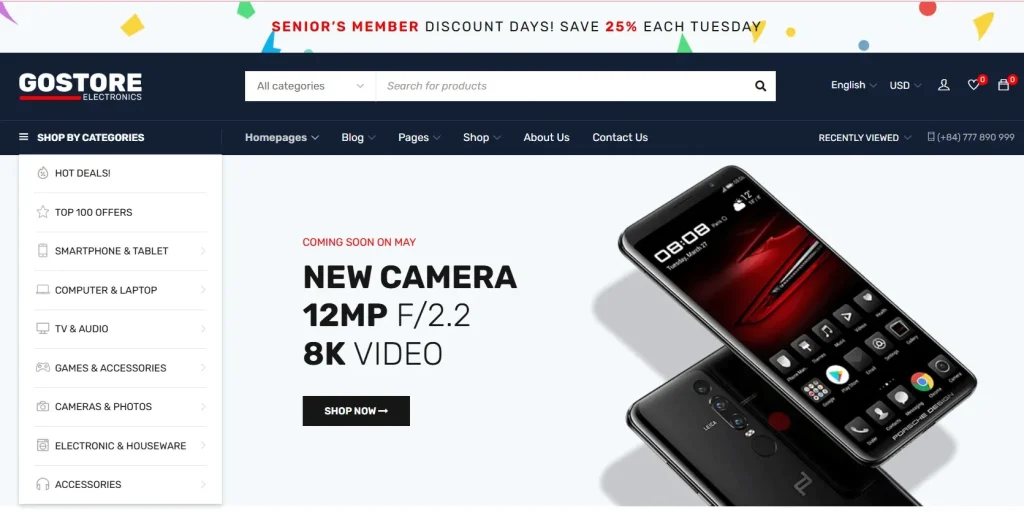
While the parent theme handles all the heavy lifting—like the complex Elementor widgets, AJAX search, and marketplace features—the child theme is where you store your personal brand’s custom CSS, PHP functions, and template overrides. It is a mandatory tool for any developer or store owner who wants to white-label their site or add custom features that the standard settings don’t cover. By using GoStore Child, you separate your personal modifications from the core files provided by the original developers.
Key Features & Selling Points
Why should you always install the GoStore Child alongside the main theme? It’s about more than just organization; it’s about site integrity.
1. Safe & Persistent Customization
When the developers of GoStore release a security patch or a new feature update, it overwrites the files in the parent folder. By using GoStore Child, your custom styles (style.css) and logic (functions.php) are stored in a separate directory, meaning they are never deleted during a theme update. This is the primary reason why professional developers insist on using GoStore Child.
2. Seamless Elementor & WooCommerce Integration
The child theme is fully compatible with the GoStore parent’s 8+ homepages and 17+ custom Elementor elements. It allows you to override specific WooCommerce templates—like the single product page or cart—to create a unique checkout flow that sets you apart from other electronics stores. GoStore Child ensures that these deep-level changes remain active even when the WooCommerce plugin itself updates.
3. Optimized for Speed & Core Web Vitals
GoStore Child is incredibly lightweight. It only loads the files it needs to modify, ensuring that your site’s performance remains blazing fast. This is crucial for maintaining the high Core Web Vitals scores that GoStore is known for, helping you rank higher on Google in 2026.
4. Developer-Friendly Hooks and Filters
For those who like to go deep into the code, the child theme provides a clean workspace to add hooks and filters. You can easily integrate third-party APIs or custom tracking scripts without cluttering the main theme’s architecture. Using GoStore Child makes your site’s code much easier to manage and debug.
How to Install GoStore Child
Installing a child theme is a simple two-step process that must be done after you have the parent theme ready:
- Ensure Parent is Installed: Make sure the main GoStore theme is already uploaded to your WordPress site.
- Download from Plugin Pro: Get the GoStore Child zip file from your Pluginpro.org account.
- Upload to WordPress: Go to Appearance > Themes > Add New > Upload Theme. Select the child theme zip and click Install Now.
- Activate: Click Activate. WordPress will automatically recognize GoStore as the parent and begin pulling its core functionality while prioritizing your GoStore Child theme for any custom changes.
Why Should You Buy at Pluginpro.org?
Smart development is about working efficiently and saving resources. Pluginpro.org is your partner in building better sites for less.
Save 95% of Your Budget
Don’t get caught in the trap of expensive, recurring subscription models. At Pluginpro.org, we provide premium WordPress resources at a 95% discount. This allows you to spend your capital on what actually brings in customers: inventory and advertising. Choosing GoStore Child from our platform is the most cost-effective way to secure your site’s future.
100% Clean Code
Your store’s security is our reputation. Every file we offer is an original, untouched GPL version. We scan our entire library daily to ensure you receive 100% clean code, free from malware, hidden links, or “nulled” vulnerabilities. With GoStore Child, you can customize with confidence knowing your foundation is secure.
Unlimited Website Usage
Agencies and freelancers love us because we don’t believe in “single-site” restrictions. When you purchase from Pluginpro.org, you can use GoStore Child on unlimited websites. Build an entire network of electronics shops under one low price without ever worrying about extra licensing fees.
Easy to Update
As WordPress 6.x and WooCommerce evolve, your theme needs to keep up. We provide consistent updates directly through our dashboard, ensuring that your customized GoStore Child site stays fast and compatible throughout 2026.
Conclusion
If you are serious about building a professional, scalable electronics marketplace, GoStore Child is not optional—it’s essential. It gives you the safety to customize and the confidence to update without fear of breaking your site.
Don’t risk your hard work with every theme update. Visit Pluginpro.org today to get GoStore Child and start building your custom WooCommerce empire while saving 95% of your budget!



