
In the rapidly evolving digital landscape of 2026, creating a website that stands out requires more than just a basic template. It requires a professional design system that balances speed, aesthetics, and cutting-edge technology. Elementor has officially moved beyond being a “page builder” to become a complete web creation ecosystem, powering over 10% of the entire internet.
If you are looking to build a high-performance website without writing a single line of code, this guide is for you. We will explore why Elementor Pro is the industry standard and why purchasing it through Pluginpro.org is the smartest move for your budget and your business.
Introduce Elementor: The Future of No-Code Web Design
Elementor is a live, visual drag-and-drop website builder for WordPress. Since its inception, it has revolutionized how we think about web development. In 2026, Elementor has introduced its most significant update yet: Editor V4, built on an “Atomic Architecture” that ensures lightning-fast loading speeds and superior Core Web Vitals scores.
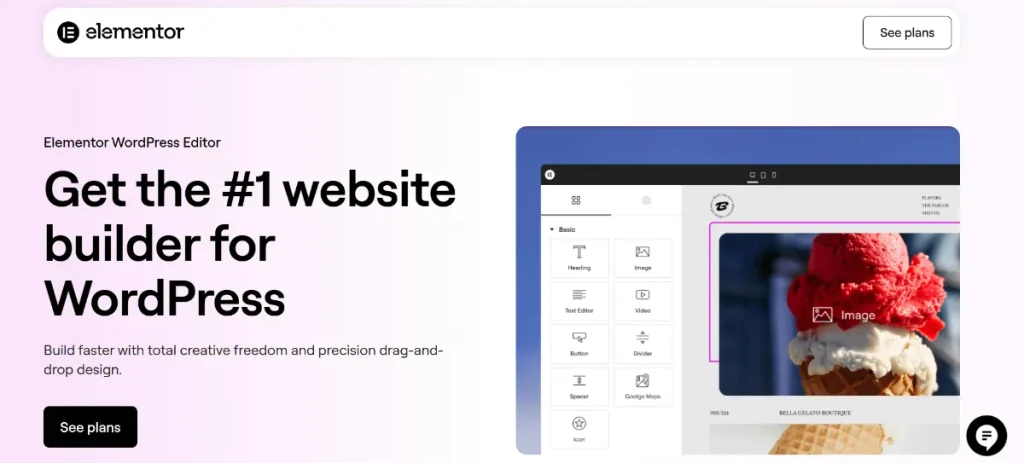
The platform allows anyone—from solo bloggers to large-scale agencies—to design every aspect of their site visually. With the introduction of Angie, Elementor’s agentic AI assistant, you can now generate full layouts, custom widgets, and even complex CSS code just by describing what you need. It is no longer just about dragging elements; it’s about collaborating with a digital partner to create a world-class user experience.
Key Features & Selling Points of Elementor Pro
While the free version of Elementor offers a solid foundation, Elementor Pro unlocks the true power of the platform. Here are the features that make it a “must-have” for 2026:
1. The Site Architect (Theme Builder)
The Theme Builder is the “brain” of your website. It allows you to design the parts of your site that are usually locked by a theme, such as your Header, Footer, Single Post Template, and 404 Pages. In 2026, the Theme Builder now includes Nestable Containers, giving you infinite layout possibilities.
2. Advanced WooCommerce Builder
For e-commerce owners, Elementor Pro is a revenue-driving machine. You can visually design your Product Pages, Cart, and Checkout screens. The latest version includes “Smart Upsell” widgets and personalized “My Account” pages that adapt based on a customer’s purchase history.
3. The Marketing & Popup Suite
Replace over 10 expensive marketing plugins with Elementor’s built-in tools:
- Form Builder: Create high-converting lead capture forms integrated with Mailchimp, HubSpot, and Salesforce.
- Popup Builder: Design exit-intent popups, countdown timers, and welcome mats with advanced AI-driven triggers.
4. Angie: The AI Creative Partner
New for 2026, Angie is an agentic AI that helps you build faster. Need a unique “Flipbook” widget for your portfolio? Just ask Angie. Need to translate your entire site into five languages? Angie handles the localization while maintaining your design integrity.
5. Performance & Atomic Components
Elementor V4 uses Atomic Components, meaning only the code needed for a specific page is loaded. This eliminates “plugin bloat” and ensures your site remains lightweight and fast, which is critical for SEO rankings in 2026.
How to Install Elementor & Elementor Pro
Setting up your design powerhouse is a straightforward process. Follow these steps to get started:
Step 1: Install Elementor (Core/Free)
- Log in to your WordPress Dashboard.
- Navigate to Plugins > Add New.
- Search for “Elementor” in the search bar.
- Click Install Now and then Activate.
Step 2: Install Elementor Pro (The Premium Extension)
- Download the Elementor Pro zip file from your Pluginpro.org dashboard.
- In your WordPress admin, go to Plugins > Add New > Upload Plugin.
- Choose the
elementor-pro.zipfile you downloaded and click Install Now. - Once the installation is complete, click Activate Plugin.
Step 3: Connect & Create
Once activated, you can start building. Navigate to Pages > Add New and click the big “Edit with Elementor” button to enter the visual editor.
Why Should You Buy at Pluginpro.org?
Building a professional website shouldn’t break the bank. Pluginpro.org was created to provide developers, entrepreneurs, and hobbyists with premium tools at a fraction of the cost. Here is why thousands of users choose us for their Elementor needs:
1. Save 95% of Your Budget
Official Elementor Pro licenses in 2026 can cost anywhere from $59 to $399 per year. At Pluginpro.org, we provide the exact same original GPL files at a 95% discount. This allows you to reallocate your budget toward marketing, SEO content, or product development.
2. 100% Clean Code & Verified Safety
Security is our #1 priority. We do not provide “nulled” or cracked plugins that contain backdoors. Every version of Elementor on our site is an original, untouched GPL file that is scanned daily for malware. You get the peace of mind that your site remains secure and fast.
3. Unlimited Website Usage
Official licenses often restrict you to a single site or a small handful of domains. When you purchase from Pluginpro.org, you can use Elementor on unlimited websites. Whether you are building one blog or managing 50 client sites, our files give you the freedom to scale without extra fees.
4. Easy to Update
The web moves fast, and so does Elementor. We provide easy access to the latest updates (including the new 2026 performance patches) directly through our user dashboard. You can keep your site running on the latest version with just a few clicks.
SEO Summary: Mastering Elementor
To succeed with Elementor in 2026, you must focus on the “Atomic” foundation. By using the Theme Builder to create a consistent design system and leveraging Angie AI to optimize your workflow, you can build sites that are not only beautiful but also mathematically optimized for Google.
The flexibility of Elementor allows you to implement on-page SEO basics—like proper heading hierarchies (H1-H6), image alt text, and lightning-fast loading speeds—directly within the visual editor. When combined with the savings and security of Pluginpro.org, you have the ultimate toolkit for digital success.
Frequently Asked Questions (FAQ)
Is Elementor Pro worth it in 2026? Absolutely. While the free version is great for layout, the Pro version is essential for “Theme Building,” WooCommerce, and advanced AI-assisted design. It replaces the need for dozens of other premium plugins.
Can I switch from Free to Pro easily? Yes. You simply install the Pro extension on top of your existing Elementor Free plugin. All your existing designs will stay intact and suddenly have more features available.
Does Elementor slow down my site? With the Editor V4 and Atomic Components update in 2026, Elementor is faster than ever. By hosting with a quality provider and using the built-in Image Optimizer, you can achieve 90+ scores on PageSpeed Insights.
Ready to start building? Visit Pluginpro.org today to get your copy of Elementor and start your journey toward a professional, high-converting website while saving 95% of your budget!



