
If you are using the Storefront theme and want a clean way to display product plans, pricing tiers, or feature comparisons, the Storefront Pricing Tables plugin is one of the simplest and most effective solutions. It allows you to build attractive pricing tables directly inside WordPress using shortcodes and the Customizer—no coding required.
For WooCommerce store owners, this plugin helps improve product clarity, increase conversions, and present multiple offers in a structured, easy-to-understand layout.
In this SEO article for Pluginpro.org, we will explore what it is, how to install it, its features, benefits, and why it is a great tool for Storefront-based online stores.
What is Storefront Pricing Tables?
Storefront Pricing Tables is a WooCommerce extension designed specifically for the Storefront theme. It allows you to create structured pricing comparison tables that display different product plans, features, and prices in a visually appealing format.
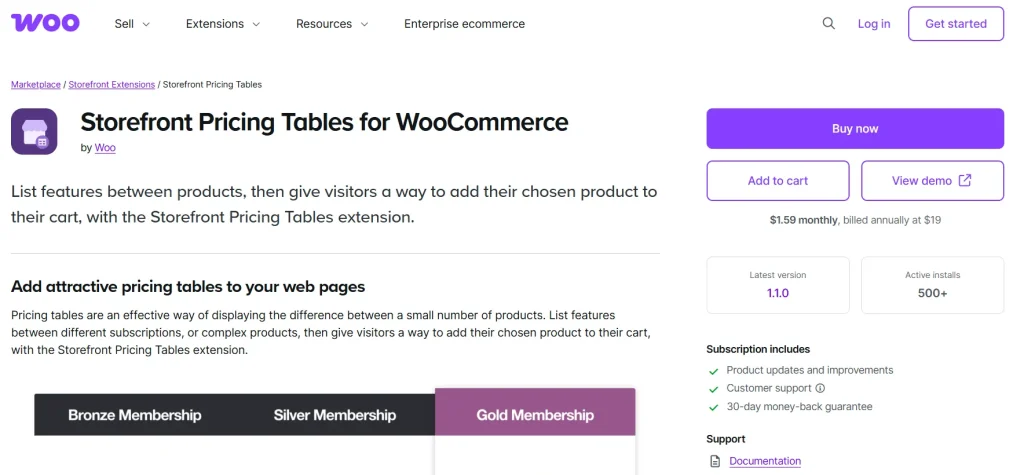
Instead of listing products separately, you can group them into a table so customers can easily compare and choose the best option.
This makes it ideal for:
- Subscription plans
- Service packages
- Membership tiers
- Product bundles
- SaaS pricing pages
Each pricing column can include product details and a direct “Add to Cart” button, making the purchase process faster and smoother.
Key Features of Storefront Pricing Tables
The plugin focuses on simplicity, flexibility, and conversion optimization.
1. Easy Shortcode-Based Table Creation
You can create pricing tables using a built-in shortcode generator inside the WordPress editor. This makes setup fast and beginner-friendly.
2. Multiple Column Layouts
Create tables with any number of columns to compare different products or pricing plans side by side.
3. Product Integration with WooCommerce
Each pricing column can be linked directly to a WooCommerce product, allowing customers to add items to cart instantly.
4. Customizable Design via Customizer
You can adjust colors, alignment, and layout styling directly from the WordPress Customizer with live preview support.
5. Highlight Featured Plans
Mark one column as “featured” to draw attention to your most popular or recommended plan.
6. Feature Comparison Display
Show differences between product plans clearly, helping customers make faster decisions.
7. Responsive Layout
Pricing tables are fully mobile-friendly, ensuring smooth display across all devices.
8. Lightweight Performance
The plugin is optimized for speed and does not slow down your WooCommerce store.
How to Install Storefront Pricing Tables
Installing the plugin is straightforward and requires only a few steps:
Step 1: Install Storefront Theme
Make sure you are using the official Storefront theme, as this plugin is designed specifically for it.
Step 2: Download the Plugin
After purchasing from Pluginpro.org, download the Storefront Pricing Tables ZIP file.
Step 3: Upload Plugin
Go to WordPress Dashboard > Plugins > Add New > Upload Plugin, then upload the ZIP file.
Step 4: Activate Plugin
Click Activate to enable pricing table functionality.
Step 5: Configure Settings
Go to a page or post and use the shortcode generator to create your pricing table:
- Choose number of columns
- Add product IDs
- Set features per column
- Highlight preferred plans
You can also adjust styling inside the Customizer.
Why Storefront Pricing Tables is Important
Most WooCommerce stores display products individually, which can confuse customers when multiple options exist.
This plugin solves that by:
- Making pricing comparisons easy
- Reducing decision fatigue
- Increasing conversion rates
- Highlighting best-value offers
Instead of browsing multiple pages, customers can compare everything in one place.
Benefits of Using Storefront Pricing Tables
Higher Conversion Rates
Clear comparisons help customers choose faster, increasing sales.
Better Product Presentation
Products and plans look more professional and structured.
Improved User Experience
Customers can easily understand differences between options.
Faster Checkout Decisions
Direct “Add to Cart” buttons reduce friction in the buying process.
No Coding Required
Everything is managed through shortcodes and visual settings.
Use Cases for Storefront Pricing Tables
This plugin is useful for many types of WooCommerce stores:
- SaaS subscription pricing pages
- Hosting plan comparisons
- Digital product bundles
- Membership websites
- Service-based businesses
Any store with multiple pricing tiers can benefit from it.
Why Buy from Pluginpro.org
Pluginpro.org offers premium WordPress plugins at highly discounted prices, making professional tools affordable for everyone.
Save 95% Budget
Get full premium functionality while saving up to 95% compared to official pricing.
100% Clean Code
All plugins are optimized, secure, and stable for long-term use.
Unlimited Website Usage
Use the plugin on unlimited WordPress sites.
Easy Updates
Regular updates ensure compatibility with the latest WooCommerce and Storefront versions.
Simple Setup Support
Even beginners can install and configure it quickly.
SEO Advantages of Storefront Pricing Tables
Using pricing tables also improves your SEO performance indirectly:
Better Engagement
Users spend more time comparing plans, improving engagement metrics.
Lower Bounce Rate
Clear pricing presentation reduces user confusion.
Higher Conversion Signals
More purchases improve overall site authority.
Structured Content Layout
Search engines better understand your product hierarchy.
Best Practices for Using Storefront Pricing Tables
To get the best results, follow these tips:
- Highlight your most profitable plan
- Keep feature lists short and clear
- Use consistent pricing structure
- Optimize table headings for keywords
- Test mobile layout carefully
Common Problems Solved by This Plugin
The Storefront Pricing Tables plugin helps solve:
- Poor product comparison structure
- Confusing pricing pages
- Low conversion rates on service pages
- Lack of visual pricing presentation
- Manual table coding requirements
Final Thoughts
The Storefront Pricing Tables plugin is a simple but powerful tool for WooCommerce store owners who want to improve how they display pricing options. It helps create clear, structured, and conversion-focused pricing tables without needing any coding skills.
When purchased from Pluginpro.org, you also get major cost savings, clean code, unlimited usage rights, and reliable updates.
If you want to improve your pricing pages and increase conversions, this plugin is a highly effective solution for Storefront-based WooCommerce stores.



