Tracking website performance is essential for any online business. Analytify Pro is a premium WordPress plugin that brings Google Analytics data directly into your WordPress dashboard, making it easy to monitor traffic, user behavior, and conversions without leaving your site.
In this article, we’ll guide you on how to install Analytify Pro, explore its key features, and explain why purchasing it from Pluginpro.org is the smartest choice for WordPress site owners.
What is Analytify Pro?
Analytify Pro is a WordPress plugin that simplifies Google Analytics by presenting your site’s data in an easy-to-understand interface. Unlike the standard Google Analytics dashboard, Analytify Pro shows insights like page views, sessions, conversions, and e-commerce stats directly in WordPress.
Key benefits include:
- Real-time traffic reports.
- Detailed post, page, and product analytics.
- Automated email reports for stakeholders.
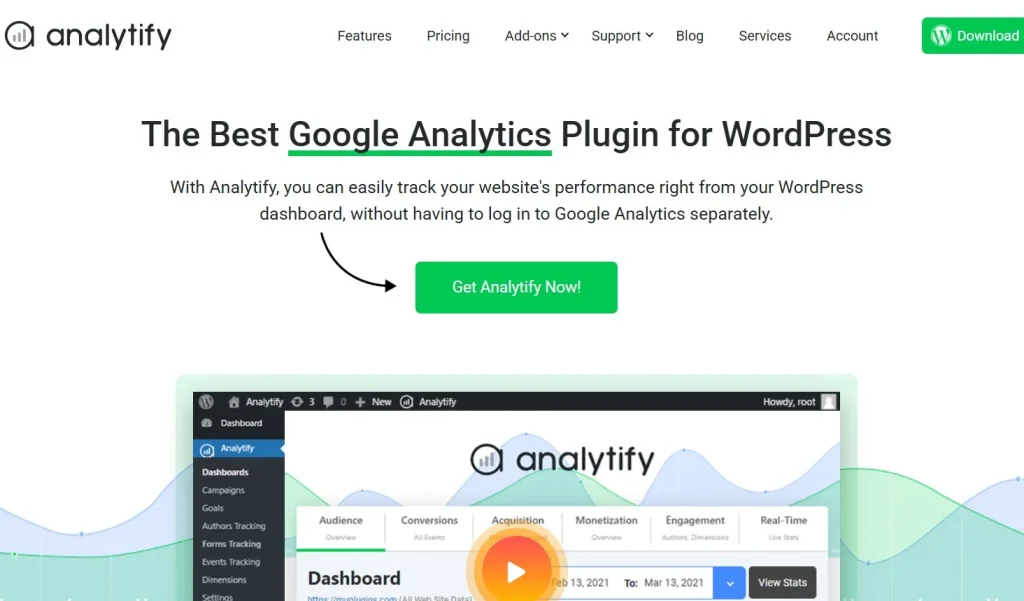
This plugin is ideal for bloggers, marketers, e-commerce store owners, and agencies that want actionable insights without the complexity of Google Analytics.
How to Install Analytify Pro
Installing Analytify Pro is quick and beginner-friendly. Follow these steps:
Step 1: Purchase and Download
- Visit Pluginpro.org and search for Analytify Pro.
- Complete the purchase and download the plugin ZIP file.
(Tip: Pluginpro.org offers up to 95% savings compared to other marketplaces.)
Step 2: Upload to WordPress
- Log in to your WordPress dashboard.
- Navigate to Plugins > Add New > Upload Plugin.
- Click Choose File, select the downloaded ZIP file, and click Install Now.
- After installation, click Activate Plugin.
Step 3: Connect with Google Analytics
- Go to Analytify > Settings in WordPress.
- Authenticate your Google account and select the website property you want to track.
- Configure additional settings like e-commerce tracking, custom dimensions, or automatic reports.
- Save changes to start receiving analytics directly in your WordPress dashboard.
Your website is now fully integrated with Google Analytics via Analytify Pro.
Key Features of Analytify Pro
Analytify Pro provides a robust set of features to monitor and analyze your website performance:
1. Real-Time Statistics
View live user activity, traffic sources, and visitor locations without leaving WordPress.
2. Post, Page, and Product Analytics
Get detailed insights for individual posts, pages, or WooCommerce products.
3. E-Commerce Tracking
Monitor online store performance, including sales, revenue, and conversion rates.
4. Email Reports
Schedule automated email reports for clients, team members, or stakeholders.
5. Google Analytics Integration
Connect seamlessly with Google Analytics and access advanced metrics in a simplified interface.
6. Custom Dimensions and Events
Track user interactions, downloads, form submissions, and other custom events.
7. Frontend Statistics Display
Optionally show analytics reports on the frontend for admin or user dashboards.
8. Developer-Friendly
Use hooks and filters to customize reports, dashboards, and tracking for tailored needs.
Selling Points: Why You Should Use Analytify Pro
Using Analytify Pro offers several advantages:
- Simplified Analytics: No need to navigate Google Analytics; view data directly in WordPress.
- Save Time: Automated reports and simplified dashboards reduce manual analysis.
- Actionable Insights: Identify top-performing content, user behavior, and conversion trends.
- E-Commerce Focused: Track sales and revenue for WooCommerce stores with ease.
- Flexible and Customizable: Adapt tracking, reports, and dashboards to your website needs.
Why Purchase Analytify Pro from Pluginpro.org?
Purchasing from Pluginpro.org provides several unique advantages:
- Save Up to 95%
Get the plugin at a fraction of the cost compared to other marketplaces. - 100% Clean Code
Verified plugin ensures reliability, security, and compatibility with WordPress. - Unlimited Website Usage
Use Analytify Pro on unlimited sites with a single purchase license. - Easy Updates
Receive lifetime updates and support for hassle-free analytics tracking. - Trusted Source
Pluginpro.org provides verified, malware-free plugins for professional use.
Tips for Maximizing Analytify Pro
- Monitor Key Pages
Track performance of your most important pages, posts, and products. - Set Up E-Commerce Tracking
Enable WooCommerce analytics to measure revenue, conversion rates, and product performance. - Schedule Automated Reports
Share analytics insights with clients or team members via email reports. - Use Custom Dimensions
Track interactions like form submissions, downloads, or memberships to get actionable data. - Compare Timeframes
Use Analytify Pro to compare performance over time and make data-driven decisions.
Conclusion
Analytify Pro is a must-have WordPress plugin for anyone seeking simplified, actionable insights from Google Analytics. With real-time tracking, detailed reports, e-commerce monitoring, and automated emails, it streamlines analytics for bloggers, marketers, and online store owners.
Purchasing Analytify Pro from Pluginpro.org guarantees affordability, clean code, unlimited site usage, and easy updates. For WordPress users looking to improve website performance and make informed decisions, Analytify Pro is an essential plugin.