For businesses in the technology and IT services industry, having a professional website is essential. Whether you run a tech startup, IT support company, software development agency, or digital consulting business, your website acts as the online face of your brand. It helps attract potential clients, showcase your services, and build credibility in a competitive market. To achieve this, choosing the right WordPress theme is extremely important. Technico is one of the themes designed specifically for technology and IT-related websites.
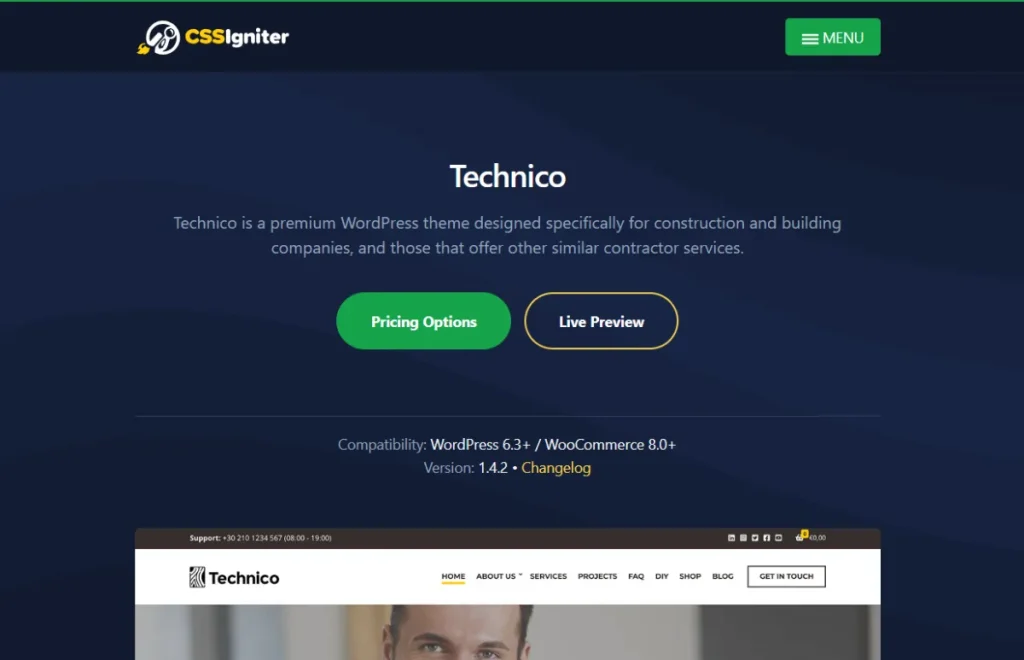
Technico is a modern WordPress theme built for IT service providers, technology companies, digital agencies, and software businesses. It provides a clean, professional design combined with powerful customization options that allow businesses to create attractive websites quickly and efficiently.
One of the key strengths of Technico is its ability to present services, solutions, and company information in a structured and visually appealing layout. The theme includes ready-made sections for services, projects, testimonials, and team members, making it easy to highlight your expertise.
In addition, Technico offers responsive design, SEO-friendly coding, and compatibility with popular WordPress plugins. These features ensure that your website performs well across devices while maintaining excellent visibility in search engines.
In this article, we will explore what Technico is, its key features, benefits, installation steps, and why purchasing it from Pluginpro.org offers the best deal for WordPress users.
What is Technico?
Technico is a premium WordPress theme designed specifically for technology-focused businesses and IT service providers. It offers a professional layout that helps companies present their services, expertise, and projects in a modern and engaging way.
The theme is suitable for various types of businesses, including:
- IT service companies
- Technology startups
- Software development agencies
- Digital marketing agencies
- Cybersecurity companies
- Consulting firms
Technico is built with a flexible design that allows businesses to customize their website according to their brand identity. Users can easily modify colors, typography, layouts, and content sections through the WordPress Customizer.
Another important feature of Technico is its responsive design. The theme automatically adjusts its layout to fit different screen sizes such as smartphones, tablets, and desktops. This ensures that visitors always have a smooth browsing experience regardless of the device they use.
Technico also includes SEO-friendly coding, which helps improve search engine visibility. When combined with SEO plugins such as Yoast SEO or Rank Math, the theme can significantly increase your chances of ranking higher on Google.
Additionally, Technico integrates well with popular WordPress plugins for page building, forms, and eCommerce. This makes it possible to expand the functionality of your website as your business grows.
Overall, Technico is a powerful WordPress theme that helps technology companies build professional websites that attract clients and showcase their services effectively.
Key Features of Technico
The Technico theme includes many advanced features that help technology businesses create professional websites.
Modern Technology-Focused Design
- Clean and professional layout for IT businesses
- Modern design suitable for technology companies
- Organized content sections for services and solutions
- Attractive visuals that highlight expertise
Customizable Homepage Layout
Technico provides flexible homepage design options that allow businesses to create unique layouts.
- Featured services sections
- Project or case study displays
- Testimonials from clients
- Company introduction blocks
Responsive and Mobile-Friendly Design
- Fully responsive layout for all devices
- Mobile-optimized pages and navigation
- Smooth browsing on smartphones and tablets
- Improved user experience
Service Showcase Sections
The theme includes dedicated sections to highlight services offered by your company.
- Display IT solutions and service packages
- Add descriptions, icons, and images
- Clearly present your business expertise
Portfolio and Project Display
Technico allows businesses to showcase completed projects and case studies.
- Dedicated portfolio layouts
- Display client projects and achievements
- Build trust with potential customers
SEO-Friendly Structure
- Optimized coding for search engines
- Compatible with popular SEO plugins
- Faster indexing and improved rankings
- Increased organic traffic opportunities
Plugin Compatibility
Technico works smoothly with many popular WordPress plugins.
- Elementor page builder
- WooCommerce for selling services or products
- Contact Form 7 for lead generation
- SEO plugins like Yoast SEO and Rank Math
Fast Performance
- Lightweight theme structure
- Optimized for fast loading times
- Improved website performance
- Reduced bounce rates
Translation Ready
- Supports multilingual websites
- Compatible with translation plugins
- Ideal for global technology businesses
Benefits of Using Technico
Using Technico offers many benefits for businesses that want to build a professional technology website.
Professional Online Presence
Technico provides a modern and polished design that helps technology companies present themselves professionally.
Easy Website Customization
The theme offers flexible customization options through the WordPress Customizer. Users can easily adjust colors, fonts, and layouts without coding.
Better Client Engagement
With dedicated sections for services, testimonials, and case studies, Technico helps visitors understand your business and builds trust with potential clients.
Mobile Optimization
Since many users browse websites on smartphones, Technico ensures a smooth and responsive experience across all devices.
Faster Website Development
Instead of creating a website from scratch, Technico provides ready-made layouts and components that speed up the development process.
SEO Advantages
The theme is built with SEO best practices in mind, helping websites rank better in search engine results.
Business Growth Opportunities
Technico integrates with WooCommerce and other plugins, allowing businesses to expand their website functionality and generate revenue online.
Cost-Effective Solution
Hiring developers to build a custom website can be expensive. Technico provides a professional solution at a much lower cost.
How to Install Technico
Installing Technico on your WordPress website is simple and can be completed in just a few steps.
Step 1: Download the Theme
Download the Technico theme package from Pluginpro.org to your computer.
Step 2: Log in to WordPress Dashboard
- Open your WordPress admin panel
- Go to yourwebsite.com/wp-admin
- Enter your login credentials
Step 3: Navigate to Themes
- Click Appearance in the dashboard
- Select Themes
- Click Add New
Step 4: Upload the Theme
- Click Upload Theme
- Choose the Technico ZIP file
- Click Install Now
Step 5: Activate the Theme
After installation:
- Click Activate
- Your website will now run using the Technico theme
Step 6: Import Demo Content (Optional)
Many users choose to import demo content to quickly set up their website.
- Go to the theme settings panel
- Import demo layouts
- Replace demo text and images with your own
Step 7: Customize Your Website
Use the WordPress Customizer to personalize your website.
- Upload your company logo
- Adjust colors and typography
- Add services and portfolio items
- Configure contact forms
Once these steps are completed, your Technico-powered website will be ready to launch.
Why Buy Technico at Pluginpro.org
Premium WordPress themes can often be expensive when purchased from official marketplaces. Pluginpro.org provides a more affordable way to access premium themes while maintaining quality and security.
Here are the key reasons to buy Technico from Pluginpro.org.
Save Up to 95% Cost
Pluginpro.org allows you to purchase premium themes like Technico at up to 95% lower cost compared to official pricing.
100% Clean Files
All files available on Pluginpro.org are carefully verified and scanned to ensure they are 100% clean and malware-free.
Unlimited Websites Usage
Unlike many official licenses that restrict usage to a single website, Pluginpro.org allows you to use Technico on unlimited websites.
Easy Updates
Pluginpro.org provides updated theme files whenever new versions are released, helping you keep your website secure and up to date.
Secure Downloads
All downloads are delivered through secure servers, ensuring safe and reliable access to premium WordPress themes and plugins.
With these advantages, Pluginpro.org has become a trusted platform for WordPress users looking for high-quality themes at affordable prices.
Conclusion
Building a professional website is essential for technology companies that want to attract clients and showcase their services effectively. Technico is a powerful WordPress theme designed specifically for IT businesses, digital agencies, and tech startups.
With its modern design, responsive layout, customizable homepage sections, and SEO-friendly structure, Technico provides everything needed to create a professional business website. The theme also integrates seamlessly with popular WordPress plugins, allowing businesses to expand their website functionality as they grow.
Additionally, Technico’s user-friendly customization options make it accessible to beginners while still offering advanced features for experienced developers.
If you want the best value for your investment, purchasing Technico from Pluginpro.org is the ideal choice. With benefits such as saving up to 95% cost, 100% clean files, unlimited website usage, easy updates, and secure downloads, Pluginpro.org provides a reliable and affordable solution for WordPress users.
By choosing Technico, you can create a professional technology website that showcases your services, builds trust with clients, and helps your business grow online.