A healthcare website needs to do much more than look professional. It must build trust quickly, present important information clearly, and make it easy for patients to take action. When someone visits a medical website, they are often looking for answers, reassurance, and a simple way to book an appointment or learn about services. That is why choosing the right WordPress theme is especially important for clinics, hospitals, dental offices, private practices, and wellness centers. A strong theme can help healthcare providers create an online presence that feels reliable, modern, and easy to navigate. MediClinic is designed specifically for that purpose.
MediClinic is a premium WordPress theme created for medical and healthcare websites. It combines clean design with practical features that support real clinic operations. Instead of forcing healthcare businesses to adapt a generic theme, MediClinic provides layouts and tools that fit the way medical websites actually work. It helps users showcase doctors, explain treatments, organize departments, display opening hours, and support online appointment requests in a structured way.
This theme is useful for a wide range of healthcare providers. A dental clinic can use it to introduce treatment options and staff. A pediatric practice can use it to make parents feel informed and comfortable before their first visit. A hospital can organize multiple departments, specialists, and patient resources. Even wellness centers and therapy practices can use MediClinic to present services in a calm and professional format.
In this article, we will take a closer look at what MediClinic is, the most important features it offers, the practical benefits of using it, how to install it properly, and why buying MediClinic at Pluginpro.org is a smart choice for anyone who wants premium quality at a much better price.
What is MediClinic?
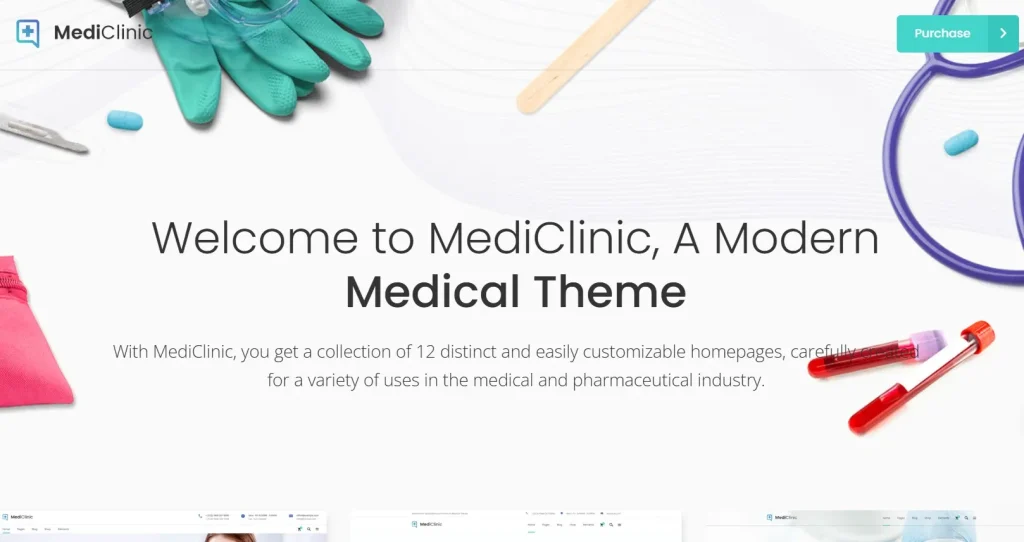
MediClinic is a premium WordPress theme built specifically for the healthcare and medical industry. Unlike general-purpose themes that try to serve every niche, MediClinic is designed around the real needs of clinics, hospitals, dental practices, doctors, surgeons, therapists, diagnostic centers, and other healthcare providers. Its layouts, design language, and built-in structure are all focused on helping medical businesses present information in a clear, trustworthy, and organized way.
At a basic level, MediClinic helps website owners create a professional healthcare website without needing to build every page from scratch. It usually includes ready-made homepage layouts, service pages, doctor profile sections, contact pages, appointment forms, and other medical website essentials. This means a clinic owner does not need to guess how to structure a site. Instead, the theme provides a strong starting point that can be customized to match the brand, specialty, and patient needs of the business.
The theme is especially useful for healthcare providers who want a website that feels serious and modern without becoming cold or difficult to use. In healthcare, website visitors are often patients or family members who may already be stressed or uncertain. A confusing website can make that worse. MediClinic is designed to support clarity. It helps present important information such as specialties, medical services, doctor qualifications, office hours, clinic locations, and booking instructions in a user-friendly way.
In real-world use, MediClinic can support many different healthcare scenarios. A dental clinic might use it to explain cosmetic dentistry, implants, orthodontics, and emergency dental care. A dermatology clinic can use it to introduce providers, list treatment plans, and publish before-and-after information. A multi-specialty hospital can use it to separate services by department, helping patients quickly find cardiology, pediatrics, orthopedics, or diagnostic imaging. A private therapist or counseling center might use the theme to create a calm, approachable site that encourages people to schedule consultations.
Another important part of MediClinic is flexibility. Even though it is healthcare-focused, it is usually compatible with popular tools like Elementor and other common WordPress plugins. That means users can customize pages visually, adjust layouts, change fonts and colors, and add the features they need without heavy coding. This makes MediClinic suitable for both beginners and professional developers. A clinic owner with limited technical knowledge can launch a site quickly, while a web designer building healthcare sites for clients can use the theme as a fast and reliable framework.
In short, MediClinic is not just a design template. It is a complete WordPress solution for medical websites that need to look credible, function smoothly, and support the real communication needs of modern healthcare businesses.
Key Features of MediClinic
MediClinic includes a range of features that make it well suited for healthcare websites. These features are valuable not just because they look good on a demo, but because they solve practical problems for clinics, hospitals, and medical professionals trying to manage their online presence effectively.
- Pre-built medical demo layouts
MediClinic typically comes with multiple professionally designed demo websites created for healthcare use cases such as clinics, hospitals, dental offices, pediatric centers, and specialist practices. These demos give users a ready-made site structure with pages for services, staff, contact details, and appointments. Instead of starting with a blank screen, you can import a full design and then replace the demo content with your own branding and information. This saves a large amount of time and is especially helpful for clinics that want to launch quickly or agencies building multiple healthcare websites. - Appointment booking support
One of the most practical features of MediClinic is its compatibility with appointment booking systems. Patients today expect convenience, and a website that supports booking requests or scheduling can reduce friction significantly. Rather than forcing patients to call during office hours for every request, the theme can work with booking plugins that allow them to choose a service, request a time, or submit an inquiry online. This improves the user experience while also reducing front-desk workload and helping clinics manage leads more efficiently. - Doctor and medical staff profiles
Trust is a major factor in healthcare, and patients often want to know who they will be seeing before they make contact. MediClinic supports detailed doctor and staff profile sections where clinics can introduce physicians, dentists, therapists, nurses, or specialists. These profiles can include names, photos, credentials, specializations, experience, and short biographies. A feature like this matters because it turns a generic clinic website into a more personal and credible platform that helps patients feel informed before booking. - Service and department presentation
Healthcare websites need to explain services clearly, especially when patients may not fully understand medical terminology. MediClinic usually includes structured service sections that make it easier to present treatments, specialties, and departments in a logical way. A clinic can create separate pages for each treatment or department, helping users navigate directly to the information they need. This is especially important for larger practices where visitors may be comparing options such as general care, cosmetic procedures, diagnostics, rehabilitation, or specialty consultations. - Responsive and mobile-friendly design
A large portion of patients now browse healthcare websites from smartphones. They may be searching for a clinic while commuting, checking office hours, or looking for contact details in a time-sensitive situation. MediClinic is built to be responsive, meaning the layout adjusts automatically across desktop, tablet, and mobile devices. This matters because a site that looks great on desktop but fails on mobile can frustrate visitors and cause them to leave before taking action. A strong mobile experience supports both usability and search visibility. - Elementor or page builder compatibility
Many users want to customize their site without relying on a developer for every small change. MediClinic typically works with popular page builders such as Elementor, allowing users to edit content visually with drag-and-drop controls. That means clinic staff or website managers can update service sections, banners, testimonials, doctor bios, or contact blocks with far less effort. This feature matters because it gives healthcare businesses more control over their site content and makes day-to-day updates easier. - Advanced customization options
Healthcare brands vary widely in tone and style. A cosmetic clinic may prefer a sleek and modern look, while a family medical center may want something softer and more reassuring. MediClinic usually includes theme customization options for colors, typography, headers, footers, layout settings, and more. These controls help users shape the visual identity of their site without needing custom development. For real businesses, that means the theme can feel branded and unique rather than looking like a copy of a demo. - SEO-friendly structure and performance optimization
A healthcare website also needs to be discoverable. MediClinic is generally built with clean code and a structure that supports search engine optimization. This helps search engines crawl pages more effectively and gives clinics a better foundation for local SEO and service-based rankings. Combined with performance optimization and fast loading design, this feature improves both user experience and online visibility. For example, a dental clinic trying to rank for local treatment searches benefits from having a technically solid theme underneath its content strategy.
Benefits of Using MediClinic
Using MediClinic offers clear advantages for healthcare businesses that want more than a basic website. The first major benefit is professional credibility. In healthcare, first impressions matter. When a patient lands on a clinic website, they are immediately judging whether the business feels trustworthy, current, and organized. A poorly designed site can create doubt, while a clean and structured site builds confidence. MediClinic helps healthcare providers create that positive first impression with layouts and design patterns that feel appropriate for the medical field.
Another major benefit is better patient communication. Many medical websites fail because they overwhelm visitors with clutter or make simple tasks too difficult. MediClinic helps organize information logically so users can find treatments, doctor details, clinic hours, and contact information faster. This matters in real situations. Someone looking for a pediatrician, dental emergency care, or therapy consultation may not spend much time searching through a confusing site. A theme that improves clarity can directly improve conversion rates.
MediClinic also helps reduce operational friction. With support for appointment forms and booking systems, clinics can guide more inquiries through the website rather than handling everything manually by phone. This is useful for front-desk staff, especially in busy practices. Even when the system is used only for appointment requests rather than full scheduling, it still helps organize incoming leads and makes the business more accessible outside office hours.
A further benefit is flexibility across different healthcare models. The same theme can support a solo doctor, a dental office, a skin clinic, a physiotherapy center, or a larger hospital group. That means web designers and agencies working with medical clients can use MediClinic repeatedly across projects, while individual clinics can expand their website over time without switching themes. For example, a clinic may begin with core pages such as services and contact information, then later add doctor profiles, blog content, patient resources, and department sections.
MediClinic is also valuable from a marketing perspective. Because it is designed for professional presentation and can support SEO-friendly structure, it gives healthcare businesses a stronger foundation for digital growth. A website built on MediClinic can be paired with content marketing, local SEO, Google Ads landing pages, and reputation management strategies more effectively than a generic or outdated design. A dermatology clinic, for instance, can publish service-specific pages and educational blog content that attract search traffic while still maintaining a consistent brand look.
Ease of management is another strong benefit. Clinics often do not have a full in-house web team. They may rely on a receptionist, assistant, or freelancer for updates. A theme that works with visual page builders and simple theme settings makes maintenance easier. Updating a doctor photo, changing clinic hours, adding a new treatment page, or posting a holiday notice becomes much more manageable.
In practice, MediClinic helps healthcare businesses do three things well: build trust, present information clearly, and support patient action. Those three benefits alone make it a valuable choice for medical websites that need both visual professionalism and practical everyday usability.
How to Install MediClinic
Installing MediClinic is not difficult, but doing it properly helps avoid layout issues, missing demo content, or plugin conflicts later. Before installation, it is a good idea to confirm that your hosting environment meets the basic requirements for WordPress, the theme, and any bundled plugins. You should also make sure you have a fresh backup of your website if you are installing the theme on an existing project rather than a new site.
Install via WordPress dashboard
The most common method is to install MediClinic directly through the WordPress admin area. Start by downloading the MediClinic theme package from your source. In many cases, the package may include the main installable theme ZIP file, documentation, and bundled plugins. Be sure you are uploading the actual installable theme file rather than the full download package if they are separate.
Next, log in to your WordPress dashboard and go to Appearance > Themes. Click Add New, then click Upload Theme. Select the MediClinic ZIP file from your computer and click Install Now. Once WordPress finishes the upload and installation, click Activate to make MediClinic your live theme.
After activation, the theme will often prompt you to install required or recommended plugins. This step is important because many key theme features, such as page building, sliders, appointment elements, or demo import functions, may depend on those plugins. Install and activate them before trying to import demo content or edit the homepage.
If MediClinic includes one-click demo import, go to the import section and choose the demo closest to your business type. For example, a dental clinic should choose the dental-style demo, while a general medical center may use a broader clinic layout. Importing the demo usually creates the main pages, menus, and placeholder content automatically. From there, replace sample text and images with your own clinic information, doctors, treatments, branding, and contact details.
Once the demo is installed, review the settings carefully. Check the homepage assignment, menu structure, contact forms, logo upload, typography settings, and color scheme. Also test mobile responsiveness and page load speed before publishing the site fully.
Manual installation
Manual installation is useful when the dashboard upload fails, when the theme file is large, or when a developer prefers direct file access. First, unzip the MediClinic theme package on your computer. Then use an FTP client or your hosting file manager to upload the theme folder to the wp-content/themes directory of your WordPress installation.
After the upload is complete, return to your WordPress dashboard and go to Appearance > Themes. You should now see MediClinic listed among available themes. Click Activate. From that point forward, the process is similar to the dashboard method. Install all required plugins, import a demo if desired, and begin customizing the theme.
Manual installation can be especially useful on managed hosting setups where upload limits are strict. It also helps developers troubleshoot if the standard installer reports errors.
Practical setup tips after installation
After MediClinic is active, do not rush to publish the website immediately. First, go through each page and remove demo content that does not match your business. Update doctor profiles carefully, making sure names, specialties, certifications, and contact details are accurate. If your website includes appointment forms, test them fully to confirm submissions are being received correctly.
You should also optimize images before uploading them. Medical websites often rely on staff photos, clinic images, and service visuals, but oversized files can slow the site down. Use compressed images and basic performance tools. Finally, review SEO basics such as page titles, service URLs, meta descriptions, and local business information. A properly installed MediClinic site should not only look good but also function as a reliable digital front desk for your practice.
Why Buy MediClinic at Pluginpro.org
Buying MediClinic at Pluginpro.org is an attractive option for users who want premium WordPress products without paying the full marketplace price. One of the biggest reasons people choose Pluginpro.org is cost savings. Premium healthcare themes can be expensive, especially for freelancers, agencies, or clinic owners managing multiple websites. Pluginpro.org helps reduce that burden by offering MediClinic at a much lower price, with savings of up to 95 percent in many cases. For businesses trying to control setup costs, that difference can be significant.
Another important advantage is access to 100% clean files. When using any premium WordPress theme, file quality matters. A website for a healthcare provider cannot afford malware, hidden code issues, or unstable downloads. Pluginpro.org emphasizes clean files, which helps users install MediClinic with more confidence. For agencies building sites for clients, this is especially important because reliability and safety affect both performance and reputation.
Unlimited website usage is another major benefit. Many official licenses restrict a theme to a single domain or require higher-tier pricing for broader use. Pluginpro.org gives users more flexibility by allowing MediClinic to be used across multiple websites. This is valuable for freelance designers managing several client projects, healthcare groups with multiple branches, or agencies specializing in medical websites.
Easy updates also add practical value. WordPress themes need updates to maintain compatibility with new WordPress versions, plugin changes, performance improvements, and security standards. A source that makes updates simple helps reduce maintenance stress over time. This is particularly useful for business owners who do not want to deal with complicated license systems or repeated purchasing processes.
Secure downloads matter as well. When you are downloading a premium theme, you want the process to be smooth, accessible, and dependable. Pluginpro.org aims to make that simple, which saves time during the website setup process.
From a business perspective, buying MediClinic at Pluginpro.org is not only about paying less. It is about getting a premium healthcare theme in a more practical way. You can build a professional medical website, maintain clean files, use the product across projects, and reduce your overall website investment at the same time. For freelancers, agencies, and clinic owners alike, that combination makes Pluginpro.org a smart place to purchase MediClinic.
Conclusion
MediClinic is a strong WordPress theme for healthcare businesses that need a website built around trust, clarity, and usability. It is designed specifically for clinics, hospitals, dental practices, therapists, specialists, and other medical providers that want a professional online presence without relying on a generic theme. Its structure supports real healthcare website needs, from doctor profiles and service pages to appointment support and mobile-friendly design.
What makes MediClinic especially useful is the balance between design quality and practical function. It helps healthcare providers present information clearly, improve the patient journey, and create a website that feels credible from the first visit. At the same time, it remains flexible enough for beginners, developers, freelancers, and agencies working on different types of medical projects.
With its healthcare-focused demos, customization options, booking compatibility, responsive layouts, and SEO-friendly structure, MediClinic offers a complete foundation for building a modern medical website. When you combine those strengths with the value available at Pluginpro.org, the theme becomes even more appealing.
If you need a WordPress theme that can support both the visual and operational needs of a healthcare website, MediClinic is a smart choice. It helps clinics look more professional, communicate more effectively, and convert more visitors into real patient inquiries.