
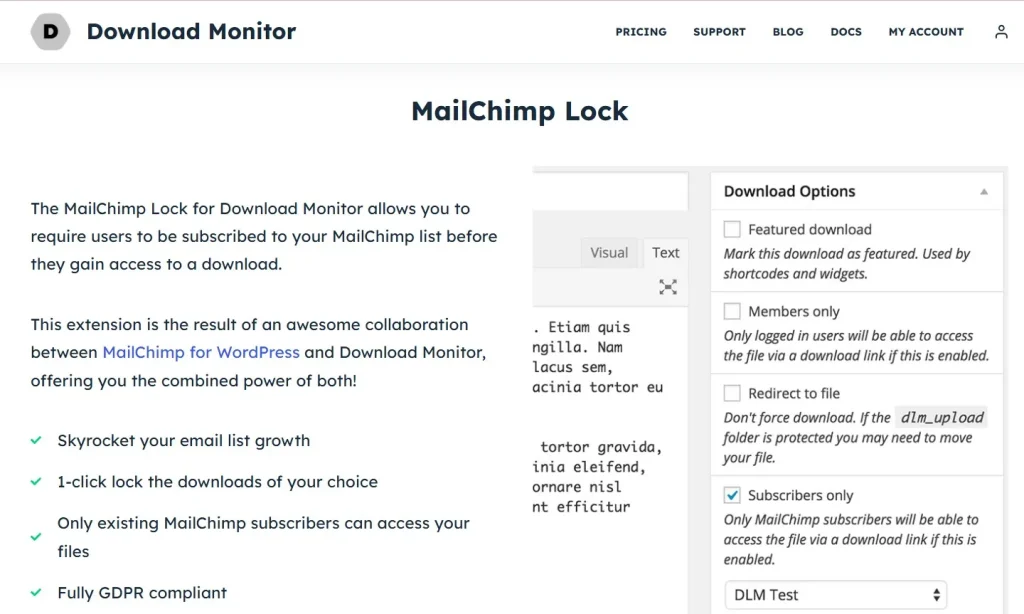
Download Monitor – MailChimp Lock is a lead-generation focused WordPress add-on that helps website owners turn ordinary file downloads into valuable email subscription opportunities. For many websites, downloadable resources such as eBooks, checklists, templates, whitepapers, case studies, software files, and media kits are some of the most attractive assets they offer. Visitors are often willing to exchange contact information for these resources, but without the right tool, that opportunity is easily missed. If a file is available with a simple direct link, you may get the download, but you lose the chance to build a long-term relationship with that visitor.
This is where Download Monitor – MailChimp Lock becomes especially useful. It works with Download Monitor to place a MailChimp subscription requirement in front of a file download. Instead of letting users access the file immediately, the plugin can require them to subscribe to your MailChimp list first. Once they complete the subscription process, the file is unlocked and the download becomes available. This creates a simple and effective value exchange: the visitor gets the resource they want, and you gain a targeted email subscriber who has already shown interest in your topic, product, or service.
That kind of exchange is highly valuable in real marketing scenarios. A consultant can offer a downloadable strategy checklist to collect qualified leads. A blogger can use a premium guide to grow a niche newsletter. A SaaS company can gate onboarding templates or comparison sheets behind an email subscription. An educator can offer worksheets or lesson packs in exchange for subscribers interested in future updates. In each case, the plugin helps connect content delivery with audience building.
In this article, we will explore what Download Monitor – MailChimp Lock is, how it works, its key features, the benefits of using it, the installation process, and why buying it from Pluginpro.org can be a cost-effective option for WordPress users who want to improve email list growth while managing downloads more strategically.
What is Download Monitor – MailChimp Lock?
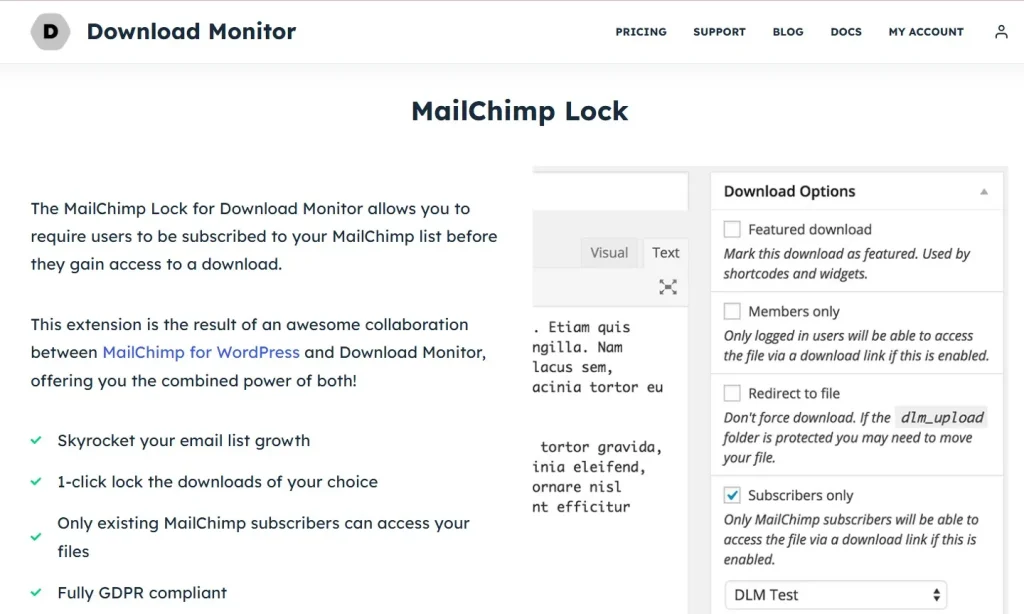
Download Monitor – MailChimp Lock is an extension for the Download Monitor plugin that allows website owners to restrict access to downloadable files until users subscribe to a MailChimp email list. In simple terms, it adds an email capture layer to your download workflow so that downloads can function as lead magnets instead of just free assets.
To understand its role, it helps to look at the two systems it connects. Download Monitor is a popular WordPress plugin for managing downloadable files. It allows you to upload files, assign versions, create clean download links, organize resources, and track how often files are downloaded. It is widely used by blogs, business websites, digital product pages, membership sites, and resource libraries because it gives WordPress users a more structured way to handle downloads than simply linking files directly in the media library.
MailChimp, on the other hand, is a well-known email marketing platform used to collect subscribers, build segmented lists, send campaigns, and automate email communication. Many businesses use MailChimp for newsletters, onboarding sequences, promotions, and educational email flows. The challenge is that collecting subscribers consistently often requires a strong offer. Downloadable resources are one of the most proven offers for this purpose.
Download Monitor – MailChimp Lock connects these two systems. When someone clicks a locked download, they are shown a MailChimp subscription form instead of receiving the file immediately. Once they submit the form and complete the required action, the file becomes accessible. This means the download is no longer just a file delivery system. It becomes a conversion tool.
This is particularly effective because the user’s intent is already strong. Someone trying to download a checklist, toolkit, or guide is usually more motivated than someone casually browsing a page. That makes them more likely to subscribe and more likely to become a relevant email contact. For example, if someone downloads a WooCommerce optimization guide, they are signaling a real interest in eCommerce topics. If someone requests a branding template, they are likely interested in design or marketing. This gives website owners not just more subscribers, but often more qualified subscribers.
In practice, the plugin can be used in many ways. A digital agency can lock downloadable audits or proposal templates behind a form. A course creator can collect leads through workbook downloads. A B2B company can gate whitepapers and industry reports. Even a personal brand can use free mini-guides to build a newsletter audience. Instead of relying only on sidebar opt-in forms or popups, the plugin lets you place your subscription ask at a moment when the visitor already wants something tangible.
Overall, Download Monitor – MailChimp Lock transforms simple file access into a more strategic process that supports list building, lead generation, and long-term marketing growth.
Key Features of Download Monitor – MailChimp Lock
Download Monitor – MailChimp Lock includes several useful features that make it practical for content marketers, businesses, and WordPress site owners who want to connect downloads with email capture. Below are the most important features and how they help in real-world use.
- MailChimp subscription requirement before download
This is the main feature of the plugin. It allows you to lock a download so users must subscribe through MailChimp before they can access the file. This matters because it turns a passive download into an active conversion step. For example, if you offer a free PDF checklist on your blog, every download becomes a chance to grow your email list instead of just giving away the file with no follow-up opportunity. - Direct integration with MailChimp lists or audiences
The plugin connects your locked download flow to MailChimp so subscriber data can go exactly where it needs to go. Instead of manually exporting emails or using disconnected tools, you can automatically place new subscribers into the correct list or audience. This is especially useful for businesses running multiple lead magnets. A site offering different resources such as SEO guides, email templates, and sales playbooks can direct subscribers into distinct MailChimp segments for more relevant follow-up emails. - Smooth value exchange for lead generation
A strong lead magnet workflow depends on clarity and simplicity. This plugin supports that by making the exchange understandable: subscribe first, then access the file. Users know what they are getting and why their email is being requested. This is more effective than vague newsletter forms because the benefit is immediate and specific. A visitor is much more likely to submit an email for a downloadable toolkit than for a generic “join our newsletter” request. - Works with Download Monitor’s file management system
Because the add-on is built around Download Monitor, you retain the benefits of structured download management. You can still organize your files, track versions, count downloads, and handle resources professionally. This matters because lead generation should not create file management chaos. A site owner running a resource library can keep everything organized while layering lead capture on top of selected downloads. - Automatic unlocking after successful subscription
Once a user subscribes successfully, the file can be unlocked automatically. This is important for user experience because people do not want to wait for manual approval or search through confusing confirmation steps just to access a promised file. For example, if a consultant offers a downloadable pricing guide, the visitor should be able to subscribe and access it in a smooth flow. Automatic unlocking helps keep the experience professional and reduces frustration. - Useful for multiple types of downloadable assets
The plugin is not limited to one kind of file. It can be used with eBooks, ZIP files, templates, PDFs, checklists, media kits, spreadsheets, presentation decks, software files, and more. This flexibility matters because different industries use different lead magnets. A designer might offer icon packs, a coach might offer worksheets, and a software company might offer setup guides or comparison sheets. The plugin adapts to all of these use cases. - Supports targeted list building strategies
Not all subscribers are equally valuable. The best email marketing strategies involve collecting subscribers based on specific interests. Download Monitor – MailChimp Lock helps with that by letting you pair different downloads with different subscription goals. A website with several downloadable resources can use each one to attract a more targeted segment of users. Someone downloading a beginner guide is likely in a different stage than someone downloading an advanced case study, and your follow-up email sequences can reflect that. - Improves conversion opportunities at high-intent moments
Timing matters in lead generation. Asking for an email when a user wants a specific resource is often more effective than asking randomly through a popup or sidebar form. This plugin lets you present the subscription request at exactly that high-intent point. For instance, a visitor who clicks to download a “2026 social media calendar template” is already engaged and motivated. That makes them far more likely to subscribe than a casual page visitor with no immediate reason to act. - Cleaner alternative to scattered opt-in methods
Many WordPress websites rely on several disconnected subscription methods, such as header bars, popups, inline forms, and widgets. While these can work, they often create a cluttered experience and inconsistent results. Download locking offers a more focused strategy because it ties subscription directly to a clear benefit. This can make your site feel less intrusive while still capturing leads effectively. - Can strengthen content marketing ROI
Creating downloadable resources takes time. If those resources are simply given away without any lead capture, their marketing value may be limited. By locking strategic downloads with a MailChimp opt-in, the plugin helps each content asset contribute to long-term audience growth. That means the return on your content investment can become stronger over time. A single well-made guide can continue generating subscribers for months if paired with the right download lock setup.
Benefits of Using Download Monitor – MailChimp Lock
Using Download Monitor – MailChimp Lock offers several clear benefits for WordPress websites that rely on content marketing, lead generation, or audience building. One of the biggest benefits is consistent email list growth. Instead of waiting for visitors to notice a standard subscription form, you can collect emails from users who are already interested enough to request a specific resource. This usually results in subscribers who are more engaged than those collected through generic opt-ins.
Another major benefit is better lead quality. When someone subscribes for a targeted download, their interests are easier to understand. A person downloading an SEO worksheet is likely interested in SEO. A person requesting a client onboarding template may be a freelancer, agency, or service provider. This context is extremely valuable because it helps you write more relevant email sequences, segment your audience more effectively, and send offers that match real user intent.
The plugin also helps improve the commercial value of free content. Many businesses give away useful files to attract traffic, but traffic alone does not build a business. Email subscribers are often much more valuable because they create an ongoing communication channel. If your downloadable assets are already attracting attention, using them to grow your MailChimp audience is a logical next step. Over time, that audience can be nurtured into customers, clients, members, or repeat readers.
There is also a strong user experience benefit when implemented properly. The exchange is clear and understandable. Users know they are giving an email in return for access to something useful. Because the system is tied to a specific file rather than a vague brand promise, the interaction can feel more transparent. A visitor who wants a free template will usually understand why an email is being requested, especially if the file is positioned as a premium resource.
Another benefit is better campaign tracking and resource performance analysis. Since the plugin works with Download Monitor, you can see which resources are being requested most often. This helps you identify which topics generate the most interest. For example, if one checklist drives significantly more downloads than another, that may indicate a stronger content angle or audience need. This information can guide future lead magnet creation.
The plugin can also support a more organized funnel strategy. Different downloads can serve different stages of the customer journey. A beginner-level guide may attract top-of-funnel leads, while a detailed case study may attract more qualified prospects. By linking these resources to MailChimp, you create a stronger connection between content, segmentation, and follow-up marketing. That makes your overall funnel more deliberate and more likely to convert over time.
How to Install Download Monitor – MailChimp Lock
Installing Download Monitor – MailChimp Lock is usually straightforward, but it works best when you set up the required parts in the correct order. Because it is an add-on, you need the core plugin and your email marketing setup ready first.
Install via WordPress Dashboard
Start by making sure Download Monitor is already installed and active on your WordPress website. Since this add-on depends on Download Monitor, the main file management system must be in place first. You should also have a MailChimp account ready, along with the correct API connection details or related configuration needed to connect your website to your MailChimp audience.
Once those requirements are ready, log in to your WordPress dashboard and go to the Plugins section. Click Add New, then choose Upload Plugin. Select the Download Monitor – MailChimp Lock ZIP file from your computer and click Install Now. When the installation is complete, click Activate.
After activation, go to the plugin settings area or the Download Monitor configuration section where the MailChimp integration options appear. Connect the plugin to your MailChimp account and select the audience or list where new subscribers should be added. Then choose one or more downloads you want to protect with the MailChimp lock.
At this point, it is important to test the flow carefully. Create a sample download page and try the process from the visitor’s perspective. Click the locked file, submit the subscription form, and verify that the email is added to MailChimp correctly and that the file becomes accessible afterward. This step matters because even a small setup issue can break the lead magnet experience.
A practical example would be a marketing site offering a downloadable PDF checklist. After setup, the user should click the download button, see the MailChimp form, submit their email, and then access the PDF immediately or through the intended confirmation flow. If any step feels confusing, adjust the settings or messaging before using it on important landing pages.
Manual Installation
Manual installation is useful if you prefer using FTP or your hosting file manager. First, download the plugin file and extract it if needed. Then upload the plugin folder to the /wp-content/plugins/ directory on your server.
Once the files are uploaded, log in to the WordPress dashboard, open Plugins, find Download Monitor – MailChimp Lock, and click Activate. After activation, go through the same configuration process as you would with dashboard installation. Connect MailChimp, choose the relevant audience, assign the lock behavior, and test one or more downloads thoroughly.
Manual installation can be helpful on staging sites or in agency environments where direct server access is part of the workflow. Regardless of installation method, the most important part is testing the actual conversion flow from the user’s side. Because this plugin affects both lead capture and file delivery, you want to make sure the setup feels smooth and trustworthy.
Why Buy Download Monitor – MailChimp Lock at Pluginpro.org
Buying Download Monitor – MailChimp Lock at Pluginpro.org offers several practical advantages for WordPress users who want premium functionality without paying full official pricing. One of the biggest reasons is cost savings. Premium WordPress add-ons can become expensive quickly, especially when a site relies on multiple marketing and download-related tools. Pluginpro.org helps reduce that financial barrier by offering access at significantly lower pricing, often with savings of up to 95%.
Another major advantage is access to 100% clean files. This is especially important for plugins that connect to marketing systems and user-facing forms. File quality affects not only security but also site stability. A plugin involved in downloads and subscriptions should be trustworthy and dependable. Clean files help reduce the risk of malware, hidden code, or unnecessary technical problems.
Unlimited websites usage is another useful benefit, especially for agencies, freelancers, and developers working across multiple projects. Official licensing models can become restrictive or expensive when you need to deploy the same tool across several client sites. Pluginpro.org gives more flexibility, which is valuable if email-based lead magnets are part of your standard WordPress workflow.
Easy updates also add practical value. WordPress plugins need ongoing compatibility with WordPress core, Download Monitor, MailChimp-related systems, and surrounding plugins. Having a straightforward way to keep the add-on updated can help maintain smooth operation over time. This matters because broken lead capture flows can directly reduce conversion opportunities.
Secure downloads are another reason Pluginpro.org is appealing. Rather than searching through low-trust sources, website owners can obtain the plugin from a more dependable platform built around plugin access and usability. That saves time and makes implementation simpler, especially for busy site owners or professionals managing multiple websites.
For marketers, bloggers, agencies, and businesses that want to build email lists using downloadable resources, Pluginpro.org offers a strong combination of affordability, flexibility, and convenience.
Conclusion
Download Monitor – MailChimp Lock is a valuable WordPress add-on for any website that wants to turn downloadable resources into lead generation tools. Instead of giving away files with no long-term marketing benefit, the plugin helps connect those downloads to email list growth through MailChimp. That makes your content work harder and gives each resource a clearer role in your funnel.
Its strength comes from the simplicity of the exchange. Users subscribe, then access the file. That straightforward model works well for blogs, agencies, SaaS websites, educators, consultants, and content-driven businesses that already use downloadable assets to attract attention. It is especially effective because it captures users at a high-intent moment, when they are actively requesting something useful.
The plugin also adds practical value by combining Download Monitor’s file management features with MailChimp’s email marketing capabilities. That means you can manage files more professionally, build targeted audiences, and create stronger follow-up campaigns based on real user interest. With the right setup, even a simple downloadable checklist can become part of a larger email growth strategy.
Installation is manageable, and once configured properly, the plugin can support ongoing list building with relatively little manual effort. When you combine that with the pricing advantages and flexibility available at Pluginpro.org, Download Monitor – MailChimp Lock becomes an even stronger choice.
For WordPress users who want to grow their email audience using content upgrades, lead magnets, and gated resources, this plugin is a practical and effective addition to the marketing toolkit.



