
Websites built around information—such as help centers, documentation hubs, or educational platforms—have a very different goal compared to typical marketing websites. Instead of focusing primarily on visuals or branding, they need to prioritize clarity, structure, and usability. Visitors come with a purpose: they want to find answers quickly, follow instructions easily, or learn something step by step.
Building this type of website from scratch can be more difficult than it seems. It is not just about creating pages, but about organizing content in a way that makes sense. Without a clear structure, even valuable content becomes hard to navigate. This is where a template kit like iKnowledge becomes highly practical.
iKnowledge Template Kit is designed to help users build structured, content-focused websites using Elementor. Instead of starting with a blank page, you get a set of pre-designed templates that already follow logical content patterns. These templates are built specifically for knowledge-based websites, which means they focus on readability, navigation, and consistency.
In real-world use, this saves time and reduces guesswork. A SaaS company can quickly create a documentation center. A course creator can organize lessons into structured pages. A business can build a support hub that answers common questions without overwhelming users.
The key advantage is not just speed, but clarity. iKnowledge helps you present information in a way that users can actually use.
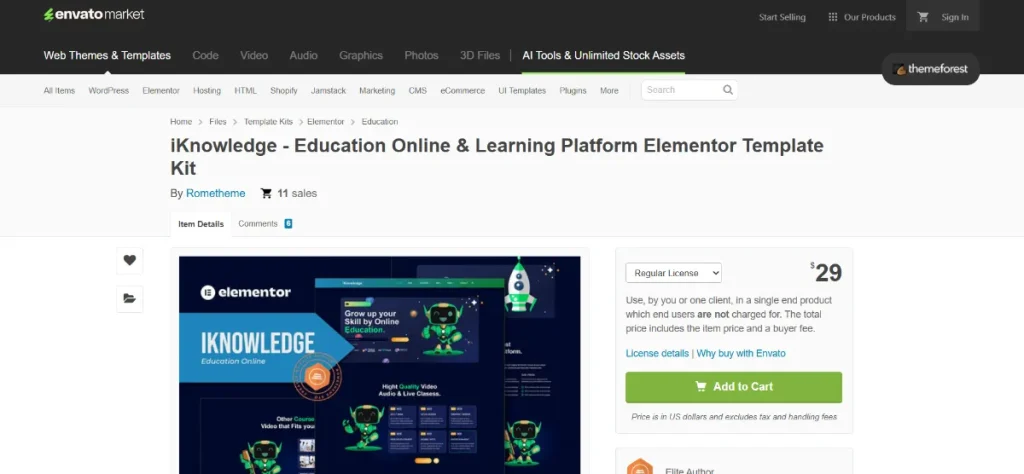
What is iKnowledge Template Kit?
iKnowledge Template Kit is a collection of professionally designed templates built for Elementor, specifically tailored for knowledge-based and content-driven websites. It allows users to create structured pages by importing ready-made layouts and customizing them with their own content.
Unlike a WordPress theme, a template kit does not control your entire website design. Instead, it works within your existing theme and uses Elementor as the design engine. Each template acts as a building block that you can import, edit, and combine to create a complete site.
The strength of iKnowledge lies in how it organizes information. Knowledge-based websites often require multiple layers of content, such as categories, subtopics, and detailed articles. Without a clear system, users can easily get lost. This template kit provides layouts that guide both the creator and the visitor through a structured experience.
For example, a software company might need:
- A homepage with quick links to major topics
- A documentation page with categorized guides
- Individual article pages with step-by-step instructions
- A FAQ section for common issues
iKnowledge includes templates for these scenarios, allowing you to build a complete system rather than isolated pages.
It is especially useful for:
- SaaS documentation hubs
- Online course platforms
- Help centers and support portals
- Resource libraries and content hubs
In practice, the kit helps transform scattered information into a structured, user-friendly system.
Key Features of iKnowledge Template Kit
- Pre-designed documentation and knowledge pages
iKnowledge includes templates specifically designed for documentation, FAQs, and structured content pages.
This is important because these pages require more than just text. They need hierarchy, spacing, and navigation that supports learning or problem-solving.
For example, a troubleshooting guide can be structured with headings, steps, and highlights that make it easy to follow. - Elementor drag-and-drop customization
All templates are built for Elementor, allowing you to edit content visually without coding.
This is especially useful for teams that need to update content regularly.
A support team, for instance, can update instructions or add new articles without relying on a developer. - Logical content hierarchy and layout consistency
The templates follow a consistent structure across pages, which helps users understand how to navigate the site.
This matters because consistency reduces confusion. When users know where to find information, they spend less time searching.
For example, all tutorial pages can follow the same layout, making it easier for users to move between topics. - Reusable sections for faster page building
The kit includes modular sections that can be reused across different pages.
This helps maintain consistency while saving time.
A company can reuse a standard article layout for every new guide, ensuring a uniform experience. - Responsive design for multi-device access
All templates are optimized for mobile, tablet, and desktop viewing.
This is critical because users often access help content on different devices, sometimes while troubleshooting an issue.
A responsive layout ensures that instructions remain readable and accessible. - Focus on readability and typography
iKnowledge emphasizes clean typography, spacing, and content organization.
This improves comprehension, especially for long-form content.
For example, step-by-step guides remain easy to follow due to clear formatting and visual separation. - Integration with existing WordPress themes
The kit works with most Elementor-compatible themes, allowing flexibility in design.
This means you can maintain your branding while using structured templates.
A company can keep its color scheme and logo while benefiting from the kit’s layout system. - Quick import and setup process
Templates can be imported quickly, allowing users to build pages in minutes rather than hours.
This is particularly useful for projects with tight deadlines.
A startup can launch a help center alongside a product release without delaying development.
Benefits of Using iKnowledge Template Kit
One of the most significant benefits of iKnowledge is improved organization. Instead of presenting content randomly, it helps structure information in a way that aligns with user expectations. This makes it easier for visitors to find what they need.
Another key benefit is faster development. Building a knowledge base manually requires planning layouts, designing pages, and ensuring consistency. With iKnowledge, much of that work is already done, allowing you to focus on content rather than design.
The kit also enhances user experience. Clear navigation, consistent layouts, and readable formatting make it easier for users to interact with content. This is particularly important for support websites, where users often need quick answers.
From a business perspective, it can reduce support workload. When users can find answers on their own, they are less likely to contact support. This saves time and improves efficiency.
It also supports scalability. As your content grows, you can continue using the same templates to add new pages. This ensures that your website remains organized even as it expands.
Finally, iKnowledge helps maintain a professional appearance. A well-structured knowledge base reflects reliability and attention to detail, which can improve user trust.
Real Use Cases of iKnowledge Template Kit
A SaaS company can use iKnowledge to build a complete documentation hub. Users can access setup guides, feature explanations, and troubleshooting articles in a structured environment. This reduces onboarding friction and improves user retention.
An online course creator can organize lessons into categories with consistent layouts. Each lesson page can follow the same structure, making it easier for students to navigate and learn.
A customer support team can create a help center with categorized FAQs and guides. Users can quickly find answers without submitting tickets, improving efficiency.
A digital product seller can provide tutorials and usage guides. This helps customers understand how to use the product, reducing confusion and increasing satisfaction.
A content publisher can build a resource library that groups articles by topic. This improves content discovery and encourages users to explore more pages.
How to Install iKnowledge Template Kit
Installing iKnowledge Template Kit involves a few steps, but the process is straightforward.
First, ensure that Elementor is installed and activated on your WordPress site. You may also need a template import plugin, such as Envato Elements or a similar tool.
Next, download the iKnowledge Template Kit file from your source.
In your WordPress dashboard, go to the template import section provided by your import plugin. Upload the template kit file and begin the import process.
Once the templates are imported, you can access them in Elementor. Create a new page, open Elementor, and choose a template from the kit. Customize the content by replacing text, images, and links with your own.
Repeat this process for each page you need. For example, create a homepage, documentation section, and individual article pages.
After setup, review your site on different devices to ensure everything displays correctly and remains easy to navigate.
Why Buy iKnowledge Template Kit at Pluginpro.org
Buying iKnowledge Template Kit at Pluginpro.org offers several practical advantages.
You can save up to 95% cost compared to standard pricing, making it accessible for startups, freelancers, and small businesses.
The platform provides 100% clean files, ensuring that the templates are safe and free from harmful code.
Unlimited website usage allows you to use the kit across multiple projects without additional costs, which is useful for agencies.
Easy updates help keep your templates compatible with the latest Elementor versions.
Secure downloads ensure a reliable installation process, reducing setup issues.
Overall, Pluginpro.org provides a cost-effective and convenient way to access premium template kits.
Is iKnowledge Template Kit Worth It?
iKnowledge Template Kit is worth it for users building knowledge-based or content-heavy websites.
It is especially valuable for those who want a structured layout without spending time on design. The templates provide a clear framework that improves usability and organization.
For simple websites, the kit may not be necessary. However, for documentation, support, or educational platforms, it offers strong practical value.
Conclusion
iKnowledge Template Kit provides a structured approach to building knowledge-based websites using Elementor. By offering pre-designed templates and modular sections, it simplifies the process of organizing and presenting content.
The kit supports better usability, faster development, and improved user experience. For businesses and creators focused on delivering information clearly and efficiently, iKnowledge is a practical and effective solution.



