
Elementor has become one of the most widely used page builders for WordPress, mainly because it makes layout design accessible without coding. However, once users move beyond basic pages, limitations start to appear. You may want more advanced widgets, better navigation systems, dynamic content control, or reusable sections across multiple websites. At that point, relying on Elementor alone often leads to installing multiple additional plugins, which can complicate your workflow.
ElementsKit is designed to solve that problem by acting as a comprehensive extension for Elementor. Instead of stacking multiple addons, it brings a wide range of features into one plugin, including advanced widgets, layout tools, mega menus, header builders, and dynamic content options. The goal is not just to add features, but to create a more complete design and marketing environment within Elementor.
In real-world scenarios, this becomes highly practical. A business website might need a custom header with a call-to-action button, a landing page with conversion-focused sections, and a blog layout that updates dynamically. An eCommerce site may require advanced navigation, product displays, and promotional elements. ElementsKit allows you to build all of this within a single interface.
The value of the plugin comes from reducing friction. Instead of juggling different tools, you can design, structure, and optimize your site in one place. That leads to faster development, better consistency, and easier long-term maintenance.
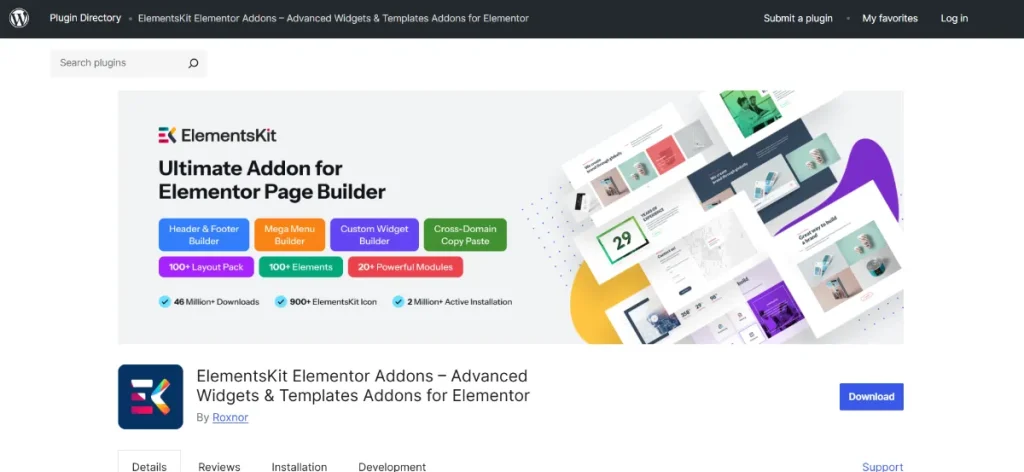
What is ElementsKit?
ElementsKit is an advanced addon for Elementor that expands its design and functionality by introducing new widgets, modules, and layout capabilities. It integrates directly into Elementor, meaning you continue working inside the same interface while gaining access to a much broader toolkit.
At a functional level, ElementsKit works by adding new building blocks to your page builder. These include design widgets, structural components, navigation tools, and dynamic elements. You can drag and drop them just like standard Elementor widgets, but they offer more control and flexibility.
The plugin is particularly useful for users who want to build more than static pages. It supports dynamic content, reusable sections, and behavior-based design elements. For example, you can create templates that update automatically based on posts, categories, or user data, which is especially useful for blogs and content-heavy websites.
ElementsKit is suitable for freelancers, agencies, marketers, and business owners who need to build functional websites efficiently. It is also valuable for users managing multiple websites, as it helps standardize design systems and reuse components.
In practice, it helps solve problems such as:
- Creating consistent layouts across multiple pages
- Building advanced navigation systems for large websites
- Adding interactive elements without custom development
- Managing dynamic content in a structured way
By extending Elementor in these areas, ElementsKit transforms it from a layout builder into a more complete website-building system.
Key Features of ElementsKit
- Extended widget library for advanced design
ElementsKit significantly expands the number of available widgets in Elementor. These include advanced headings, image comparison tools, pricing tables, testimonials, tabs, accordions, and more.
This matters because real-world websites often require more than basic text and image blocks.
For example, a service-based business can use advanced testimonial sliders to display client feedback in a more engaging format, which helps build credibility and trust. - Header and footer builder inside Elementor
Instead of relying on theme settings, ElementsKit allows you to design headers and footers visually.
This is important because headers often contain navigation, branding, and key actions such as contact buttons or login links.
In practice, you can create different headers for different pages. A landing page might have a simplified header focused on conversions, while a blog section might include full navigation. - Mega menu builder for complex navigation
ElementsKit includes a powerful mega menu system that allows multi-column layouts, images, and custom content inside navigation menus.
This is especially useful for large websites or eCommerce stores with many categories.
For instance, an online store can display product categories, featured items, and promotional banners directly inside the menu, helping users navigate faster. - Pre-designed templates and reusable sections
The plugin provides ready-made templates that can be inserted into pages and customized.
This speeds up the design process and ensures consistency across the site.
A marketing team, for example, can reuse a proven landing page section across multiple campaigns instead of rebuilding it each time. - Dynamic content and layout control
ElementsKit allows you to create layouts that update automatically based on content.
This is particularly useful for blogs, portfolios, and listing websites.
For example, a blog homepage can automatically display the latest posts in a structured layout without manual updates. - Interactive elements and animations
The plugin includes animation effects and interactive components that enhance user engagement.
These features should be used carefully, but when applied correctly, they make websites feel more modern and responsive.
A portfolio site, for example, can use subtle hover effects to highlight projects without distracting users. - Cross-domain copy and paste functionality
This feature allows you to copy sections from one website and paste them into another.
It is especially useful for agencies or freelancers managing multiple projects.
Instead of recreating layouts, you can reuse high-performing sections across different client sites. - Modular performance control
ElementsKit lets you enable or disable specific modules depending on your needs.
This helps maintain site performance by avoiding unnecessary features.
For example, if you are not using mega menus, you can disable that module to keep your site lighter.
Benefits of Using ElementsKit
One of the most practical benefits of ElementsKit is workflow efficiency. By combining multiple features into a single plugin, it reduces the need to install and manage several separate addons. This simplifies both setup and ongoing maintenance.
Another key benefit is design flexibility. You are not limited to basic layouts or predefined structures. With additional widgets and layout tools, you can create more customized and professional designs that match your business needs.
ElementsKit also improves consistency. When you use a unified toolkit, it becomes easier to maintain the same design language across all pages. This is particularly important for branding and user experience.
From a performance perspective, the modular system helps keep your website optimized. You can control which features are active, reducing unnecessary load and improving page speed.
There is also a clear business benefit. With better design tools and interactive elements, you can create pages that guide users more effectively. Whether it is a landing page, product page, or service page, improved structure and clarity often lead to higher engagement and conversions.
Finally, the plugin supports scalability. As your website grows, you can add new sections, templates, and features without restructuring your entire site.
Real Use Cases of ElementsKit
A digital agency can use ElementsKit to standardize website builds. Instead of designing each project from scratch, they can create reusable templates for headers, landing pages, and service sections. This reduces development time and ensures consistency across client projects.
An eCommerce store can use mega menus and product display widgets to improve navigation. Customers can browse categories visually, which makes it easier to find products and reduces bounce rates.
A blogger or content publisher can use dynamic content features to display posts automatically. This keeps the website updated without manual effort and ensures that new content is always visible.
A SaaS or service-based business can create high-converting landing pages using pricing tables, testimonials, and call-to-action sections. These elements help guide visitors toward signing up or contacting the business.
A freelancer can use cross-domain copy features to reuse design sections across multiple websites, saving time and maintaining quality.
How to Install ElementsKit
Installing ElementsKit follows a standard process within WordPress.
First, download the plugin ZIP file from your source. Keep the file in ZIP format.
Next, log in to your WordPress dashboard. Go to Plugins and click Add New. Select Upload Plugin, choose the ZIP file, and click Install Now.
Once installation is complete, activate the plugin. ElementsKit will automatically integrate with Elementor, and you will see new widgets and options available in the builder.
After activation, go to the plugin settings and enable only the modules you plan to use. This helps maintain performance and keeps your interface clean.
It is recommended to test your setup by creating a sample page and using different widgets. This helps you understand how the plugin works before applying it to live pages.
Why Buy ElementsKit at Pluginpro.org
Buying ElementsKit at Pluginpro.org offers a practical advantage for users who want access to premium features at a lower cost.
You can save up to 95% cost compared to standard pricing, which is especially helpful for freelancers, small businesses, and agencies managing multiple projects.
The platform provides 100% clean files, ensuring that the plugin is safe and free from harmful code. This is essential for maintaining website security.
Unlimited website usage allows you to install the plugin on multiple sites without additional licensing costs, making it a cost-effective solution for agencies.
Easy updates help keep the plugin compatible with the latest versions of WordPress and Elementor, reducing the risk of conflicts.
Secure downloads ensure that files are delivered reliably, allowing for a smooth installation process.
Is ElementsKit Worth It?
ElementsKit is worth it for anyone using Elementor who needs more advanced design and functionality.
It is particularly valuable for users building complex websites, managing multiple projects, or creating conversion-focused pages. The plugin provides tools that would otherwise require several separate addons.
For simple websites, Elementor alone may be sufficient. However, as soon as your requirements grow, ElementsKit becomes a practical and efficient solution.
Conclusion
ElementsKit extends Elementor into a more complete website-building system by adding advanced widgets, layout tools, and dynamic features. It helps users create more flexible, interactive, and professional websites without increasing complexity.
By combining multiple capabilities into one plugin, it simplifies workflows and supports better design outcomes. For WordPress users looking to go beyond basic layouts, ElementsKit offers a strong and practical upgrade.



