
The fitness industry has rapidly shifted toward digital platforms, where trainers, coaches, and gym owners can connect with clients beyond physical locations. Whether offering personalized workout plans, online coaching, or subscription-based fitness programs, having a professional website is essential. However, building a fitness-focused platform from scratch can be complex without the right tools. This is where a Fitness Trainer Plugin becomes a powerful solution for WordPress users.
A Fitness Trainer Plugin is designed to help fitness professionals create structured, scalable, and user-friendly websites that manage workouts, client interactions, and memberships. Instead of relying on multiple disconnected tools, this plugin consolidates essential features into one system. From managing training programs to tracking user progress, it enables fitness businesses to operate more efficiently online.
For personal trainers, gyms, yoga instructors, and online coaches, this plugin provides a way to deliver value directly through their website. It allows trainers to offer customized programs, schedule sessions, and even monetize their services through memberships or premium content. At the same time, clients benefit from having a centralized platform where they can access workouts, monitor progress, and stay engaged.
In this article, we will explore what a Fitness Trainer Plugin is, its key features, real-world benefits, installation process, and why purchasing it from Pluginpro.org is a smart investment for anyone in the fitness industry looking to scale their online presence.
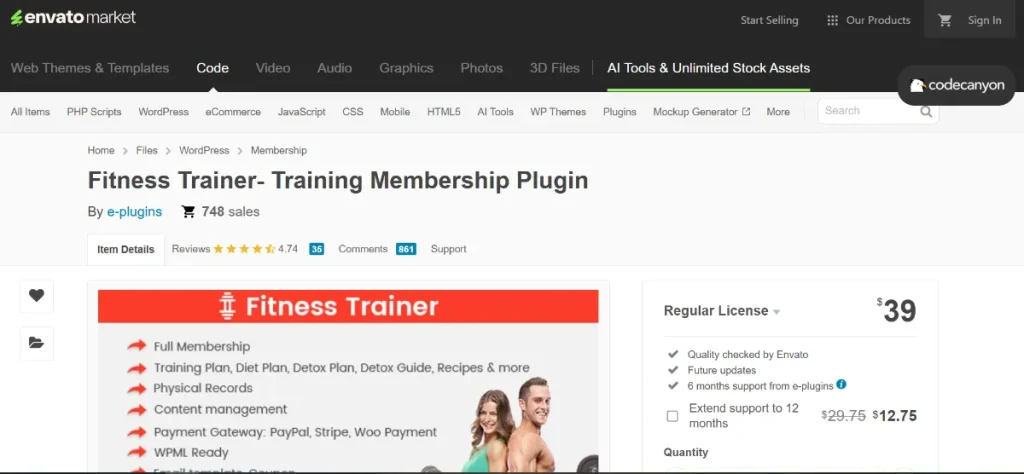
What is Fitness Trainer Plugin?
A Fitness Trainer Plugin is a specialized WordPress plugin designed to transform a standard website into a fully functional fitness management platform. It enables trainers and fitness businesses to create, manage, and deliver workout programs, track client performance, and build long-term engagement with users.
At its core, the Fitness Trainer Plugin focuses on bridging the gap between trainers and clients in a digital environment. Instead of relying solely on in-person sessions or external apps, trainers can manage everything directly from their WordPress website. This includes creating structured workout plans, assigning exercises, monitoring progress, and communicating with clients.
The plugin is particularly useful for several types of users. Personal trainers can use it to deliver customized fitness programs tailored to individual client goals such as weight loss, muscle gain, or rehabilitation. Gym owners can integrate it into their website to provide members with access to training schedules and digital workout libraries. Online fitness coaches can use it to scale their business by offering subscription-based programs accessible worldwide.
For example, a fitness coach running an online transformation program can use the Fitness Trainer Plugin to assign weekly workout routines, upload instructional videos, and track each client’s progress. Clients can log in to their accounts, follow the assigned plans, and update their performance metrics. This creates a more structured and professional coaching experience compared to using spreadsheets or messaging apps.
Additionally, the plugin often integrates with other WordPress tools such as membership systems, payment gateways, and email marketing platforms. This allows trainers to build a complete online fitness business, from onboarding new clients to delivering ongoing value.
Overall, the Fitness Trainer Plugin is a comprehensive solution for fitness professionals who want to digitize their services, improve client engagement, and create a scalable business model through their WordPress website.
Key Features of Fitness Trainer Plugin
The Fitness Trainer Plugin includes a range of powerful features that support both trainers and clients. These features are designed to streamline operations, improve user experience, and enhance the overall effectiveness of online fitness programs.
Workout Plan Builder
- The workout plan builder allows trainers to create structured fitness programs tailored to different goals and fitness levels. Trainers can organize exercises into daily or weekly routines, ensuring that clients follow a clear progression path. This helps maintain consistency and prevents confusion for users who are following the program.
- This feature typically includes options to add exercise descriptions, sets, repetitions, rest intervals, and instructional videos. By providing detailed guidance, trainers can ensure that clients perform exercises correctly even without direct supervision. This reduces the risk of injury and improves overall results.
- In real-world use, a trainer can design multiple programs such as beginner, intermediate, and advanced plans. These can then be assigned to different clients based on their fitness level. This scalability allows trainers to serve more clients without sacrificing quality.
Client Management System
- The client management system enables trainers to organize and manage all their clients from a single dashboard. Each client profile can include personal information, fitness goals, progress data, and assigned programs. This centralized approach simplifies client tracking and communication.
- Trainers can monitor client activity, see which workouts have been completed, and identify areas where clients may need additional support. This allows for more personalized coaching, even in an online environment.
- For example, if a client is consistently missing workouts, the trainer can quickly identify this and follow up with guidance or adjustments. This level of insight helps improve client retention and satisfaction.
Progress Tracking and Analytics
- Progress tracking is a key feature that allows clients to log their performance, including completed workouts, weight changes, and other fitness metrics. This data is then visualized through charts or reports, making it easy to track improvement over time.
- Trainers can use this data to evaluate the effectiveness of their programs and make necessary adjustments. For example, if a client is not progressing as expected, the trainer can modify the workout intensity or frequency.
- This feature also motivates clients by showing tangible results. Seeing progress in numbers or graphs can encourage users to stay consistent and committed to their fitness goals.
Membership and Subscription Integration
- The Fitness Trainer Plugin often integrates with membership systems, allowing trainers to offer subscription-based services. This means users can pay for access to exclusive workout programs, coaching sessions, or premium content.
- Trainers can create different membership tiers, such as basic access, premium coaching, or one-on-one training. This flexibility enables multiple revenue streams within a single platform.
- For instance, a trainer might offer a low-cost monthly subscription for general workout plans and a higher-priced tier for personalized coaching. This model helps maximize revenue while catering to different client needs.
Exercise Library and Media Support
- The plugin includes an exercise library where trainers can store and organize exercises. Each exercise can include images, videos, and detailed instructions to guide clients.
- This feature ensures consistency across different programs and makes it easier to build new workout plans. Trainers can reuse exercises without having to recreate content every time.
- In practice, this allows trainers to maintain a professional and organized system. Clients benefit from clear instructions and visual demonstrations, which improve their workout experience.
Scheduling and Booking System
- Many Fitness Trainer Plugin solutions include scheduling features that allow clients to book sessions directly through the website. This is especially useful for trainers who offer both online and in-person sessions.
- The booking system can include calendar integration, time slot management, and automated confirmations. This reduces administrative workload and improves efficiency.
- For example, a trainer offering virtual coaching sessions can allow clients to book appointments based on availability. This creates a seamless booking experience and reduces back-and-forth communication.
User Dashboard and Experience
- The plugin provides a dedicated dashboard for clients, where they can access their workout plans, track progress, and manage their accounts. This centralized interface improves usability and engagement.
- A well-designed dashboard helps users stay organized and focused on their goals. It eliminates confusion and ensures that all necessary information is easily accessible.
- From a business perspective, a smooth user experience increases client satisfaction and retention, which is essential for long-term success in the fitness industry.
Benefits of Using Fitness Trainer Plugin
Using a Fitness Trainer Plugin offers several practical advantages for fitness professionals and businesses. One of the most significant benefits is the ability to scale services. Instead of being limited by physical sessions, trainers can reach a global audience and manage multiple clients simultaneously.
Another major benefit is improved organization. With all client data, workout plans, and progress tracking centralized in one system, trainers can operate more efficiently. This reduces the need for spreadsheets, emails, and third-party apps, simplifying workflow management.
The plugin also enhances client engagement. Features like progress tracking, personalized plans, and interactive dashboards keep clients motivated and committed to their fitness journey. Engaged clients are more likely to continue their subscriptions and recommend services to others.
From a financial perspective, the plugin supports multiple revenue streams. Trainers can offer subscriptions, sell digital programs, or provide premium coaching services. This flexibility allows for sustainable business growth.
Additionally, the Fitness Trainer Plugin improves professionalism. A well-structured website with integrated fitness tools builds trust and credibility with clients. It positions the trainer as a serious professional rather than just a service provider.
How to Install Fitness Trainer Plugin
Installing the Fitness Trainer Plugin is a straightforward process that can be completed through the WordPress dashboard or manually.
Install via WordPress Dashboard
First, log in to your WordPress admin panel and navigate to the “Plugins” section. Click on “Add New” and then select “Upload Plugin.” Choose the Fitness Trainer Plugin ZIP file and click “Install Now.”
Once installed, click “Activate” to enable the plugin. After activation, you may need to configure basic settings such as user roles, workout categories, and membership options.
Next, create sample workout plans and test the client dashboard to ensure everything is functioning correctly. This step helps you understand the plugin’s features before launching it to users.
Manual Installation
For manual installation, download the plugin file and extract it on your computer. Use an FTP client to upload the plugin folder to the “/wp-content/plugins/” directory.
After uploading, log in to your WordPress dashboard, go to “Plugins,” and activate the Fitness Trainer Plugin. Then proceed with configuration and testing.
Manual installation is useful when dealing with file size limitations or advanced server setups.
Why Buy Fitness Trainer Plugin at Pluginpro.org
Purchasing the Fitness Trainer Plugin from Pluginpro.org provides several advantages that make it a smart choice for WordPress users.
One of the biggest benefits is cost savings. You can save up to 95% cost compared to buying from original sources, making it an affordable option for trainers and businesses.
Another key advantage is access to 100% clean files. This ensures that the plugin is safe to use and free from malicious code, which is critical for maintaining website security.
Pluginpro.org also allows unlimited websites usage, which is ideal for agencies or trainers managing multiple platforms. This flexibility reduces overall costs and simplifies management.
Easy updates ensure that your plugin remains compatible with the latest WordPress versions. This helps maintain performance and security over time.
Additionally, secure downloads provide a reliable and fast way to access your files whenever needed. This is especially important for professionals working on tight deadlines.
Overall, Pluginpro.org offers a combination of affordability, security, and convenience, making it an excellent place to purchase the Fitness Trainer Plugin.
Conclusion
The Fitness Trainer Plugin is a powerful tool for fitness professionals looking to expand their services online. With features like workout plan creation, client management, progress tracking, and membership integration, it provides everything needed to build a scalable fitness business.
By using this plugin, trainers can improve efficiency, enhance client engagement, and create new revenue streams. It transforms a standard WordPress website into a complete fitness platform that supports both trainers and clients.
When combined with the cost savings and reliability of Pluginpro.org, the Fitness Trainer Plugin becomes an even more valuable investment. For anyone in the fitness industry aiming to grow their online presence and deliver professional services, this plugin is a highly effective solution.



