
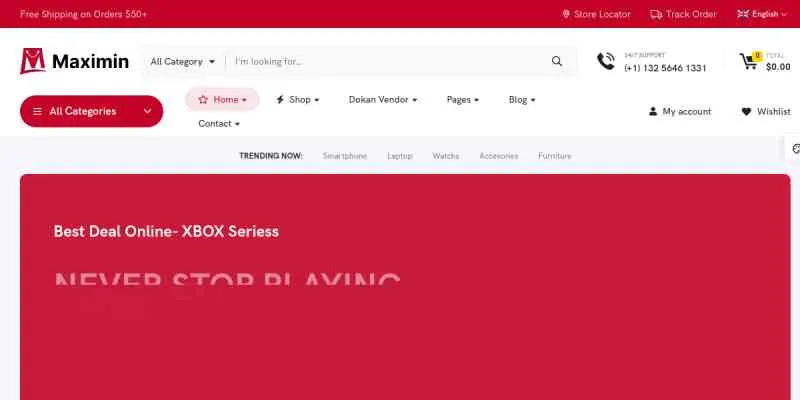
Maximin is a premium WordPress theme built for online stores that want to combine strong visual presentation with high-performance functionality. Maximin is particularly known for its seamless integration with WooCommerce, making it a practical solution for businesses that need to launch and scale eCommerce websites efficiently. From the outset, the theme focuses on delivering a smooth shopping experience while giving store owners the flexibility to customize their storefronts without technical complexity.
What makes Maximin stand out is its ability to handle real-world eCommerce demands. Many themes look appealing in demos but struggle when applied to large product catalogs or dynamic promotions. Maximin is designed with these challenges in mind, offering structured layouts, optimized performance, and built-in tools that support product display, filtering, and conversion.
In practice, Maximin is well suited for fashion stores, electronics shops, furniture retailers, and multi-category marketplaces. These businesses require clear navigation, engaging product pages, and fast loading speeds to keep users browsing and purchasing. Maximin addresses these needs by combining responsive design with conversion-focused elements such as product grids, quick views, and promotional banners.
A deeper look into real-world deployment reveals how valuable this structure is. For example, a mid-sized fashion retailer transitioning from offline to online sales can use Maximin to replicate the in-store browsing experience. Categories such as “New Arrivals,” “Best Sellers,” and “Seasonal Collections” can be visually highlighted, guiding customers naturally through the store. This mirrors how customers shop in physical environments, increasing familiarity and comfort.
Another important factor is scalability. As an online store grows, it needs a theme that can support more products, traffic, and features without breaking performance. Maximin is built to scale, allowing businesses to expand their offerings while maintaining a consistent user experience. This becomes especially important during peak sales periods such as Black Friday or holiday campaigns, where traffic spikes can expose weaknesses in poorly optimized themes.
Ultimately, Maximin is not just a theme for building an online store. It is a framework that helps businesses create efficient, user-friendly shopping environments that drive sales and support long-term growth.
What is Maximin?
Maximin is a WooCommerce-focused WordPress theme designed to help users create modern and fully functional online stores. It provides a collection of pre-built templates and customization tools that simplify the process of building an eCommerce website while maintaining professional design standards.
At its core, Maximin is built around the needs of online retailers. It includes layouts for homepages, product listings, category pages, and product detail pages. Each layout is structured to guide customers through the buying process, from discovery to checkout. This approach ensures that the website is not only visually appealing but also effective in converting visitors into customers.
To understand its value, consider a startup launching its first online store. Without a structured theme, the team would need to design navigation systems, product pages, and conversion flows from scratch. Maximin eliminates this complexity by providing ready-made frameworks that follow proven eCommerce patterns. This allows businesses to focus on product strategy rather than technical design.
A typical use case involves a fashion retailer launching an online store. With Maximin, the retailer can use pre-designed product grids, category filters, and promotional sections to showcase collections. This reduces development time and ensures that the store follows best practices for eCommerce design.
Another example involves a home decor business selling furniture and accessories. These products often require high-quality visuals and detailed descriptions. Maximin supports large images, zoom functionality, and structured layouts that allow customers to explore products thoroughly before making a purchase. This is critical for higher-ticket items where customers need more confidence before buying.
Maximin also supports integration with page builders, allowing users to customize layouts visually. This is particularly useful for store owners who want to update promotions, adjust product displays, or experiment with different page structures without relying on developers.
Who should use Maximin? It is ideal for small to medium-sized eCommerce businesses, entrepreneurs launching new stores, and agencies building online shops for clients. It works especially well for those who need a reliable and scalable solution without extensive coding.
On the other hand, users who require highly specialized or custom-built eCommerce features may need additional development. However, for most standard online store scenarios, Maximin provides a strong and practical foundation.
Key Features of Maximin
- WooCommerce Integration
Maximin is fully integrated with WooCommerce, ensuring compatibility with essential eCommerce functions such as product management, cart systems, and checkout processes.
In practice, this means store owners can manage inventory, track orders, and process payments without additional setup. For example, a small electronics shop can quickly upload products, set pricing, and start selling online with minimal configuration.
A deeper workflow example involves setting up payment gateways. A business can integrate PayPal, Stripe, or local payment methods, configure tax rules, and automate order confirmations. This entire process can be completed within hours instead of days.
- Pre-built eCommerce Layouts
The theme includes multiple ready-made layouts designed specifically for online stores. These layouts cover homepages, product pages, and category listings.
A common scenario involves a furniture store using a layout that highlights featured products, seasonal promotions, and customer reviews. This structured approach helps guide users toward making purchasing decisions.
For example, a homepage might start with a hero banner showcasing a seasonal collection, followed by product categories, then featured items, and finally testimonials. This flow mirrors successful eCommerce strategies used by leading brands.
- Advanced Product Filtering
Maximin offers built-in filtering options that allow customers to sort products based on categories, price ranges, or attributes.
For stores with large inventories, this feature is essential. For example, a clothing store can enable filters for size, color, and style, making it easier for customers to find what they need.
In a real-world workflow, a customer searching for “black running shoes under $100” can apply filters instantly, narrowing down hundreds of products to a few relevant options. This reduces frustration and increases conversion rates.
- Quick View and Wishlist Features
Customers can preview products and save items to a wishlist without leaving the current page.
This improves the browsing experience and encourages engagement. In real-world use, shoppers often compare multiple products before making a decision. Quick view and wishlist features support this behavior.
For instance, a customer browsing electronics can quickly compare specifications across multiple products without navigating away, leading to faster decision-making.
- Responsive and Mobile-Optimized Design
Maximin ensures that the store functions smoothly across all devices, including smartphones and tablets.
Mobile shopping continues to grow, and a responsive design is critical. A store that loads quickly and displays properly on mobile devices is more likely to retain customers.
A practical example involves a customer browsing during commute hours. If the website is slow or difficult to navigate, they will leave. Maximin ensures that menus, images, and buttons adapt seamlessly to smaller screens.
- Customization Options
The theme provides flexible design settings for colors, fonts, and layouts. Users can adapt the store’s appearance to match their brand identity.
For example, a luxury brand can use minimalist design elements, while a vibrant fashion store can apply bold colors and dynamic layouts.
The workflow typically involves selecting a base template, adjusting global design settings, and then fine-tuning individual pages. This ensures consistency across the entire site.
- Performance Optimization
Maximin is optimized for speed, reducing load times and improving user experience.
Faster websites lead to higher conversion rates. Customers are less likely to abandon a store that loads quickly and responds smoothly.
For example, reducing page load time from 4 seconds to 2 seconds can significantly increase sales, especially on mobile devices.
- Promotional and Marketing Elements
The theme includes banners, sliders, and promotional sections that help highlight deals and special offers.
In practice, a store can use these elements to showcase discounts, new arrivals, or limited-time offers, encouraging customers to take action.
A common workflow involves updating homepage banners weekly to reflect current promotions, ensuring that returning customers always see fresh content.
Benefits of Using Maximin
Using Maximin provides several tangible benefits for online store owners. One of the most important advantages is improved conversion rates. The theme’s structured layouts and user-friendly design help guide customers through the purchasing process, reducing friction and increasing sales.
Another key benefit is efficiency. Maximin allows users to set up a fully functional store quickly, saving time and resources. Instead of building a website from scratch, users can rely on pre-built templates and customization tools.
Performance is also a major advantage. Faster loading times improve user satisfaction and contribute to better search engine rankings. In competitive eCommerce markets, even small improvements in speed can lead to significant gains in revenue.
Maximin also enhances user experience. Features such as product filtering, quick view, and responsive design make it easier for customers to browse and interact with the store. This leads to higher engagement and longer session durations.
Another deeper benefit is increased average order value. By strategically placing upsell and cross-sell sections, businesses can encourage customers to purchase additional items. For example, suggesting accessories during checkout can significantly boost revenue.
Scalability is another benefit. As a business grows, Maximin can support additional products, categories, and features without compromising performance. This ensures that the theme remains useful over time.
Real Use Cases of Maximin
Maximin is versatile and can be applied to various eCommerce scenarios. One common use case is fashion retail. A clothing brand can use Maximin to display collections, enable filtering by size and color, and highlight seasonal promotions.
Electronics stores also benefit from the theme. These stores often have large product catalogs, and Maximin’s filtering and quick view features make navigation easier for customers.
Furniture retailers can use Maximin to showcase products with high-quality images and detailed descriptions. This helps customers visualize items and make informed decisions.
Another strong example is a multi-vendor marketplace. By combining Maximin with marketplace plugins, businesses can create platforms where multiple sellers offer products. This model is commonly used in niche industries such as handmade crafts or specialty foods.
Service-based businesses entering eCommerce can also benefit. For example, a fitness brand selling digital products and physical merchandise can use Maximin to manage both seamlessly.
How to Install Maximin
Installing Maximin is a straightforward process, but following best practices ensures optimal performance. Start by downloading the theme files from your source, including the main package and required plugins.
Log in to your WordPress dashboard and navigate to Appearance, then select “Themes” and click “Add New.” Upload the Maximin theme file and activate it once installation is complete.
After activation, install the recommended plugins. These plugins enable key features such as page building and eCommerce functionality.
Import demo content if available. This allows you to start with a pre-designed layout that can be customized to suit your business.
Next, configure WooCommerce settings, including payment methods, shipping rules, and tax settings. This step is essential for ensuring smooth transactions.
Optimize images and enable caching to improve performance. Test all functionalities, including checkout and filtering, to ensure everything works correctly.
Why Buy Maximin at Pluginpro.org
Buying Maximin at Pluginpro.org offers clear advantages, particularly for businesses looking to reduce costs and streamline operations. One of the most significant benefits is affordability.
For example, an agency managing 20 client websites could save thousands of dollars by using Pluginpro.org instead of purchasing individual licenses. This makes it a practical solution for scaling operations.
Another advantage is access to clean and secure files, ensuring stability and performance. Users can download with confidence and avoid potential risks associated with unreliable sources.
Pluginpro.org also simplifies updates, allowing users to keep their websites compatible with the latest WordPress versions without hassle.
Is Maximin Worth It?
Yes, Maximin is worth it for businesses that need a reliable and scalable WooCommerce theme. It offers strong design, functionality, and performance.
It is ideal for eCommerce businesses, agencies, and entrepreneurs who want a professional store without extensive development.
However, it may not suit highly specialized needs requiring custom development.
Conclusion
Maximin provides a complete solution for building high-performance eCommerce websites. Its combination of design, functionality, and scalability makes it a valuable tool for online businesses.
By focusing on real-world usability, Maximin helps businesses create stores that not only look professional but also drive sales and growth.



