
Lindo is a modern WordPress theme designed to help users create visually refined, high-performing websites without relying on complex development workflows. It combines aesthetic design with practical functionality, making it suitable for businesses, creatives, and agencies that want both flexibility and efficiency in one solution. Lindo focuses on clean layouts, fast performance, and seamless customization, allowing users to build professional websites that align with their brand identity.
In practice, many website owners face a trade-off between design quality and usability. Some themes offer attractive visuals but are difficult to customize, while others are functional but lack visual appeal. Lindo bridges this gap by providing a balanced approach where design and usability work together. It integrates smoothly with popular page builders, supports responsive design, and includes pre-built layouts that can be adapted quickly.
For freelancers and agencies, Lindo reduces the time required to deliver polished websites. Instead of starting from scratch, users can rely on structured templates and refine them based on project requirements. This means faster turnaround times and more consistent results across different projects.
Another important aspect is long-term flexibility. Lindo is built to support growth, allowing users to expand their websites over time without changing themes. Whether starting with a simple landing page or scaling into a full business website, Lindo provides a stable foundation that adapts to evolving needs.
From a workflow perspective, Lindo helps reduce friction between design and execution. Instead of relying on multiple tools or switching between platforms, users can manage layout, content, and styling within one cohesive system. This becomes especially valuable when working under deadlines or managing multiple projects simultaneously.
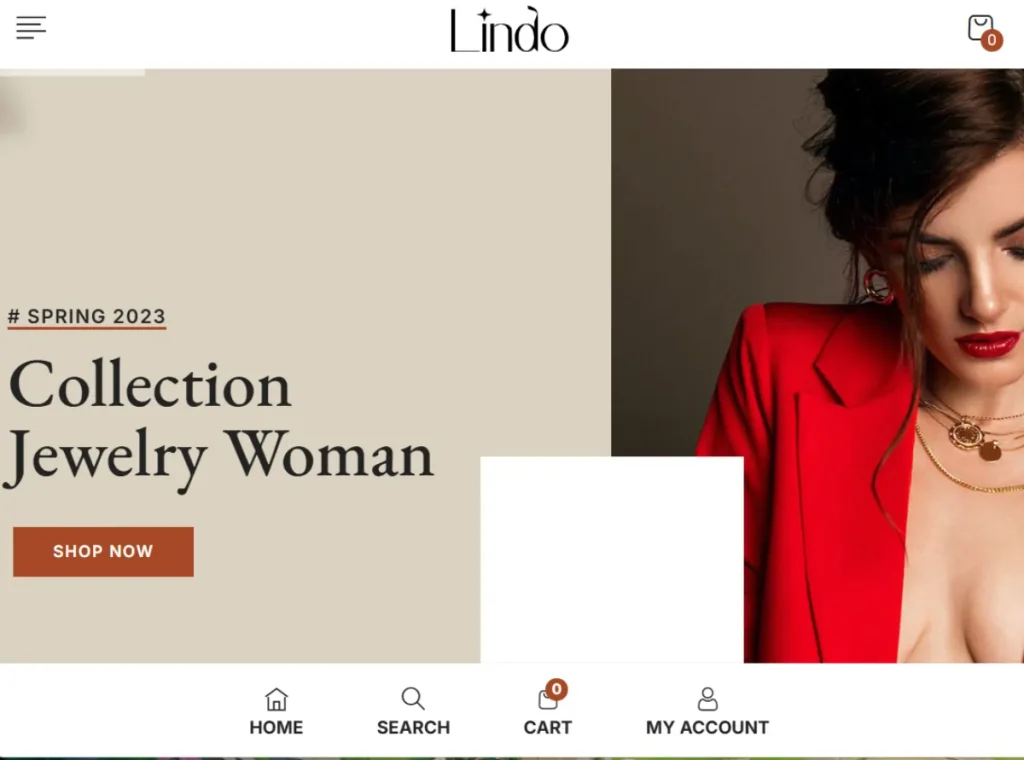
What is Lindo?
Lindo is a multi-purpose WordPress theme designed to simplify website creation while maintaining strong visual standards and performance. It provides a flexible framework that allows users to build responsive, professional websites without advanced coding knowledge.
At its core, Lindo offers a combination of pre-designed templates, customization tools, and layout systems. These elements work together to help users quickly launch websites tailored to different industries, including eCommerce, creative portfolios, corporate websites, and blogs.
A clear definition would be: Lindo is a design-focused, customizable WordPress theme that enables users to create responsive and visually engaging websites efficiently.
In real-world scenarios, a small business owner can use Lindo to build a service-based website with landing pages, testimonials, and contact forms. A creative professional can create a portfolio that highlights their work through visually structured layouts. Agencies can deploy Lindo across multiple client projects, maintaining consistency while customizing each site.
Who should use Lindo?
- Freelancers building client websites
- Agencies managing multiple projects
- Small to medium business owners
- Creatives such as designers and photographers
- Bloggers focused on visual storytelling
Lindo is especially useful for users who want strong design control without dealing with technical complexity. It allows teams to collaborate efficiently, with designers focusing on visuals and content managers handling updates.
Another practical use case involves businesses upgrading outdated websites. Instead of investing in custom development, they can switch to Lindo and recreate their structure using templates, then gradually improve performance and user experience.
In addition, Lindo supports modular workflows. This means users can build different sections of a website independently and then combine them into a cohesive structure. For example, a team can design landing pages, blog layouts, and product pages separately, then integrate them seamlessly.
Key Features of Lindo
- Pre-Designed Layouts and Templates
Lindo provides a wide range of professionally designed templates that can be imported and customized. These templates serve as a starting point, reducing development time significantly.
For example, a marketing agency can import a corporate template and adjust branding elements to match a client’s identity, allowing for quick deployment without sacrificing quality.
In a practical workflow, this enables teams to reuse high-performing layouts across projects, ensuring consistency while saving time. - Visual Customization Tools
The theme includes an intuitive customization panel that allows users to adjust colors, fonts, layouts, and spacing. This makes it easy to align the website with brand guidelines.
In practice, a business owner can update the entire website’s color scheme in minutes, ensuring consistency across all pages.
This flexibility is particularly useful for businesses that frequently update branding or run seasonal campaigns. - Fully Responsive Design
Lindo ensures that websites look and function well on all devices, including smartphones and tablets. This improves user experience and supports SEO performance.
For instance, an online store built with Lindo will display product images and descriptions clearly on mobile devices, increasing the likelihood of conversions.
Mobile responsiveness also reduces bounce rates, as users are less likely to leave a site that is easy to navigate. - Optimized Performance
The theme is built with performance in mind, using efficient coding practices to ensure fast loading times. This is essential for user retention and search engine rankings.
A content-heavy blog can maintain speed even with multiple images and posts, which helps keep visitors engaged.
In real-world terms, faster performance can directly impact revenue by improving conversion rates. - Page Builder Compatibility
Lindo works seamlessly with popular page builders such as Elementor. This allows users to create custom layouts using drag-and-drop functionality.
In real workflows, this enables rapid design iteration without requiring developer support.
For example, marketers can create and test multiple landing page variations to optimize conversion rates. - SEO-Friendly Structure
The theme follows best practices for SEO, including clean code and proper heading hierarchy. This helps search engines index content effectively.
For example, well-structured blog posts are more likely to rank higher when combined with strong content strategies.
This makes Lindo a strong foundation for long-term organic growth. - WooCommerce Support
Lindo integrates with WooCommerce, allowing users to create fully functional online stores.
A small business can quickly set up product listings, manage orders, and process payments without additional complexity.
This reduces time to market and allows businesses to start generating revenue faster. - Regular Updates and Maintenance
Lindo is updated regularly to ensure compatibility with the latest WordPress versions and security standards.
This reduces the risk of technical issues and ensures long-term stability.
In practice, this means fewer disruptions and more reliable performance over time.
Benefits of Using Lindo
One of the main benefits of using Lindo is improved workflow efficiency. By combining design and functionality into a single theme, it eliminates the need for multiple plugins. This reduces setup time and simplifies maintenance.
Another significant advantage is cost savings. Many features that would typically require paid plugins are included in Lindo. For example, advanced layout controls and responsive design features are built-in, reducing the need for additional purchases. Over time, this can save hundreds of dollars, especially for agencies managing multiple websites.
In real-world scenarios, a freelancer managing five to ten client websites can avoid purchasing separate premium plugins for each project. Instead, they can rely on Lindo’s built-in features, significantly reducing operational expenses while maintaining high-quality output.
User experience also improves noticeably. Visitors benefit from clean layouts, intuitive navigation, and fast loading times. For example, a service-based website can guide users through service descriptions, testimonials, and contact forms seamlessly, increasing lead conversion rates.
Another benefit is scalability. As a business grows, its website needs to support more content and functionality. Lindo provides a stable foundation that can handle this growth without requiring a complete redesign. This reduces long-term development costs and ensures continuity.
Additionally, Lindo reduces dependency on developers. Business owners and content teams can manage updates independently, which speeds up publishing and allows faster response to market changes. This is especially useful for businesses that frequently update offers or content.
Real Use Cases of Lindo
Lindo is widely used in eCommerce projects. A small retailer can create an online store with product pages, shopping carts, and checkout systems. The theme’s design ensures that products are presented clearly, improving user experience and increasing sales.
Agencies use Lindo to streamline client work. By leveraging templates and customization tools, they can deliver websites faster while maintaining high design standards. This allows agencies to take on more projects without increasing workload significantly.
For example, a digital agency working with multiple local businesses can use Lindo to create standardized website structures. Each site can be customized for branding while maintaining a consistent backend workflow, reducing both development time and training requirements for team members.
Freelancers also benefit from Lindo when building portfolio websites. Instead of designing layouts from scratch, they can focus on showcasing their work effectively. This improves presentation quality and increases the chances of attracting new clients.
Bloggers use Lindo to create content-focused websites with strong readability. A well-structured blog layout ensures that readers can navigate articles easily, which improves engagement and retention.
Startups often use Lindo to validate ideas quickly. Instead of investing heavily in custom development, they can launch a professional website within days, test market demand, and iterate based on feedback. This reduces risk and accelerates growth.
How to Install Lindo
Installing Lindo is straightforward and does not require technical expertise.
First, download the Lindo theme ZIP file from your purchase source. Make sure you have the correct file ready for upload. Keeping a backup ensures you can reinstall if needed.
Next, log in to your WordPress dashboard. Navigate to Appearance, select Themes, and click Add New. Choose Upload Theme and select the ZIP file.
Click Install, then Activate the theme. Once activated, Lindo will become your website’s default design.
After activation, install any recommended plugins. These plugins enhance functionality and allow you to use all of Lindo’s features fully.
Import demo content if available. This gives you a ready-made layout that you can customize according to your needs. For example, an agency can import a demo and adapt it quickly for a client project.
Then, adjust global settings such as colors, fonts, and layout preferences. This ensures visual consistency across your website.
Finally, test your website across devices and browsers. This step ensures that all elements display correctly and provides a smooth user experience before launch.
In a real workflow, this entire process can be completed within a short time, allowing users to move quickly from setup to customization and deployment.
Why Buy Lindo at Pluginpro.org
Buying Lindo at Pluginpro.org offers clear financial and operational advantages, especially for users managing multiple websites.
One of the biggest benefits is cost savings. Instead of purchasing individual licenses at full price, users can access Lindo at a significantly reduced cost. For agencies handling multiple projects, this can lead to substantial savings over time.
For example, an agency building websites for ten clients would normally need ten licenses. With Pluginpro.org, they can use Lindo across all projects without paying repeated fees. This directly improves profit margins and allows agencies to reinvest in other areas such as marketing or hiring.
Another key advantage is unlimited website usage. Freelancers and developers can use Lindo on as many projects as needed, making it a flexible solution for growing businesses. This is particularly useful for agencies scaling their operations without increasing software costs.
Pluginpro.org also provides clean and secure files. This reduces the risk of malware or corrupted installations, which can disrupt workflows and compromise website performance. In professional environments, reliability is critical because downtime can affect both revenue and client trust.
From a workflow perspective, having immediate access to Lindo simplifies project execution. Teams can start building websites without waiting for approvals or additional purchases. This speeds up delivery timelines and improves overall efficiency.
Another cost-saving scenario involves long-term maintenance. Traditional licensing models often require annual renewals, which add up over time. By using Pluginpro.org, users can avoid recurring fees and allocate their budget to growth-focused activities such as advertising or content production.
For instance, a freelancer can use the money saved from licensing to invest in SEO or paid ads for clients, delivering better results and increasing client satisfaction. Agencies can scale their operations without worrying about rising software expenses.
Is Lindo Worth It?
Yes, Lindo is worth it for users who want a design-focused, flexible WordPress theme that simplifies website creation while maintaining high quality.
For freelancers, Lindo enables faster project delivery without sacrificing visual quality. This means they can handle more clients and increase their income without increasing workload significantly.
Agencies benefit from standardized workflows. By using Lindo across multiple projects, they can reduce development time and maintain consistent quality. This directly improves efficiency and profitability.
Business owners also gain significant value. Lindo allows them to manage content and design updates independently, reducing reliance on developers. This leads to faster updates and lower operational costs.
A practical scenario involves a startup launching its first product. Instead of investing heavily in custom development, it can use Lindo to create a professional website quickly, test user response, and refine its strategy. This approach minimizes risk and supports faster decision-making.
Lindo is best suited for users who need a scalable solution that balances design, performance, and efficiency. If your goal is to build professional websites while controlling costs and maintaining flexibility, Lindo delivers strong value.
Conclusion
Lindo offers a balanced combination of design, performance, and usability. It simplifies website creation while providing the flexibility needed to adapt to different projects and industries.
From freelancers to agencies and business owners, Lindo supports a wide range of use cases. Its built-in features reduce the need for additional tools, saving both time and money.
What makes Lindo particularly valuable is its ability to streamline workflows. Users can build, customize, and manage websites within a single environment, leading to faster results and more consistent outcomes.
Beyond initial setup, Lindo continues to deliver value through scalability and ease of maintenance. Users can expand their websites over time without needing to switch themes or rebuild structures.
For anyone looking to create professional websites efficiently while maintaining control over design and performance, Lindo provides a reliable and scalable solution that supports both immediate needs and long-term growth.



