Chardonnay is a versatile WordPress plugin designed to streamline content presentation and enhance user interaction through dynamic layouts and customization tools. In the first moments of working with Chardonnay, it becomes clear that this is not just a design enhancement plugin, but a structured solution for improving how websites deliver content and engage visitors.
For website owners who struggle with rigid layouts or limited customization options, Chardonnay introduces a flexible system that adapts to different types of content. Whether you are managing a blog, running an online store, or building websites for clients, the ability to control layout, styling, and interaction without complex coding can significantly improve workflow efficiency.
In practice, many site owners face challenges when trying to create visually appealing pages while maintaining performance. Chardonnay addresses this by combining lightweight architecture with powerful customization features. It allows users to design pages that feel unique while still loading quickly and functioning smoothly across devices.
Another important factor is scalability. As websites grow, managing design consistency becomes increasingly complex. Chardonnay provides structured tools that help maintain a cohesive visual identity without requiring constant manual adjustments. For developers and agencies, this translates into faster project delivery and easier long-term maintenance.
What is Chardonnay?
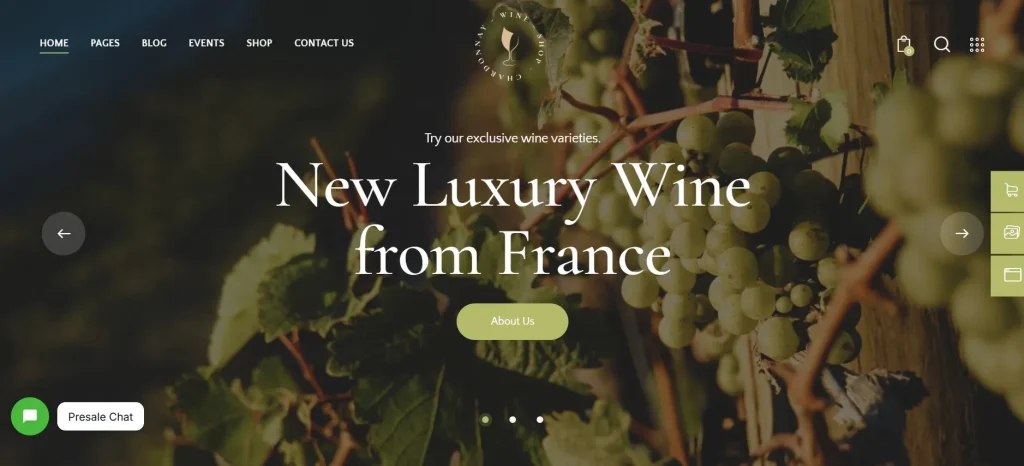
Chardonnay is a WordPress plugin that enhances website layout control and visual customization through a modular system. It enables users to build flexible page structures, customize content elements, and optimize user experience without relying heavily on external builders or custom code.
At its core, Chardonnay functions as a design and layout management tool. Instead of being limited to predefined templates, users can create dynamic sections that adapt to different types of content. This makes it especially useful for websites that require frequent updates, such as blogs, portfolios, and eCommerce platforms.
For example, a content-heavy blog can use Chardonnay to organize articles into visually engaging grids, featured sections, and interactive layouts. This not only improves readability but also encourages users to explore more content. Similarly, an online store can use the plugin to highlight products in customized layouts that guide customers toward key items.
Chardonnay is particularly valuable for users who want design flexibility without the complexity of advanced development. Beginners can use its intuitive interface to create professional layouts, while experienced developers can integrate it into existing workflows to speed up production.
Another practical application is in agency environments. Agencies often manage multiple client websites with different branding requirements. Chardonnay allows them to standardize their workflow while still delivering unique designs for each client. This reduces development time and ensures consistency across projects.
Key Features of Chardonnay
- Dynamic Layout Builder
Chardonnay provides a flexible layout system that allows users to design pages using modular components. Instead of being restricted to static templates, users can rearrange sections, adjust spacing, and control alignment with precision.
In practice, this means a blog homepage can feature a combination of featured posts, category sections, and custom content blocks without needing multiple plugins. This flexibility is especially useful when redesigning a website or adapting layouts for seasonal campaigns. - Advanced Styling Controls
The plugin includes detailed styling options that allow users to customize colors, typography, spacing, and visual elements.
For example, a brand-focused website can maintain consistent colors and fonts across all pages while still allowing variation in layout. This reduces the need for custom CSS and speeds up the design process. - Responsive Design Optimization
Chardonnay ensures that all layouts automatically adapt to different screen sizes. Users can preview and adjust designs for desktop, tablet, and mobile devices.
A common use case is optimizing product pages for mobile users, where layout adjustments can improve readability and conversion rates. Instead of manually coding responsive behavior, users can manage it directly within the plugin interface. - Content Block System
The plugin introduces reusable content blocks that can be inserted across multiple pages.
This is particularly useful for elements like call-to-action sections, promotional banners, or featured content areas. Once created, these blocks can be reused and updated globally, saving time and ensuring consistency. - Performance-Focused Architecture
Unlike many design plugins that add unnecessary weight to a website, Chardonnay is built with performance in mind.
This results in faster load times, which is critical for SEO and user experience. For example, a content-heavy website can maintain speed even when using multiple layout elements. - Integration with Existing Themes
Chardonnay works seamlessly with most WordPress themes, allowing users to enhance existing designs without starting from scratch.
This is especially beneficial for businesses that already have an established website but want to improve its design without a full redesign. - User-Friendly Interface
The plugin is designed to be accessible for users with different skill levels. Its intuitive interface reduces the learning curve, making it easier to implement changes quickly.
For example, a small business owner with limited technical knowledge can update layouts and content without relying on a developer. - Custom Template Creation
Users can create and save custom templates for different types of pages.
This feature is particularly useful for agencies that need to maintain consistency across multiple projects. Instead of rebuilding layouts from scratch, they can reuse templates and adjust them as needed.
Benefits of Using Chardonnay
One of the most immediate benefits of Chardonnay is improved workflow efficiency. By centralizing layout and design controls within a single plugin, users can reduce the time spent switching between tools or writing custom code. This leads to faster project completion and fewer errors during implementation.
Another significant advantage is enhanced user experience. Well-structured layouts make content easier to navigate, which increases engagement and reduces bounce rates. For example, a blog that uses clear visual hierarchy and organized sections can keep readers on the site longer.
Chardonnay also supports better scalability. As a website grows, maintaining consistent design becomes more challenging. The plugin’s reusable blocks and templates allow users to manage this growth without losing visual coherence.
From a performance perspective, Chardonnay helps maintain fast loading times even when using advanced layouts. This is critical for SEO, as search engines prioritize websites that offer a smooth user experience.
Additionally, the plugin reduces dependency on multiple tools. Instead of combining several plugins for layout, styling, and responsiveness, users can rely on Chardonnay to handle these tasks efficiently.
Real Use Cases of Chardonnay
A common use case for Chardonnay is in eCommerce websites. Store owners can create custom product layouts that highlight key features, promotions, and related items. This improves product visibility and encourages higher conversion rates.
For agencies, Chardonnay simplifies client project management. By using reusable templates and consistent design systems, agencies can deliver high-quality websites more efficiently. This reduces development time and increases profitability.
Bloggers and content creators also benefit from the plugin’s layout flexibility. They can organize articles into engaging formats that improve readability and encourage exploration. For example, featured posts can be displayed prominently, while secondary content is arranged in grids or lists.
Another practical scenario is portfolio websites. Designers and freelancers can showcase their work in visually appealing layouts that reflect their personal style. This helps create a stronger impression on potential clients.
How to Install Chardonnay
Installing Chardonnay is a straightforward process that can be completed in a few steps.
First, download the Chardonnay plugin file from a trusted source. Make sure the file is in ZIP format, as this is required for WordPress installation.
Next, log in to your WordPress dashboard. Navigate to the Plugins section and click on “Add New.” From there, select the “Upload Plugin” option and choose the Chardonnay ZIP file from your computer.
After uploading, click “Install Now.” WordPress will process the file and prepare it for activation. Once the installation is complete, click “Activate” to enable the plugin on your website.
In practice, it is recommended to check the plugin settings immediately after activation. This allows you to configure layout preferences, styling options, and other features according to your needs.
For users working on live websites, testing the plugin in a staging environment is a good approach. This ensures compatibility with existing themes and plugins before applying changes to the main site.
Why Buy Chardonnay at Pluginpro.org
Purchasing Chardonnay at Pluginpro.org offers a practical and cost-effective solution for users who want access to premium features without paying high licensing fees. Instead of buying a single license for one website, users can access the plugin for use across multiple projects.
One of the most compelling advantages is the cost savings. Premium plugins often require annual subscriptions that can quickly add up, especially for agencies managing multiple websites. With Pluginpro.org, users can significantly reduce these costs while still accessing the same functionality.
In real-world scenarios, this becomes particularly valuable for freelancers and agencies. For example, an agency building websites for several clients can use Chardonnay across all projects without purchasing separate licenses. This not only reduces expenses but also simplifies license management.
Another important factor is file integrity. Pluginpro.org provides clean and secure files, ensuring that users receive a reliable version of Chardonnay. This reduces the risk of compatibility issues and ensures stable performance.
Additionally, the platform supports unlimited website usage. This flexibility allows users to scale their projects without worrying about additional costs. Whether you are running one website or managing dozens, the plugin remains accessible.
Updates are also easier to manage. Instead of dealing with multiple subscriptions, users can access updates through a centralized system. This ensures that the plugin remains compatible with the latest WordPress versions and continues to perform efficiently.
From a workflow perspective, having a single source for premium plugins simplifies project management. Users can focus on building and optimizing websites rather than managing multiple licenses and renewals.
Is Chardonnay Worth It?
Yes, Chardonnay is worth it for anyone who needs flexible layout control and efficient design management within WordPress.
For bloggers, it provides a way to organize content in a more engaging and structured format. For businesses, it enhances user experience and supports better conversion rates through optimized layouts. Agencies benefit from faster workflows and reduced development time.
A practical scenario would be a growing website that needs frequent design updates. Instead of rebuilding pages manually, Chardonnay allows users to adjust layouts quickly while maintaining consistency. This saves time and ensures a professional result.
Conclusion
Chardonnay stands out as a practical solution for improving website design and content presentation without adding unnecessary complexity. Its combination of flexibility, performance, and ease of use makes it suitable for a wide range of users, from beginners to experienced developers.
In practice, the plugin simplifies the process of creating and managing layouts, allowing users to focus on delivering better content and user experiences. Whether you are building a new website or optimizing an existing one, Chardonnay provides the tools needed to achieve professional results efficiently.
For those looking to streamline their workflow and reduce costs, accessing Chardonnay through Pluginpro.org offers a strategic advantage. It allows users to scale their projects while maintaining control over design and performance, making it a valuable addition to any WordPress toolkit.