Groovy is a flexible WordPress plugin designed to enhance website navigation, layout control, and user experience through advanced menu systems and interactive design elements. From the first interaction, Groovy provides a powerful way to transform standard navigation into a dynamic and visually engaging experience that supports both usability and branding.
Navigation is one of the most critical aspects of any website. Poorly structured menus often lead to confusion, increased bounce rates, and lost conversions. Groovy addresses this by offering customizable menu layouts that are both visually appealing and functionally efficient, ensuring users can easily find what they are looking for.
In practice, Groovy is widely used across business websites, eCommerce platforms, and content-heavy blogs. For example, an online store can use Groovy to create mega menus that display categories, featured products, and promotional content in a structured way, improving navigation and boosting conversions.
Another important aspect is adaptability. Modern users access websites from various devices, and navigation must perform consistently across all of them. Groovy ensures responsive behavior, allowing menus to function seamlessly on mobile, tablet, and desktop environments.
For developers and agencies, Groovy offers a scalable solution that can be applied across multiple projects. Instead of building custom navigation systems for each website, they can use Groovy to implement consistent, high-quality menu structures quickly.
In real-world workflows, many teams struggle with maintaining clarity in navigation as websites grow. Groovy simplifies this by allowing structured hierarchy and visual organization, making it easier to manage large volumes of content.
Another practical advantage is improved engagement. Interactive menus encourage users to explore more pages, increasing session duration and overall site interaction.
A deeper insight from real implementations is that optimized navigation often leads to measurable improvements in conversion rates. When users can quickly locate key pages, they are more likely to take action.
Another real-world observation is that Groovy helps reduce friction in user journeys. By presenting content in a clear and organized manner, it minimizes confusion and enhances usability.
In real deployment environments, businesses often discover that navigation redesign has one of the highest ROI impacts compared to other UI changes. Groovy enables these improvements without requiring a full website rebuild.
Another practical insight is that structured menus also support accessibility. Clear hierarchy and logical grouping make it easier for all users, including those using assistive technologies, to navigate effectively.
What is Groovy?
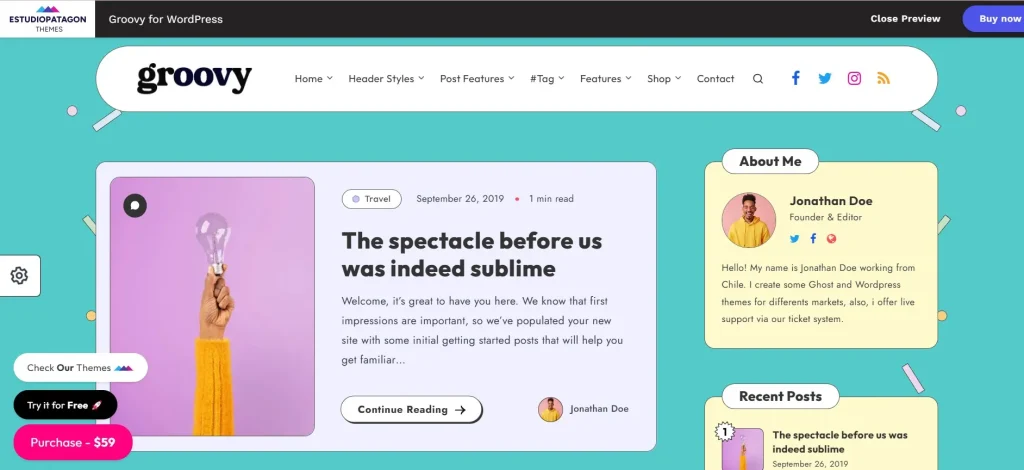
Groovy is a WordPress plugin that provides advanced navigation and menu customization capabilities, allowing users to create structured and visually enhanced menus. At its core, it functions as a navigation management system that improves how users interact with website content.
The plugin works by replacing standard WordPress menus with customizable layouts that can include multiple levels, icons, images, and dynamic content. Users can design menus that align with their website’s structure and branding.
For example, a corporate website can use Groovy to create a multi-level menu that organizes services, case studies, and resources in a clear hierarchy. Each menu item can include additional elements such as icons or descriptions, making navigation more intuitive.
Groovy is particularly useful for:
- Business and corporate websites
- eCommerce platforms with large product catalogs
- Blogs and content-heavy websites
- Agencies managing multiple projects
A common use case is an eCommerce store with hundreds of products. Groovy allows the store to create mega menus that display categories and subcategories, helping users find products quickly.
Another example is a content platform with multiple sections. Groovy helps organize these sections into a clear structure, improving navigation and user experience.
In practice, Groovy enhances both usability and aesthetics by combining structured navigation with visual customization.
Another important aspect is flexibility. Users can design menus that fit their specific needs while maintaining consistency across the website.
In real workflows, Groovy is often used alongside page builders to create cohesive design systems where navigation aligns with overall layout.
Another practical application is improving internal linking structure. Well-organized menus help distribute traffic across important pages, supporting SEO strategies.
In advanced scenarios, Groovy is used to create conversion-focused navigation systems, where key actions such as sign-ups or purchases are highlighted within menus.
Another real-world benefit is simplifying large website structures. Even complex sites with many pages can maintain clarity through well-designed navigation.
In enterprise-level projects, Groovy is often used to standardize navigation across multiple sub-sites, ensuring consistent user experience across a network of pages.
Another operational advantage is the ability to quickly restructure navigation when business priorities change, such as promoting new services or campaigns.
Key Features of Groovy
- Mega Menu Builder
Groovy allows users to create advanced mega menus with multiple columns and rich content.
This improves navigation for large websites.
In practice, an eCommerce store can display product categories and promotions in a single menu.
This structured layout helps users find products faster.
In real workflows, mega menus are often used to highlight best-selling or seasonal items.
They also allow integration of banners and CTAs directly within navigation. - Drag-and-Drop Menu Customization
The plugin provides intuitive tools for designing menus visually.
Users can rearrange items and customize layouts easily.
For example, a business can prioritize important pages in the menu.
This flexibility supports ongoing optimization of navigation.
It also allows quick adjustments based on user behavior.
Teams can test different menu structures without development overhead. - Responsive Navigation Design
Groovy ensures menus work seamlessly across devices.
This improves usability on mobile and tablets.
In practice, responsive menus reduce bounce rates.
Developers can adjust layouts for different screen sizes.
This ensures consistent navigation experiences.
Mobile-first optimization ensures usability in high mobile traffic environments. - Icon and Image Integration
Users can add icons and images to menu items.
This enhances visual appeal and usability.
For example, icons can represent categories for quick recognition.
This improves user interaction with menus.
In real scenarios, visual cues help users navigate faster.
This also supports branding by reinforcing visual identity. - Sticky and Floating Menus
Groovy supports menus that remain visible during scrolling.
This ensures constant access to navigation.
For example, users can navigate without scrolling back to the top.
This improves user experience.
It also increases interaction with key pages.
Sticky menus are often used for high-conversion actions like sign-ups. - Custom Styling Options
Users can customize colors, fonts, and layouts.
This ensures alignment with branding.
For example, a company can match menu design with its brand identity.
Centralized controls simplify updates.
This allows quick design changes when needed.
This feature supports brand consistency across all pages. - Integration Compatibility
Groovy works with other WordPress plugins and themes.
This allows extended functionality.
For instance, integration with eCommerce plugins enhances navigation.
This ensures scalability.
It also supports complex website ecosystems.
This makes it suitable for multi-functional websites. - Performance Optimization
The plugin is optimized for speed and efficiency.
This ensures fast loading times.
In practice, optimized menus improve user experience.
This supports better SEO performance.
It also reduces reliance on additional optimization tools.
Efficient code ensures minimal impact on page speed.
Benefits of Using Groovy
Groovy provides several practical benefits that improve website navigation and overall user experience. One of the most important advantages is improved usability. Structured menus make it easier for users to find information quickly.
This leads to higher engagement. Users are more likely to explore the website when navigation is clear and intuitive.
Another key benefit is increased conversion rates. When users can easily access key pages, they are more likely to take action.
From a performance perspective, Groovy ensures fast and efficient navigation. This improves both user experience and SEO.
User experience is further enhanced through responsive design and interactive elements. This ensures consistent behavior across devices.
In real workflows, these benefits reduce bounce rates and improve session duration.
Another advantage is scalability. As websites grow, Groovy allows navigation to expand without losing clarity.
Additionally, the plugin supports branding by allowing customized menu designs.
Another important benefit is improved internal linking, which supports SEO strategies.
Another practical advantage is faster iteration of navigation structures based on analytics data.
A deeper benefit is strategic alignment between user journey and business goals. Navigation becomes a tool for guiding conversions rather than just organizing pages.
Another real-world advantage is improved content discovery, especially for large websites where users may otherwise miss valuable pages.
Real Use Cases of Groovy
Groovy is widely used across different industries and website types. Businesses use it to create professional navigation systems that enhance usability.
eCommerce stores use Groovy to build mega menus that organize products effectively.
Agencies rely on Groovy to standardize navigation across client projects.
Content creators use it to structure blogs and improve readability.
Another practical use case is landing pages, where navigation highlights key actions.
In real scenarios, freelancers use Groovy to deliver consistent navigation systems.
Another example is startups building scalable websites.
A practical workflow scenario involves agencies creating reusable menu templates.
Another real-world example is large websites managing hundreds of pages.
Another use case involves educational platforms organizing courses and resources.
A practical example includes SaaS platforms highlighting features and pricing.
Another scenario involves media websites organizing categories for fast browsing.
Another real-world use case is multilingual websites where navigation must adapt to different languages and structures.
How to Install Groovy
Installing Groovy is straightforward and follows standard WordPress procedures.
Download the plugin from Pluginpro.org.
Upload it via the WordPress dashboard.
Install and activate the plugin.
Access settings and configure menus.
Customize layouts based on your needs.
Test responsiveness across devices.
In real workflows, developers use staging environments before deployment.
Another step is configuring global styles early.
Users often integrate analytics tools during setup.
Teams test different menu structures before finalizing.
Another step is documenting configurations.
A practical workflow includes testing performance after installation.
Another important step is validating navigation usability.
In real scenarios, teams also test user interaction patterns to ensure optimal navigation flow.
Another practical step is optimizing menu load behavior to maintain performance.
Why Buy Groovy at Pluginpro.org
Purchasing Groovy at Pluginpro.org offers a strong advantage for users who need a cost-effective and scalable solution for advanced navigation systems. One of the most immediate benefits is affordability. Instead of paying full price for a single license, users can access the plugin at a significantly reduced cost, making it accessible for freelancers, agencies, and businesses with multiple projects.
In real-world scenarios, agencies often build navigation systems for multiple client websites. Buying individual licenses for each project can quickly increase costs. Pluginpro.org removes this limitation by allowing broader usage, enabling agencies to maintain profitability while delivering high-quality results.
Another important factor is workflow efficiency. Pluginpro.org centralizes plugin access, reducing the complexity of managing multiple vendors, licenses, and renewals. This is particularly useful for teams working under tight deadlines and handling multiple projects simultaneously.
For freelancers, this translates into faster project execution. They can install Groovy immediately and start building navigation systems without delays. This improves turnaround time and client satisfaction.
Security is also a key consideration. Pluginpro.org provides clean and verified files, ensuring safe and reliable installations. This is essential for maintaining website integrity and protecting user data.
Scalability is another major advantage. As businesses grow and expand their websites, they need tools that can support increased complexity without increasing costs. Pluginpro.org allows users to scale their operations efficiently.
Consider a scenario where an agency builds navigation systems for multiple eCommerce stores. Purchasing individual licenses would reduce profit margins. With Pluginpro.org, the agency can reuse Groovy across projects, improving efficiency and cost management.
Another practical example involves testing different navigation strategies. Developers can experiment with layouts and structures across multiple projects without worrying about licensing restrictions.
Another real-world advantage is faster onboarding for new team members. They can access tools immediately without dealing with multiple accounts.
Additionally, Pluginpro.org simplifies long-term maintenance by providing easy access to updates.
Another strategic benefit is improved profitability. Lower tool costs allow agencies to allocate more resources to design and strategy.
Another operational advantage is reduced administrative overhead, freeing teams to focus on client delivery.
Is Groovy Worth It?
Yes, Groovy is worth it for anyone looking to improve website navigation and user experience.
The plugin is particularly valuable for businesses, agencies, and developers managing complex websites. By providing advanced menu customization, Groovy simplifies navigation management and enhances usability.
In a practical scenario, an eCommerce store can use Groovy to organize product categories effectively, improving user experience and increasing sales.
Another important factor is long-term efficiency. Once navigation is set up, it can be updated easily without major changes.
From a performance perspective, Groovy ensures fast and responsive menus, which are essential for modern websites.
For agencies, the value becomes even more evident when scaling operations. Reusable templates and consistent navigation systems create a competitive advantage.
In real-world terms, Groovy reduces complexity and improves workflow efficiency.
Another key advantage is improved user engagement through interactive navigation.
Additionally, the plugin supports evolving website structures, allowing users to adapt menus without rebuilding them.
Another practical benefit is improved user retention, as intuitive navigation encourages repeat visits.
Another real-world advantage is faster implementation of marketing strategies through flexible menu updates.
Conclusion
Groovy stands out as a powerful solution for enhancing WordPress navigation systems. By combining structured design, customization, and performance optimization, it improves both usability and engagement.
From small websites to large platforms, Groovy adapts to different needs while maintaining clarity and consistency.
In real-world applications, it consistently improves navigation efficiency and user experience.
When combined with the affordability of Pluginpro.org, Groovy becomes an even more compelling choice.
Ultimately, Groovy is not just a menu plugin—it is a complete navigation system that supports scalable and efficient website development.
From a strategic perspective, adopting Groovy allows users to create better user journeys, improve engagement, and optimize conversions.