
Avada is one of the most popular premium WordPress themes available today, and for good reason. Known for its flexibility, powerful design tools, and extensive customization options, Avada has become a preferred solution for website owners, agencies, freelancers, online stores, and businesses of all sizes. Whether you are building a corporate website, an eCommerce store, a portfolio, a blog, or a landing page, Avada provides the tools needed to create a professional website without relying heavily on coding.
Over the years, the Avada WordPress theme has earned a strong reputation within the WordPress community. Millions of websites have been built using this theme because it combines visual design freedom with performance-focused development. Users can create unique layouts, customize every part of their website, and manage content through an intuitive visual builder.
One reason many professionals choose Avada is its all-in-one approach. Instead of installing multiple design plugins and layout builders, users gain access to an integrated ecosystem that includes a visual page builder, theme builder, form builder, header builder, footer builder, and extensive design controls. This simplifies website management while reducing compatibility issues.
For website owners who want complete control over design and functionality, Avada offers a practical solution. It supports beginners who need an easy website-building experience while also providing advanced features for developers and agencies managing multiple client projects. As a result, Avada continues to remain one of the best-selling WordPress themes on the market and a trusted choice for creating modern websites.
What is Avada?
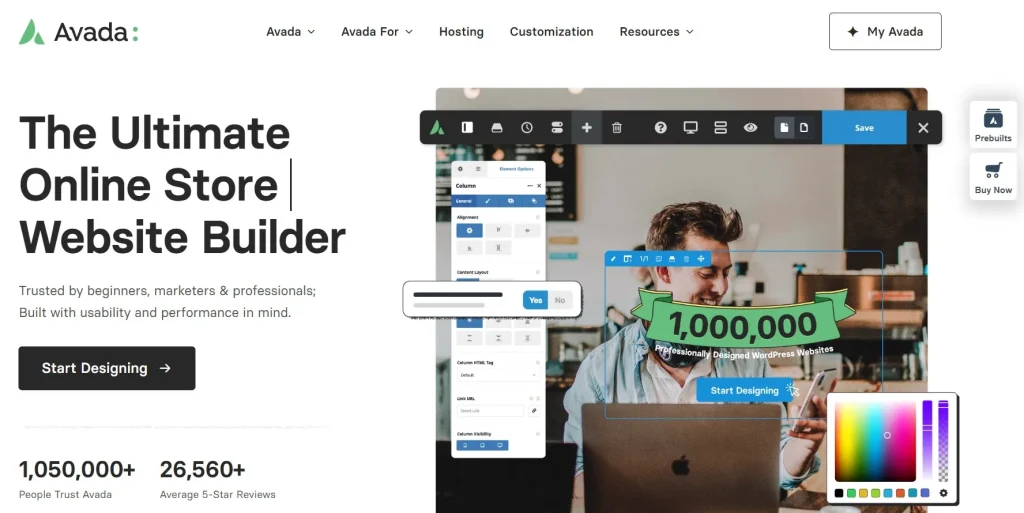
Avada is a premium multipurpose WordPress theme designed to help users build virtually any type of website without requiring extensive coding knowledge. Developed by ThemeFusion, it has consistently ranked among the best-selling themes in the WordPress ecosystem due to its versatility, reliability, and ongoing development.
At its core, Avada functions as a complete website-building framework. Unlike traditional themes that provide only a visual design layer, Avada includes advanced tools for designing headers, footers, page layouts, blog templates, archive pages, WooCommerce stores, forms, and dynamic content sections.
The Avada WordPress theme is suitable for a wide range of users. Small business owners can create professional company websites. Freelancers can showcase portfolios and services. Bloggers can build content-focused platforms with customized layouts. Online stores can use WooCommerce integration to create scalable eCommerce experiences.
A common use case is a digital agency building websites for multiple clients. Instead of purchasing separate themes for each project, the agency can use the Avada WP theme to create highly customized websites that match each client’s branding requirements. This flexibility saves time while maintaining design consistency.
Another example involves entrepreneurs launching online businesses. With the built-in page builder and WooCommerce compatibility, users can design product pages, checkout experiences, promotional landing pages, and customer account areas without hiring a developer.
Many users searching for avada wordpress themes appreciate that the theme offers a balance between ease of use and advanced functionality. Beginners can start with prebuilt website demos, while experienced users can create completely custom layouts from scratch.
Because of its broad feature set and continuous updates, the wordpress avada theme remains a popular option for both new website owners and seasoned WordPress professionals.
Key Features of Avada
Avada offers a comprehensive collection of features designed to simplify website creation while providing extensive customization capabilities.
Fusion Builder Visual Editor
- Avada includes a powerful drag-and-drop visual builder called Fusion Builder.
- Users can design pages visually without touching code.
- Layouts can be adjusted in real time.
- Content blocks, images, videos, testimonials, sliders, and pricing tables can be added easily.
For example, a marketing agency can create custom landing pages for clients within minutes using prebuilt design elements.
Avada Theme Builder
- The theme builder allows complete control over website structure.
- Users can customize headers, footers, archive pages, search results, and blog layouts.
- Dynamic templates can be assigned to different content types.
This feature is especially useful for large websites that require consistent branding across hundreds of pages.
Extensive Design Options
- Thousands of design combinations are possible.
- Typography settings can be customized globally.
- Colors, spacing, borders, and animations are fully adjustable.
- Responsive controls help optimize designs for mobile devices.
Users looking for a wordpress theme avada often choose it because they can achieve a unique appearance without custom development.
Ready-Made Website Demos
- Avada provides professionally designed demo websites.
- One-click import simplifies deployment.
- Demos cover industries such as healthcare, finance, education, technology, restaurants, and eCommerce.
A local business can launch a complete website within hours by starting with an industry-specific template.
WooCommerce Integration
- Built specifically to support online stores.
- Product pages can be customized visually.
- Cart and checkout layouts can be optimized.
- Advanced design controls improve customer experience.
Businesses using wp themes avada frequently leverage WooCommerce features to create professional shopping experiences.
Responsive Design Framework
- Mobile-friendly layouts come standard.
- Custom breakpoints can be configured.
- Mobile visibility settings provide granular control.
Since mobile traffic continues to grow, responsive design remains essential for website performance.
Global Design System
- Global colors simplify branding updates.
- Global typography settings maintain consistency.
- Design changes can be applied across the entire website.
For agencies managing multiple pages, this significantly reduces maintenance time.
Performance Optimization Features
- Built-in performance controls improve loading speed.
- CSS and JavaScript optimization settings are included.
- Asset loading can be customized.
Website owners using the avada theme wp often appreciate these features because they help improve Core Web Vitals and user experience.
Form Builder
- Custom forms can be created directly inside Avada.
- Contact forms, lead forms, surveys, and inquiries are supported.
- Conditional logic enhances form functionality.
A consulting business can build lead-generation forms without purchasing additional plugins.
Dynamic Content Support
- Dynamic fields can populate content automatically.
- Blog posts, portfolios, products, and custom post types are supported.
- Personalized layouts become easier to manage.
This capability benefits content-heavy websites that require scalable design systems.
Advanced Header Builder
- Create unique headers for different pages.
- Customize navigation layouts.
- Add promotional banners and call-to-action buttons.
The flexibility provided by the wp theme avada helps businesses improve user engagement and navigation.
Role Manager
- Restrict builder access based on user roles.
- Protect design settings from accidental changes.
- Improve collaboration within teams.
For agencies and corporate websites, this feature helps maintain website integrity.
SEO-Friendly Architecture
- Clean code structure supports search engine visibility.
- Schema compatibility improves search results.
- Mobile optimization contributes to ranking factors.
Many users selecting an avada theme for wordpress value its SEO-friendly foundation because it supports long-term content growth.
Custom Layout Builder
- Build layouts without limitations.
- Combine rows, columns, elements, and dynamic content.
- Create highly personalized page designs.
This flexibility makes the avada wordpress theme suitable for unique branding requirements.
Benefits of Using Avada
One of the primary benefits of Avada is its ability to replace multiple plugins and design tools with a single integrated platform. This streamlines website management and reduces compatibility concerns that often arise when combining various third-party solutions.
Another major advantage is design freedom. Users are not limited to predefined layouts or rigid templates. Every aspect of the website can be customized to match branding requirements, marketing goals, and audience expectations.
Performance is another area where Avada delivers value. Modern optimization features help improve page speed, which contributes to better user experiences and stronger search visibility. Faster websites often experience lower bounce rates and improved conversion rates.
The extensive demo library also saves considerable development time. Businesses can start with a professionally designed foundation instead of building layouts from scratch. This approach accelerates project delivery and reduces design costs.
For agencies, the wordpress themes avada ecosystem offers scalability. Teams can create client websites efficiently while maintaining consistent quality standards. Reusable templates, global settings, and dynamic content tools help simplify ongoing maintenance.
Another important benefit is long-term reliability. ThemeFusion continues to release updates, security improvements, and new features. Website owners can confidently invest in the platform knowing that active development supports future WordPress compatibility.
Whether building a simple blog or a large corporate website, the wp avada theme provides a practical balance between flexibility, usability, and performance.
Real Use Cases of Avada
Avada supports a wide variety of real-world website projects.
An eCommerce business can use Avada to create product catalogs, promotional landing pages, and customized checkout experiences. The WooCommerce integration helps store owners manage sales while maintaining full design control.
Marketing agencies frequently use the avada theme for wordpress to build client websites across multiple industries. The combination of demo imports and visual editing reduces project turnaround times while preserving design flexibility.
Content creators and bloggers can design engaging article layouts, category pages, and author profiles. The theme builder allows custom blog templates that enhance content presentation.
Professional service providers such as lawyers, consultants, accountants, and healthcare organizations often use Avada to create credibility-focused websites. Testimonials, service pages, contact forms, and appointment request systems can all be built within the theme.
Educational organizations can also benefit from Avada’s flexible layout options, creating course pages, resource centers, and membership-based learning environments.
How to Install Avada
Installing Avada is a straightforward process.
Step 1: Download the Theme
After purchasing or obtaining access to Avada, download the theme package from your account dashboard.
Step 2: Log Into WordPress
Access your WordPress administration panel using administrator credentials.
Step 3: Navigate to Themes
Go to Appearance → Themes and select Add New.
Step 4: Upload the Theme
Click Upload Theme and select the Avada ZIP file. Start the installation process and wait for completion.
Step 5: Activate Avada
Once installation finishes, activate the theme.
Step 6: Install Required Plugins
Avada will recommend required plugins such as Fusion Builder and other core components. Install and activate them.
Step 7: Import a Demo Website
Access the Avada Dashboard and browse available website demos. Choose a design that matches your project and import it with a few clicks.
Step 8: Customize the Website
Use the visual builder and theme options panel to modify colors, typography, layouts, and content.
Step 9: Configure WooCommerce (Optional)
If building an online store, install WooCommerce and customize product pages using Avada’s design tools.
Step 10: Launch Your Website
Review all pages, test responsiveness, optimize SEO settings, and publish your website.
Following these steps allows users to quickly deploy an avada theme wordpress website while maintaining full customization flexibility.
Why Buy Avada at Pluginpro.org
Purchasing access through Pluginpro.org provides a practical and cost-effective solution for users who need premium WordPress products without paying high individual licensing fees for every project.
For freelancers managing several websites, purchasing separate premium products can become expensive very quickly. A designer building multiple client websites may need themes, builders, SEO tools, security plugins, form plugins, and eCommerce extensions. These costs can easily reach hundreds or even thousands of dollars annually.
Pluginpro.org helps reduce those expenses by providing access to premium WordPress resources at a significantly lower cost. This makes it easier for freelancers, agencies, startups, and small businesses to access professional-grade tools while staying within budget.
Consider a web design agency handling ten client websites. Purchasing individual licenses for each project could dramatically increase operating expenses. By using Pluginpro.org, the agency can access Avada alongside other essential WordPress products and maintain profitability.
Another benefit is convenience. Instead of managing multiple vendor accounts, renewals, and subscriptions, users can access numerous premium resources from a single platform. This streamlines workflow management and saves administrative time.
Small business owners also benefit from reduced startup costs. Launching a professional website often requires multiple premium components. Pluginpro.org makes these tools more accessible, allowing businesses to invest additional resources into marketing, content creation, and customer acquisition.
Website developers who regularly experiment with different solutions appreciate the ability to test products before committing to expensive long-term investments. Access to a broader toolkit supports innovation and project flexibility.
The platform is especially valuable for entrepreneurs launching new projects. Instead of spending large amounts on individual licenses during the early stages of business growth, users can allocate resources more strategically while still building high-quality websites.
For professionals seeking the avada wordpress theme and other premium WordPress products, Pluginpro.org offers an efficient way to obtain the tools needed for website development while maintaining cost control.
Is Avada Worth It?
Yes, Avada is absolutely worth considering for users who want a powerful, flexible, and professional WordPress website-building solution.
The theme is particularly suitable for freelancers, agencies, business owners, eCommerce stores, bloggers, and organizations that require extensive customization without relying heavily on custom code. Its visual builder, theme builder, WooCommerce support, and extensive design controls provide exceptional versatility.
For example, a growing business that expects to expand its website over time can benefit from Avada’s scalable architecture. Instead of switching themes later, the company can continue building upon the same framework as its needs evolve.
Users who value design freedom, long-term support, and integrated functionality will likely find that Avada delivers substantial value compared to many competing themes.
Conclusion
Avada remains one of the most comprehensive and versatile WordPress themes available today. Its combination of visual design tools, theme-building capabilities, WooCommerce integration, responsive layouts, and performance optimization features makes it suitable for a wide range of website projects.
Whether you are creating a business website, online store, agency portfolio, blog, educational platform, or corporate presence, Avada provides the flexibility needed to build professional results without excessive technical complexity. The extensive demo library, customization controls, and dynamic content capabilities help users create unique websites that align with specific business goals.
The theme is especially valuable for users who want complete control over website design while maintaining an efficient workflow. Beginners benefit from intuitive tools, while advanced users gain access to sophisticated customization options.
If you are looking for a premium WordPress solution that balances ease of use, scalability, and professional-grade functionality, Avada is certainly worth considering.
You may also find value in related products such as GeneratePress Premium, Astra Pro, Kadence Theme Pro, Bricks Builder, and Oxygen Builder, all of which can further enhance WordPress website performance, customization, and development flexibility.



