
In eCommerce, customers make decisions quickly. They scan product images, compare prices, notice discounts, and react to visual signals that help them understand what matters most. This is why product labels play a much bigger role than many store owners realize. A small badge such as “Sale,” “New,” “Best Seller,” “Low Stock,” or “Limited Offer” can immediately influence attention and encourage clicks. On a crowded WooCommerce store, these labels help products stand out and make it easier for shoppers to identify priority items without reading every detail.
The problem is that standard WooCommerce label options are very limited. Most stores rely on the default sale badge, which may not fit the brand design or support more advanced promotional strategies. This becomes a bigger issue as the product catalog grows. A store may want to show “New Arrival” on products added in the last 14 days, “Only a Few Left” on products with low stock, or “Save 25%” on products above a certain discount level. Manually managing these labels across dozens or hundreds of products is not practical.
This is where Advanced Woo Labels PRO becomes extremely useful. The plugin gives WooCommerce store owners full control over how labels are created, styled, and displayed. More importantly, it allows labels to be automated based on rules. Instead of editing products one by one, you can define conditions and let the plugin apply labels dynamically. That means labels can respond to real product data such as stock, pricing, categories, tags, discount percentage, and more.
This matters in real business situations. A fashion store can automatically show “New Season” labels on recently added collections. A beauty store can highlight “Hot Deal” products with discounts above 20 percent. A gadget store can create urgency with “Almost Gone” labels when inventory drops below five units. A seasonal campaign can show “Black Friday Offer” labels only during specific dates. These are not just design enhancements. They are merchandising tools that can support click-through rates, product discovery, and conversions.
Another major advantage is branding. Product badges should not look random or disconnected from the rest of the store. Advanced Woo Labels PRO allows customization of colors, shapes, sizes, text, and placement so the labels feel integrated into the storefront. This is important because a well-designed store needs consistency, even in promotional elements.
In this article, we will explore Advanced Woo Labels PRO in depth, including what it is, how it works, its key features, the practical benefits it offers, how to install it, and why buying it from Pluginpro.org can be a smart and cost-effective choice for WooCommerce users.
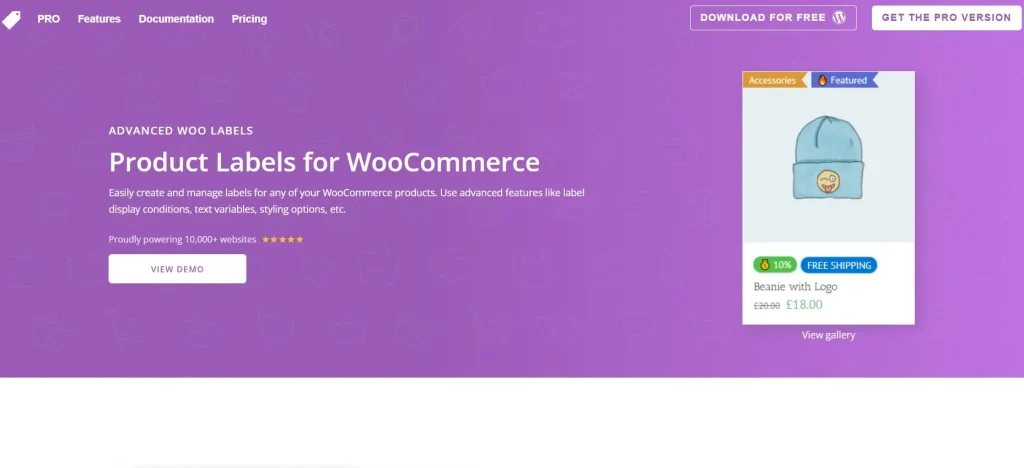
What is Advanced Woo Labels PRO?
Advanced Woo Labels PRO is a premium WooCommerce plugin that helps store owners create and manage dynamic product labels for their online stores. It expands WooCommerce’s basic label functionality by giving users the ability to create custom badges and apply them automatically based on product rules and store conditions.
At its core, the plugin is built for one main purpose: helping store owners highlight important product information more effectively. Instead of relying only on the standard WooCommerce sale badge, users can create a wide range of labels that communicate promotions, urgency, stock status, product type, or special product attributes. These labels appear directly on product images or in visible product areas, making them easy for customers to notice while browsing.
What makes Advanced Woo Labels PRO especially valuable is its rule-based logic. Rather than assigning labels manually to individual products, store owners can define conditions that control when labels appear. For example, a product can receive a “Low Stock” label automatically if inventory is below a certain quantity. A “Save 30%” badge can appear if a discount exceeds a defined percentage. A “Featured” label can be added to products within specific categories or tags. This automation saves time and reduces the chance of outdated or incorrect promotional badges appearing on the store.
The plugin is useful for many kinds of WooCommerce businesses. A clothing store can use it to mark “Trending” collections or highlight size-limited items. A furniture shop can use it to label selected pieces as “Best Seller” or “Online Exclusive.” A supplement store can draw attention to “Bundle Deal” products. A multi-category marketplace can use different labels for different types of campaigns across the site. The flexibility of the plugin makes it suitable for stores with simple catalogs as well as more complex product structures.
Another important part of the plugin is visual control. Product labels are not only informational. They are part of the storefront design. Advanced Woo Labels PRO gives users styling options so badges can match the overall brand. This includes text, colors, shapes, positions, and other visual settings. As a result, labels do not need to look like generic stickers. They can become a polished part of the shopping experience.
In practical terms, Advanced Woo Labels PRO turns labels into a merchandising system. It helps store owners guide attention, emphasize offers, create urgency, and communicate key product status in a faster and more visual way. Instead of being a minor design detail, the label becomes a functional conversion tool.
Key Features of Advanced Woo Labels PRO
- Rule-based label creation
One of the biggest strengths of Advanced Woo Labels PRO is the ability to build labels based on custom conditions. Store owners can define rules related to categories, tags, prices, stock levels, discount percentages, product age, and more. This means a label is not static. It appears only when the product meets the criteria you set. For example, you can create a “New Arrival” label for products published within the last seven days or a “Flash Sale” label for products discounted above a specific threshold. - Dynamic label automation
Once the rules are created, the plugin updates labels automatically. This is very important for stores with changing prices and inventory. If a product stops being discounted, the sale-based label can disappear automatically. If stock drops below a certain level, a low-stock badge can appear without manual editing. This automation reduces store management time and helps keep product badges accurate. - Custom text labels
The plugin allows users to create custom text-based labels such as “Best Seller,” “New,” “Limited Offer,” “Trending,” or any other wording relevant to the store. This is helpful because different businesses need different promotional messages. A fashion boutique and an electronics store often need completely different label strategies. Custom text makes that possible. - Percentage and value-based labels
Instead of just showing a generic sale tag, store owners can display exact savings information such as “Save 15%” or “-$20.” This type of label is especially useful because it gives customers immediate clarity about the size of the deal. Shoppers often respond better when they see a specific discount amount rather than a vague promotion. - Visual customization controls
Advanced Woo Labels PRO includes styling options that let users control colors, shapes, borders, fonts, padding, size, and placement. This matters because product labels should not clash with the store design. For example, a luxury brand may want minimal, elegant labels with subtle colors, while a discount-focused store may prefer bold colors and stronger visual emphasis. The plugin supports both approaches. - Flexible label positioning
Labels can be placed in different locations on the product image or product card, depending on the theme and preferred design. This flexibility helps store owners keep labels visible without covering important product details. On some stores, top-left positioning may work best. On others, top-right or custom offsets may produce a cleaner result. - Category and tag targeting
The plugin can apply labels only to products in specific categories or with specific tags. This is very useful for targeted campaigns. For example, a store can show “Summer Collection” only in seasonal categories or apply “Bundle Offer” only to tagged items. This allows for better merchandising control across large product catalogs. - Stock-based labels
Urgency is a strong conversion factor, and stock-based rules allow store owners to use labels like “Only 2 Left,” “Low Stock,” or “Almost Sold Out.” These labels help communicate scarcity and can encourage faster decisions. This is especially effective in fashion, limited-run products, or stores with fast-moving inventory. - Scheduled labels for campaigns
The plugin can support time-based promotions by showing labels only during defined periods. This is useful for campaigns such as Black Friday, Christmas sales, weekend deals, or product launches. Instead of manually turning campaign labels on and off, the schedule can control them automatically. - Compatibility with WooCommerce store workflows
Advanced Woo Labels PRO is made for WooCommerce environments, so it integrates into the normal store structure rather than forcing a disconnected workflow. This makes it easier for store owners to manage labels as part of product merchandising rather than as an awkward extra task.
Benefits of Using Advanced Woo Labels PRO
One of the biggest benefits of using Advanced Woo Labels PRO is improved product visibility. Many shoppers browse category or shop pages quickly, and labels help direct their attention to products that matter most. A discount badge, low-stock warning, or new-arrival label can make a product more noticeable in a crowded product grid. This simple visual emphasis can increase clicks and product exploration.
Another major benefit is stronger promotional communication. Without a label system, many offers stay buried inside product pages. With this plugin, the promotion can be visible before the customer even clicks. For example, a product can show “25% OFF” directly in the catalog view, which gives shoppers a reason to pay attention immediately. This is especially valuable during sales campaigns or seasonal promotions.
Automation is another practical advantage. Stores with many products cannot manage labels manually in an efficient way. Advanced Woo Labels PRO reduces repetitive work by applying labels automatically through rules. This not only saves time but also reduces human error. A store owner does not need to remember to add or remove badges on each product individually. The system handles it based on real product data.
The plugin also improves consistency. A manually managed store often ends up with inconsistent label usage, where some products are highlighted correctly and others are forgotten. With rule-based conditions, labels are applied more systematically across the catalog. That creates a cleaner and more professional shopping experience.
Another important benefit is better customer guidance. Labels act as visual shortcuts. They help customers understand what is special about a product without reading long descriptions. A “Best Seller” label signals popularity. A “Low Stock” label signals urgency. A “New” badge signals freshness. This kind of communication makes browsing easier and can improve decision-making.
From a branding perspective, the plugin helps stores use promotional labels without damaging visual quality. Since labels can be customized, they can become part of the brand design rather than feeling like generic add-ons. A premium beauty store, for example, can use refined labels that match its color palette and product photography. A discount retailer can use bolder badges to emphasize urgency and price savings.
In real-world eCommerce scenarios, the benefits become very clear. A fashion brand can use “Just In” labels on new arrivals to drive early attention. A home goods store can mark “Top Pick” items during peak shopping seasons. A health supplements store can highlight “Bundle Deal” products to improve average order value. An electronics seller can use “Limited Stock” to encourage faster purchasing decisions. In each case, the label is doing more than decorating the product. It is supporting a specific business goal.
Overall, Advanced Woo Labels PRO helps store owners merchandise products more effectively, save time on store management, and create a more responsive and informative shopping experience.
How to Install Advanced Woo Labels PRO
Installing Advanced Woo Labels PRO on a WooCommerce website is usually straightforward. The first step is to download the plugin file from a trusted source. Once you have the ZIP file, log in to your WordPress dashboard and go to the Plugins section.
Click Add New, then choose Upload Plugin. Select the ZIP file from your computer, upload it, and click Install Now. After installation is complete, click Activate. Once activated, the plugin will typically appear in your WordPress or WooCommerce settings area, where you can start configuring labels.
Before creating label rules, it is a good idea to review your store structure. Look at how your products are organized by category, tags, pricing patterns, and stock handling. This helps you design smarter label rules. For example, if you want to show a “New Arrival” label, decide how many days a product should count as new. If you want a “Low Stock” badge, define the exact quantity threshold.
Next, create your first labels. A practical starting point is to set up a few high-impact rules such as:
“Sale” or percentage-off labels for discounted products,
“New” for recently added products,
“Low Stock” for inventory below a chosen number,
and “Best Seller” or category-specific labels for featured items.
After building the rules, customize the design. Adjust colors, text, shape, font size, and position so the labels fit your store branding. Testing is very important here. A label may look good in theory but overlap with product images or feel too aggressive in the actual product grid. Check how the labels appear on desktop and mobile devices, especially on category pages and single-product pages.
You should also test rule accuracy. Make sure products receive the correct labels based on your defined conditions. If you use scheduled campaign labels, verify that the date-based settings work properly. This is especially important before running large promotions such as end-of-season sales or holiday events.
Finally, treat labels as part of your merchandising strategy, not just a one-time setup. Review them regularly as your inventory, promotions, and product priorities change. For example, you may want different labels during new product launches, clearance events, or seasonal shopping peaks. The plugin becomes most valuable when it is used actively to support store goals.
Why Buy Advanced Woo Labels PRO at Pluginpro.org
Buying Advanced Woo Labels PRO at Pluginpro.org can be a smart option for WooCommerce users who want premium functionality while managing costs carefully. One of the strongest reasons is affordability. Users can often save up to 95% compared to standard pricing, which is especially helpful for small businesses, freelancers, agencies, and store owners already paying for multiple premium WooCommerce tools.
Another important benefit is access to 100% clean files. This matters because WooCommerce plugins interact directly with the storefront experience and product display. Clean files help reduce the risk of technical problems, malware concerns, or unexpected issues that could affect the store’s appearance or functionality. For an eCommerce site, reliability is essential because even a small display issue can affect user trust and sales.
Unlimited website usage is another major advantage. Many premium plugins come with restrictive licenses, which can become expensive for agencies or developers who manage several client stores. More flexible usage means better long-term value and makes it easier to standardize favorite tools across multiple WooCommerce projects.
Easy updates also add value. WordPress and WooCommerce evolve regularly, and store plugins need to stay compatible. Access to updates helps maintain plugin stability and reduces the risk of conflicts as your site grows or changes. For online stores, staying current is especially important because merchandising tools should work smoothly during active promotions and busy sales periods.
Secure downloads are another practical reason to consider Pluginpro.org. A reliable download and access process helps users install and deploy tools quickly, which is useful for agencies on deadlines and store owners preparing campaigns. This kind of convenience becomes even more valuable when multiple premium products are involved.
There is also a broader cost-efficiency advantage. Most WooCommerce stores rely on more than one premium plugin. A typical store may use paid tools for labels, filtering, variation swatches, marketing, SEO, checkout optimization, or performance. Paying full price for every plugin can raise total store setup costs significantly. Pluginpro.org helps make premium WooCommerce stacks more financially manageable.
In real terms, a boutique brand can use Pluginpro.org to improve product merchandising without stretching its operating budget. A freelance WooCommerce developer can use the plugin across client projects more efficiently. A growing online store can invest the saved budget into photography, advertising, or inventory rather than spending it all on plugin licensing.
For users who care about affordability, clean files, flexible usage, updates, and secure access, Pluginpro.org offers a compelling reason to get Advanced Woo Labels PRO there.
Conclusion
Advanced Woo Labels PRO is a highly practical WooCommerce plugin for store owners who want better control over product merchandising. It takes a simple but powerful concept, product labels, and turns it into a dynamic system that supports promotions, urgency, product visibility, and cleaner customer communication.
Its value comes from both automation and flexibility. Instead of manually adding generic badges, users can create rule-based labels that respond to real store conditions such as discounts, stock, categories, and campaign timing. This makes the store easier to manage and helps labels stay accurate as products and promotions change.
The plugin is also useful because it improves both design and conversion potential. Labels can be styled to match the brand while still drawing attention to key product information. That means they can support sales goals without making the storefront feel cluttered or inconsistent.
For WooCommerce businesses of all sizes, from fashion boutiques to electronics stores to niche product shops, Advanced Woo Labels PRO offers a better way to highlight what matters in the catalog. It helps products stand out, supports more effective promotions, and creates a more informative shopping experience.
When purchased through Pluginpro.org, the plugin becomes even more attractive from a value standpoint. The combination of major cost savings, clean files, unlimited website usage, easy updates, and secure downloads gives users strong overall value.
If you want to make your WooCommerce store more visually strategic, more efficient to manage, and better equipped for promotions, Advanced Woo Labels PRO is well worth considering.



