Docy is a powerful WordPress theme built specifically for creating documentation websites, knowledge bases, help centers, and support portals. From the moment you implement Docy, it becomes clear that this theme is designed to solve a very specific problem: organizing complex information into a structure that users can easily navigate and understand.
In practice, businesses, SaaS companies, and product teams often struggle with scattered documentation. Important guides, FAQs, and tutorials are frequently spread across multiple pages or platforms, making it difficult for users to find what they need. Docy addresses this challenge by offering a centralized and well-structured documentation system.
This matters because documentation is not just about information—it directly impacts user experience, customer support efficiency, and product adoption. When users can quickly find answers, support tickets decrease and satisfaction increases. Docy is designed to make this process seamless.
For developers, support teams, and agencies, Docy provides a ready-made framework that eliminates the need to build documentation systems from scratch. Instead of focusing on structure and layout, users can concentrate on creating high-quality content.
In real workflows, Docy is often implemented alongside product launches. Companies use it to create onboarding guides, API documentation, and troubleshooting resources, ensuring that users have access to clear and organized information from day one.
Another important aspect is scalability. As products evolve, documentation grows. Docy supports this expansion by maintaining a consistent structure, allowing users to add new sections without disrupting existing content.
In practice, documentation often becomes a living system rather than a static resource. Teams continuously update guides, refine instructions, and expand knowledge bases based on user feedback. Docy supports this iterative process by making updates simple and structured, ensuring that content remains relevant over time.
Another key factor is cross-team collaboration. Product managers, developers, and support agents often contribute to documentation. Docy enables this collaboration by providing a unified framework where multiple contributors can work without breaking consistency.
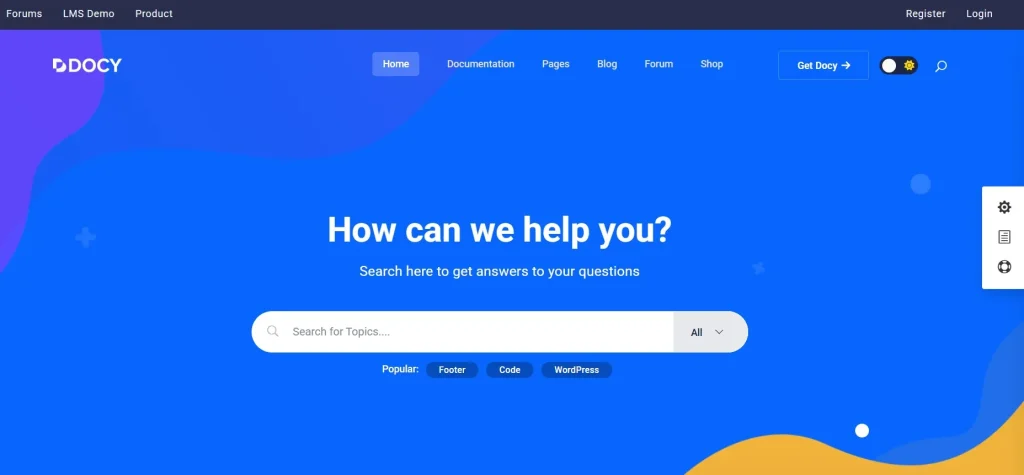
What is Docy?
Docy is a WordPress theme designed for building professional documentation websites, offering structured layouts, navigation systems, and search functionality tailored for knowledge-based content.
At its core, Docy functions as a documentation management system within WordPress. It enables users to organize content into categories, sections, and articles, making it easier for visitors to navigate complex information.
A clear definition would be: Docy is a documentation-focused WordPress theme that helps users create structured, searchable, and user-friendly knowledge bases.
Who should use Docy?
- SaaS companies and product teams
- Software developers and technical writers
- Customer support teams
- Agencies building knowledge base websites
In practical scenarios, a SaaS company might use Docy to create onboarding guides and FAQs. This reduces the need for manual support and improves user experience.
Another use case involves API documentation. Developers can structure endpoints, parameters, and examples in a way that is easy to follow.
Agencies benefit by using Docy to build help centers for clients. Instead of creating custom solutions, they can deploy Docy and customize it to fit branding requirements.
Additionally, startups can use Docy to document their products early, ensuring that users have access to clear instructions as the product grows.
In larger organizations, Docy can serve as an internal knowledge base. Teams can document processes, guidelines, and training materials, improving efficiency and knowledge sharing.
Another practical scenario involves customer self-service portals. Businesses can reduce dependency on live support by offering detailed documentation, allowing users to solve issues independently.
For enterprise-level applications, Docy can be used to manage documentation across multiple products. Each product can have its own section while maintaining a unified structure, making navigation easier for users.
Key Features of Docy
- Structured Documentation Layouts
Docy provides pre-built layouts designed specifically for documentation.
In practice, users can organize content into sections and categories, making navigation intuitive. For example, a software product can separate guides into “Getting Started,” “Advanced Features,” and “Troubleshooting.” This structure reduces confusion and improves accessibility. - Advanced Search Functionality
The theme includes powerful search features that help users find content quickly.
This is critical for large documentation sites where manual navigation would be inefficient. In real scenarios, users rely on search to locate specific solutions instantly. - Interactive Table of Contents
Each page can include a dynamic table of contents.
This allows users to jump between sections easily, improving readability and usability. For long technical guides, this feature significantly enhances navigation. - Knowledge Base Organization
Docy supports hierarchical content structures.
This ensures that even complex documentation remains organized and accessible. - User Feedback System
Visitors can rate articles or provide feedback.
This helps content creators identify areas that need improvement and refine documentation over time. - Responsive Design
The theme is optimized for all devices.
This ensures that users can access documentation on desktops, tablets, and smartphones. - Code Snippet Support
Docy allows developers to include formatted code blocks.
This is essential for technical documentation and tutorials. - SEO Optimization
The theme follows best practices for search engine optimization.
This helps documentation pages rank in search results and attract organic traffic. - Customization Options
Users can adjust design elements to match branding.
This ensures a consistent visual identity across the platform. - Integration with Support Tools
Docy can integrate with ticket systems and other support tools.
This creates a seamless connection between documentation and customer support workflows.
Beyond these features, Docy supports content tagging. Tags allow users to connect related articles, improving discoverability and navigation.
Another advanced feature is conditional content display. This allows businesses to show different documentation sections based on user roles or product versions, making the experience more personalized.
Benefits of Using Docy
One of the most significant benefits of using Docy is improved user experience. Clear navigation and structured content make it easier for users to find answers quickly.
Another key advantage is reduced support workload. When users can resolve issues through documentation, support teams receive fewer inquiries, saving time and resources.
From a workflow perspective, Docy simplifies content management. Teams can create, update, and organize documentation without technical complexity.
In real-world scenarios, this leads to faster onboarding. Users can learn how to use products independently, improving satisfaction and retention.
Cost savings are another major benefit. Instead of building a custom documentation system, businesses can use Docy as a ready-made solution.
For agencies, the theme enables scalability. They can create multiple knowledge bases using the same framework, reducing development time.
A practical example involves a SaaS company handling thousands of users. By implementing Docy, they can reduce support tickets significantly, lowering operational costs and improving efficiency.
Another example is a startup with limited resources. Instead of hiring a development team to build a documentation system, they can use Docy and allocate resources to product development.
Additionally, Docy improves internal efficiency. Teams spend less time answering repetitive questions and more time focusing on strategic tasks.
Real Use Cases of Docy
Docy is widely used across different industries and workflows, making it a versatile solution for documentation needs.
For SaaS companies, Docy serves as a customer support hub. A typical workflow involves creating onboarding guides, feature explanations, and troubleshooting articles.
Developers use Docy to build API documentation. Structured layouts and code snippet support make it easier to present technical information clearly.
Agencies benefit by using Docy to create help centers for clients. This allows them to offer additional services without building custom systems.
Another practical scenario involves internal documentation. Companies can use Docy to store training materials, operational guidelines, and knowledge resources.
For example, a software company launching a new product can use Docy to create a complete documentation system. This reduces support requests and improves user adoption.
Another real-world example involves educational platforms. Instructors can use Docy to provide course documentation, helping students understand complex topics more easily.
Additionally, startups can use Docy to document their products early, ensuring scalability as their user base grows.
Another scenario involves eCommerce platforms. Businesses can use Docy to create detailed product guides, return policies, and FAQs, improving customer satisfaction and reducing support workload.
For enterprise companies, Docy can support multi-department documentation, allowing HR, IT, and operations teams to maintain structured knowledge bases within a single system.
How to Install Docy
Installing Docy is a straightforward process that follows standard WordPress theme installation steps.
First, download the Docy theme package from a trusted source. Then, log in to your WordPress dashboard and navigate to Appearance > Themes. Click on “Add New” and select “Upload Theme.”
After uploading the file, click “Install Now” and wait for the installation to complete. Once installed, activate the theme to apply it to your website.
Next, import demo content if available. This provides a ready-made structure that can be customized with your own documentation.
After that, configure categories, sections, and navigation menus. This ensures that your documentation is well-organized.
Finally, test the website to confirm that all features work correctly. Once completed, your documentation platform is ready for use.
In practice, teams often integrate analytics tools during installation. This helps track which articles are most viewed and where users encounter difficulties.
Another useful step is setting up feedback loops. By enabling article ratings, teams can continuously improve documentation based on user input.
Why Buy Docy at Pluginpro.org
Purchasing Docy from Pluginpro.org offers significant advantages, especially for businesses and agencies looking to optimize costs.
One of the most notable benefits is cost savings. Premium documentation themes can be expensive, especially when used across multiple projects. Pluginpro.org provides access to Docy at a much lower cost.
For example, an agency building multiple knowledge bases can reuse Docy without purchasing separate licenses. This reduces expenses and increases profitability.
Another key advantage is unlimited website usage. Freelancers and agencies can deploy the theme across projects without additional costs.
File quality and security are also important considerations. Pluginpro.org ensures that all files are clean and safe to use.
In real-world scenarios, this creates a strong return on investment. A company can build multiple documentation platforms while minimizing costs.
Another example involves startups launching new products. They can create full documentation systems without allocating large budgets, allowing them to focus on development and marketing.
Additionally, agencies can standardize their workflow using Docy, reducing development time and improving efficiency across projects.
A practical cost-saving scenario involves a SaaS agency managing 10–20 clients. Instead of paying for individual licenses, they can use Pluginpro.org to deploy Docy across all projects, saving thousands annually.
Another scenario involves freelancers offering documentation services. Lower costs allow them to price services competitively while maintaining high profit margins.
Is Docy Worth It?
Yes, Docy is worth it for anyone who needs a professional and scalable documentation system.
This theme is particularly suitable for SaaS companies, developers, and agencies that require structured knowledge bases. It provides essential features for organizing and presenting information effectively.
For example, a SaaS startup can use Docy to create onboarding guides and FAQs. This improves user experience and reduces support workload.
From a cost perspective, Docy delivers strong value by eliminating the need for custom development.
It is especially beneficial for teams managing large amounts of content. The structured layout ensures that information remains accessible and organized.
For businesses focused on improving support efficiency and user experience, Docy is a practical and reliable solution.
Another practical example involves growing companies transitioning from manual support systems. By implementing Docy, they can scale support operations without increasing team size.
For agencies, Docy provides a repeatable solution. They can deliver consistent results across multiple clients, improving efficiency and client satisfaction.
Conclusion
Docy stands out as a specialized WordPress theme for documentation and knowledge base websites. It combines structured design, powerful search functionality, and user-friendly navigation to create an effective documentation system.
By simplifying content management, reducing support workload, and improving user experience, it provides clear advantages for businesses and developers.
Whether used for customer support, internal knowledge bases, or technical documentation, Docy offers a flexible and scalable solution. When combined with the affordability of Pluginpro.org, it becomes an even more compelling choice for long-term use.