
Managing events on a WordPress website becomes much more complicated once the schedule itself matters as much as the event title. A simple event list may work for a site that only publishes occasional announcements, but it starts to break down when visitors need to understand time slots, parallel sessions, daily agendas, class blocks, instructor availability, or multi-track programs. This is exactly the kind of problem that Events Schedule WP Plugin is built to solve.
On many websites, event information is not just “what” and “when.” It is also “what happens before this,” “what overlaps with it,” “which room or track it belongs to,” and “how the day or week is structured.” For conferences, schools, training centers, gyms, and festival websites, this context is critical. Users are not simply reading event details. They are planning their time. If the schedule is hard to scan, visitors may get confused, miss important sessions, or abandon the site altogether.
This is why presentation matters so much. A timetable or schedule grid often communicates complex information much more effectively than a standard post list or date archive. When users can see time horizontally or vertically, sessions grouped by track, and visual blocks representing duration, they understand the schedule faster. Instead of reading multiple event cards and trying to mentally reconstruct a day plan, they can glance at the layout and immediately understand what is happening.
That kind of clarity has a direct impact on user experience. For example, a conference attendee may want to compare simultaneous sessions across different rooms. A student may want to know what classes happen on Tuesday morning. A gym member may want to check whether yoga overlaps with spinning. A training participant may want to identify which workshop comes after lunch. These are not unusual tasks, but they become frustrating when schedules are buried inside long event lists.
The challenge is that many standard WordPress event tools are designed for event publishing, not schedule visualization. They may display upcoming events in a calendar or list, which is useful in general terms, but not ideal for a timetable-style experience. This creates a gap between event management and schedule communication. Events Schedule WP Plugin fills that gap by letting site owners organize event information into a more readable and actionable schedule format.
This is especially useful for websites such as:
- conferences and seminars
- schools and educational institutions
- gyms, yoga studios, and fitness centers
- training academies and workshop providers
- corporate event programs
- music festivals or multi-day events
- coworking spaces with recurring sessions
- churches or community groups with weekly programs
A practical example shows the value clearly. Imagine a three-day business conference with keynote sessions, workshops, breakout rooms, networking events, and sponsor activities. A plain event list would force users to open individual entries and compare times manually. A schedule grid, on the other hand, could show the whole day in a structured format with tracks side by side. Users would understand the program much faster.
Or imagine a fitness studio that offers morning and evening classes throughout the week. Members want to see all available classes by day and time. A schedule view with instructors, class names, and color-coded categories is much easier to use than a simple chronological list of posts.
Another important point is that schedule pages are often high-intent pages. The user is already interested. They are trying to make a decision, commit time, and plan attendance. If the schedule is presented well, the website supports that intent. If it is presented poorly, the site creates friction exactly where it should be helping.
In this article, we will explore Events Schedule WP Plugin in detail, including what it is, its key features, the benefits of using it, how to install it, and why buying it from Pluginpro.org can be a smart and cost-effective choice.
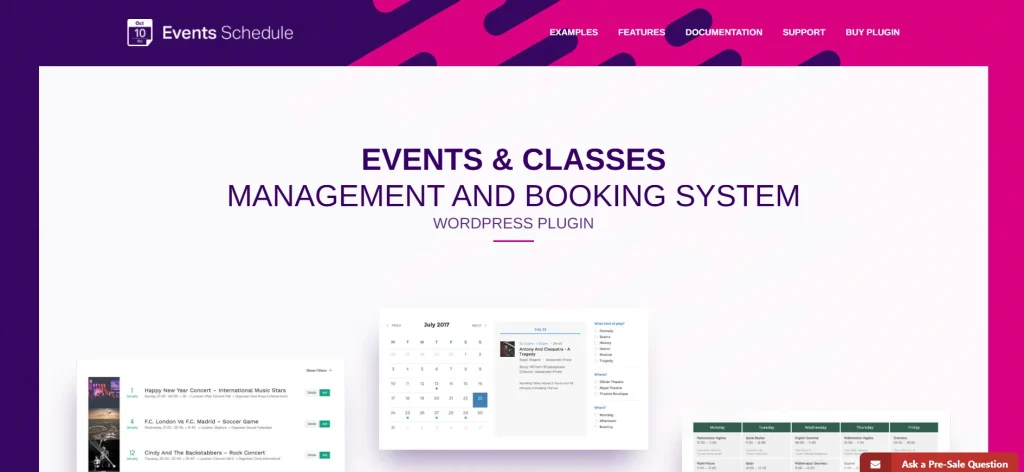
What is Events Schedule WP Plugin?
Events Schedule WP Plugin is a WordPress plugin designed to display events in a timetable or structured schedule format rather than only as simple lists or standard calendar entries. Its main purpose is to help site owners present time-based information in a way that is easier to scan, compare, and understand.
At a practical level, the plugin takes event information and arranges it into a schedule layout based on time slots, days, categories, tracks, or similar dimensions. This makes it especially useful when multiple events take place across a shared timeframe or when users need to see relationships between sessions rather than just isolated event entries.
This is important because many websites using event content are not simply publishing standalone event posts. They are presenting programs. A program has structure. It may include overlapping sessions, recurring classes, room-based timetables, weekly plans, or multi-day agendas. Events Schedule WP Plugin helps communicate that structure visually.
The plugin is especially suitable for:
- conference and convention websites
- educational timetables
- class schedules for schools and academies
- gym and wellness class calendars
- training programs and internal company workshops
- church or community weekly schedules
- festivals with multiple stages or venues
A practical example makes the use case clearer. Imagine a university department running a weekly seminar schedule. Students need to know which lecture occurs at 9:00 AM, what room it is in, and which seminars overlap. If this is presented as a normal blog list, it becomes cumbersome. With a schedule layout, the structure becomes immediately understandable.
Another example would be a conference site with separate tracks such as “Marketing,” “Technology,” and “Leadership.” Attendees want to compare sessions happening at the same time across these tracks. Events Schedule WP Plugin makes that kind of comparison much easier because it presents parallel sessions in one visual system instead of scattering them across unrelated entries.
The plugin also tends to be useful because it does not replace WordPress itself. It works within the WordPress ecosystem, letting site owners manage schedules using content they already understand. This is valuable for editorial teams, administrators, and organizations that want a specialized visual result without leaving the CMS workflow.
Another key part of what this plugin is comes down to communication efficiency. Timetable-style layouts reduce the cognitive effort required to understand a schedule. Users do not need to reconstruct the day mentally from separate posts. The page itself shows the structure.
In short, Events Schedule WP Plugin is best understood as a visual schedule presentation tool for WordPress. It helps turn event information into something more usable for real planning and navigation.
Key Features of Events Schedule WP Plugin
Events Schedule WP Plugin includes features that make it especially useful for websites where schedule clarity matters. Its value comes not only from displaying events, but from displaying them in a way that matches how users actually think about time and planning.
- Grid-based timetable layout for schedule clarity
One of the most important features is the timetable or grid-based display format. Instead of presenting events as disconnected list items, the plugin places them into a schedule framework where time slots and categories can be compared visually. This is especially useful when multiple events happen within a structured program. For example, a conference user can see the 10:00 AM sessions across all tracks at once instead of opening different pages to compare them. This makes planning faster and reduces confusion. - Support for multiple tracks, categories, or columns
Many event systems involve parallel structures. A conference may have multiple rooms. A school may have different class groups. A fitness center may separate by class type or instructor. Events Schedule WP Plugin is valuable because it can group or display schedule content across columns or categories, helping users compare options side by side. For example, a festival website might use columns for stages, while a corporate training site might use columns for departments or workshop streams. - Customizable time slots and duration handling
Not every schedule works in identical intervals. Some events run in 30-minute blocks, others in one-hour sessions, and others may span longer or irregular durations. A useful scheduling plugin needs flexibility here, and this is one of its practical features. Site owners can usually define time ranges and durations so the timetable reflects reality rather than forcing every event into an awkward uniform structure. This is especially helpful for class timetables, workshop agendas, and conference programs with varied session lengths. - Detailed event blocks with rich information
A schedule item often needs more than a title. It may need a description, speaker name, instructor, room, category, image, or link. Events Schedule WP Plugin is stronger when each event block can contain enough information to be useful without becoming cluttered. For example, a yoga class entry may show the class name, instructor, and level. A conference session may show the title and speaker. A business program entry may link to a more detailed agenda page. This helps the schedule remain informative rather than purely decorative. - Responsive schedule display for mobile users
Schedule pages are frequently viewed on mobile devices, especially for live events, gyms, and educational websites. A useful schedule plugin must adapt to smaller screens without becoming unreadable. Events Schedule WP Plugin becomes much more practical when the timetable layout remains manageable on phones and tablets. For example, a conference attendee checking the next session from their phone still needs the schedule to be understandable and easy to scroll. Good responsive behavior is critical because schedule information is often accessed while users are on the move. - Color coding and visual differentiation
On busy schedules, visual cues help users understand the page quickly. Different tracks, classes, or event types can often be distinguished with colors or styling variations. This is especially valuable when a schedule includes many blocks across a single page. For example, a fitness center might color-code yoga, cardio, strength, and dance classes. A conference may use different colors for keynote, workshop, and networking sessions. These distinctions make the timetable easier to read at a glance. - Integration with WordPress content workflow
A major advantage of using a schedule plugin in WordPress is that it fits into the site’s normal management flow. Users do not have to maintain an external schedule system unless they choose to. This helps content managers and site owners update schedules alongside the rest of the site. For example, if a training company changes workshop times weekly, the updates can be managed directly in the same platform as pages, media, and other content. That makes long-term administration easier. - Suitable for recurring and repeatable scheduling needs
Some events happen once, but many schedules are recurring. Weekly classes, semester timetables, and repeated training programs benefit from a schedule tool that supports consistency over time. Even when the underlying content changes, the visual structure remains familiar. This is one of the reasons the plugin is valuable beyond one-time conference sites. It can support ongoing schedule-dependent operations.
Benefits of Using Events Schedule WP Plugin
One of the biggest benefits of using Events Schedule WP Plugin is improved clarity. Users can understand structured schedules much more quickly when information is visualized in a timetable format. This is especially important when a page contains many sessions or overlapping items. A good grid reduces the mental work required to compare time slots, tracks, and durations.
Another major benefit is better user experience. Visitors to a schedule page are often trying to make decisions. They may want to choose a session, compare classes, or plan their day. A schedule that is easy to scan helps them do that with less friction. For example, a gym member deciding whether to attend a 6 PM class can see immediately what else is happening that evening. A conference attendee can identify which keynote overlaps with which breakout session. This makes the site more useful in practical terms.
The plugin also supports higher engagement. When users can understand the schedule more easily, they are more likely to explore multiple sessions, click through to details, and commit to attendance. A poorly presented schedule can discourage deeper interaction, while a well-designed one invites exploration.
There is also a professionalism benefit. A structured timetable makes an organization look more organized and prepared. This matters for conferences, schools, training providers, and any site where trust and coordination matter. For example, a corporate event page with a polished schedule grid looks more credible than one with a long unstructured list of time blocks.
Another benefit is better communication for complex events. Multi-track or multi-day events are inherently harder to explain. A timetable plugin helps simplify that communication. This is useful not only for attendees, but also for organizers trying to reduce repetitive questions about timing and session overlap.
The plugin can also improve operational efficiency. When schedules are clearer, support requests may decrease. Users can answer more of their own questions by looking at the schedule page rather than contacting the organization for clarification. This can be especially valuable for schools, training centers, and event teams managing many attendees.
From a business perspective, schedule clarity can support stronger attendance and conversion. If the user understands what is happening and when, they are more likely to register, enroll, or show up. That makes the schedule page a more effective part of the business funnel.
There is also a long-term content benefit. A site that regularly publishes schedules becomes easier to maintain when there is a standardized visual structure. Staff can repeat the same schedule logic across weeks, events, or semesters rather than reinventing the presentation each time.
Finally, the plugin is cost-effective compared to building custom schedule displays manually. A custom timetable system would usually require design and development work. A dedicated plugin shortens that process and makes schedule management more repeatable.
How to Install Events Schedule WP Plugin
Installing Events Schedule WP Plugin is typically a standard WordPress plugin process. The simplest method is through the WordPress dashboard.
First, download the plugin ZIP file. Then log in to your WordPress admin panel and go to Plugins > Add New. Click Upload Plugin, choose the ZIP file from your computer, and click Install Now. After WordPress completes the installation, click Activate.
Once activated, the next important step is configuration. Before creating the first schedule, it helps to define your schedule structure. Think about how users need to view the content. For example:
- Will the schedule be daily or weekly?
- Will it use tracks, rooms, instructors, or class categories as columns?
- What time interval makes sense: 30 minutes, 1 hour, or custom durations?
- What details should each event block include?
This planning matters because a schedule is most useful when its structure matches how real users think about the program.
After configuration, create a sample timetable and test it with actual content. For example, add a few sessions for a training day or several classes for a weekly gym schedule. Check whether the time flow is readable and whether the category structure is intuitive. This helps ensure the plugin is supporting the real user journey rather than just displaying raw data.
Manual installation is also possible. Extract the ZIP file on your computer, then upload the plugin folder to the wp-content/plugins directory using an FTP client. After that, return to the WordPress dashboard, go to Plugins, locate the plugin in the list, and activate it.
After setup, test the schedule page across devices. This is especially important because schedule pages are often viewed on mobile by users who are already attending or traveling to the event. Make sure text remains legible, blocks are easy to navigate, and important details are visible without excessive zooming.
It is also wise to test different content densities. A sparse schedule may look fine, but a more crowded one may reveal readability issues. If your site supports large conference agendas or many class blocks, testing a realistic heavy schedule is important.
A thoughtful installation process is not just about making the plugin active. It is about shaping the schedule to match the practical needs of the audience.
Why Buy Events Schedule WP Plugin at Pluginpro.org
Buying Events Schedule WP Plugin at Pluginpro.org offers several practical advantages for WordPress users, agencies, and organizations.
One of the biggest benefits is cost savings. Premium schedule and event-display plugins can become expensive, especially when agencies or businesses are already investing in themes, builders, event systems, and other operational tools. Pluginpro.org helps make the plugin more accessible by offering the chance to save up to 95% compared to the original price.
Another important advantage is access to 100% clean files. This matters because any plugin used on public-facing event or business websites should come from a source that users can trust. Clean files help reduce the risk of malware, hidden code, or compromised packages. For schedule pages that often serve as core operational pages, reliability matters.
Unlimited website usage is another strong benefit. Agencies and organizations often work on multiple WordPress projects, such as conference sites, class systems, or client event portals. A plugin that can be used across multiple installs offers much better long-term value than a restrictive single-site license.
Pluginpro.org also offers easy updates, which is important because WordPress, themes, and event tools continue to evolve. Better access to updates helps maintain compatibility and reduces the chance of issues as the broader site ecosystem changes.
Finally, secure downloads improve trust in the purchasing process. Users need confidence that the plugin files they receive are safe, available, and ready for deployment.
For anyone who needs a structured event schedule solution without overspending, Pluginpro.org provides a strong value proposition.
Conclusion
Events Schedule WP Plugin is a highly practical tool for WordPress websites that need to present time-based information clearly and professionally. It solves a common problem for conferences, schools, gyms, workshops, and event-heavy platforms: standard event lists often fail when users need to understand actual schedule structure.
Its value comes from turning event data into a more usable visual timetable. Grid-based layouts, support for multiple tracks, flexible time slots, rich event blocks, responsive behavior, and WordPress-friendly management all make it easier to communicate schedules in a way users can understand quickly.
The benefits are significant. Better clarity, better user experience, stronger engagement, reduced confusion, and more professional presentation all make this plugin useful far beyond simple event publishing. It helps websites support real planning behavior rather than just display event content.
When purchased through Pluginpro.org, Events Schedule WP Plugin becomes even more attractive because of the substantial cost savings, clean files, unlimited website usage, easy updates, and secure downloads.
For any WordPress site owner or agency looking to improve how schedules are displayed and understood, Events Schedule WP Plugin is definitely worth serious consideration.



