
When people search online for an upcoming event, conference, seminar, summit, or workshop, the first impression often comes from the event website. Before attendees buy a ticket, submit a registration form, review the speaker lineup, or decide whether the event is worth their time, they usually visit the website to judge its professionalism. For event organizers, this means a poorly designed website can reduce trust and hurt conversions, while a polished and well-structured site can increase registrations and strengthen the event brand. That is exactly where GrandConference becomes a valuable solution for WordPress users.
GrandConference is a premium WordPress theme built specifically for conferences, business events, expos, training programs, academic seminars, and similar gatherings. Instead of forcing event organizers to adapt a generic website theme, GrandConference provides layouts, sections, and features that already fit the needs of event-based websites. This helps users launch faster and present information in a clearer, more effective way.
Whether you are organizing a corporate leadership summit, a startup networking event, an online webinar series, or a local workshop, GrandConference gives you the tools to showcase speakers, publish schedules, promote ticket options, and guide visitors toward registration. It combines clean design, flexibility, and event-focused functionality in a way that is useful for both beginners and experienced WordPress users.
In this article, you will learn exactly what GrandConference is, which features make it stand out, the real benefits it offers, how to install it properly, and why buying it from Pluginpro.org can be a smart and cost-effective choice for your website project.
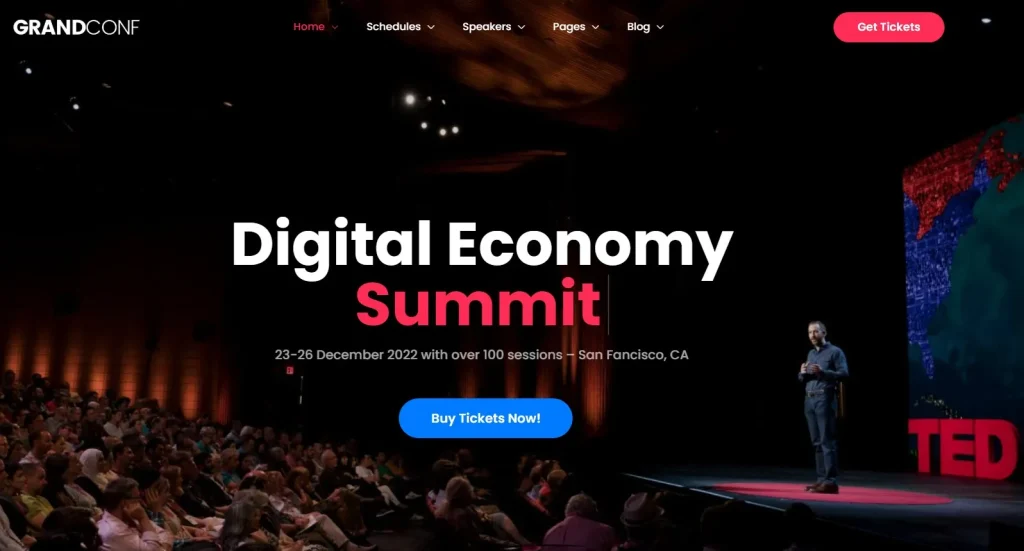
What is GrandConference?
GrandConference is a WordPress theme designed to help users build professional websites for conferences, expos, seminars, meetups, training sessions, and corporate events. Unlike a general multipurpose theme that tries to serve every type of business, GrandConference is focused on the event industry. That focus matters because event websites have very specific goals. They need to provide clear schedules, introduce speakers, explain venue details, promote ticket options, and encourage fast registration without confusing the visitor.
At its core, GrandConference helps turn a WordPress website into a complete event presentation platform. It usually includes ready-made pages and templates for important sections such as the homepage, event agenda, speaker profiles, ticket information, FAQ, blog updates, and contact forms. Because these elements are already built with events in mind, users can avoid wasting time creating every page from scratch.
This theme is useful for a wide range of users. Event agencies can use GrandConference to launch websites for clients efficiently. Businesses can use it for annual company conferences, product launch events, or team summits. Universities and educational organizations can build websites for academic conferences or training programs. Even solo organizers can use it for small but professional-looking workshops or local networking events.
For example, imagine a technology company hosting a two-day innovation conference. They need a homepage with a strong banner, a schedule with multiple sessions, individual speaker profiles, sponsor logos, and a clear call to action for ticket registration. GrandConference is designed to handle that structure easily. In another example, a business coach running a paid workshop series may use the theme to present event details, add testimonials, highlight session topics, and collect registrations online.
Another reason GrandConference is appealing is that it balances visual quality with usability. A beautiful website alone is not enough if visitors cannot find the event date, location, or booking options. GrandConference typically addresses both design and functionality, helping organizers build websites that look credible and work effectively. In simple terms, GrandConference is not just a theme for making an event site look attractive. It is a practical tool for promoting events, building trust, and increasing attendance.
Key Features of GrandConference
GrandConference includes a strong set of features that make it highly suitable for event-based websites. Below are some of the most important features, along with practical explanations of how they work and why they matter in real use.
- Pre-built event demos
GrandConference usually comes with ready-made demo websites designed for conferences, seminars, exhibitions, workshops, and corporate events. These demos provide full page layouts, design styles, and sample content structures that can be imported quickly. This matters because event organizers often work under tight deadlines, and starting with a complete demo can save many hours of design and setup work. - One-click demo import
The one-click demo import feature allows users to install a sample site layout in just a short time without building everything manually. After importing the demo, you can replace the sample text, speaker images, event dates, and ticket details with your own content. This is especially useful for beginners who want a professional-looking site quickly, as well as agencies managing multiple client projects with similar event website needs. - Event schedule management
A conference or seminar website needs a clear and organized way to present the agenda, and GrandConference is built for that purpose. It allows users to display session times, tracks, program details, and activity blocks in a format that visitors can read easily. This feature matters because attendees often decide whether to register based on the quality and clarity of the schedule, especially for multi-session or multi-day events. - Speaker profile showcase
GrandConference lets you create dedicated speaker sections or pages that include names, photos, biographies, and session details. This helps visitors learn about the qualifications and expertise of the event speakers before they register. For real-world events, this is one of the most persuasive parts of the website because respected speakers often increase trust, authority, and ticket sales. - Ticket and registration support
The theme is designed to work well with ticketing and registration systems, helping organizers collect sign-ups directly from the website. Depending on the setup, users can link to external booking tools or integrate with WordPress plugins for event registration and payment collection. This matters because a smooth registration process reduces friction and increases the chances that interested visitors will actually complete their booking. - Responsive mobile-friendly design
GrandConference is built to adapt to desktops, tablets, and smartphones so that the website remains usable across different screen sizes. Many event attendees browse websites on mobile devices when checking schedules, venue information, or registration pages. A mobile-friendly design is important not only for user experience but also for SEO, since search engines value responsive websites more highly. - Modern visual design for branding
The theme typically includes polished layouts, attractive typography, clean spacing, and stylish homepage sections that help events look more premium and credible. For conferences and seminars, presentation quality influences how visitors perceive the value of the event. A well-designed site can make even a new event brand look more established and trustworthy, which can directly impact conversions. - Customization options without coding
GrandConference usually offers theme settings that allow users to change colors, fonts, page layouts, header styles, and section arrangements without needing custom code. This is important because event organizers are often marketers, business owners, or project managers rather than developers. Easy customization means users can align the site with their event branding while keeping the setup process simple. - Sponsor and partner sections
Most conference websites need a way to highlight sponsors, media partners, or event collaborators, and GrandConference often includes dedicated areas for that purpose. These sections help demonstrate event credibility and provide value to sponsoring brands. In practice, sponsor visibility can also help event organizers secure partnerships because brands want professional representation on the website. - SEO-friendly structure and performance support
GrandConference is generally designed with clean code and organized page structures that support better search visibility. When paired with strong content and SEO plugins, it can help event pages rank for relevant searches such as conference name, business event location, or seminar topic keywords. This feature matters because organic traffic can reduce advertising costs and bring in targeted visitors who are actively searching for events like yours.
Benefits of Using GrandConference
Using GrandConference offers more than just a nice-looking website. It provides real practical benefits for organizers who need to promote events effectively, communicate information clearly, and turn visitors into attendees.
One of the biggest benefits is speed. Building an event website from scratch can take a long time, especially if you need separate pages for speakers, schedules, ticket information, venue maps, and event updates. With GrandConference, much of that structure is already available. This allows you to focus on your content rather than technical design work. For example, if your event is only a few weeks away, using a theme like GrandConference can help you launch quickly without sacrificing professionalism.
Another major benefit is improved credibility. People are more likely to trust an event that looks organized and well presented online. If your website has clear navigation, professional design, strong speaker pages, and complete event details, visitors will feel more confident about registering. This is especially important for paid events where attendees want reassurance before they spend money.
GrandConference also helps improve communication. Event websites must answer essential questions: what is the event about, who is speaking, when does it happen, where is it located, and how do people register? A theme designed specifically for events helps organize this information logically. That means fewer confused visitors and a better user experience overall.
There is also a strong marketing benefit. A well-structured homepage can highlight the event’s value proposition, featured speakers, schedule, testimonials, and registration button in the right order. This can increase conversions because visitors are guided naturally toward taking action. For example, a business summit can use GrandConference to lead users from event overview, to speaker credibility, to agenda highlights, and finally to ticket purchase.
Another practical benefit is flexibility. Not every event is the same. Some are corporate and formal, while others are creative, educational, or community-focused. GrandConference usually provides enough layout and styling flexibility to support different event types without requiring a full redesign.
Finally, the theme can help reduce costs. Instead of hiring a custom web designer or developer for every event website, many users can launch and maintain a professional site themselves. For freelancers, agencies, and businesses that run multiple events each year, this can translate into major savings in both time and budget.
How to Install GrandConference
Installing GrandConference on a WordPress website is generally a straightforward process, but doing it carefully helps ensure better performance and fewer setup issues later. Before starting, it is a good idea to make sure your WordPress installation is updated and that your hosting environment meets the recommended requirements for modern themes and plugins.
Install via WordPress dashboard
The most common installation method is through the WordPress admin dashboard. First, log in to your WordPress website and go to Appearance and then Themes. Click Add New, then choose Upload Theme. Select the GrandConference ZIP file from your computer and click Install Now.
Once the upload finishes, WordPress will install the theme automatically. After that, click Activate to make GrandConference your active theme. When the theme is activated, you may see prompts asking you to install recommended plugins. These plugins are often necessary for demo import, page building, event layouts, or additional theme functionality, so it is usually best to install and activate them.
After activation, check the theme options panel and import the demo content if needed. The demo import process helps create sample pages, menus, homepage layouts, and event sections that match the preview design. Once the demo is installed, go through each page and replace the placeholder content with your own event details, speaker information, branding, and images.
This method is ideal for most users because it is simple, quick, and does not require technical tools. It is especially useful for beginners who prefer to manage everything inside the WordPress dashboard.
Manual installation via FTP
Manual installation is another option, especially if the theme file is too large for the dashboard uploader or if your hosting configuration causes upload issues. To begin, unzip the GrandConference package on your computer. Inside, you should find the main theme folder that needs to be uploaded to WordPress.
Next, use an FTP client such as FileZilla to connect to your hosting account. Go to the wp-content/themes/ directory on your server and upload the GrandConference folder there. After the upload is complete, return to your WordPress dashboard, go to Appearance and Themes, and activate GrandConference from the installed themes list.
After activation, follow the same next steps as with the dashboard method. Install any required plugins, import demo content if available, and begin editing your pages. Manual installation is often preferred by developers, agencies, or advanced users who want more control over the file upload process.
Practical setup tips after installation
Once GrandConference is installed, do not stop at activation. Review your homepage settings to make sure the correct front page is assigned. Check menus, permalinks, and mobile responsiveness. Add your real logo, event colors, registration links, and contact information. Test all forms and ticket buttons before launching the site publicly.
It is also smart to optimize images before uploading them, especially speaker photos and event banners, because oversized files can slow down the website. Finally, test the website on both desktop and mobile devices to confirm that schedules, buttons, and layouts display properly. A clean installation is only the first step. Proper configuration is what turns the theme into a functional event website.
Why Buy GrandConference at Pluginpro.org
Buying GrandConference at Pluginpro.org can be a practical choice for users who want to keep costs under control while still getting access to a premium WordPress theme. For many freelancers, agencies, small businesses, and event organizers, budget matters. One of the main reasons buyers choose Pluginpro.org is the opportunity to save up to 95 percent of the original cost. This makes premium tools more accessible, especially for those managing multiple websites or multiple event projects during the year.
Another major advantage is the availability of 100 percent clean files. When downloading themes from any source, security is always a serious concern. A clean file means the theme package is free from malicious code, hidden scripts, or unsafe modifications that could harm your website. This is critical because event websites often collect user data through forms, registrations, and contact pages. Using secure files helps protect both your business and your visitors.
Pluginpro.org also offers unlimited website usage, which can be a strong benefit for developers and agencies. Instead of being limited to one installation, users can apply GrandConference across multiple projects. For example, a web design agency building sites for different seminars, workshops, and conferences can reuse the theme structure to speed up delivery and maintain quality across client work.
Easy updates are another important point. WordPress themes need updates for compatibility, performance, and security improvements. Access to updated files makes it easier to keep your website working smoothly with the latest WordPress version and plugin ecosystem. This reduces the chance of broken layouts or feature conflicts over time.
Secure downloads also improve the buying experience. Users want a simple process where they can purchase, download, install, and start building right away without unnecessary confusion. Pluginpro.org aims to make that process smoother, which saves time and reduces friction.
Overall, buying GrandConference at Pluginpro.org can offer a strong value combination: lower cost, clean files, flexible usage, secure access, and easier long-term maintenance. For anyone building an event website on WordPress, that can make a meaningful difference in both budget and workflow.
Conclusion
GrandConference is a focused and practical WordPress theme built for conferences, seminars, workshops, expos, and business events. Its biggest strength is that it is not trying to be everything for everyone. Instead, it is designed around the real needs of event websites, including schedules, speaker profiles, registration support, sponsor areas, and strong visual presentation.
For organizers, this means less time building from scratch and more time promoting the event itself. For visitors, it means a better experience with clearer information, smoother navigation, and greater confidence in the professionalism of the event. Whether you are launching a large corporate summit or a smaller educational workshop, GrandConference can help you create a website that looks credible and supports real conversions.
When combined with the value offered by Pluginpro.org, GrandConference becomes even more attractive. Lower costs, clean files, unlimited website usage, easy updates, and secure downloads make it a smart option for many WordPress users. If you want an event theme that combines design quality, usability, and practical business value, GrandConference is a strong choice worth considering.



