
For content-driven WordPress websites, getting traffic is only the first step. The bigger challenge is keeping visitors engaged after they land on a single article. Many blogs, affiliate sites, magazine websites, and niche content platforms invest heavily in SEO, social media, and content production, but still struggle with one major issue: users read one page and leave. When that happens, page views stay low, session duration remains short, and bounce rate becomes a problem. Over time, this can weaken the overall performance of the website, both from a user experience perspective and from an SEO perspective. This is exactly why a plugin like Inline Related Posts can be so useful.
Most WordPress websites already understand the value of internal linking and related content. The problem is that traditional related posts sections often appear at the bottom of the article, where many users never reach them. Even when visitors scroll to the end, they may already be mentally finished with the page. Inline Related Posts changes that behavior by placing relevant post suggestions directly inside the article content while the user is still actively reading. This simple change in placement can make a meaningful difference.
The idea is practical. Instead of waiting until the end of the article to recommend more content, the plugin introduces related posts at strategic moments during the reading experience. For example, if a visitor is halfway through an article about email marketing, an inline suggestion to read a related guide on subject lines, automation, or segmentation can feel natural and timely. That recommendation appears when the visitor is still engaged, not when they are already deciding to leave.
This approach is especially useful for websites that depend on content depth and user engagement. A news site can keep readers moving from one story to another. An affiliate website can push users toward comparison pages or buyer’s guides. A tutorial blog can direct readers to supporting how-to articles. An educational platform can create a more connected learning path between related pieces of content. In all of these cases, the plugin is not just inserting extra links. It is shaping how users move through the website.
Another important advantage is efficiency. Manual internal linking is still valuable, but it can be time-consuming and inconsistent, especially on websites with a large number of articles. Editors may forget to add links, older posts may become outdated, and high-value pages may not get enough internal promotion. Inline Related Posts helps automate part of that process by inserting related content dynamically. This creates a more consistent engagement system across the site.
In this article, we will take a detailed look at Inline Related Posts, including what it is, its most important features, the practical benefits it offers, how to install it, and why buying it from Pluginpro.org can be a smart choice for WordPress users who want premium functionality without overspending.
What is Inline Related Posts?
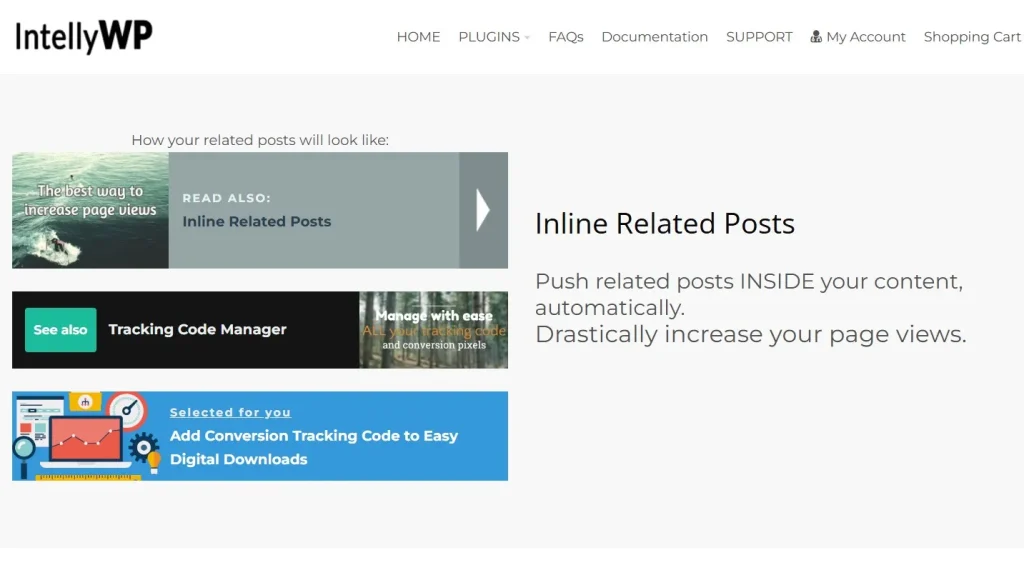
Inline Related Posts is a WordPress plugin designed to automatically display related articles within the body of a post rather than only at the bottom of the page. Its main purpose is to increase user engagement by showing relevant content while the reader is still actively consuming the current article. This makes the recommendations more visible, more timely, and often more effective.
At its core, the plugin helps solve a common content problem. Many websites publish a lot of useful articles, but those articles remain too isolated from one another. A user may arrive on one page through search, read it, and leave without ever discovering the rest of the site. That means the website misses opportunities to increase page views, strengthen topic authority, promote important articles, and build deeper engagement. Inline Related Posts helps connect that content more intelligently.
The plugin works by identifying other posts on the site that are related to the current article. Depending on configuration, it may use categories, tags, topic similarity, or manual selection logic. Then it inserts one or more related post recommendations at chosen positions inside the article content. For example, a site owner may decide to show the first related post after the third paragraph and another after the eighth paragraph. This gives the recommendations a natural place in the reading flow.
This is different from a traditional “related posts” box at the end of an article. End-of-post suggestions can still be useful, but they often have lower visibility. Users may never reach them, especially on longer articles. Inline Related Posts puts those recommendations in front of readers earlier, when attention is still high. This alone can significantly increase the likelihood of clicks.
The plugin is particularly useful for websites that publish a large volume of content or rely heavily on content discoverability. News websites, magazine sites, affiliate blogs, tutorial platforms, educational blogs, recipe sites, and SEO-focused content hubs are all strong examples. On these types of websites, every article can become an entry point into a wider network of content. Inline Related Posts helps create that network automatically.
For example, a technology blog publishing an article about laptop buying advice can use the plugin to insert related posts about specific laptop reviews, battery comparison guides, or budget recommendations. A health website publishing an article about sleep habits can show related content about stress reduction, supplements, or bedtime routines. An SEO blog can insert related posts about on-page optimization, keyword research, and internal linking strategy inside one main article. In each case, the recommendations help the user continue exploring naturally.
Another important point is that the plugin supports both automation and control. Site owners can automate most of the process, but they can also override suggestions manually when they want to highlight specific pages. This is useful when promoting cornerstone content, commercial pages, or strategic articles that deserve more internal traffic.
In simple terms, Inline Related Posts is a plugin that turns passive content into a more active internal discovery system. It helps readers find more value, helps site owners get more from their content library, and helps WordPress websites build stronger engagement pathways.
Key Features of Inline Related Posts
- Automatic insertion of related posts inside article content
One of the main features of Inline Related Posts is the ability to insert related content automatically into the article body. This means site owners do not need to manually edit each article to add suggestions. Once the plugin is configured, it can place related posts inside content based on the rules you define. This is especially useful for websites with a large archive of posts where manual linking would take too much time. - Contextual relevance based on categories, tags, or content logic
A related post recommendation only works if it is genuinely relevant. The plugin helps solve this by selecting related content based on shared categories, tags, or other matching criteria. For example, an article in the “SEO” category can show related SEO articles instead of random content from the site. This improves click quality because the user is more likely to see something useful and aligned with their current interest. - Flexible placement controls
Inline Related Posts allows users to choose where the related posts appear inside the article. For instance, a site owner may want the first insertion after the second paragraph and another after the sixth paragraph. This flexibility matters because different content types need different placement strategies. Long-form educational content may support multiple insertions, while shorter news content may need only one well-placed recommendation. - Customizable design and appearance
The plugin usually gives users control over how the related post box looks. This can include title styling, font size, spacing, borders, background color, and thumbnail presentation. This is important because the recommendation unit should fit the website design rather than look awkward or distracting. A clean design can make the related content feel like a natural part of the reading experience. - Multiple display formats
Different websites benefit from different types of recommendation boxes. Some may prefer a simple text link with a short title. Others may want a richer format with post thumbnails, excerpts, or styled cards. Inline Related Posts supports different display approaches so website owners can choose what works best for their audience and design style. - Control over number of inserted posts
Too many related recommendations can become distracting, while too few may miss engagement opportunities. The plugin allows users to control how many related posts appear inside each article. For example, a short article might contain one inline suggestion, while a long guide may include two or three. This control helps balance engagement and readability. - Manual override and hand-picked suggestions
Automation is useful, but sometimes a site owner wants to promote a specific article regardless of the automatic logic. Inline Related Posts often supports manual control so you can choose exact articles to display in important posts. This is especially useful for pushing cornerstone content, affiliate pages, evergreen guides, or strategic conversion-focused articles. - Lightweight performance approach
Plugins that affect content rendering should not create unnecessary performance problems. A good related posts plugin is designed to be efficient so it does not significantly slow down page loading. This is an important feature because user engagement tools should improve the site experience, not harm it. - Compatibility with most WordPress themes
Inline Related Posts is useful partly because it can work with many different WordPress themes and content layouts. Site owners do not want a plugin that requires a complete redesign or extensive technical fixes. Theme compatibility makes the plugin easier to adopt across different types of content websites. - Analytics or click tracking potential
Some implementations or premium versions provide click tracking or reporting so site owners can monitor how often users click inline related recommendations. This helps with optimization. For example, if one placement performs better than another, or if a certain display style gets more clicks, site owners can use that information to improve content strategy.
Benefits of Using Inline Related Posts
One of the biggest benefits of Inline Related Posts is improved engagement. When readers are shown relevant content while they are still reading, they are more likely to continue exploring the website. This can increase pages per session and encourage users to spend more time on the site overall. For content-focused websites, that is a major advantage.
Another important benefit is lower bounce rate. Many users land on one article, read it, and then leave, especially when they arrive through search engines. Inline recommendations help interrupt that exit pattern by giving the user a relevant next step before they leave. That makes the reading experience feel more connected and helps the website retain traffic more effectively.
The plugin also improves content discovery. Many websites have excellent older articles that no longer receive enough visibility. Inline Related Posts can help bring those pieces back into the user journey by surfacing them inside newer or high-traffic articles. This is especially useful for evergreen content that still holds value but may not always rank strongly on its own.
Another major benefit is internal linking efficiency. Manual internal linking remains important, but it can be difficult to maintain at scale. On websites with hundreds or thousands of posts, ensuring every article has useful connections becomes challenging. Inline Related Posts creates an automated support layer for internal discovery, which helps strengthen the site structure and distribute attention more evenly.
From an SEO perspective, the plugin can support better behavioral signals by increasing interaction and encouraging deeper browsing. While user behavior metrics alone do not guarantee rankings, stronger engagement can help content performance indirectly. In addition, greater internal content discovery can support a more connected topical architecture across the site.
There is also a strategic business benefit. Site owners can use inline related recommendations to push readers toward high-value pages. For example, an affiliate website can move readers from informational articles to buying guides. A lead generation website can guide readers toward service pages or case studies. A publisher can move users toward subscription-driving or high-engagement editorial content. This means the plugin is not only useful for page views, but also for broader content funnel strategy.
In real-world terms, the benefits are easy to see. A recipe blog can recommend related meals or ingredient guides while the user is still reading. A digital marketing blog can move readers from beginner content to advanced tutorials. A finance site can guide readers from educational content to calculators or deeper planning articles. A niche affiliate website can keep readers in the buying journey longer by connecting review pages and comparison posts more effectively.
Overall, Inline Related Posts helps content work harder. It improves how articles connect to one another, how users move through the site, and how website owners promote valuable content without constantly editing posts manually.
How to Install Inline Related Posts
Installing Inline Related Posts on a WordPress website is usually a simple process. The first step is to obtain the plugin ZIP file from a trusted source. Once you have the file, log in to your WordPress dashboard and go to the Plugins section.
Click Add New, then choose Upload Plugin. Select the ZIP file from your computer, upload it, and click Install Now. After the installation is complete, click Activate. Once activated, the plugin will typically appear in your settings area or as a separate menu item in the dashboard.
After activation, the next step is configuration. This is where the plugin becomes especially useful, because placement and display settings matter a lot. Start by deciding where related posts should appear. For example, you may want the first suggestion after the third paragraph and a second suggestion later in the article if the content is long enough. The ideal setup depends on your site type and article length.
Next, review the relevance logic. Decide whether related posts should be selected by categories, tags, manual choice, or another available option. If your site uses categories well, category-based relevance may be enough. If your tagging structure is stronger, tag-based recommendations may produce better results. For strategic content, manual overrides can help promote priority pages.
Then customize the appearance. Adjust the design so the related post box fits naturally into the theme. It should be noticeable enough to attract attention but not so aggressive that it feels disruptive. A clean headline such as “Related reading” or “You may also like” often works well. If thumbnails are enabled, make sure the visual format still looks balanced inside your content area.
Testing is essential. Check the related post insertions on several articles across the site. Review both desktop and mobile versions. Make sure the inserted blocks do not break the content layout, appear too early, or interrupt readability. It is also smart to test on different types of content because shorter posts and longer guides may need slightly different behavior.
Once the plugin is configured, monitor how users respond. If the plugin includes click tracking, review which insertion points and formats perform best. Over time, you may find that a certain placement strategy generates more clicks or that some categories benefit more than others from inline related suggestions.
Finally, treat the plugin as part of your broader content strategy. It works best when your content taxonomy is organized well and when your site has valuable related articles to recommend. The stronger your content network, the more effective Inline Related Posts becomes.
Why Buy Inline Related Posts at Pluginpro.org
Buying Inline Related Posts at Pluginpro.org can be a smart decision for WordPress users who want premium plugin functionality while keeping costs under control. One of the biggest reasons is affordability. Users can often save up to 95% compared to standard pricing, which can make a meaningful difference, especially for bloggers, affiliate marketers, agencies, and publishers who already use several premium plugins.
Another important reason is access to 100% clean files. This matters because plugins that interact directly with post content should be safe, stable, and reliable. Clean files help reduce the risk of malware, corrupted code, or compatibility issues that could negatively affect the site. For content-based websites, reliability is especially important because even small formatting issues can affect user experience across many posts.
Unlimited website usage is another major benefit. Many official plugin licenses are limited to one site or a small number of installations. That can become expensive for agencies, freelance developers, or publishers managing multiple projects. More flexible usage increases long-term value and makes it easier to use the same proven plugin stack across several websites.
Easy updates also add practical value. WordPress changes, themes evolve, and plugin ecosystems shift over time. A plugin that affects content insertion needs to remain compatible. Access to updates helps keep the plugin functioning smoothly as the rest of your site changes. This matters especially for active sites that publish regularly and depend on stable content formatting.
Secure downloads are another useful advantage. When users purchase a plugin, they want fast, dependable access. This is especially valuable for agencies and publishers working on timelines or managing multiple websites at once. A secure and reliable download process helps reduce friction and speeds up deployment.
There is also a broader financial benefit. Most content-focused websites use several tools for SEO, caching, design, monetization, forms, or engagement. Paying full retail price for every premium plugin can become expensive. Pluginpro.org helps reduce the overall cost of building and maintaining a strong WordPress setup.
In practical terms, a content publisher can use Pluginpro.org to improve article engagement without stretching the software budget. An affiliate marketer can deploy the plugin across several niche sites. A WordPress agency can use it as part of a repeatable content website stack for client projects. These are real operational advantages, not just abstract cost savings.
For users who want affordability, clean files, unlimited site usage, easy updates, and secure access, Pluginpro.org offers a compelling place to get Inline Related Posts.
Conclusion
Inline Related Posts is a highly practical WordPress plugin for websites that depend on content engagement. By placing related articles directly inside the reading flow, it helps readers discover more pages, improves internal content pathways, and increases the chances that users stay on the site longer.
Its value lies in both timing and efficiency. Traditional related posts sections are often overlooked, while inline recommendations appear at a moment when the user is still actively engaged. Combined with automatic insertion, relevance controls, and design customization, the plugin gives site owners a much more effective way to connect their content.
It is especially useful for blogs, affiliate sites, publishers, tutorial platforms, and any website where more page views and deeper sessions matter. Whether the goal is stronger user engagement, better content discovery, lower bounce rate, or more visibility for strategic pages, Inline Related Posts provides a practical solution.
When purchased through Pluginpro.org, the plugin becomes even more attractive from a value perspective. The combination of major cost savings, clean files, unlimited website usage, easy updates, and secure downloads makes it a smart choice for WordPress users who want premium features without unnecessary expense.
If you want to turn your content into a stronger internal discovery system and keep readers moving through your website more effectively, Inline Related Posts is well worth considering.



