
Choosing a WordPress theme is not just about aesthetics—it is a long-term decision that affects how your website performs, grows, and adapts over time. Many users make the mistake of selecting a theme based purely on appearance, only to realize later that it lacks flexibility, scalability, or the structural depth needed for real-world use. This is especially important for businesses, agencies, freelancers, and content creators who expect their websites to evolve. A theme must support that evolution, not limit it. This is where Legacy becomes a highly practical and strategic choice.
Legacy is a premium multi-purpose WordPress theme designed to provide a strong, flexible foundation for a wide range of websites. It focuses on combining clean design with adaptability, allowing users to create professional websites without being locked into a single niche or layout style. Whether you are building a business website, a portfolio, a service-based platform, or a content-driven blog, Legacy offers the structural flexibility needed to support those goals.
In real-world scenarios, many websites do not stay the same over time. A freelancer may begin with a simple portfolio but later add services, testimonials, and blog content. A startup may start with a landing page and later expand into a full website with multiple pages and features. A business may need to integrate lead generation tools, case studies, and marketing content as it grows. Themes that are too rigid often require a complete redesign when these changes happen. Legacy helps avoid this by offering a flexible framework from the beginning.
Another important factor is usability. A theme should not only be powerful but also manageable. Overly complex themes can slow down development and make updates difficult, while overly simple themes can limit what you can build. Legacy aims to strike a balance by providing enough features to support professional websites while maintaining a user-friendly experience.
For example, a consulting firm can use Legacy to present services clearly, highlight client success stories, and include strong calls to action. A creative agency can showcase portfolio projects in an engaging way while also generating leads. A content-driven website can use the theme to organize articles and improve readability. These different use cases demonstrate the versatility of the theme.
Another key advantage is efficiency. Legacy includes pre-built demos and layout options that allow users to launch websites quickly. Instead of starting from scratch, users can import a demo and customize it to fit their brand. This reduces development time and helps businesses go live faster.
In this article, we will explore Legacy in detail, including what it is, its key features, benefits, installation process, and why purchasing it from Pluginpro.org is a smart choice for WordPress users.
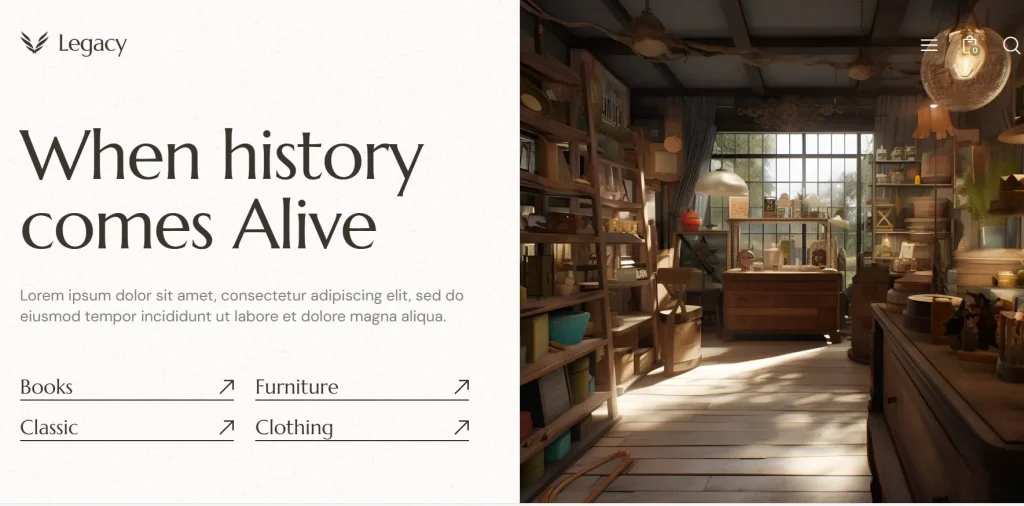
What is Legacy?
Legacy is a premium multi-purpose WordPress theme designed to help users build modern, professional, and adaptable websites. It provides a flexible framework that can be customized to suit different industries, making it a practical choice for a wide range of users.
At its core, Legacy is built to support business and professional websites. This means it includes layouts and components that help users present services, showcase work, and communicate value effectively. However, its multi-purpose nature allows it to go beyond business use cases and support portfolios, blogs, and content-driven platforms.
The theme is particularly useful for:
- Businesses and service providers who need a professional online presence
- Creative agencies that want to showcase projects and attract clients
- Freelancers building personal brand websites
- Content creators who need a structured blogging platform
One of the defining features of Legacy is its adaptability. Instead of forcing users into a specific design or structure, the theme provides customization options that allow users to create a website that matches their needs. This includes control over layouts, colors, fonts, and content sections.
In practical terms, this means that a user can start with a simple website and expand it over time. For example, a freelancer might begin with a portfolio page and later add service pages, testimonials, and a blog. A business might start with a basic website and later integrate marketing tools, landing pages, and additional features.
Another important aspect is clarity. Legacy is designed to present information in a structured and easy-to-understand way. This is important because visitors should be able to quickly understand what the website offers and what action they should take.
From a technical perspective, Legacy is responsive and optimized for performance. This ensures that the website works well on all devices and provides a smooth user experience.
Overall, Legacy is not just a theme—it is a flexible platform that supports long-term website growth and adaptability.
Key Features of Legacy
- Pre-built demo layouts for multiple industries
Legacy includes a variety of demo designs tailored for different types of websites, such as business, portfolio, and blog layouts. These demos provide a ready-made structure that users can import and customize. For example, a business can use a demo with service sections and testimonials, while a freelancer can choose a portfolio-focused layout. - Multi-purpose design flexibility
One of the most important features of Legacy is its flexibility. The theme can be adapted to different use cases, allowing users to create various types of websites without changing themes. This is particularly useful for businesses that plan to expand their website over time. - Drag-and-drop page builder support
Legacy supports page builders, enabling users to create and customize pages visually. This makes it easier to design layouts, add content, and make changes without coding. For example, users can create landing pages, service pages, and blog layouts using a simple interface. - Service and portfolio showcase sections
The theme includes dedicated sections for presenting services and portfolio projects. This is especially useful for agencies and freelancers who need to showcase their work. For instance, a design agency can display case studies with images and descriptions, while a consultant can list services with clear explanations. - Responsive and mobile-friendly design
Legacy is designed to work across all devices, ensuring a consistent experience for users on desktops, tablets, and smartphones. This is essential for modern websites, as mobile traffic continues to grow. - Customization options for branding
Users can customize colors, fonts, layouts, and other design elements to match their brand identity. This allows businesses to create a unique and professional appearance. - SEO-friendly structure
The theme is built with clean code and optimized structure, making it easier to implement SEO strategies. This helps improve search engine rankings and visibility. - Performance optimization
Legacy is designed for fast loading times, which is important for both user experience and SEO. A fast website keeps visitors engaged and reduces bounce rates. - Integration support
The theme supports integration with popular plugins and tools, such as contact forms, analytics platforms, and marketing tools. This enhances functionality and allows businesses to extend their website capabilities. - Regular updates and compatibility
Legacy is regularly updated to ensure compatibility with WordPress and other plugins. This helps maintain stability and ensures that the website continues to function properly over time.
Benefits of Using Legacy
One of the most significant benefits of using Legacy is its versatility. Users can create different types of websites using a single theme, which reduces the need to switch themes as their needs change. This is especially valuable for businesses and professionals who want a long-term solution.
Another key benefit is ease of use. The combination of pre-built demos and page builder support makes it possible to create a professional website without advanced technical skills. This lowers the barrier to entry and allows users to focus on content and strategy.
Legacy also improves user experience by providing clear navigation and structured layouts. Visitors can easily find information, understand the website’s purpose, and take action. This is important for conversion, whether the goal is generating leads, selling services, or building an audience.
From a business perspective, the theme supports scalability. As the website grows, users can add new pages, features, and integrations without needing to redesign the entire site. This makes Legacy a future-proof choice.
Another benefit is improved branding. A well-designed website helps build trust and credibility. Legacy allows users to create a consistent visual identity that reflects their brand.
In real-world scenarios:
- A freelancer can use Legacy to build a portfolio and attract clients.
- A business can use it to generate leads and showcase services.
- An agency can present case studies and build credibility.
- A blogger can create a structured content platform.
These examples demonstrate how Legacy can support different goals.
How to Install Legacy
Installing Legacy on a WordPress website is a straightforward process. First, download the theme file from a trusted source such as Pluginpro.org.
Next, log in to your WordPress dashboard and navigate to Appearance > Themes. Click Add New, then select Upload Theme. Choose the Legacy ZIP file and click Install Now. Once the installation is complete, click Activate.
After activation, install any required plugins. These may include page builders and demo import tools. Installing these ensures that the theme functions correctly.
The next step is importing demo content. This provides a ready-made layout that you can customize. Replace demo content with your own text, images, and branding.
After that, configure theme settings such as colors, fonts, and layouts. Create pages, set up navigation menus, and add your content.
Testing is essential. Check the website on different devices, review all pages, and ensure that features work correctly.
Finally, optimize the website for performance and SEO before launching.
Why Buy Legacy at Pluginpro.org
Purchasing Legacy from Pluginpro.org offers several advantages. One of the biggest benefits is cost savings, with users able to save up to 95% compared to official pricing.
Pluginpro.org provides 100% clean files, ensuring that the theme is safe and reliable.
Another advantage is unlimited website usage, which is ideal for developers and agencies.
Easy updates ensure compatibility with the latest WordPress versions.
Secure downloads provide a smooth installation process.
Overall, Pluginpro.org offers a practical and cost-effective way to access premium themes.
Conclusion
Legacy is a powerful multi-purpose WordPress theme that combines flexibility, performance, and ease of use. It is suitable for a wide range of websites, from business and portfolio sites to blogs and content platforms.
With features such as pre-built demos, customization options, and responsive design, Legacy provides a strong foundation for building professional websites.
When purchased from Pluginpro.org, it becomes even more accessible and cost-effective.
If you are looking for a versatile and future-proof WordPress theme, Legacy is a strong option worth considering.



