Media websites have very different needs compared to standard business sites or simple blogs. A traditional WordPress theme may work well for text-based articles, but once a website starts publishing videos, podcasts, image galleries, streaming content, interviews, trailers, music episodes, or mixed-format editorial content, the limitations of a generic theme become obvious. Navigation gets messy, media players feel disconnected from the design, category structures become hard to manage, and content discovery suffers. This is exactly where Mediaflex becomes a valuable solution.
Mediaflex is a premium WordPress theme designed specifically for multimedia websites. It is built for projects where video, audio, images, and editorial content need to work together in one cohesive platform. This makes it especially useful for digital magazines, video blogs, entertainment sites, podcast platforms, music websites, streaming-style portals, review platforms, and creator hubs that publish in multiple formats.
That specialized focus matters in real-world use. A digital magazine may publish breaking news articles, interviews, embedded videos, and photo galleries all on the same site. A podcast brand may need episode pages with audio players, show notes, guest details, and category-based browsing. A video content platform may need featured media sections, playlists, thumbnails, and intuitive archive pages. A general-purpose theme often handles these tasks in a clumsy way because it was never designed for media-first consumption. Mediaflex, on the other hand, is structured around that exact challenge.
Another major issue with media-rich sites is engagement. When users visit a platform built around entertainment, education, commentary, or streaming-style content, they are often willing to stay longer if the experience is smooth. But for that to happen, the site needs to make content discovery easy. Users should be able to move naturally from one video to another, from one podcast episode to related episodes, or from a feature article to supporting media content. Mediaflex helps create that kind of environment by giving site owners a structure that supports exploration instead of just one-time page views.
Performance is also a critical factor. Media-heavy sites can become slow very quickly if the theme itself is overloaded or poorly structured. A well-designed media theme must help present rich content without making the website feel bloated or difficult to navigate. Mediaflex is useful because it is designed for this kind of balance. It gives media content the space it needs visually while still supporting usability and performance.
Another advantage is launch speed. Many media projects need to go live quickly, whether it is a new podcast website, a creator portfolio, an online magazine, or a niche entertainment hub. Building all the layouts from scratch would take significant time. Mediaflex includes demo layouts and design structures that reduce that setup burden, allowing users to import a starting point and customize from there.
In this article, we will explore Mediaflex in detail, including what it is, its key features, the practical benefits it offers, how to install it, and why purchasing it from Pluginpro.org can be a smart choice for WordPress users who want a premium media-focused theme without paying full retail pricing.
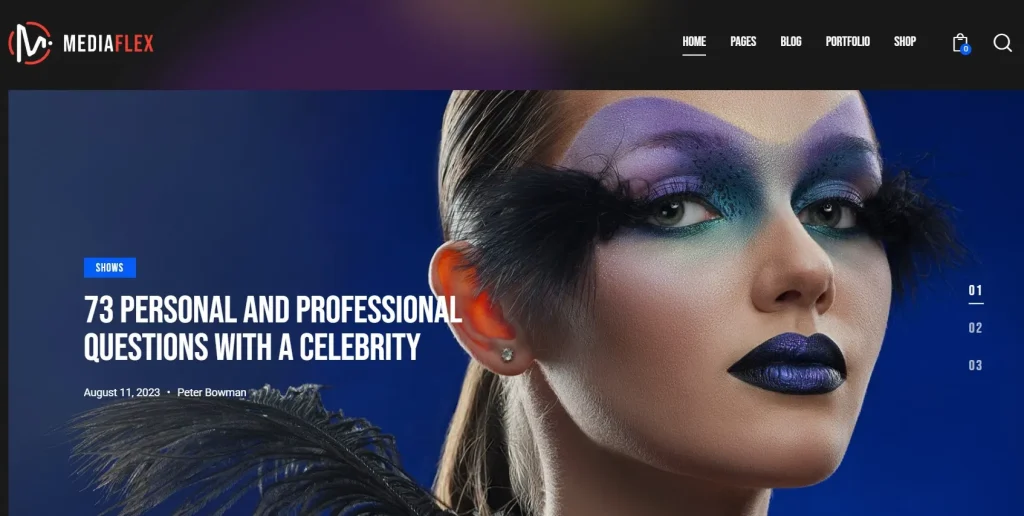
What is Mediaflex?
Mediaflex is a premium WordPress theme created for websites that publish and organize multimedia content. Instead of treating video, audio, image galleries, and written articles as secondary elements inside a standard blog layout, Mediaflex is designed to make these content types central to the user experience. This makes it especially suitable for publishers, creators, online media brands, and entertainment-focused projects.
At its core, Mediaflex is built for content diversity. Many modern websites do not rely on only one format anymore. A site may publish long-form written posts, short videos, podcast episodes, event recaps, galleries, and embedded social media clips all within the same platform. A theme that only handles text well creates friction in that environment. Mediaflex is useful because it provides a more balanced structure for different media formats so they can coexist without making the site feel inconsistent.
The theme is well suited for several kinds of projects. A video-based website can use Mediaflex to showcase featured videos, organize content by category, and make archives easier to browse. A podcast site can use it to create episode pages with embedded audio players, descriptions, timestamps, and guest information. A digital magazine can use it to combine editorial articles with featured media, category blocks, and homepage sections that prioritize visuals. A musician, creator, or media brand can use it to build a content hub rather than just a simple website.
One of the main reasons Mediaflex is valuable is that it improves content presentation. On media-heavy sites, presentation is not just aesthetic. It directly affects content discovery and session depth. If users cannot easily find the next piece of relevant content, they leave. Mediaflex helps organize categories, highlight featured content, and create layouts where users naturally continue exploring. This is a major difference compared to themes that only focus on one post at a time.
Another important point is branding. Media websites often depend on their own visual identity. A podcast brand may want a darker, more immersive interface. A magazine may want a clean editorial structure. A music or entertainment site may need bold imagery and featured media blocks. Mediaflex helps support that branding through customization and layout flexibility, allowing different types of publishers to shape the theme to match their own tone.
From a technical perspective, Mediaflex is also useful because it supports responsive design and structured media presentation across devices. Since a large share of users now consume media on mobile, a modern media theme cannot treat mobile browsing as secondary. Episode pages, galleries, and embedded content must still feel accessible and visually clean on smaller screens.
In simple terms, Mediaflex is more than a visually attractive theme. It is a functional foundation for content-rich websites that need to publish, organize, and promote multimedia content in a more intentional way.
Key Features of Mediaflex
- Pre-built demo layouts for media platforms
One of the most practical features of Mediaflex is its set of pre-built demo layouts designed for media-heavy websites. These demos provide structured starting points for different types of projects such as digital magazines, podcast sites, video hubs, and content creator platforms. Instead of starting from a blank page, users can import a demo that already includes homepage sections, featured content layouts, category blocks, and archive structure. This can save a great deal of time during setup. - Support for multiple content formats
Mediaflex is built to support video, audio, image galleries, and written articles in a more unified way than standard blog themes. This is important because many publishers and creators no longer work in only one medium. A site may publish an interview article with a video clip, or a podcast episode with supporting images and text. The theme helps these formats work together without creating a disjointed experience. - Media player-friendly layouts
A theme designed for multimedia content needs to accommodate audio and video playback properly. Mediaflex supports layouts where media players feel like a natural part of the page rather than an awkward embed inside a standard post. This matters for podcast episodes, streaming previews, music releases, video reviews, and other pages where media playback is central to the experience. - Strong content organization and categorization
Media sites often publish large libraries of content, so navigation and discovery become critical. Mediaflex helps organize posts through category sections, content blocks, archives, and homepage structures that highlight different types of media. For example, a podcast network can separate shows by topic, while a video site can organize content by genre or series. Better structure helps users find more content without friction. - Featured content and homepage spotlight sections
Media websites often need to promote certain items more heavily than others. A new video release, a podcast premiere, a top news story, or a trending article may deserve stronger homepage placement. Mediaflex includes layout structures for featured content areas so site owners can highlight priority pieces more effectively. This makes the homepage feel more editorial and strategic rather than just chronological. - Responsive and mobile-friendly design
A large percentage of media consumption happens on mobile devices. Mediaflex is designed to adapt across desktops, tablets, and smartphones so that content remains accessible and visually strong on different screen sizes. This is especially important for podcast listeners, video viewers, and readers who discover content through social media and visit from mobile first. - Customization options for media branding
Every media brand has its own style. Some need a clean editorial look, while others need a bolder entertainment-style presentation. Mediaflex offers customization controls for colors, typography, layout choices, and overall styling so users can shape the theme to match their brand. This is important because media websites often depend on recognizability and presentation as much as content itself. - SEO-friendly structure
For media publishers, search traffic can be a major source of growth. Mediaflex provides a cleaner structural base for SEO than many visually overloaded themes. This helps support optimization on articles, category pages, and content archives. While the theme alone does not create SEO success, it makes it easier to build on-page optimization and content structure properly. - Performance-conscious design for rich content
Media sites can easily become slow if both the content and the theme are heavy. Mediaflex is valuable because it aims to present rich media attractively without adding unnecessary visual clutter or technical overhead. This gives site owners a better foundation for balancing performance and presentation, especially when dealing with thumbnails, embeds, and large content libraries. - Regular updates and compatibility support
For content-driven sites that publish continuously, theme stability matters. Mediaflex becomes more useful when it stays compatible with WordPress updates and related plugins over time. This helps site owners avoid unnecessary disruptions and gives the theme more long-term reliability.
Benefits of Using Mediaflex
One of the biggest benefits of using Mediaflex is better content presentation. A media-rich website is only as strong as its ability to display content in a way that feels organized and compelling. If a site publishes strong videos or episodes but presents them poorly, users are less likely to continue exploring. Mediaflex helps improve that by giving media content a better visual and structural environment.
Another major benefit is improved user engagement. Media sites often succeed by keeping users on the platform longer, encouraging them to watch another clip, play another episode, or read another article. Mediaflex supports this by making content discovery easier through better navigation, featured sections, and category-based organization. Instead of isolated posts, the site begins to feel like an interconnected content hub.
The theme also saves time in the build process. Pre-built demos and media-oriented layouts mean users do not have to invent every section manually. This is especially helpful for new projects that want to launch quickly, such as an online publication, a creator brand site, or a niche podcast platform. Rather than spending weeks designing from scratch, users can start from a professional media framework and customize from there.
Another important benefit is stronger branding. Media brands need visual consistency. A site that feels generic may undermine the identity of a creator, magazine, or show. Mediaflex helps users shape the website around a stronger brand style, whether that means polished editorial design, bold entertainment visuals, or streamlined podcast presentation.
It also supports content diversity more effectively than simple blog themes. For example, a site that publishes review videos, audio interviews, written features, and photo galleries can maintain a more consistent presentation across all those formats. This is useful because audiences increasingly expect multimedia content ecosystems rather than one-format websites.
From a business perspective, Mediaflex can also help support monetization strategies. Better content discovery can increase page views, better media presentation can improve user trust, and stronger branding can make the site more attractive to sponsors, subscribers, or advertisers. A media platform that feels more professional often has stronger commercial potential than one that feels improvised.
In real-world use, these benefits are easy to imagine. A podcast site can use Mediaflex to make episode archives easier to browse and listen to. A news website can use it to balance breaking stories with embedded video and visual coverage. A review site can create better pathways between articles and media. A creator can build a central hub for content that exists across multiple platforms instead of relying only on social media profiles.
Overall, Mediaflex helps a media website feel more complete. It improves how content is displayed, how users move through it, and how the brand is experienced across different formats.
How to Install Mediaflex
Installing Mediaflex on a WordPress website is usually a straightforward process. The first step is to obtain the theme ZIP file from a trusted source. Once you have it, log in to your WordPress dashboard and navigate to Appearance > Themes.
Click Add New, then choose Upload Theme. Select the Mediaflex ZIP file from your computer, upload it, and click Install Now. After the installation is complete, click Activate. At that point, Mediaflex becomes the active theme on your WordPress site.
After activation, the next step is to install any required or recommended plugins. Media themes often rely on supporting plugins for page building, demo import, sliders, or media integration. Installing these ensures that the demos and specialized content layouts work as intended. If the theme includes demo import functionality, this is usually the easiest way to begin.
Importing demo content can save a lot of time. It gives you a homepage structure, category sections, content blocks, and visual hierarchy similar to the theme preview. From there, you can replace the placeholder material with your own branding, logo, media assets, posts, and layout preferences. For a media site, this is particularly helpful because homepage structure can otherwise take a long time to build manually.
Next, customize the theme settings. Adjust fonts, colors, header layouts, category displays, and content sections so the site reflects your own brand or publication style. For example, a podcast site may want a darker, audio-focused homepage, while a digital magazine may prefer a cleaner editorial layout with featured story sections.
Then prepare your content system. Create categories for your content formats, organize posts clearly, upload media assets, and make sure your archives are easy to navigate. If your site includes podcasts, make sure episode pages include the correct player embeds and metadata. If it includes video, test thumbnails and playback areas carefully. If it uses image-heavy articles, review gallery presentation and loading behavior.
Testing is important before launch. View the site on both desktop and mobile. Check homepage sections, article pages, category archives, and embedded media. Make sure the theme handles video, audio, and image content properly without breaking layout or reducing readability. Pay close attention to navigation and session flow, since content discovery is one of the most important goals of a media site.
Finally, optimize performance. A media theme provides the structure, but overall speed will also depend on properly sized images, reasonable embed usage, caching, and good hosting. Mediaflex gives you a better foundation, but good optimization practices still matter.
Why Buy Mediaflex at Pluginpro.org
Buying Mediaflex at Pluginpro.org can be a smart choice for WordPress users who want premium media-focused design at a lower cost. One of the strongest reasons is affordability. Users can often save up to 95% compared to standard pricing, which is especially helpful for startups, publishers, creators, small media brands, and agencies working with limited budgets.
Another important benefit is access to 100% clean files. This matters because theme reliability is critical for any active content website. A media site often publishes frequently and depends on stable layout behavior across a large number of pages. Clean files reduce the risk of technical problems, malware concerns, or compatibility issues that could disrupt the publishing workflow.
Unlimited website usage is another major advantage. Many premium theme licenses restrict installation to a small number of domains, which can become expensive for agencies, developers, or media entrepreneurs operating several projects. More flexible usage offers better value and makes it easier to use the theme across multiple builds.
Easy updates also add practical value. Media websites often evolve continuously, and compatibility matters as WordPress changes over time. Access to updates helps the theme stay usable and reduces the likelihood of technical conflicts with plugins or core updates. This is especially useful for active sites that rely on long-term stability.
Secure downloads are another benefit. When users purchase a theme, they want access quickly and reliably so they can begin setup without delays. This matters for agencies on deadlines, creators launching projects, and publishers trying to improve an active site on a schedule.
There is also a broader financial advantage. Most media websites use more than one premium tool. In addition to a theme, they may need plugins for SEO, caching, forms, media management, newsletter integration, ad placement, or analytics. Paying full price for every component can significantly increase project cost. Pluginpro.org helps make a more complete premium stack financially realistic.
In practical terms, a new podcast network can use Pluginpro.org to launch a polished website without putting too much budget into theme licensing. A digital publisher can allocate more money to content production instead of software costs. A WordPress developer can use Mediaflex across multiple client sites more efficiently. These are real operational benefits.
For users who value affordability, clean files, flexible usage, easy updates, and secure access, Pluginpro.org offers a compelling option for getting Mediaflex.
Conclusion
Mediaflex is a strong WordPress theme for websites built around multimedia content. Its main advantage is that it understands the needs of media-first projects better than a generic blogging or business theme. It helps users organize and present videos, podcasts, images, and written content in a more effective and engaging way.
This makes it especially useful for digital magazines, podcast websites, entertainment portals, creator hubs, streaming-style platforms, and mixed-format content brands. The theme supports stronger content presentation, better content discovery, improved branding, and a more professional overall experience for visitors.
Mediaflex is also practical because it balances design and functionality. It gives rich content the visual space it needs while still supporting navigation, responsive browsing, and structured homepage design. For projects that want to keep users engaged longer and turn individual posts into a broader content experience, this is a major advantage.
When purchased through Pluginpro.org, Mediaflex becomes even more attractive from a value perspective. The combination of major cost savings, clean files, unlimited website usage, easy updates, and secure downloads gives users strong overall value.
If you want to build a WordPress website focused on rich media content and need a theme that is designed for that environment rather than adapted to it, Mediaflex is well worth considering.