
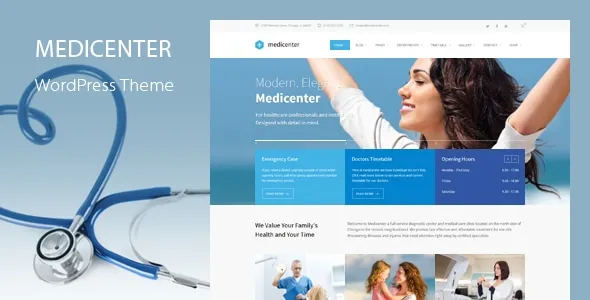
MediCenter is a specialized WordPress theme designed for medical, healthcare, and clinic websites that need both professional presentation and practical functionality. From the very first interaction, MediCenter makes it clear that it is not just about visual appeal—it is built to handle real operational needs such as appointment scheduling, doctor profiles, and service management.
Healthcare providers today require more than a simple website. Patients expect to find accurate information quickly, book appointments online, and trust the credibility of the brand they are interacting with. MediCenter addresses these expectations by combining structured layouts with purpose-driven features tailored for clinics, hospitals, dental offices, and wellness centers.
In practice, MediCenter reduces the gap between website design and day-to-day operations. Instead of relying on multiple plugins to handle booking systems, schedules, and content presentation, this theme integrates essential tools into a cohesive framework. That makes it especially valuable for medical professionals who want a reliable digital presence without complex technical setup.
For agencies and freelancers working with healthcare clients, MediCenter provides a scalable solution that balances customization with ease of deployment. Whether you are launching a new clinic website or redesigning an outdated one, it offers a structured starting point that aligns with industry expectations.
What is MediCenter?
MediCenter is a WordPress theme specifically built for healthcare-related websites, offering pre-designed layouts and built-in tools that support medical services, doctor management, and patient interaction. It is not a generic theme adapted for clinics; it is purpose-built to match the workflows and presentation standards of the healthcare industry.
At its core, MediCenter functions as a complete website solution for medical professionals. It includes templates for departments, doctors, services, and appointment booking, allowing users to create a fully functional site without relying heavily on third-party plugins. This integrated approach helps maintain consistency across the website while reducing compatibility issues.
The theme is particularly suited for clinics, hospitals, dentists, physiotherapists, and wellness centers. For example, a dental clinic can use MediCenter to showcase treatment services, introduce its team of dentists, and allow patients to book appointments directly from the website. A larger hospital, on the other hand, can organize multiple departments with structured navigation that helps visitors find information efficiently.
In real-world use, MediCenter simplifies the process of building trust with potential patients. A well-organized website with clear doctor profiles, service descriptions, and booking options creates a sense of professionalism. This is especially important in healthcare, where credibility plays a major role in decision-making.
Another key aspect is its adaptability. While it is designed for medical use, MediCenter can also be used by related industries such as fitness centers, rehabilitation clinics, and alternative therapy providers. This flexibility allows developers to use the theme across different projects without starting from scratch each time.
Key Features of MediCenter
- Built-in Appointment Booking System
MediCenter includes an integrated appointment booking feature that allows patients to schedule visits directly from the website. Instead of redirecting users to external systems, everything happens within a unified interface.
In practice, this means a clinic can reduce administrative workload by minimizing phone-based bookings. Patients select available time slots, fill in their details, and confirm appointments instantly. This improves efficiency and enhances user convenience. - Doctor Profiles and Team Management
The theme provides structured layouts for doctor profiles, including qualifications, specialties, and availability. These profiles are not just informational—they are designed to build trust.
For example, a patient searching for a specialist can quickly review multiple doctors, compare expertise, and choose the most suitable option. This transparency often leads to higher engagement and conversion rates. - Department and Service Pages
MediCenter allows you to organize services into departments, making it easier for users to navigate complex offerings. Each department can have its own detailed page with descriptions, images, and related doctors.
This structure is particularly useful for multi-specialty clinics where patients need to identify the correct department before booking an appointment. - Timetable and Scheduling System
A built-in timetable feature enables clinics to display working hours, doctor availability, and service schedules in a clear format.
In real scenarios, this reduces confusion for patients who might otherwise call for basic availability information. It also helps clinics manage expectations by showing real-time schedules. - Responsive and Mobile-Friendly Design
MediCenter is fully responsive, ensuring that the website performs well on all devices. This is critical because a large portion of users access healthcare websites via mobile devices.
A responsive design ensures that appointment booking, navigation, and content readability remain seamless, regardless of screen size. - Pre-built Demo Layouts
The theme comes with multiple demo layouts that can be imported with a single click. These demos are designed for different types of medical services, allowing users to choose a starting point that closely matches their needs.
For example, a physiotherapy clinic can select a layout that emphasizes treatment plans, while a hospital can use a more comprehensive structure. - Customization Options
MediCenter offers flexible customization through theme settings and compatibility with page builders. Users can adjust colors, fonts, layouts, and content without needing advanced coding skills.
This flexibility allows agencies to maintain brand consistency across multiple client projects while still delivering unique designs. - SEO-Friendly Structure
The theme is built with clean code and optimized structure, making it easier for search engines to index content.
In practice, this helps healthcare websites rank for local search queries such as “clinic near me” or “dentist appointment,” which are critical for attracting new patients. - Integration with Essential Plugins
MediCenter works well with popular WordPress plugins, including contact forms, SEO tools, and performance optimization plugins.
This ensures that users can extend functionality without facing compatibility issues, which is a common challenge with poorly designed themes. - Fast Performance and Optimization
Performance plays a significant role in user experience, especially for medical websites where users expect quick access to information. MediCenter is optimized for speed, ensuring that pages load efficiently.
Faster loading times reduce bounce rates and improve overall engagement, particularly for mobile users.
Benefits of Using MediCenter
One of the most noticeable benefits of MediCenter is its ability to streamline website management for healthcare providers. Instead of juggling multiple plugins for booking, scheduling, and content organization, users can manage everything within a single system. This reduces complexity and minimizes the risk of technical conflicts.
From a workflow perspective, MediCenter improves operational efficiency. Clinics can automate appointment bookings, display real-time schedules, and update doctor availability without manual intervention. This not only saves time but also reduces the chances of scheduling errors.
User experience is another area where MediCenter excels. Patients visiting the website can quickly find relevant information, explore services, and book appointments without confusion. A well-structured interface creates a smoother journey, which often leads to higher conversion rates.
Performance optimization is also a key advantage. A fast-loading website ensures that users do not leave due to delays, which is particularly important in competitive local markets. Combined with its SEO-friendly structure, MediCenter helps healthcare providers attract and retain more visitors.
Finally, the theme supports long-term scalability. As a clinic grows and adds more services or departments, the website can expand without requiring a complete redesign. This makes MediCenter a practical investment for both small clinics and larger healthcare organizations.
Real Use Cases of MediCenter
A common use case for MediCenter is a private clinic that wants to modernize its online presence. Instead of relying on a static website, the clinic can implement dynamic features such as appointment booking and doctor profiles. This transformation often leads to increased patient engagement and reduced administrative workload.
Agencies frequently use MediCenter when building websites for healthcare clients. Its pre-built templates and structured layout allow developers to deliver projects faster while maintaining professional quality. For example, an agency managing multiple clinic websites can reuse the same framework and customize it for each client.
For blogs and informational healthcare websites, MediCenter provides a clean and organized layout that supports content publishing. Articles, updates, and announcements can be presented in a way that is easy to navigate, helping build authority and trust with the audience.
Another practical scenario involves multi-location healthcare providers. MediCenter allows them to showcase different branches, each with its own team and services, while maintaining a unified brand identity across the website.
How to Install MediCenter
Installing MediCenter is a straightforward process that can be completed in a few steps. Even users with limited technical experience can set it up without difficulty.
First, download the MediCenter theme package from a trusted source. Once you have the file, log in to your WordPress dashboard and navigate to the “Appearance” section. From there, select “Themes” and click on “Add New,” then upload the theme file.
After uploading, activate the theme. At this stage, the basic structure of MediCenter will be applied to your website. However, to achieve the full functionality, you will need to install the recommended plugins. These are usually provided within the theme package and can be installed directly from the dashboard.
Next, import the demo content. This step is particularly useful because it gives you a ready-made layout that you can customize. Instead of building everything from scratch, you can replace the demo content with your own information.
Once the demo is imported, begin customizing the website. Update the logo, colors, and typography to match your brand. Then, add your services, doctor profiles, and schedule information. This is where the theme’s structured design becomes especially helpful.
Finally, test the website thoroughly. Check the appointment booking system, ensure that all pages load correctly, and verify that the site is responsive on different devices. Once everything is working as expected, your MediCenter website is ready to go live.
Why Buy MediCenter at Pluginpro.org
Purchasing MediCenter at Pluginpro.org offers a practical advantage for users who want premium quality without paying full retail prices. Instead of purchasing individual licenses at higher costs, users gain access to the same theme at a significantly reduced price.
One of the biggest benefits is cost efficiency. For example, an agency managing multiple client websites can save a substantial amount by using Pluginpro.org. Instead of buying separate licenses for each project, they can deploy MediCenter across multiple sites without additional expenses. This approach directly improves profit margins while maintaining quality.
Another advantage is access to clean and secure files. Pluginpro.org ensures that the theme files are free from malicious code and safe to use. In real-world scenarios, this is critical because compromised files can lead to security issues and damage a website’s reputation.
Unlimited website usage is also a major benefit. A freelancer working with several healthcare clients can use MediCenter repeatedly without worrying about licensing restrictions. This flexibility allows for faster project delivery and consistent results across different clients.
The platform also simplifies updates. Instead of managing multiple licenses and renewal fees, users can access updated versions of MediCenter through a centralized system. This reduces administrative overhead and ensures that websites remain compatible with the latest WordPress updates.
Another practical scenario involves startups or small clinics with limited budgets. By purchasing MediCenter through Pluginpro.org, they can access a premium solution without exceeding their financial constraints. This allows them to invest more resources into marketing or patient services.
Compared to buying directly from multiple vendors, Pluginpro.org provides a streamlined experience. Users can access a wide range of themes and plugins in one place, making it easier to manage their digital toolkit.
Is MediCenter Worth It?
Yes, MediCenter is worth it for healthcare providers and developers who need a reliable, purpose-built website solution. It is particularly valuable for clinics, hospitals, and agencies working with medical clients.
For example, a small clinic that wants to reduce phone-based bookings can benefit immediately from the built-in appointment system. Instead of hiring additional staff to manage scheduling, the website handles a large portion of the workload automatically.
Similarly, agencies can use MediCenter to deliver professional healthcare websites quickly, without compromising on functionality. This makes it a practical choice for both individual projects and long-term client relationships.
Conclusion
MediCenter stands out as a comprehensive solution for healthcare websites, combining design, functionality, and performance in a single package. Its focus on real-world usability makes it more than just a theme—it becomes an operational tool that supports daily activities.
From appointment booking to doctor management, every feature is designed with practical application in mind. This makes it easier for healthcare providers to maintain a professional online presence while improving efficiency.
For developers and agencies, MediCenter offers a scalable framework that can be adapted to different client needs. Combined with cost-saving options from Pluginpro.org, it becomes an even more attractive choice.
When implemented correctly, MediCenter helps bridge the gap between digital presence and real-world service delivery, making it a valuable asset for any healthcare-focused website.



