Building a professional website for a consulting firm, insurance agency, financial service, or corporate business requires more than just basic design. It demands a combination of credibility, performance, and flexibility. Visitors expect a website that clearly communicates services, builds trust, and delivers a seamless browsing experience across all devices. This is where Modins becomes a powerful solution for WordPress users.
Modins is a modern WordPress theme specifically designed for insurance companies, consulting firms, finance businesses, and corporate service providers. It focuses on delivering a clean, professional, and conversion-oriented design that helps businesses present their services effectively. Whether you are an insurance broker, financial advisor, or corporate consultant, Modins provides the structure and tools needed to create a strong online presence.
In today’s competitive market, having a fast, SEO-friendly, and mobile-responsive website is essential. Modins is built with these priorities in mind, ensuring that your website not only looks professional but also performs well in search engines and provides a smooth user experience. With ready-made demos, flexible layouts, and easy customization, users can launch a fully functional website without advanced technical skills.
In this comprehensive article, we will explore everything you need to know about Modins, including what it is, its key features, practical benefits, installation process, and why purchasing it from Pluginpro.org is a smart investment.
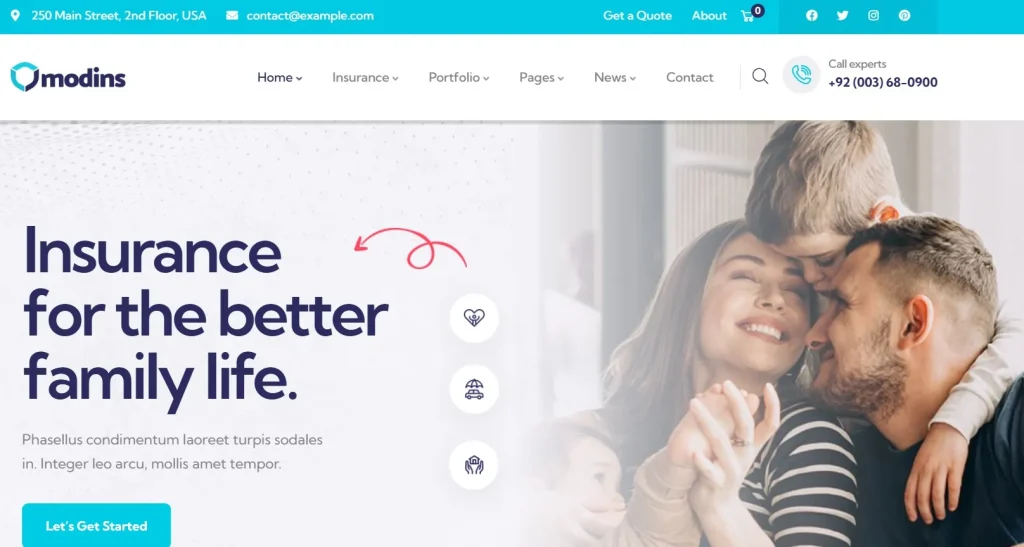
What is Modins?
Modins is a premium WordPress theme designed for businesses in the insurance, consulting, and financial sectors. It provides a complete framework for building professional corporate websites with a strong focus on service presentation, lead generation, and user trust. Unlike generic themes, Modins is tailored to industries that require credibility, clarity, and structured content.
The theme comes with pre-built demo layouts that are specifically designed for insurance agencies, financial advisors, and consulting firms. These demos include essential pages such as service listings, about pages, team profiles, testimonials, and contact forms. This allows users to quickly set up a website and then customize it according to their business needs.
One of the key aspects of Modins is its integration with modern page builders. This enables users to create and modify layouts using a drag-and-drop interface. For example, a consulting firm can easily build a landing page that highlights services, case studies, and client testimonials without writing any code. This flexibility makes Modins accessible to both beginners and experienced developers.
In real-world use cases, Modins is ideal for insurance companies showcasing policies and coverage plans, financial consultants presenting investment services, and corporate agencies highlighting their expertise. It can also be used by startups that want a professional and trustworthy website to attract clients and investors.
Additionally, Modins supports integration with popular WordPress plugins, allowing users to extend functionality. This includes SEO plugins, contact forms, and performance optimization tools. As a result, the theme is not only visually appealing but also highly functional and scalable.
Overall, Modins is a specialized WordPress theme that combines professional design, flexibility, and performance to meet the needs of modern business websites.
Key Features of Modins
Modins offers a wide range of features that are specifically designed to support corporate and business websites. Below are the key features that make Modins a powerful choice:
- Pre-built Professional Demos
Modins includes multiple demo websites tailored for insurance, consulting, and finance industries. These demos come with ready-made pages and layouts, allowing users to quickly launch their website. For example, an insurance agency can import a demo and immediately have pages for services, claims, and contact information. This significantly reduces development time and helps users focus on content and branding. - Drag-and-Drop Page Builder Integration
The theme is compatible with popular page builders, enabling users to create custom layouts without coding. This feature allows you to easily add sections such as service blocks, testimonials, and call-to-action elements. For instance, a financial advisor can design a landing page that highlights key services and encourages client inquiries. This flexibility is essential for creating unique and effective websites. - Responsive and Mobile-Friendly Design
Modins is fully responsive, ensuring that your website looks great on all devices. With more users accessing websites via smartphones, mobile optimization is crucial. The theme automatically adjusts layouts for different screen sizes, providing a consistent user experience. This also improves SEO performance, as search engines prioritize mobile-friendly websites. - Service-Oriented Layouts
The theme includes layouts specifically designed for showcasing services. Users can present detailed descriptions, pricing, and benefits in a structured format. This is particularly useful for consulting firms and insurance providers who need to explain complex services clearly. Well-organized service pages help visitors understand offerings and make informed decisions. - SEO Optimization
Modins is built with clean code and optimized structure, making it easier for search engines to index your website. It is compatible with popular SEO plugins, allowing users to further optimize their content. For example, businesses can target keywords related to insurance or consulting services to attract organic traffic. This helps increase visibility and generate leads. - Customization and Theme Options
The theme offers extensive customization options, including colors, typography, header styles, and layout settings. Users can easily adjust these elements to match their brand identity. This ensures that each website built with Modins can have a unique look while maintaining professional quality. - Performance and Speed Optimization
Fast loading times are essential for user experience and conversion rates. Modins is optimized for performance, using lightweight code and efficient design practices. This ensures that pages load quickly, reducing bounce rates and improving user engagement.
Benefits of Using Modins
Using Modins provides several practical benefits for businesses and website owners. One of the most important advantages is the ability to create a professional and trustworthy website quickly. With pre-built demos and easy customization, users can launch their site without hiring developers, saving both time and money.
Another key benefit is improved lead generation. Modins is designed with conversion in mind, featuring clear call-to-action sections, service highlights, and contact forms. For example, an insurance company can use the theme to encourage visitors to request quotes or consultations. This helps turn website visitors into potential clients.
Modins also enhances user experience. Its clean layout and intuitive navigation make it easy for visitors to find information. Whether users are looking for services, testimonials, or contact details, the website structure ensures a smooth browsing experience. This increases the likelihood of engagement and conversions.
For businesses in competitive industries, branding is crucial. Modins allows users to customize their website to reflect their brand identity. Consistent design and messaging help build trust and recognition among potential clients.
Additionally, the theme supports scalability. As your business grows, you can expand your website by adding new pages, services, and features. This makes Modins a long-term solution for business websites.
Finally, Modins helps improve search engine visibility. With SEO-friendly structure and fast performance, it supports better rankings and organic traffic growth. Over time, this can lead to increased business opportunities.
How to Install Modins
Installing Modins is a simple process that can be completed using two main methods. Before installation, ensure that your WordPress version and hosting environment meet the theme’s requirements.
Install via WordPress Dashboard
- Log in to your WordPress admin panel.
- Navigate to Appearance > Themes and click “Add New.”
- Click the “Upload Theme” button and select the Modins ZIP file.
- Click “Install Now” and wait for the process to complete.
- Once installed, click “Activate” to enable the theme.
After activation, you can import demo content to quickly set up your website. This includes pages, layouts, and settings that match the demo design. You can then customize content to suit your business.
Manual Installation
- Download the Modins theme ZIP file to your computer.
- Extract the ZIP file to access the theme folder.
- Use an FTP client to upload the folder to /wp-content/themes/.
- Log in to your WordPress dashboard and go to Appearance > Themes.
- Find Modins and click “Activate.”
Manual installation is useful for advanced users or when dealing with large files.
Practical Setup Tips
After installing Modins, configure theme options such as logo, colors, and typography. Import demo content if available and replace placeholder text with your own content. Install recommended plugins for additional functionality, such as SEO tools and contact forms. Finally, test your website on different devices to ensure responsiveness.
Why Buy Modins at Pluginpro.org
Purchasing Modins from Pluginpro.org offers several advantages that make it a smart choice. One of the biggest benefits is cost savings, as users can save up to 95% compared to the original price. This makes premium themes accessible to businesses of all sizes.
Pluginpro.org provides 100% clean files, ensuring that your theme is safe and free from malware. This is essential for maintaining website security and performance.
Another advantage is unlimited website usage. You can use Modins on multiple websites without additional licensing fees. This is particularly beneficial for agencies and developers.
The platform also offers easy updates, allowing you to keep your theme up to date with the latest features and improvements. Regular updates ensure compatibility with WordPress and plugins.
Additionally, Pluginpro.org ensures secure downloads and a smooth user experience. You can quickly access your files and start building your website without hassle.
Is Modins Worth It?
Yes, Modins is worth it for insurance agencies, financial advisors, consultants, and professional service businesses seeking a modern and trustworthy website solution.
Its combination of professional design, customization flexibility, lead generation features, and mobile responsiveness makes it a valuable investment for organizations focused on growth. Businesses that depend on credibility and customer trust will particularly benefit from the theme’s polished presentation.
For example, an insurance agency looking to increase quote requests and improve online visibility can use Modins to create a professional website that attracts and converts potential clients. The theme provides the tools necessary to support both branding and lead generation objectives.
Organizations seeking an affordable and scalable website solution should strongly consider Modins.
Conclusion
Modins is a feature-rich WordPress theme designed specifically for insurance agencies, financial consultants, and professional service providers. Its professional layouts, lead generation tools, responsive design, and customization options make it an excellent choice for businesses that want to establish credibility and attract new clients online.
The theme simplifies website development while providing the flexibility required to support different business models and service offerings. Whether you are operating a local insurance agency, an investment advisory firm, or a consulting business, Modins delivers the functionality needed to build a strong digital presence.
Businesses that value professional branding, customer trust, and efficient lead generation will find Modins to be a worthwhile investment. Combined with the affordability and convenience available through Pluginpro.org, it offers exceptional value for both individuals and agencies.
Users interested in expanding their website capabilities may also consider Elementor Pro for advanced page building, Rank Math Pro for SEO optimization, WPForms for lead generation forms, Advanced Custom Fields PRO for custom content management, and Slider Revolution for creating engaging visual presentations. Together with Modins, these tools can help build a highly effective business website.