
In today’s digital environment, nonprofit organizations, charities, NGOs, churches, community groups, and fundraising campaigns need far more than a simple online brochure. A strong website has become a central part of how these organizations build trust, communicate their mission, attract donors, recruit volunteers, and keep supporters updated. For many causes, the website is the first place where people learn about the organization, decide whether it feels credible, and determine if they want to donate or get involved. That is why choosing the right WordPress theme matters so much.
Orgarium is a WordPress theme created specifically for nonprofit and charity websites. Instead of forcing organizations to adapt a generic business theme to a mission-driven project, Orgarium provides a structure that fits the real needs of social impact organizations. It is built for campaigns, donation pages, volunteer recruitment, project showcases, event promotion, and storytelling. This makes it much more practical for charities and nonprofits that need a website to do real work, not just look attractive.
One of the biggest challenges for many nonprofit teams is limited technical capacity. Smaller organizations often do not have a full-time web developer or design department, yet they still need a professional website that can inspire confidence. Orgarium helps address this challenge by offering pre-built layouts, user-friendly customization tools, and compatibility with common WordPress plugins. This makes it easier for teams to launch and manage a polished site without advanced coding knowledge.
Another important advantage is the theme’s focus on emotional communication. Nonprofit websites are not only about services or products. They are about purpose, impact, and human stories. A strong charity website needs to explain a mission clearly, show where donations go, and help supporters feel emotionally connected to the cause. Orgarium supports that through modern design, campaign sections, image-driven content areas, and layouts that help organizations present their work in a compelling way.
Whether you are creating a website for a local food bank, a fundraising campaign, a child education charity, a disaster relief organization, an animal rescue project, or a faith-based nonprofit, Orgarium provides a flexible and professional foundation. It helps organizations communicate more effectively, raise support more efficiently, and build a stronger online presence that supports long-term growth.
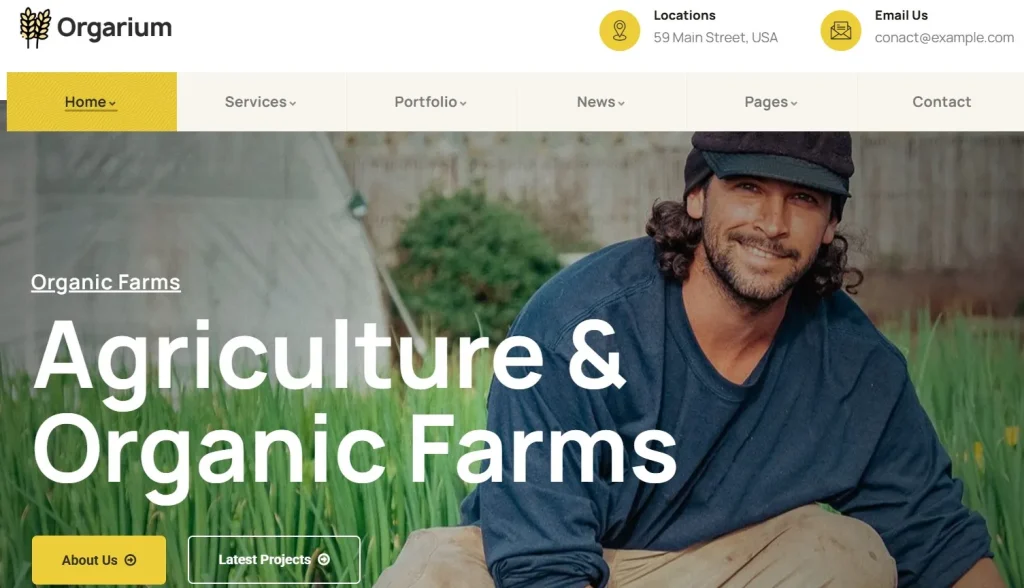
What is Orgarium?
Orgarium is a premium WordPress theme designed for nonprofits, charities, fundraising organizations, community projects, NGOs, and social initiatives. Its purpose is to help mission-driven organizations build websites that are visually professional, easy to manage, and equipped with the core features needed for outreach, fundraising, and engagement.
At a practical level, Orgarium is more than a visual design template. It is a website framework tailored to the operational needs of nonprofit work. Many nonprofit sites require specific elements such as donation calls to action, fundraising campaign pages, event promotion, volunteer sign-up forms, impact stories, project galleries, and sponsor or partner sections. Generic WordPress themes may require significant customization to support these goals effectively. Orgarium, by contrast, is created with these needs in mind from the start, which can save time and improve results.
For example, imagine an education-focused nonprofit that raises money to provide school supplies and scholarships for children in underserved communities. With Orgarium, the organization can create a homepage that introduces the mission, add campaign pages for active fundraising goals, show real project photos, publish stories of student success, and include clear donation buttons across the site. Instead of piecing together many separate design elements, the organization can work from a theme already aligned with its objectives.
Another example might be an environmental charity running tree-planting campaigns and volunteer cleanup events. That organization needs a website that can present campaign updates, explain impact clearly, recruit volunteers, accept donations, and promote upcoming events. Orgarium supports all of these needs through structured templates and customizable layouts.
Orgarium is also useful for religious nonprofits, community centers, health initiatives, and humanitarian projects. A local food pantry might use it to explain services, accept online donations, and recruit community volunteers. An animal rescue group could use it to share rescue stories, promote adoption drives, and fund medical care for animals. A social foundation could use it to build trust with supporters by displaying project progress, transparency information, and team or partner details.
In short, Orgarium is a purpose-built charity WordPress theme that helps nonprofits create websites that are not only attractive but also functional and mission-aligned. It combines design, storytelling, fundraising support, and usability in a way that serves the real-world needs of organizations trying to make a difference.
Key Features of Orgarium
- Pre-built nonprofit and charity templates
Orgarium includes professionally designed templates built specifically for charities, NGOs, and fundraising organizations. These layouts often cover homepages, campaign pages, donation sections, volunteer pages, event pages, and about sections. This matters because nonprofits usually need a clear way to present mission, impact, and calls to action without building everything from scratch. For example, a small charity can import a demo layout, replace the sample content with its own stories and images, and have a professional website structure ready much faster than designing each page manually. - Donation system compatibility
One of the most valuable features of Orgarium is its compatibility with popular donation and fundraising plugins. This allows organizations to accept online contributions, create campaign goals, and encourage supporters to donate easily. A smooth donation process matters because every extra step in the payment flow can reduce conversions. In real use, this means a nonprofit can set up a campaign such as “Support Clean Water Access” and direct users to a clear donation section where they can contribute without confusion. - Campaign and cause presentation layouts
Orgarium includes layouts designed to highlight specific causes, projects, or fundraising campaigns. These sections help organizations explain what they are working on, why the cause matters, and what kind of support is needed. This is especially useful because nonprofit audiences often want to understand where money goes and what outcomes it creates. For example, a rescue organization can create separate pages for emergency treatment, shelter support, and adoption events, each with clear messaging and visuals. - Volunteer and event management sections
Many nonprofits depend on volunteers, community events, and awareness campaigns, and Orgarium supports this through layouts for event promotion and volunteer engagement. A nonprofit can promote upcoming fundraisers, community drives, or training sessions while also collecting volunteer interest through forms. This feature is important because websites are often the first touchpoint for people who want to help but do not yet know how. A structured event section can turn passive visitors into active participants. - Responsive and mobile-friendly design
Orgarium is built to work across desktops, tablets, and smartphones. This is essential because many users now discover organizations through mobile search, social media, or links shared in messaging apps. A mobile-friendly nonprofit site ensures that donation buttons, forms, event details, and campaign pages remain easy to read and use on smaller screens. For example, if a supporter sees a fundraising post on social media and opens the link on their phone, the site should make it easy to understand the cause and donate immediately. - Drag-and-drop page builder support
The theme is designed to work with popular page builders, making it easier for non-technical users to edit layouts visually. This allows organizations to create custom pages, update campaigns, and adjust homepage sections without code. This matters because many nonprofit teams rely on staff or volunteers who are comfortable with content editing but not development. In practice, this means someone can add a new campaign banner, update impact numbers, or rearrange content blocks without needing outside technical help. - Storytelling-focused visual design
Nonprofit websites rely heavily on emotional communication, and Orgarium supports this with image-friendly layouts, testimonial sections, project galleries, and content blocks that help tell human stories. Stories are often what move supporters from awareness to action. For example, a children’s charity can use these design elements to combine photos, quotes, and progress updates in a way that makes the cause feel real and urgent. - SEO-friendly structure and performance optimization
Orgarium is built with clean code and a structure that supports search engine visibility. While content quality and SEO strategy still matter, having a technically sound theme creates a stronger base. Faster loading times and a clear heading hierarchy help both search engines and users navigate the site more effectively. For nonprofits trying to reach new donors organically, this can make a meaningful difference over time. - Customization options for branding
Every organization needs a website that reflects its identity, and Orgarium includes tools for adjusting colors, fonts, layouts, and visual styles. This helps nonprofits align the site with their logo, campaign branding, or institutional voice. A health-focused nonprofit may want a calm, trustworthy visual tone, while a youth-focused campaign might prefer something more energetic and bold. Orgarium gives the flexibility to support different brand personalities without requiring a full custom design.
Benefits of Using Orgarium
One of the most important benefits of using Orgarium is that it helps nonprofits appear more professional and trustworthy online. For mission-driven organizations, credibility is critical. Donors, volunteers, and partners are more likely to engage with a cause if the website feels clear, organized, and legitimate. A poorly designed or outdated site can make even a worthy organization appear less reliable. Orgarium helps solve that problem by giving nonprofits access to a polished design framework suited to their sector.
Another major benefit is time efficiency. Building a charity website from scratch takes significant work, especially when you need campaign pages, event sections, donation areas, and storytelling components. Orgarium reduces that workload by providing ready-made layouts that already match common nonprofit needs. This is especially valuable for smaller organizations that need to move quickly or work with limited time and resources. A campaign team can launch a fundraising microsite much faster when the structure is already in place.
Orgarium also improves fundraising support. Because the theme is built with donation-oriented layouts and plugin compatibility, it makes it easier to place calls to action in strategic positions throughout the site. This matters because effective fundraising often depends on visibility, clarity, and emotional timing. A supporter may read a story, view a campaign update, and feel ready to act in that moment. Orgarium helps make sure the donation path is close at hand rather than buried deep in the site.
The theme also supports better communication. Nonprofits often need to explain not just what they do, but why it matters. They need room for impact stories, project updates, transparency information, and announcements. Orgarium’s design helps structure all of this in a way that is easier for visitors to follow. For example, a donor might want to understand how a campaign works before giving, while a volunteer might want event details and sign-up instructions. A well-structured site supports both journeys.
Scalability is another key benefit. An organization may begin with a small website containing a homepage, about page, and donation page, then later add projects, events, blogs, reports, and multilingual support. Orgarium offers enough flexibility for this kind of growth. Instead of needing a redesign too early, organizations can keep building on the same theme as their outreach expands.
Finally, Orgarium helps nonprofits improve user engagement. A better visual layout, faster performance, and clearer navigation all contribute to longer sessions and stronger interaction. When visitors can quickly understand the mission, browse campaigns, and find ways to help, the website becomes a more effective support tool rather than just an information page.
How to Install Orgarium
Installing Orgarium is relatively simple, and most users can complete the setup process without advanced technical knowledge. As with most premium WordPress themes, there are two common methods: installing the theme through the WordPress dashboard or uploading it manually using FTP. The best method depends on your comfort level and hosting setup, but for most nonprofit teams, the dashboard method is the easiest.
Install via WordPress Dashboard
To begin, download the Orgarium theme ZIP file from your chosen source. Then log in to your WordPress admin area and go to Appearance > Themes. Click Add New, then choose Upload Theme. Select the Orgarium ZIP file from your computer and click Install Now.
Once the theme is installed, click Activate. At this point, the site will switch to the Orgarium design, but some important setup work still remains. Most premium themes recommend installing companion plugins for page builders, demo import, sliders, donation features, forms, or event functionality. Install the recommended plugins so you can use the theme’s full feature set.
After activation, import the demo content if it is included. This is often the fastest way to get started because it gives you a ready-made layout similar to the theme preview. Instead of building the homepage and inner pages from scratch, you can replace sample images, text, and campaign content with your own organization’s details. For example, you can swap generic cause images with photos from your projects, replace placeholder text with your mission statement, and update buttons to lead to your real donation form.
Next, configure the site settings. This usually includes setting your logo, brand colors, menu structure, footer content, and homepage sections. If your nonprofit uses a donation plugin, connect it at this stage and test the donation flow. Also review your contact forms, volunteer forms, and event pages to make sure they are working properly.
Manual Installation
Manual installation is another option if you are more comfortable working directly with server files. First, unzip the Orgarium download package on your computer. Then use an FTP client such as FileZilla to connect to your hosting account. Navigate to the wp-content/themes/ directory and upload the extracted Orgarium theme folder there.
Once the upload finishes, log in to your WordPress dashboard, go to Appearance > Themes, and activate Orgarium. Then proceed with the same steps as above by installing required plugins, importing demo content if available, and customizing the site settings.
After either installation method, it is a good idea to test the website carefully. Check the homepage on both desktop and mobile, review campaign pages, test donation buttons, verify forms, and make sure events or volunteer sections display correctly. A nonprofit website often plays a direct role in public trust and fundraising, so a smooth launch is especially important.
Why Buy Orgarium at Pluginpro.org
Buying Orgarium at Pluginpro.org offers several practical advantages, especially for organizations, freelancers, and agencies looking for cost-effective access to premium WordPress themes. One of the biggest reasons many users choose this route is the potential to save up to 95 percent compared to standard premium pricing. For nonprofits with limited budgets, this cost difference can be especially meaningful. Money saved on website tools can be redirected toward campaigns, outreach, or program activities.
Another major benefit is access to 100 percent clean files. This matters because website security is critical, especially for organizations handling donations, supporter forms, or sensitive communication. Clean files reduce the risk of installing malicious code or poorly modified theme packages that could harm website performance or security. For nonprofits that depend on public trust, starting with reliable files is essential.
Unlimited website usage is another strong advantage. This is particularly valuable for agencies, developers, or nonprofit networks managing multiple sites. For example, a web agency working with several charities can use the same theme across different client projects. A foundation with several chapters or programs may also benefit from being able to deploy the theme on more than one website without separate license costs for each project.
Easy updates also provide value. WordPress themes need to stay compatible with core WordPress changes, plugin updates, and modern web standards. Access to updated files helps users keep their websites stable, secure, and functional over time. This matters even more when donation systems, event forms, or mobile performance are involved, because compatibility issues can directly affect supporter experience.
Secure downloads are another practical advantage. When downloading a theme, users want a smooth and dependable process, especially when working on a live organization site with deadlines. Pluginpro.org helps provide that convenience alongside affordability.
For users building nonprofit websites, these benefits combine into a practical value proposition. Instead of paying full premium prices while still needing flexibility across projects, users can access Orgarium in a more budget-friendly way while still focusing on launching a strong website.
Conclusion
Orgarium is a strong WordPress theme choice for nonprofits, charities, NGOs, social initiatives, and fundraising campaigns that need a professional, mission-driven online presence. It goes beyond generic business design by offering layouts and features specifically aligned with how nonprofit organizations communicate, fundraise, and build community engagement.
One of the theme’s greatest strengths is relevance. Charity websites need more than attractive visuals. They need clear storytelling, effective donation paths, event support, campaign pages, volunteer engagement tools, and room to show real impact. Orgarium brings these elements together in a structure that makes sense for nonprofit work. This helps organizations save time while still creating a site that feels purposeful and trustworthy.
It is also highly practical for teams without deep technical expertise. With drag-and-drop compatibility, demo imports, branding options, and plugin support, Orgarium makes it easier for nonprofit staff and volunteers to manage content and updates without depending entirely on developers. That usability can make a major difference for organizations working with small teams and limited resources.
At the same time, Orgarium offers room to grow. A nonprofit can start with a simple site and later expand into more campaigns, events, reports, stories, and supporter resources without needing to change themes immediately. That flexibility makes it a smart long-term option.
When purchased through Pluginpro.org, Orgarium becomes even more appealing thanks to lower cost, clean files, unlimited usage, easy updates, and secure downloads.
Overall, Orgarium is a reliable and well-suited nonprofit WordPress theme for organizations that want to communicate their mission clearly, engage supporters more effectively, and build a website that supports both visibility and impact.



