Social Sharing Panel for Calendarize it! is a specialized add-on that enhances event visibility by enabling users to share events directly across social media platforms. For websites that rely on event promotion—such as conferences, workshops, classes, or community gatherings—this feature plays a critical role in expanding reach beyond the website itself.
Events are time-sensitive by nature. Unlike evergreen content, they require immediate attention and fast dissemination. Simply publishing an event on your website is not enough to guarantee attendance. The Social Sharing Panel for Calendarize it! addresses this challenge by allowing visitors to share events with a single click, turning your audience into active promoters.
In real-world scenarios, this can significantly impact event success. For example, a local workshop listed on a website might initially reach only a limited audience. However, when attendees share the event on platforms like Facebook or Twitter, it gains exposure to entirely new networks, increasing the likelihood of higher attendance.
Another important aspect is user behavior. People are more likely to trust and engage with content shared by friends or colleagues. By enabling social sharing directly on event pages, this add-on leverages that trust factor to improve engagement.
From a marketing perspective, this add-on transforms your event calendar into a distribution channel. Instead of relying solely on paid advertising or email campaigns, you create an organic sharing mechanism that continuously promotes your events.
In practice, this becomes even more powerful when combined with user intent. Visitors who land on your event page are already interested in the topic. Giving them a frictionless way to share allows you to capture that interest at the right moment. For instance, someone browsing a tech meetup might share it instantly with their team, bringing in multiple attendees from a single action.
Another real-world observation is that event promotion often suffers from limited reach due to budget constraints. Smaller organizations cannot afford large ad campaigns. This add-on acts as a multiplier, enabling organic reach through user networks without additional cost, making it especially valuable for startups, nonprofits, and local communities.
What is Social Sharing Panel for Calendarize it!?
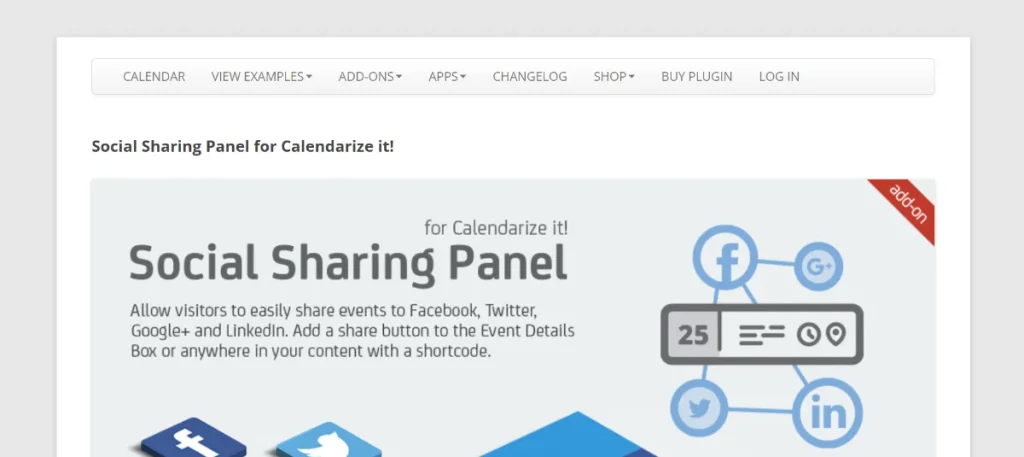
Social Sharing Panel for Calendarize it! is an extension for the Calendarize it! plugin that adds social media sharing buttons to event pages. These buttons allow users to share events instantly across various platforms, including Facebook, Twitter, LinkedIn, and more.
At its core, the add-on enhances the functionality of your event calendar by integrating social sharing directly into the user experience. Instead of copying links manually, users can share events with predefined messages and links in just one click.
For example, when a user views an event page, they can click a social icon to share the event details with their network. This action includes essential information such as the event title, date, and link, ensuring that the shared content is both informative and clickable.
From a workflow perspective, this simplifies promotion. Website owners do not need to manually distribute event links across multiple platforms. Instead, they rely on users to amplify reach organically.
A practical example would be an online webinar. Once published on your website, attendees can share it with colleagues or friends, increasing registration numbers without additional marketing effort.
This add-on essentially turns every visitor into a potential promoter, creating a network effect that helps events gain visibility quickly.
In real operations, this reduces dependency on centralized marketing. Instead of a single team pushing content outward, the system distributes promotion across many individuals. Each share creates a new entry point for potential attendees, expanding reach in a decentralized way.
Another important aspect is consistency. Since the plugin automatically formats shared content, every share maintains a professional appearance. This ensures that event details are always presented correctly, regardless of who shares them.
Key Features
Social Media Integration
The add-on supports integration with major social media platforms, allowing users to share events easily.
In practice, this ensures that your events can reach audiences across different channels without requiring separate tools.
For example, a user can share an event on Facebook while another shares it on LinkedIn, expanding reach across different demographics.
This cross-platform reach is particularly valuable for events targeting diverse audiences. A business seminar might gain traction on LinkedIn, while a creative workshop spreads more effectively on Instagram or Facebook.
One-Click Sharing
Users can share events instantly with a single click.
This simplicity reduces friction and encourages more users to share content.
In real-world usage, reducing even one step in the sharing process can significantly increase the number of shares.
For example, requiring users to copy and paste links often results in fewer shares. One-click functionality removes this barrier completely.
Customizable Sharing Options
You can customize how sharing buttons appear on event pages.
This includes positioning, design, and visibility settings.
For example, placing buttons near RSVP sections can encourage sharing after users decide to attend.
This strategic placement can influence behavior. Users who commit to an event are more likely to share it, making timing and positioning critical.
Automatic Event Data Integration
The add-on automatically includes event details in shared posts.
This ensures consistency and saves users from manually entering information.
For instance, shared posts include titles, dates, and links, which improves clarity and engagement.
This automation also reduces errors. Users do not need to remember details or retype information, ensuring accuracy across all shares.
Responsive Design
The sharing panel is fully responsive, ensuring it works seamlessly on all devices.
Since many users access event pages via mobile, this is essential.
In practice, mobile-friendly sharing significantly increases engagement rates, especially for social-driven audiences.
Lightweight and Fast
The add-on is optimized for performance, ensuring that it does not slow down your website.
This is crucial for maintaining fast load times, especially for event-heavy websites.
In real-world scenarios, this allows you to add functionality without sacrificing performance.
Benefits of Using Social Sharing Panel for Calendarize it!
One of the main benefits is increased event visibility. By enabling sharing, your events reach audiences beyond your immediate website traffic.
Another key advantage is organic promotion. Instead of relying on paid ads, your users become your marketing channel.
It also improves engagement. Users who share events are more invested and more likely to attend.
From a cost perspective, this reduces marketing expenses. Businesses can achieve wider reach without increasing ad spend.
Another benefit is improved credibility. Events shared by real users appear more trustworthy.
Additionally, it enhances user experience by simplifying the sharing process.
From a strategic standpoint, this add-on improves conversion efficiency. Instead of driving cold traffic through ads, you benefit from warm referrals through social networks. This often leads to higher attendance rates.
Another important benefit is scalability. As your audience grows, the impact of social sharing increases exponentially. Each new user adds potential reach, creating a compounding effect over time.
Real Use Cases of Social Sharing Panel for Calendarize it!
This add-on is particularly useful for websites that rely on event promotion.
For event organizers, it increases attendance through organic reach.
Educational institutions can use it to promote courses and seminars, leveraging student networks.
Community organizations benefit by spreading awareness of local events.
Businesses hosting webinars can increase registrations through attendee sharing.
Recurring events gain consistent visibility through repeated sharing cycles.
Agencies can use it to improve client results without increasing budgets.
In more advanced scenarios, this add-on supports viral campaigns. For example, a limited-seat workshop can quickly fill up when shared across multiple networks.
Another real-world case involves niche communities. Events targeting specific industries or interests often spread faster through peer sharing than traditional advertising.
How to Install
Installation is straightforward.
Download the add-on, upload it to WordPress, and activate it.
Configure sharing options and test functionality.
In real workflows, testing across platforms ensures proper formatting.
You should also review how posts appear on different networks and adjust settings accordingly.
Another practical step is aligning sharing with your event strategy. For example, enabling sharing for high-priority events ensures maximum impact.
Why Buy Social Sharing Panel for Calendarize it! at Pluginpro.org
Buying from Pluginpro.org provides significant cost savings.
For example, agencies managing multiple event sites can avoid purchasing separate licenses for each project, reducing expenses substantially.
Unlimited usage allows businesses to scale without increasing costs.
This is especially valuable for organizations running multiple event platforms or managing client websites.
From a financial perspective, this reduces long-term software investment.
Instead of recurring license fees, businesses can allocate budget toward marketing or event production.
Additionally, centralized access to plugins simplifies management and improves workflow efficiency.
Is Social Sharing Panel for Calendarize it! Worth It?
This add-on is worth it for any event-driven website.
For small organizations, it provides a cost-effective alternative to paid promotion.
For larger businesses, it enhances existing marketing strategies by adding organic reach.
It improves efficiency by turning users into promoters.
From a long-term perspective, its value increases as your audience grows.
For example, a website with 1,000 visitors may see moderate sharing, but at 10,000 visitors, the impact becomes significantly larger.
It is particularly valuable for recurring events, where consistent sharing builds momentum over time.
Conclusion
Social Sharing Panel for Calendarize it! is a powerful tool for event promotion.
It transforms your audience into a marketing channel, increasing reach and engagement.
Its ease of use and flexibility make it suitable for various use cases.
Combined with Pluginpro.org’s cost benefits, it becomes a highly efficient solution.
With proper implementation, this add-on can significantly improve event visibility and success, making it an essential tool for event-based websites.