Stratum Mega Menu is a powerful WordPress plugin designed to enhance website navigation by creating visually rich, highly customizable mega menus. Stratum Mega Menu allows website owners to organize large amounts of content into structured, user-friendly navigation systems that improve both usability and engagement.
Traditional menus often become cluttered and difficult to navigate as websites grow. Stratum Mega Menu solves this problem by transforming simple dropdowns into multi-column layouts that can include images, icons, widgets, and dynamic content. This makes navigation more intuitive and visually appealing.
In practice, this is especially useful for content-heavy websites such as eCommerce stores, news portals, and corporate platforms. Instead of forcing users to search through multiple pages, everything can be accessed directly from a well-structured menu.
For example, an online store can display product categories, featured items, and promotions within the menu itself. A media website can highlight trending topics, recent articles, and featured content. Stratum Mega Menu turns navigation into an interactive experience rather than a simple list of links.
For anyone looking to improve user experience and organize complex website structures effectively, Stratum Mega Menu provides a practical and scalable solution.
Another important advantage is how it influences user behavior. A well-designed mega menu reduces friction, helping users find what they need faster, which directly impacts engagement and conversion rates.
It also supports content discovery. By exposing more content at the navigation level, Stratum Mega Menu increases visibility for important pages without requiring additional clicks.
In real-world scenarios, this often leads to longer session durations, as users are more likely to explore multiple sections of the site when navigation is clear and engaging.
Additionally, it plays a role in improving internal linking. By surfacing deeper pages directly in the menu, Stratum Mega Menu helps distribute link equity more effectively across the website.
What is Stratum Mega Menu?
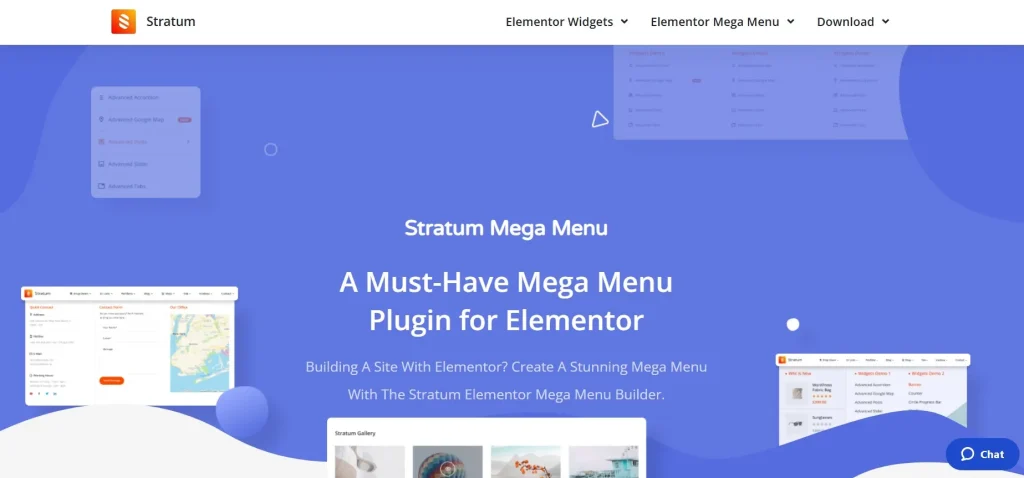
Stratum Mega Menu is a WordPress navigation plugin that enables users to create advanced, multi-level menus with rich content and flexible layouts. At its core, it replaces standard dropdown menus with structured, customizable mega menus that can display a wide range of content elements.
The plugin allows users to design menus that go beyond simple text links. You can include images, icons, widgets, and even dynamic content blocks, making navigation more interactive and informative.
A common example is an eCommerce website with multiple product categories. Instead of listing categories in a long dropdown, Stratum Mega Menu organizes them into columns with images and descriptions, helping users quickly identify what they are looking for.
Another use case is a corporate website that needs to present multiple services. The plugin allows each service to be displayed with icons and short descriptions, improving clarity and professionalism.
Stratum Mega Menu is also highly relevant for content-heavy platforms such as blogs or news websites. It can display featured posts, categories, and trending topics directly within the menu, making it easier for users to discover content.
From a usability perspective, the plugin integrates seamlessly with WordPress and works with most themes. It provides a visual interface for building menus, reducing the need for coding.
For anyone managing a complex website structure, Stratum Mega Menu offers a scalable and efficient way to improve navigation.
Another key strength is its flexibility. Menus can be tailored to different sections of the site, allowing for context-specific navigation that adapts to user needs.
It also supports modular design. Menu elements can be reused and adjusted across different pages, ensuring consistency while allowing customization.
In advanced implementations, Stratum Mega Menu can function as a central navigation hub, combining links, promotions, and content previews in a single interface.
It also supports UX optimization workflows. Designers can adjust menu structures based on analytics data, improving navigation performance over time.
Key Features of Stratum Mega Menu
- Multi-Column Menu Layouts
Stratum Mega Menu allows users to create multi-column dropdowns that organize content efficiently.
This helps structure large amounts of information in a clear and accessible way.
For example, an eCommerce site can display categories, subcategories, and featured products in separate columns.
This layout improves readability and reduces clutter.
In practice, this is often used to highlight high-priority categories while still maintaining access to secondary items. - Rich Content Integration
The plugin supports adding images, icons, and widgets directly into menus.
This transforms navigation into a visual experience.
For instance, a service-based website can include icons and descriptions for each service.
This makes menus more engaging and informative.
It also allows businesses to highlight key offerings visually rather than relying on text alone. - Drag-and-Drop Menu Builder
Stratum Mega Menu provides an intuitive interface for building menus.
Users can arrange elements easily without coding.
This speeds up the design process and reduces complexity.
Even non-technical users can create advanced menus quickly.
This feature is particularly useful for teams that need to update menus frequently. - Responsive Design Support
Menus created with Stratum Mega Menu adapt to different screen sizes.
This ensures a consistent experience across devices.
Mobile users can navigate the site as easily as desktop users.
This is essential for modern websites.
In real workflows, mobile optimization is often prioritized to match user behavior trends. - Custom Styling Options
Users can customize colors, fonts, and layouts to match their branding.
This ensures that menus integrate seamlessly with the overall design.
For example, a brand can maintain consistent visual identity across navigation elements.
This level of control is important for maintaining a professional appearance. - Integration with WordPress Widgets
The plugin allows widgets to be placed inside menus.
This adds functionality such as search bars, recent posts, or promotional banners.
This enhances usability and engagement.
For example, a search bar in the menu improves accessibility for users. - Advanced Navigation Control
Administrators can define how menus behave, including hover effects and animations.
This allows for a more dynamic user experience.
For example, menus can expand smoothly to reveal content.
These interactions improve perceived quality and usability. - Scalable Menu Management
Stratum Mega Menu is designed to handle complex navigation structures.
This makes it suitable for large websites.
As content grows, menus can be expanded without losing organization.
This scalability ensures long-term usability.
Benefits of Using Stratum Mega Menu
Stratum Mega Menu offers several practical benefits for website owners. One of the most important is improved user experience. Structured navigation helps users find content quickly and easily.
Another benefit is increased engagement. Interactive menus encourage users to explore more pages, reducing bounce rates.
From a design perspective, the plugin enhances visual appeal. Rich content elements make menus more attractive and professional.
It also supports better content organization. Websites with large amounts of information can present it in a clear and structured way.
Performance is another advantage. By consolidating navigation into a single system, it reduces the need for multiple plugins.
Stratum Mega Menu also improves conversion rates. Clear navigation helps users reach key pages such as products or services more efficiently.
Additionally, it supports scalability. As websites grow, menus can be expanded without losing structure.
It also enables better marketing opportunities. Featured products or promotions can be displayed directly in the menu.
Another benefit is improved SEO structure. Better internal linking and navigation clarity help search engines understand site hierarchy.
It also supports analytics-driven improvements. Website owners can adjust menu layouts based on user behavior data to improve performance.
Real Use Cases of Stratum Mega Menu
Stratum Mega Menu is used across various industries. eCommerce websites use it to display product categories and promotions.
Corporate websites use it to present services and company information in a structured way.
Blogs and media platforms use it to highlight featured content and categories.
Educational websites use it to organize courses and resources.
Another use case involves portfolio websites where navigation includes project previews.
It is also used by SaaS platforms to guide users through features and pricing pages.
Additionally, large organizations use it to manage complex site structures with multiple departments.
Another scenario involves marketplaces where vendors and product categories need to be clearly structured.
It is also effective for travel websites that organize destinations, packages, and guides within a single navigation system.
Additionally, event platforms use it to display schedules, speakers, and resources directly in the menu.
How to Install Stratum Mega Menu
Installing Stratum Mega Menu is a simple process within WordPress.
First, download the plugin file from Pluginpro.org.
Next, log in to your WordPress dashboard and navigate to the Plugins section.
Click “Add New” and then “Upload Plugin.” Upload the ZIP file and click “Install Now.”
Once installed, activate the plugin.
After activation, access the menu settings and start building your mega menu.
It is recommended to test the menu on different devices to ensure responsiveness.
Once configured, your enhanced navigation system is ready to use.
In practice, testing different menu structures helps identify the most effective layout for users.
Another useful step is reviewing analytics after implementation to optimize menu performance.
Why Buy Stratum Mega Menu at Pluginpro.org
Purchasing Stratum Mega Menu at Pluginpro.org offers a cost-effective and flexible solution compared to traditional licensing.
One major benefit is cost savings. Users can access the plugin at a reduced price.
Unlimited website usage allows installation across multiple projects.
Pluginpro.org ensures secure and clean files.
Updates are easy to manage without complex licensing.
This simplifies workflows for agencies and developers.
It also supports scalability as projects grow.
Developers can deploy the plugin quickly without delays.
For example, an agency managing multiple client websites can use Stratum Mega Menu across all projects without purchasing separate licenses, significantly reducing costs.
Another advantage is consistency. Using the same plugin across projects ensures predictable performance and easier maintenance.
It also supports faster project delivery. Teams can implement advanced navigation systems without waiting for licensing approvals.
Additionally, Pluginpro.org reduces administrative overhead by centralizing plugin access.
Another important benefit is long-term cost control. Businesses can scale without worrying about increasing licensing expenses.
It also enables rapid testing and deployment, allowing developers to experiment with different navigation strategies.
Is Stratum Mega Menu Worth It?
Yes, Stratum Mega Menu is worth it for anyone looking to improve website navigation and user experience.
It is particularly useful for large websites with complex structures.
For example, an eCommerce site can organize categories and promotions effectively.
It also enhances engagement and supports better content discovery.
For scalable navigation solutions, Stratum Mega Menu provides a reliable option.
Another strong reason is its impact on usability. Clear navigation reduces friction and improves overall user satisfaction.
It is also valuable for businesses focused on conversions. Better navigation leads users to key pages more efficiently.
For growing websites, it provides a scalable framework that adapts as content expands.
Additionally, it supports long-term optimization. Menus can be refined based on user behavior and analytics.
Conclusion
Stratum Mega Menu offers a practical way to transform standard navigation into an interactive and structured system. By combining advanced layouts with rich content, it improves usability and engagement.
Its flexibility and scalability make it suitable for a wide range of websites.
When combined with the benefits of Pluginpro.org, Stratum Mega Menu becomes a strong choice for enhancing WordPress navigation.
As websites continue to grow in complexity, having an effective navigation system is essential. Stratum Mega Menu provides the tools needed to manage that complexity efficiently.
For businesses aiming to improve user experience, increase engagement, and optimize site structure, it delivers a reliable and scalable solution.