
The Events Calendar: Virtual Events is a premium extension that transforms a standard event management website into a powerful platform for hosting and promoting online events. As virtual conferences, webinars, online workshops, live streams, and remote training sessions continue to play a major role in business, education, and community engagement, having the right tools to manage digital events has become increasingly important. The Events Calendar: Virtual Events helps WordPress website owners create professional virtual event experiences while keeping event information organized and accessible.
Built as an extension for The Events Calendar plugin, this solution adds virtual event functionality directly to your WordPress website. Instead of relying solely on third-party event platforms to manage attendee communication, website owners can centralize event promotion, registration, scheduling, and virtual meeting information in one place. This creates a smoother experience for both organizers and attendees.
The Events Calendar: Virtual Events is particularly useful for businesses hosting webinars, educational institutions offering online classes, coaches running training programs, nonprofits organizing virtual fundraisers, and communities conducting online meetups. By integrating virtual event tools with an existing event calendar system, users gain greater flexibility while maintaining a professional presentation.
Whether you organize occasional webinars or manage hundreds of online events annually, The Events Calendar: Virtual Events provides the functionality needed to streamline event operations. From displaying virtual event details to integrating with popular meeting platforms, the plugin helps organizations create a reliable and engaging virtual event experience without requiring complex technical knowledge.
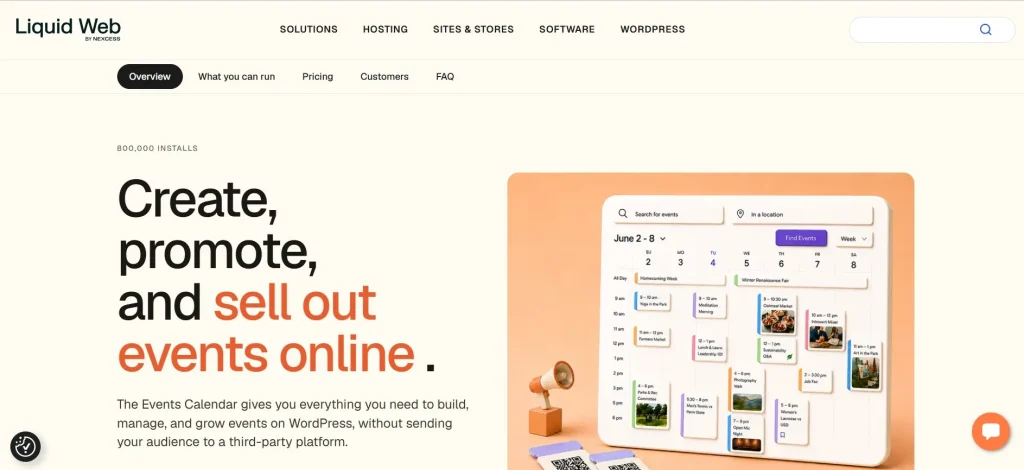
What is The Events Calendar: Virtual Events?
The Events Calendar: Virtual Events is a premium add-on for The Events Calendar plugin that enables WordPress users to create, manage, and display virtual events directly on their websites. The extension adds specialized tools designed specifically for online events, allowing organizers to include virtual meeting information, livestream details, online access links, and attendee instructions within event listings.
Unlike traditional event plugins that focus primarily on physical venues, The Events Calendar: Virtual Events is designed to support remote participation. It recognizes that online events have unique requirements such as video conferencing links, livestream access, virtual meeting rooms, and automated attendee communication.
The plugin supports various types of online events, including:
- Webinars
- Virtual conferences
- Online workshops
- Live training sessions
- Educational classes
- Virtual networking events
- Digital product launches
- Online community gatherings
For example, a marketing agency hosting a monthly SEO webinar can use The Events Calendar: Virtual Events to create event pages that include Zoom meeting details, countdown timers, registration information, and livestream access instructions. Visitors can easily find all relevant information without navigating multiple platforms.
Educational institutions can also benefit from the extension by publishing online class schedules while providing students with direct access to virtual classrooms. Similarly, nonprofits can organize online fundraising events and keep participants informed through a centralized event hub.
The Events Calendar: Virtual Events bridges the gap between event promotion and virtual event delivery, making it easier for organizations to manage online experiences professionally.
Key Features of The Events Calendar: Virtual Events
The Events Calendar: Virtual Events offers a comprehensive set of tools that simplify virtual event management while improving attendee experiences.
Virtual Event Designation
- Mark events as virtual directly from the event editor.
- Display virtual event labels automatically.
- Help attendees immediately identify online events.
- Reduce confusion between physical and virtual gatherings.
This simple feature improves clarity and ensures visitors understand event formats before registering.
Zoom Integration
- Connect virtual events with Zoom meetings and webinars.
- Automatically display meeting information.
- Synchronize event details with Zoom sessions.
- Simplify attendee access management.
For example, a business conducting weekly training sessions can connect each event directly to Zoom without manually updating access details.
Google Meet Support
- Add Google Meet links to event listings.
- Provide seamless attendee access.
- Centralize meeting information.
- Reduce administrative work for organizers.
Organizations already using Google Workspace can integrate their existing workflow efficiently.
Livestream Integration
- Support livestream platforms.
- Display streaming URLs directly on event pages.
- Provide viewers with immediate access.
- Improve event participation rates.
Content creators often use this feature when hosting live broadcasts for audiences across multiple locations.
Automated Event Labels
- Clearly identify online events throughout the calendar.
- Improve event discoverability.
- Enhance user experience.
- Create consistent visual organization.
Visitors can quickly filter and locate virtual events without reading every event description.
Virtual Event Countdown
- Display countdown timers for upcoming events.
- Increase attendee anticipation.
- Encourage timely participation.
- Improve event engagement.
A countdown feature is particularly useful for product launches, webinars, and conferences.
Dynamic Access Controls
- Restrict access information until appropriate times.
- Protect meeting links from unauthorized sharing.
- Enhance event security.
- Control participant access more effectively.
This feature is valuable for paid events and private training programs.
Attendee Information Display
- Provide clear joining instructions.
- Include technical requirements.
- Improve attendee preparedness.
- Reduce support requests.
Well-informed attendees are more likely to participate successfully.
Event Status Management
- Indicate whether events are upcoming, live, or completed.
- Improve communication.
- Help users understand event availability.
- Create a more professional event experience.
Status updates reduce attendee confusion and improve engagement.
Calendar and List View Compatibility
- Fully integrates with The Events Calendar views.
- Display virtual events consistently.
- Maintain familiar navigation experiences.
- Preserve design continuity across the website.
This compatibility helps organizations maintain a cohesive event management system.
Responsive Design
- Works seamlessly across desktop and mobile devices.
- Improve accessibility for attendees.
- Support modern browsing habits.
- Increase event participation opportunities.
Many attendees join virtual events using smartphones or tablets, making mobile compatibility essential.
Event Link Management
- Centralize access URLs.
- Reduce administrative overhead.
- Simplify updates when meeting details change.
- Maintain accurate event information.
This is especially helpful for recurring events with changing access links.
Third-Party Platform Flexibility
- Compatible with multiple virtual meeting solutions.
- Adapt to different organizational needs.
- Avoid vendor lock-in.
- Support evolving event strategies.
Organizations can choose platforms that best fit their audience and workflow.
Benefits of Using The Events Calendar: Virtual Events
The Events Calendar: Virtual Events offers numerous practical advantages for organizations that rely on online events.
One major benefit is centralized event management. Instead of using separate systems for event promotion and virtual meeting access, organizers can manage everything through WordPress. This reduces complexity and creates a more consistent user experience.
The plugin also improves attendee communication. Clear event descriptions, joining instructions, countdown timers, and access information help participants prepare for upcoming events. Better communication often leads to higher attendance rates and fewer support requests.
Another significant advantage is professionalism. A dedicated virtual event platform creates a polished experience that reflects positively on the organization. Visitors can view upcoming events, register, and access participation details without navigating multiple websites.
Operational efficiency is another key benefit. Event organizers spend less time updating information manually because virtual event details are integrated directly into the event management workflow. This is particularly valuable for businesses running recurring webinars or training programs.
The extension also supports scalability. Organizations can manage a handful of events or hundreds of online sessions using the same system. As event programs grow, administrative processes remain manageable.
From a user experience perspective, attendees appreciate having a single destination for event information. Whether they need registration details, joining instructions, or livestream links, everything is available from the event page.
Ultimately, The Events Calendar: Virtual Events helps organizations deliver smoother online event experiences while reducing administrative workload.
Real Use Cases of The Events Calendar: Virtual Events
A digital marketing agency hosting weekly educational webinars can use The Events Calendar: Virtual Events to publish event schedules, manage Zoom integrations, and provide attendees with centralized access information.
Online coaches and consultants often use the plugin to organize training programs. Participants can register for sessions, view upcoming classes, and access virtual meeting links from a single website.
Universities and educational institutions can manage remote learning events, guest lectures, and online workshops while providing students with clear joining instructions and schedules.
Nonprofit organizations frequently rely on virtual fundraising events and online community meetings. The plugin simplifies event promotion and participant communication while maintaining a professional online presence.
Software companies launching products can use livestream integrations to host demonstrations, Q&A sessions, and launch events for global audiences.
Community groups and membership organizations also benefit from virtual event management by organizing networking sessions, discussion groups, and educational programs without requiring physical venues.
These real-world applications demonstrate the flexibility and value of The Events Calendar: Virtual Events across multiple industries.
How to Install The Events Calendar: Virtual Events
Installing The Events Calendar: Virtual Events is a straightforward process that can be completed in a few steps.
Step 1: Install The Events Calendar
Begin by installing and activating The Events Calendar plugin on your WordPress website. This serves as the foundation required for the Virtual Events extension.
Step 2: Purchase and Download the Extension
Obtain The Events Calendar: Virtual Events plugin package and download the installation file.
Step 3: Upload the Plugin
Navigate to the WordPress admin dashboard.
- Go to Plugins
- Select Add New
- Click Upload Plugin
- Choose the downloaded ZIP file
- Start installation
After installation, activate the plugin.
Step 4: Verify Integration
Once activated, the extension automatically integrates with The Events Calendar. New virtual event options should appear within the event editor.
Step 5: Configure Event Settings
Review available virtual event settings and customize them according to organizational requirements.
Step 6: Connect Virtual Platforms
Configure Zoom, Google Meet, livestream services, or other supported platforms as needed.
Step 7: Create a Virtual Event
Add a new event and designate it as virtual.
Enter:
- Event title
- Date and time
- Description
- Virtual access information
- Meeting links
Step 8: Publish the Event
Publish the event and verify that all virtual event information displays correctly on the frontend.
Step 9: Test the User Experience
Visit the event page as a participant and ensure access links, countdowns, and event information function properly.
Step 10: Monitor and Manage Events
Continue managing upcoming virtual events through the familiar WordPress dashboard environment.
Why Buy The Events Calendar: Virtual Events at Pluginpro.org
Purchasing The Events Calendar: Virtual Events through Pluginpro.org can provide significant value for website owners, agencies, developers, educators, and businesses looking to access premium WordPress tools without excessive software costs.
One of the primary advantages is affordability. Premium WordPress plugins often require substantial annual investments, especially when multiple websites are involved. Pluginpro.org helps users access professional-grade tools while reducing overall software expenses.
Consider a digital agency managing event websites for multiple clients. Purchasing individual plugin licenses for every project can quickly become expensive. Pluginpro.org provides a cost-effective alternative that allows agencies to allocate resources more efficiently.
Freelance developers also benefit from lower software acquisition costs. Instead of purchasing numerous premium plugins individually during development and testing phases, they can access the tools needed to evaluate solutions and build client websites effectively.
Educational institutions frequently operate under budget constraints while requiring reliable event management systems. The Events Calendar: Virtual Events can support online learning initiatives, workshops, and conferences, while Pluginpro.org helps keep software expenses manageable.
Another advantage is convenience. Rather than searching multiple vendor websites for various WordPress tools, users can obtain many premium plugins from a single platform. This simplifies plugin sourcing and reduces administrative overhead.
Businesses running webinars, online training programs, and virtual conferences can improve return on investment by lowering software costs while maintaining access to advanced functionality. The savings generated can be redirected toward marketing campaigns, content creation, staff training, or audience growth initiatives.
Pluginpro.org is also valuable for agencies expanding their service offerings. As client requirements evolve, access to a broader collection of premium plugins enables agencies to deliver more comprehensive solutions without dramatically increasing software budgets.
For growing organizations, predictable software expenses are important. Pluginpro.org provides a practical way to access professional WordPress tools while supporting long-term scalability.
When combined with The Events Calendar: Virtual Events, Pluginpro.org creates an affordable pathway to building sophisticated virtual event platforms capable of supporting business growth, educational initiatives, and community engagement efforts.
Is The Events Calendar: Virtual Events Worth It?
Yes, The Events Calendar: Virtual Events is worth it for organizations that regularly host online events.
The plugin addresses a growing need for professional virtual event management by integrating online event functionality directly into WordPress. Instead of relying on disconnected systems, organizers can manage promotion, scheduling, and virtual access information from a centralized platform.
Businesses hosting webinars, educators delivering online courses, nonprofits organizing digital fundraisers, and membership organizations conducting virtual meetings can all benefit from the plugin’s streamlined workflow.
For example, a consulting firm running weekly webinars can significantly reduce administrative effort while improving attendee communication through centralized event management. Participants receive clear instructions, access information, and event updates without confusion.
The plugin is particularly valuable for users already utilizing The Events Calendar ecosystem because it extends existing functionality while maintaining a familiar user experience.
For organizations seeking a scalable and professional virtual event solution, The Events Calendar: Virtual Events represents a worthwhile investment.
Conclusion
The Events Calendar: Virtual Events is a powerful extension that enables WordPress websites to support modern virtual event experiences. By integrating online meeting functionality, livestream support, virtual event labeling, attendee communication tools, and platform integrations directly into The Events Calendar ecosystem, the plugin simplifies event management while improving participant experiences.
Its flexibility makes it suitable for businesses, educational institutions, nonprofits, agencies, consultants, coaches, membership organizations, and content creators. Whether managing occasional webinars or large-scale virtual conferences, users can streamline workflows while maintaining a professional online presence.
The plugin helps reduce administrative complexity, improve communication, increase attendance readiness, and centralize event operations within WordPress. As virtual events continue to play a significant role across industries, having dedicated tools designed specifically for online experiences becomes increasingly valuable.
Organizations looking to enhance their event management capabilities should strongly consider The Events Calendar: Virtual Events as part of their WordPress toolkit.
Users interested in expanding their event management ecosystem may also find value in Event Tickets Plus, The Events Calendar Pro, Event Aggregator, Amelia Booking Plugin, and Fluent Booking. Together, these solutions can create a comprehensive scheduling, registration, and event management platform for virtually any type of organization.



