
When building an online store with WordPress, the theme you choose has a direct impact on how customers experience your brand. A strong eCommerce theme does much more than provide a nice homepage layout. It affects product presentation, navigation, mobile usability, loading speed, conversion flow, and even how trustworthy your store appears to first-time visitors. For WooCommerce websites in particular, the theme plays a central role because it shapes how products are displayed and how shoppers move from browsing to checkout. This is where TM Robin becomes a valuable option for store owners who want a balance of design quality and practical eCommerce functionality.
TM Robin is a premium WooCommerce WordPress theme created for modern online stores. It is especially suitable for businesses in fashion, furniture, beauty, accessories, home decor, and lifestyle categories, but its flexibility also makes it useful for many other product-based businesses. The theme is built with a clean visual style, strong product-focused layouts, and a set of features designed to improve the shopping experience without overwhelming the site owner with unnecessary complexity.
That matters in real business situations. Many online stores face one of two problems. Some themes look stylish but lack the practical eCommerce features needed to support browsing and conversion. Others include many features but look outdated or cluttered, which can weaken customer trust. TM Robin stands out because it aims to solve both problems at once. It provides a polished, modern design while also supporting the features that matter in a real store, such as product quick views, wishlist functionality, responsive layouts, flexible homepage sections, and strong WooCommerce integration.
Consider a few examples. A fashion boutique may want large imagery, elegant category pages, and a clean brand presentation that feels premium. A home decor store may need room for multiple product collections, seasonal campaigns, and product details that help customers compare options. A cosmetics brand may want promotional sections, best-seller displays, and a mobile-friendly browsing experience. TM Robin supports these types of goals by giving users a framework that is visually attractive and commercially practical.
Another major advantage is efficiency. Building an online store from scratch can take a lot of time, especially if you need to design every section manually. TM Robin includes pre-built demos that help users launch faster. Instead of starting with a blank site, you can import a demo, replace the content, adjust the branding, and create a store that already has a professional structure in place.
In this article, we will look closely at TM Robin, including what it is, the features that make it useful, the practical benefits it offers, how to install it, and why buying it from Pluginpro.org can be a smart option for WordPress users who want premium theme quality at a more affordable price.
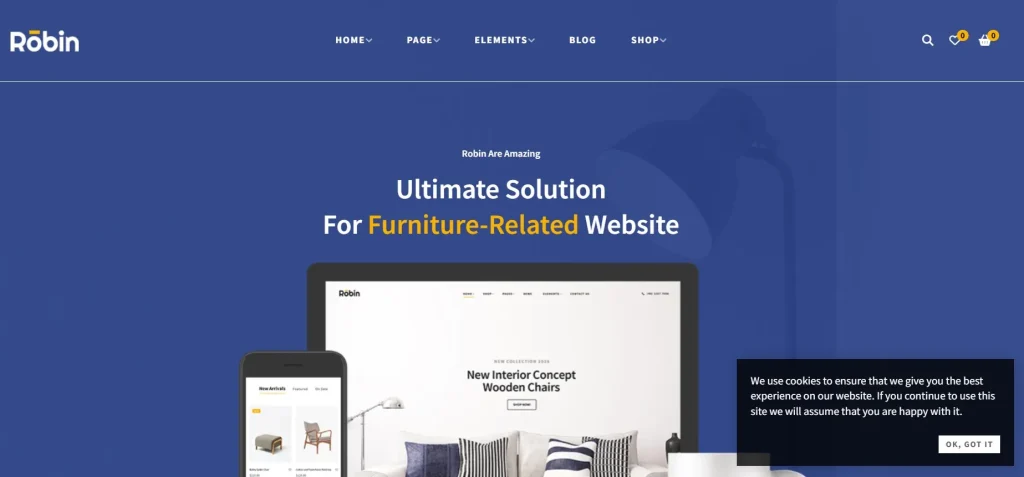
What is TM Robin?
TM Robin is a premium WooCommerce WordPress theme designed for online stores that want a modern, product-focused, and visually polished website. It is built to work closely with WooCommerce, which means it does not simply add attractive page layouts on top of WordPress. Instead, it is structured to support the core needs of eCommerce websites, including product pages, category views, carts, checkout flows, and promotional merchandising.
At a basic level, TM Robin helps users create an online shop that looks professional and functions well across devices. But its real value comes from the way it combines design flexibility with shopping-focused usability. The theme is meant to help businesses present products clearly, organize categories effectively, and build a storefront that feels trustworthy to customers.
This is important because eCommerce themes are not judged only by appearance. They are also judged by how easily customers can browse products, understand product details, move through the shopping process, and feel confident enough to buy. A beautiful theme that makes products hard to find or slows down the buying process can hurt sales. TM Robin is designed with this commercial reality in mind.
The theme is especially relevant for visual product categories. Fashion brands can use it to display collections, featured items, and seasonal promotions in a stylish layout. Furniture stores can present products with strong images and clean content sections that support product comparisons. Lifestyle and beauty brands can use it to create a premium storefront that feels more like a curated shopping experience than a generic product catalog. These use cases help explain why TM Robin remains attractive to store owners who care about branding as much as functionality.
Another useful way to think about TM Robin is as a store-building framework rather than just a skin. It gives users structure. That structure can include homepage layouts, product grids, promotional sections, banners, category blocks, and store navigation patterns that are already aligned with eCommerce needs. Instead of trying to turn a general-purpose theme into a store, users begin with a theme that already understands the priorities of WooCommerce.
TM Robin is also useful for people who are not advanced developers. Many small business owners and freelancers need a theme that can be customized without heavy coding. TM Robin supports that kind of workflow by offering demo imports, theme customization options, and compatibility with page-building tools. This makes it more accessible for users who want professional results without having to build everything manually.
From a practical perspective, TM Robin is best suited for businesses that want their WooCommerce website to feel modern, organized, and conversion-friendly. It helps bridge the gap between visual branding and the real operational needs of an online store.
Key Features of TM Robin
- Multiple pre-built demo layouts
One of the strongest features of TM Robin is its library of pre-built demo designs. These demos help users launch faster by providing ready-made website structures for different store styles and industries. Instead of starting with an empty site, a user can import a demo that already includes a homepage layout, product sections, banners, and store organization. For example, a fashion seller can choose a sleek boutique-style demo, while a furniture brand can select a layout that emphasizes product imagery and featured collections. - Full WooCommerce integration
TM Robin is built specifically for WooCommerce, which means the theme supports the key elements of an online store in a more natural way than generic WordPress themes. Product pages, cart pages, shop archives, and checkout flows are all designed with WooCommerce functionality in mind. This matters because a theme that integrates well with WooCommerce reduces display issues and creates a smoother customer experience. In practical terms, it helps products look more polished and makes shopping feel more seamless. - Drag-and-drop page builder compatibility
Many users want more layout control without needing to code. TM Robin supports page builders, which makes it easier to create and customize pages visually. This is useful for building custom homepages, promotional landing pages, seasonal campaign pages, and branded content sections. For example, a store owner can quickly create a homepage section for new arrivals, another for best sellers, and another for limited-time promotions, all without touching code. - Strong product display options
Product presentation is one of the most important parts of any store theme, and TM Robin includes flexible ways to showcase items. Users can present products in grids, lists, sliders, and feature sections depending on the page purpose. This is valuable because different pages require different browsing experiences. A homepage may benefit from carousels and featured collections, while category pages may perform better with structured product grids that make comparison easier. - Responsive and mobile-friendly design
A large percentage of eCommerce traffic comes from mobile devices, so a theme must work well on smaller screens. TM Robin is designed to be responsive, which means layouts adapt across desktops, tablets, and smartphones. This is more than a design convenience. Mobile usability affects both sales and trust. If a store looks cluttered or difficult to navigate on a phone, customers are more likely to leave before purchasing. - Advanced customization controls
Brand identity matters in eCommerce, and TM Robin includes customization options that help users align the theme with their business. Store owners can adjust colors, fonts, layouts, headers, and other visual details to create a site that feels branded rather than generic. This is particularly useful for small businesses that want a premium storefront appearance without hiring a designer for every adjustment. - Product quick view functionality
Quick view allows shoppers to preview key product details without leaving the current page. This improves browsing efficiency, especially on category or shop pages where users want to compare multiple products quickly. For example, a shopper browsing dresses or home accessories can open product previews one by one without constantly loading separate product pages. That smoother flow can help reduce friction in the buying journey. - Wishlist support
Wishlist functionality allows customers to save products for later. This may seem like a small feature, but it is very useful in real shopping behavior. Many users browse before they are ready to buy, especially for fashion, decor, or higher-value products. A wishlist helps keep them engaged with the store and gives them a reason to return. It can also improve the user experience for repeat visitors who are comparing multiple items. - SEO-friendly and clean structure
A good eCommerce theme should not only look good but also support search visibility. TM Robin is built with a clean structure that can work well alongside SEO plugins and good optimization practices. While the theme itself does not replace SEO work, it creates a stronger technical base for product pages, category pages, and store content. That is important because messy code or poor theme structure can make optimization harder. - Regular updates and compatibility maintenance
WordPress, WooCommerce, and related plugins change over time. TM Robin becomes more valuable when it stays compatible with those changes. Ongoing updates help ensure that the theme continues to function properly, supports modern plugin ecosystems, and stays secure. For store owners, this reduces the risk of building a shop on a theme that later becomes unstable or outdated.
Benefits of Using TM Robin
One of the biggest benefits of using TM Robin is that it helps online stores look more professional without requiring a completely custom design process. Many small businesses want a site that feels premium and trustworthy, but they do not have the budget or time to design everything from scratch. TM Robin solves this by providing a strong starting point with modern layouts and visually polished store sections.
Another major benefit is improved product presentation. In eCommerce, how products are shown often affects whether customers continue browsing or leave the site. TM Robin gives store owners better ways to showcase products through clean layouts, featured sections, promotional blocks, and responsive design. This makes it easier to create a store that feels curated and intentional rather than crowded or difficult to navigate.
It also saves time in the launch process. Importable demos can significantly reduce setup time, especially for freelancers, agencies, or small business owners who want to move quickly. Instead of spending days building the base layout, users can start with a ready-made structure and focus on adapting it to their brand, product catalog, and content. This makes TM Robin especially useful for stores that need to launch efficiently.
A practical benefit is better mobile shopping experience. Since TM Robin is responsive, store owners do not have to treat mobile usability as an afterthought. This matters because many users will first discover the store on mobile. A theme that handles mobile browsing well can improve product engagement, reduce bounce rates, and support stronger conversion performance.
TM Robin also supports stronger user interaction through features like wishlist and quick view. These features do not just add convenience. They support real shopping behavior. Customers often compare products, browse casually before buying, or save items while deciding. A theme that accommodates that behavior creates a better overall store experience.
From a branding perspective, TM Robin helps businesses create a store that feels aligned with their niche. A fashion brand can feel stylish and editorial. A furniture store can feel structured and premium. A beauty brand can feel sleek and promotional. This flexibility matters because different product categories need different visual emphasis.
There is also a long-term benefit in scalability. As the store grows, the theme’s WooCommerce support and layout flexibility can help users expand categories, add more products, and introduce seasonal campaigns without needing to redesign the whole site. That makes TM Robin useful not only at launch but also as the business develops over time.
In real-world terms, a boutique clothing brand can use TM Robin to create an elegant storefront that highlights featured collections and new arrivals. A home decor shop can use it to create category-rich product pages and showcase curated room styles. A cosmetics seller can use it to support promotions, product ranges, and mobile browsing. Across these examples, the core benefits remain the same: better presentation, better usability, and a more professional store experience.
How to Install TM Robin
Installing TM Robin in WordPress is usually a straightforward process, especially for users who have installed themes before. The first step is to obtain the theme file from a trusted source. Once you have the TM Robin ZIP file, log in to your WordPress dashboard and navigate to Appearance > Themes.
From there, click Add New, then choose Upload Theme. Select the TM Robin ZIP file from your computer, upload it, and click Install Now. After WordPress completes the installation, click Activate to make TM Robin your active theme. At this point, the basic theme files are in place, but the setup is not complete yet.
The next step is to install any required or recommended plugins that the theme depends on. WooCommerce will usually be one of the most important, since TM Robin is built for online stores. Depending on the theme package, there may also be page builder plugins, demo import tools, or theme companion plugins. Installing these helps ensure the theme functions properly and gives you access to its full feature set.
After activation, one of the most useful steps is importing demo content. This is especially helpful if you want your site to resemble one of the pre-built demos. Demo import can provide the homepage structure, product layouts, banners, navigation, and design framework you saw in the preview. Once imported, you can replace placeholder content with your own products, branding, images, and text. This is much faster than building the structure manually.
Next, go through the customization settings. Adjust colors, typography, logos, header options, homepage sections, and store layout preferences so the site reflects your brand. This part is important because the demo is only a starting point. A real store should feel customized, not copied. For example, a beauty brand may want softer styling and promotional homepage sections, while a furniture store may want a more minimal catalog presentation.
You should also configure WooCommerce properly during setup. Add your products, define categories, set shipping zones, configure payment gateways, and test key store pages like shop, cart, and checkout. The theme may handle design, but the store still needs to function operationally before launch.
Testing is an essential step. Check the website on desktop and mobile devices. Browse category pages, open product pages, test quick view, review navigation, and confirm that the shopping flow works correctly. Pay close attention to image display, mobile menus, and product layouts, since these are critical parts of the store experience.
Finally, optimize performance and content before going live. Even a strong theme needs well-sized images, clear product descriptions, organized categories, and SEO support. Combined with proper WooCommerce setup, this helps TM Robin perform at its best.
Why Buy TM Robin at Pluginpro.org
Buying TM Robin at Pluginpro.org can be an appealing option for WordPress users who want premium theme quality at a much lower cost. One of the biggest reasons is affordability. Users can often save up to 95% compared to standard pricing, which makes premium WooCommerce themes much more accessible to small businesses, freelancers, agencies, and online sellers working within a budget.
Another important reason is access to 100% clean files. This is especially important with WordPress themes because the theme affects the full visual and functional structure of the site. Clean files help reduce the risk of technical issues, malware concerns, or stability problems. For business websites, that reliability matters because a store theme is too central to the site to take unnecessary risks.
Unlimited website usage is another strong benefit. Many official theme licenses are limited to a small number of domains, which can become expensive for agencies or developers working on multiple client stores. More flexible usage gives professionals more room to standardize their workflows and use the same trusted theme across different projects without repeated licensing costs.
Easy updates also add value. WordPress and WooCommerce evolve continuously, and themes need to stay compatible. Access to updates helps keep the theme functioning properly as plugins, WordPress core, and eCommerce tools change over time. This is especially important for stores, where compatibility issues can affect product pages, checkout flow, or other critical functions.
Secure downloads are another practical advantage. A smooth download process helps users get started quickly, especially when they are working on launch timelines or client deadlines. For agencies and businesses, reliable delivery makes the setup process more efficient.
There is also a broader financial advantage. Most eCommerce sites rely on more than one premium product. In addition to a theme, users may need premium plugins for SEO, forms, speed optimization, filters, product variation features, or marketing tools. Paying full price for every component can increase the total cost of building the store. Pluginpro.org helps make a stronger professional stack more affordable overall.
In real terms, a startup clothing store can use Pluginpro.org to launch a visually strong site without overspending. A freelance developer can build client stores more cost-effectively. A small furniture business can access a premium WooCommerce theme while still leaving budget for photography, ads, or product setup. These are practical business benefits, not just technical ones.
For users who value affordability, clean files, flexible usage, updates, and secure access, Pluginpro.org offers a compelling reason to get TM Robin there.
Conclusion
TM Robin is a strong WooCommerce WordPress theme for businesses that want a modern, polished, and functional online store. It combines attractive design with practical eCommerce features, making it useful for product-focused businesses such as fashion, home decor, beauty, accessories, and lifestyle stores.
Its value lies in how well it balances branding and store usability. The theme helps businesses present products more effectively, launch faster through demo imports, support better mobile shopping, and create a more professional customer experience overall. It is especially useful for users who want strong visual results without having to build everything from scratch.
TM Robin also offers practical long-term advantages. Its WooCommerce integration, page builder compatibility, flexible layouts, and store-focused features make it useful not only at launch but also as the store grows. For freelancers, agencies, and business owners, this combination of design quality and operational usefulness makes it a dependable theme choice.
When purchased through Pluginpro.org, TM Robin becomes even more attractive from a value standpoint. The combination of significant cost savings, clean files, unlimited website usage, easy updates, and secure downloads gives users strong overall value.
If you are building a WooCommerce store and want a theme that looks modern, supports product-focused design, and helps create a smoother shopping experience, TM Robin is well worth considering.



