
Uncode is one of the most popular creative WordPress themes available today, trusted by designers, agencies, freelancers, businesses, and online store owners who want complete control over website design without sacrificing performance. Known for its pixel-perfect layouts, advanced customization capabilities, and extensive library of professionally designed templates, Uncode has become a preferred choice for building modern websites across a wide range of industries. Whether you are creating a portfolio, business website, online shop, magazine, or landing page, Uncode provides the tools needed to achieve a professional result without extensive coding knowledge.
The strength of the Uncode theme lies in its combination of flexibility and usability. Users can create unique page layouts, customize typography, manage media-rich content, and optimize websites for various devices through an intuitive visual editing experience. Unlike many themes that require multiple third-party plugins to unlock advanced functionality, Uncode includes many premium features directly within the package.
Website owners often choose the Uncode WordPress theme because it supports scalable projects. A simple company website can later evolve into a complex eCommerce platform, membership portal, or creative showcase without requiring a complete redesign. This flexibility makes it an attractive long-term investment for professionals who want a future-proof website solution.
For businesses seeking a polished online presence and designers who value creative freedom, Uncode offers a balanced mix of visual creativity, technical performance, and practical usability. Its continued popularity in the WordPress ecosystem demonstrates its ability to adapt to modern web design trends while maintaining reliable functionality.
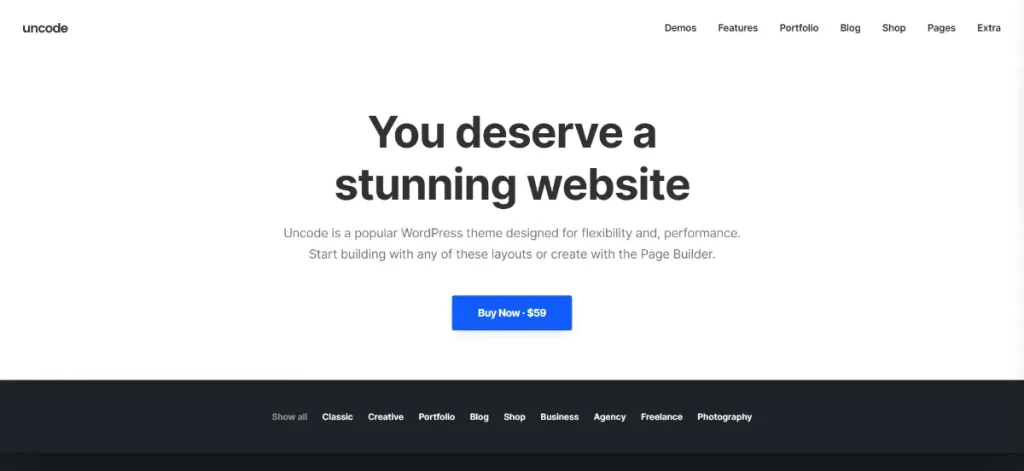
What is Uncode?
Uncode is a premium multipurpose WordPress theme designed to help users build highly customized websites using a visual approach. Developed with both beginners and professionals in mind, it offers a complete website-building framework that supports a wide range of project types.
At its core, the Uncode theme functions as a design system that combines page building, template management, advanced styling options, and responsive design tools. Instead of relying heavily on external development resources, users can visually construct pages and customize layouts directly from the WordPress dashboard.
The Uncode WordPress theme is widely used by:
- Creative agencies
- Freelance designers
- Marketing teams
- Photographers
- Architects
- Online retailers
- Corporate businesses
- Bloggers and publishers
One of the reasons the uncode wordpress theme remains popular is its adaptability. A photography studio can use it to display high-resolution portfolios. A digital agency can create conversion-focused landing pages. An online retailer can launch a visually appealing WooCommerce store. Each use case benefits from the same underlying framework while maintaining a completely unique appearance.
The theme includes a large collection of professionally designed demos that can be imported and customized quickly. Rather than starting from a blank canvas, users can select a design that matches their industry and modify it according to their brand requirements.
Another notable aspect is the attention to visual quality. The developers behind Uncode prioritize typography, spacing, image presentation, and layout consistency. As a result, websites built with the theme often appear more polished compared to sites created using basic WordPress themes.
For organizations seeking a professional website without extensive development costs, the uncode theme offers a practical solution that combines design flexibility with robust functionality.
Key Features of Uncode
The success of the Uncode theme is largely driven by its extensive feature set. Below are some of the most valuable capabilities that make it stand out in the competitive WordPress marketplace.
Advanced Visual Page Builder
- Includes a powerful drag-and-drop editing experience.
- Enables real-time design adjustments.
- Supports custom rows, columns, and content blocks.
- Reduces dependency on coding.
For example, a marketing team can create landing pages for different campaigns without hiring a developer for every update.
Large Demo Library
- Provides hundreds of professionally designed page layouts.
- Covers industries including business, education, hospitality, healthcare, fashion, and eCommerce.
- Allows rapid project deployment.
A common use case is launching a client website within days rather than weeks by importing a suitable demo and customizing content.
Dynamic Content Integration
- Supports dynamic data sources.
- Simplifies content management.
- Useful for blogs, portfolios, and product catalogs.
This feature becomes especially valuable when managing large amounts of content that require consistent formatting.
WooCommerce Optimization
- Deep integration with WooCommerce.
- Custom product layouts.
- Enhanced product galleries.
- Improved shopping experience.
Businesses using the uncode wordpress theme can create visually appealing online stores that maintain strong branding while offering a smooth purchasing process.
Advanced Typography Controls
- Extensive font customization.
- Google Fonts integration.
- Fine-grained control over spacing and sizing.
- Consistent branding across all pages.
Typography plays a major role in user experience, and Uncode provides professional-level control over text presentation.
Responsive Design Framework
- Mobile-friendly layouts.
- Tablet optimization.
- Cross-browser compatibility.
- Automatic responsiveness.
As mobile traffic continues to grow, having a fully responsive website is essential for maintaining engagement and search visibility.
Media-Rich Content Management
- Advanced image galleries.
- Video integration.
- Portfolio showcases.
- Interactive content displays.
Creative professionals often select the uncode theme specifically because of its ability to present visual content in a sophisticated manner.
Adaptive Image System
- Automatically optimizes images.
- Improves page loading speed.
- Maintains visual quality.
- Enhances performance metrics.
This means websites can showcase high-resolution media without significantly impacting user experience.
Custom Grid System
- Flexible content arrangement.
- Advanced filtering options.
- Masonry and isotope layouts.
- Dynamic portfolio management.
For agencies and portfolio websites, this feature helps organize large collections of projects efficiently.
Header and Navigation Builder
- Multiple header styles.
- Sticky navigation options.
- Mega menu support.
- Custom menu configurations.
Navigation directly influences user engagement, and Uncode provides extensive tools for creating intuitive site structures.
Theme Options Panel
- Centralized management dashboard.
- Visual customization controls.
- Site-wide design consistency.
- Simplified workflow.
Instead of editing code, administrators can manage most settings through a user-friendly interface.
Performance Optimization
- Clean coding practices.
- Optimized asset loading.
- Lazy loading support.
- Fast rendering capabilities.
Website speed influences both user satisfaction and SEO rankings. The uncode wordpress theme incorporates several optimization techniques to support faster performance.
Portfolio and Showcase Features
- Project galleries.
- Interactive layouts.
- Detailed project pages.
- Creative presentation options.
Design studios and freelancers frequently rely on these tools to display their work professionally.
Advanced Animation Controls
- Scroll effects.
- Entrance animations.
- Interactive transitions.
- Visual engagement enhancements.
Used carefully, these elements can improve user interaction without compromising performance.
Multilingual Compatibility
- WPML support.
- Translation-ready architecture.
- Global audience accessibility.
Businesses operating internationally can manage multilingual websites more efficiently using Uncode.
Benefits of Using Uncode
Choosing the Uncode theme provides several practical benefits that extend beyond aesthetics.
One major advantage is design flexibility. Many WordPress themes force users into predefined layouts, limiting creativity. Uncode removes many of these restrictions by allowing extensive customization while maintaining design consistency.
Another important benefit is workflow efficiency. Teams can rapidly build and modify pages using visual tools rather than relying on custom development. This reduces project timelines and lowers maintenance costs.
The uncode wordpress theme also supports scalability. Small businesses can start with a basic website and gradually expand functionality as their needs evolve. Additional pages, product catalogs, portfolios, and marketing campaigns can be added without replacing the theme.
User experience is another area where Uncode excels. Responsive design, optimized media handling, and intuitive navigation contribute to better engagement and lower bounce rates.
For agencies managing multiple client websites, the theme’s reusable design elements and template system streamline project delivery. Designers can maintain quality standards while accelerating production.
Search engine optimization also benefits from clean code structure and performance-focused development practices. While SEO success depends on multiple factors, a technically sound foundation contributes positively to search visibility.
Additionally, the theme’s compatibility with major WordPress plugins reduces integration challenges. Businesses can add marketing tools, forms, membership systems, and eCommerce functionality without major conflicts.
For professionals who prioritize both creative freedom and operational efficiency, the uncode theme offers substantial long-term value.
Real Use Cases of Uncode
The versatility of the Uncode theme makes it suitable for numerous real-world applications.
An eCommerce company can build a visually engaging WooCommerce store featuring custom product galleries, promotional landing pages, and optimized checkout experiences. The theme’s design flexibility helps strengthen brand identity while supporting conversions.
Creative agencies often use the uncode wordpress theme to showcase client projects, team profiles, case studies, and service offerings. The portfolio features help present work professionally and attract new clients.
Bloggers and content publishers benefit from advanced typography controls, dynamic content layouts, and media-rich article presentation. This improves readability and audience engagement.
Architectural firms frequently utilize Uncode to display project portfolios, design concepts, and company information. High-quality image presentation plays a significant role in communicating expertise.
Freelancers can create personal branding websites that highlight skills, testimonials, and completed projects. The ability to customize layouts extensively helps differentiate their online presence.
These diverse examples demonstrate why the uncode theme continues to appeal to users across multiple industries.
How to Install Uncode
Installing the Uncode theme is a straightforward process that can be completed within a few steps.
Step 1: Download the Theme Package
After obtaining the theme files, download the installation package to your computer. Ensure you have the correct theme archive file ready for upload.
Step 2: Access WordPress Dashboard
Log in to your WordPress administration panel using an account with administrator privileges.
Step 3: Navigate to Themes
Go to:
Appearance → Themes → Add New Theme → Upload Theme
Select the Uncode theme ZIP file from your computer.
Step 4: Upload and Install
Click the install button and wait for WordPress to complete the upload process. Once installation finishes, activate the theme.
Step 5: Install Required Plugins
After activation, the theme will recommend required and optional plugins.
Install and activate:
- Page builder components
- WooCommerce integration tools
- Demo import modules
- Performance-related extensions
These plugins unlock the full functionality of the uncode wordpress theme.
Step 6: Import a Demo
Navigate to the demo import section and choose a template that matches your project goals.
Importing a demo provides:
- Page layouts
- Menus
- Sample content
- Design settings
This significantly reduces setup time.
Step 7: Customize Branding
Update:
- Logo
- Typography
- Colors
- Navigation menus
- Contact information
At this stage, the website begins to reflect your brand identity.
Step 8: Configure Performance Settings
Optimize:
- Image handling
- Caching solutions
- Asset loading
- Mobile responsiveness
Proper configuration helps maximize performance from the beginning.
Step 9: Publish Content
Replace demo content with your own pages, products, blog posts, and media assets.
Step 10: Launch Your Website
Review all pages across desktop and mobile devices before making the site publicly available.
Following these steps ensures a smooth deployment experience when using the uncode theme.
Why Buy Uncode at Pluginpro.org
Purchasing the Uncode theme through Pluginpro.org offers several practical advantages for website owners, agencies, freelancers, and businesses seeking premium WordPress tools at a more affordable cost.
One of the biggest benefits is cost efficiency. Many premium WordPress products require separate purchases, annual renewals, and recurring subscription fees. These expenses can quickly accumulate, especially for agencies managing multiple websites. Pluginpro.org helps reduce these costs by providing access to premium resources at significantly lower prices.
For freelancers building websites for clients, this creates substantial savings. Instead of purchasing individual licenses for every project, professionals can access the tools they need while maintaining profitability.
Agencies often manage multiple client websites simultaneously. A common challenge is controlling software expenses while delivering premium functionality. Pluginpro.org offers a practical solution by allowing agencies to utilize advanced products across various projects without excessive licensing costs.
Another advantage is convenience. Rather than purchasing from multiple vendors, users can access a broad collection of premium plugins and themes in one place. This simplifies website management and reduces administrative overhead.
Businesses launching new websites can also benefit. Startup budgets are often limited, making it difficult to justify purchasing numerous premium products individually. Pluginpro.org provides access to professional-grade solutions that support business growth while keeping costs manageable.
For example, a digital marketing agency building ten client websites annually could save hundreds or even thousands of dollars by sourcing premium themes and plugins through Pluginpro.org rather than purchasing individual licenses for each project.
The platform also appeals to developers who frequently test different tools and frameworks. Access to a wide selection of products enables experimentation and faster project development.
Another practical consideration is scalability. As projects grow, website owners often need additional functionality. Pluginpro.org allows users to explore complementary plugins and themes without significantly increasing operational expenses.
For professionals seeking premium WordPress resources while maintaining budget flexibility, Pluginpro.org represents a compelling option.
Is Uncode Worth It?
Yes, Uncode is worth it for users who need a highly flexible, professionally designed WordPress theme capable of supporting a wide variety of website projects.
The uncode wordpress theme is particularly valuable for designers, agencies, freelancers, online retailers, and businesses that prioritize visual quality and customization. Its extensive design options eliminate many limitations found in standard WordPress themes.
A practical scenario would be an agency building websites for clients in multiple industries. Instead of learning different themes for each project, the agency can standardize its workflow around Uncode while still delivering unique website designs.
The theme also offers long-term value because it can scale with evolving business needs. A company website can later incorporate eCommerce functionality, portfolios, landing pages, and marketing campaigns without requiring a complete redesign.
Users who want advanced design control without extensive coding knowledge will likely find the uncode theme to be a worthwhile investment.
Conclusion
Uncode remains one of the most powerful and versatile WordPress themes available for professionals who value design flexibility, performance, and long-term scalability. From creative portfolios and agency websites to corporate platforms and online stores, the theme provides a comprehensive toolkit for building visually impressive and highly functional websites.
The uncode wordpress theme stands out because it combines advanced customization options with user-friendly management tools. Users can create sophisticated layouts, optimize user experiences, manage dynamic content, and maintain consistent branding without relying heavily on custom development. Whether you are a freelancer launching a personal portfolio, a business establishing an online presence, or an agency managing multiple client projects, Uncode offers the flexibility needed to support your goals.
For those seeking a premium website-building solution, the uncode theme is certainly worth considering. Its extensive feature set, scalability, and professional design capabilities make it suitable for both current requirements and future growth.
You may also find value in related products such as WoodMart Theme for advanced WooCommerce stores, TheGem Theme for creative website design, Bridge Theme for multipurpose business projects, Salient Theme for modern visual experiences, and Impreza Theme for highly customizable WordPress development. These solutions can complement your toolkit and provide additional flexibility for different types of web projects.



