
A well-structured product catalog is essential for any successful WooCommerce store. When customers can easily navigate categories, they are more likely to stay longer and make purchases. WooCommerce Category Accordion is a powerful plugin that helps you display product categories in a clean, collapsible accordion format, improving both usability and design.
In this article, we’ll explore how to install the plugin, its key features, selling points, and why purchasing it from Pluginpro.org is the best choice for your business.
What is WooCommerce Category Accordion?
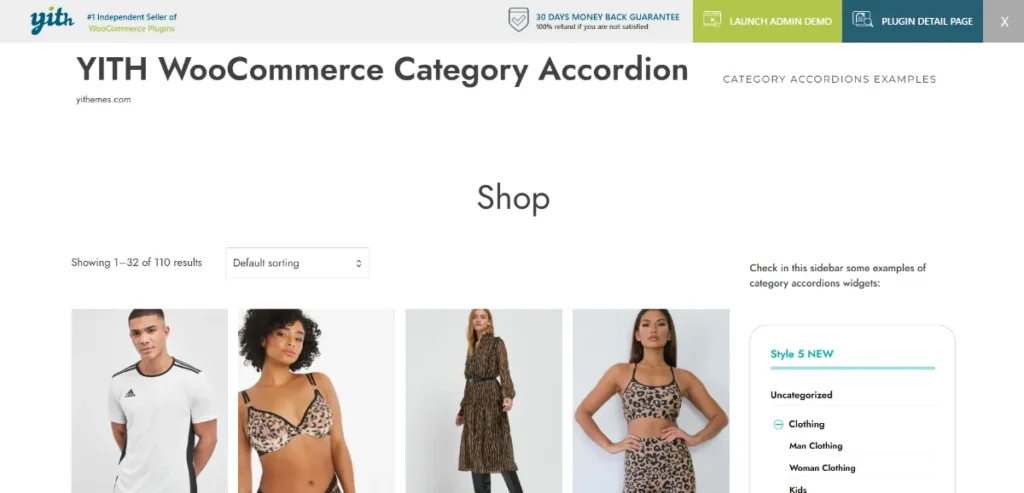
WooCommerce Category Accordion is a plugin designed to enhance how product categories are displayed in your WooCommerce store. Instead of showing a long list of categories, the plugin organizes them into a collapsible accordion structure.
This makes navigation easier, especially for stores with many categories and subcategories. Customers can expand or collapse sections to quickly find what they’re looking for without feeling overwhelmed.
The plugin is ideal for eCommerce websites that want to improve user experience, reduce clutter, and present their product catalog in a professional way.
How to Install WooCommerce Category Accordion
Installing WooCommerce Category Accordion is quick and beginner-friendly. Follow these steps:
1. Download the Plugin
Purchase and download the plugin from Pluginpro.org. You will receive a zip file containing the plugin files.
2. Upload to WordPress
- Log in to your WordPress dashboard
- Go to Plugins → Add New → Upload Plugin
- Select the zip file and click Install Now
3. Activate the Plugin
After installation, click Activate Plugin to enable the functionality on your site.
4. Configure Settings
Navigate to the plugin settings panel (usually under WooCommerce or Appearance). From here, you can:
- Choose which categories to display
- Set accordion behavior (open/close style)
- Customize icons and layout
5. Add Accordion to Your Site
Use widgets or shortcodes to display the category accordion in sidebars, menus, or pages.
6. Test the Display
Visit your store frontend to ensure the accordion works smoothly and categories expand/collapse properly.
After completing these steps, your store will have a more organized and visually appealing category navigation system.
Key Features of WooCommerce Category Accordion
WooCommerce Category Accordion offers a variety of features that improve navigation and usability:
1. Accordion-Style Category Display
Transform long category lists into a structured accordion layout for better organization.
2. Support for Subcategories
Display unlimited levels of subcategories in a hierarchical format.
3. Expand/Collapse Controls
Users can easily open or close category sections, making browsing faster and more intuitive.
4. Custom Icons and Styles
Choose different icons, colors, and styles to match your website’s design.
5. Widget and Shortcode Support
Add the accordion anywhere using widgets or shortcodes for maximum flexibility.
6. Mobile-Friendly Design
Fully responsive layout ensures smooth navigation on smartphones and tablets.
7. Lightweight and Fast
Optimized for performance, ensuring your website remains fast and responsive.
8. SEO-Friendly Structure
Clean HTML structure helps search engines crawl your category pages effectively.
Selling Points of WooCommerce Category Accordion
Using WooCommerce Category Accordion brings multiple advantages to your online store:
Improved User Experience
Customers can quickly navigate through categories without scrolling through long lists.
Better Store Organization
The accordion structure keeps your store neat and visually appealing.
Increased Engagement
Easy navigation encourages users to explore more products and categories.
Higher Conversion Rates
When customers find products faster, they are more likely to make a purchase.
Flexible Customization
Adapt the design and functionality to match your brand and website layout.
These benefits make the plugin an essential tool for any WooCommerce store aiming to improve usability and performance.
Why Purchase WooCommerce Category Accordion from Pluginpro.org?
Choosing Pluginpro.org gives you unmatched advantages when purchasing WooCommerce Category Accordion:
Save Up to 95%
Get premium plugins at a fraction of the original price, helping you reduce costs.
100% Clean Code
All plugins are tested and verified to ensure secure, clean, and optimized code.
Unlimited Website Usage
Install and use the plugin on as many websites as you want without restrictions.
Easy Updates
Stay up to date with the latest features and improvements effortlessly.
Instant Download
Get immediate access to the plugin after purchase and start using it right away.
Reliable Support
Receive assistance whenever needed to ensure smooth installation and operation.
Pluginpro.org ensures you get high-quality plugins with maximum value and flexibility.
Tips for Optimizing WooCommerce Category Accordion
To get the most out of WooCommerce Category Accordion, follow these best practices:
- Limit Category Depth: Avoid overly complex hierarchies that may confuse users
- Use Clear Category Names: Make it easy for customers to understand each section
- Highlight Important Categories: Keep top-selling or featured categories expanded by default
- Ensure Mobile Optimization: Test the accordion on mobile devices for smooth performance
- Combine with Search Plugins: Enhance navigation further by adding an Ajax search feature
Conclusion
WooCommerce Category Accordion is a must-have plugin for store owners who want to improve navigation and organize their product categories efficiently. With its accordion-style layout, customizable design, and user-friendly features, it enhances both usability and aesthetics.
By purchasing from Pluginpro.org, you gain access to a high-quality plugin at a significantly reduced cost, along with clean code, unlimited usage, and easy updates.
If you’re looking to create a more professional and user-friendly WooCommerce store, WooCommerce Category Accordion is the perfect solution. Start using it today and transform how customers browse your product categories.



