FAT Event is a powerful WordPress plugin designed to manage events, schedules, bookings, and calendars within a single, structured system. FAT Event helps businesses, event organizers, and service providers create professional event management platforms without relying on multiple plugins or complex custom development.
Managing events online often involves juggling different tools for scheduling, ticketing, and attendee management. This fragmented approach can lead to inefficiencies and inconsistencies. FAT Event solves this by offering a centralized solution where all event-related functions are handled in one place.
In practice, this means an organizer can create events, assign schedules, manage bookings, and display everything in a user-friendly calendar interface. For example, a training center can list upcoming classes, while a conference organizer can manage multi-day events with multiple sessions.
Another important advantage is scalability. As event operations grow, the plugin continues to support increased complexity without requiring additional systems. Whether managing a small workshop or a large conference, FAT Event provides the flexibility needed for long-term use.
As user expectations increase, having a structured and responsive event system becomes essential. FAT Event ensures that both administrators and visitors experience a smooth and efficient workflow.
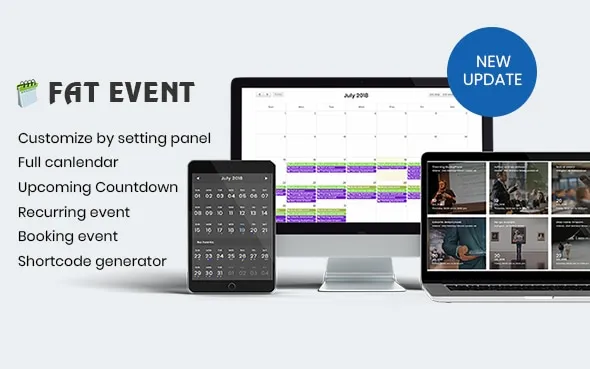
What is FAT Event?
FAT Event is a WordPress event management plugin that allows users to create, organize, and display events through customizable calendars and booking systems. It combines scheduling, event display, and user interaction into a single platform.
At its core, FAT Event functions as a comprehensive event management system. Users can define event details, set schedules, and present them in an organized format. This eliminates the need for separate plugins for each function.
This plugin is particularly useful for businesses and organizations that host recurring events. For example, a fitness center can manage class schedules, while an educational institution can organize workshops and seminars.
Another key aspect is automation. FAT Event allows users to automate event listings and updates, reducing manual effort. Instead of updating multiple pages, administrators can manage everything from a central dashboard.
From a practical perspective, FAT Event is ideal for users who need a structured and scalable event management solution. It simplifies workflows while improving user experience.
In real-world workflows, this means administrators can quickly update schedules, add new events, and manage bookings without technical complexity.
Key Features of FAT Event
- Event Scheduling and Calendar Management
FAT Event provides a visual calendar interface for organizing events. Users can create events with specific dates and times.
In practice, this allows visitors to view schedules clearly and plan their participation.
For example, a training center can display weekly classes in a calendar format, making it easier for users to choose sessions. - Booking and Registration System
The plugin includes tools for managing event bookings and attendee registrations.
This simplifies the process of collecting participant information and managing capacity.
In real scenarios, users can register for events directly on the website, reducing friction. - Recurring Event Support
FAT Event allows users to create recurring events such as weekly classes or monthly meetings.
This eliminates the need to create events manually each time.
For example, a yoga studio can set up recurring sessions once and manage them automatically. - Customizable Event Layouts
Users can choose from different layouts to display events, including grids, lists, and calendars.
This flexibility ensures that event information is presented effectively.
In practice, organizers can highlight featured events or important sessions. - Responsive Design
The plugin ensures that event pages display correctly across all devices.
This is essential for providing a consistent user experience.
Many users access event information on mobile devices, making this feature critical. - Integration with WordPress
FAT Event works seamlessly within the WordPress environment.
Users can manage events without switching between platforms.
This simplifies workflows and improves efficiency. - Custom Fields and Options
Users can add custom fields to events, such as location, speakers, or pricing.
This allows for detailed event descriptions.
In real use cases, this helps provide all necessary information to attendees. - Performance Optimization
The plugin is designed to handle large volumes of events without affecting performance.
This ensures smooth operation even for busy websites.
Maintaining speed is essential for user experience and SEO.
Benefits of Using FAT Event
Using FAT Event provides immediate improvements in how events are managed and presented. One of the most significant benefits is organization. Events are displayed in a clear and structured format, making it easier for users to find information.
Another key advantage is efficiency. Instead of using multiple tools, users can manage everything within one plugin. This reduces setup time and simplifies ongoing management.
In real-world scenarios, this leads to better user engagement. For example, a well-organized event calendar encourages users to explore more events and register for sessions.
There is also a cost-saving benefit. Without FAT Event, businesses might need multiple plugins or custom development. This increases both initial costs and maintenance effort.
Another important benefit is scalability. As event operations grow, the plugin can handle increased complexity without requiring major changes.
For agencies, this means delivering event systems faster. For businesses, it means focusing on operations rather than technical setup.
Real Use Cases of FAT Event
FAT Event is widely used by fitness centers to manage class schedules and bookings. Users can view available sessions and register directly, improving convenience and reducing administrative work.
Educational institutions use the plugin to organize courses, workshops, and seminars. By presenting schedules clearly, they improve communication with students.
Corporate organizations use FAT Event to manage internal and external events. This includes training sessions, meetings, and conferences.
Agencies use the plugin to build event systems for clients quickly. Instead of developing custom solutions, they can use FAT Event to deliver professional results.
Another practical use case involves event marketing. Businesses can create dedicated event pages and promote them through campaigns, improving attendance and engagement.
How to Install FAT Event
Installing FAT Event is a straightforward process that requires minimal technical knowledge. Begin by downloading the plugin file from your source.
Log in to your WordPress dashboard and navigate to the Plugins section. Click on “Add New,” then select “Upload Plugin.” Upload the FAT Event file and proceed with installation.
Once installed, activate the plugin. After activation, you will see new options within your dashboard for managing events.
Next, configure the plugin by setting preferences such as calendar layout, booking options, and event details.
Create your first event by entering information such as date, time, and description. Add custom fields if needed.
In real workflows, users often start by setting up recurring events or templates to streamline future event creation.
Finally, display events on your website using shortcodes or widgets. Test functionality to ensure everything works correctly.
Why Buy FAT Event at Pluginpro.org
Buying FAT Event at Pluginpro.org offers significant advantages in both cost and scalability. Instead of purchasing individual licenses for each website, users can access the plugin at a reduced cost.
In a real-world scenario, consider an agency managing multiple client websites. Purchasing separate licenses for each project would quickly become expensive. With Pluginpro.org, the agency can use FAT Event across all projects without additional licensing costs.
Another important benefit is convenience. Pluginpro.org provides ready-to-use files that can be installed immediately. This eliminates the need for managing licenses and renewals.
Security is also a priority. Files are verified to ensure they are safe and free from malicious code. This helps maintain website stability.
Unlimited website usage allows businesses to scale without financial limitations. As new projects are launched, users can continue using FAT Event without additional costs.
From a workflow perspective, using a single source for plugins simplifies project management. Teams can standardize tools and improve efficiency.
Is FAT Event Worth It?
Yes, FAT Event is worth it for anyone managing events and needing a structured, scalable solution. It provides all the necessary tools to organize, display, and manage events effectively.
For example, a fitness center can use FAT Event to manage class schedules and bookings in one system. This reduces administrative work and improves user experience.
For agencies, the value lies in efficiency. They can deliver event systems quickly without custom development, improving profitability.
The plugin is best suited for businesses, organizations, and agencies that require reliable event management tools.
Conclusion
FAT Event provides a comprehensive solution for managing events within WordPress. By combining scheduling, booking, and display features, it simplifies event management while improving user experience.
Its flexibility allows it to adapt to different use cases, from small workshops to large-scale events. Users can create professional event systems without technical complexity.
When combined with the cost advantages of Pluginpro.org, FAT Event becomes an even more compelling choice. It allows users to build scalable and efficient event platforms while keeping costs under control, making it a valuable tool for long-term success.