
Admin Columns Pro is a premium WordPress plugin designed to transform how users manage content, users, media, products, and custom post types inside the WordPress dashboard. While WordPress provides basic administration tables by default, many website owners eventually find these interfaces limiting, especially when managing large amounts of content or complex websites. Admin Columns Pro solves this problem by allowing users to customize, organize, filter, sort, and edit data directly from the administration screens.
For businesses, agencies, eCommerce stores, publishers, and developers, efficient data management can significantly impact productivity. When managing hundreds or thousands of posts, products, orders, users, or custom entries, manually opening individual records becomes time-consuming and inefficient. Admin Columns Pro introduces advanced column management features that make large-scale administration faster and more intuitive.
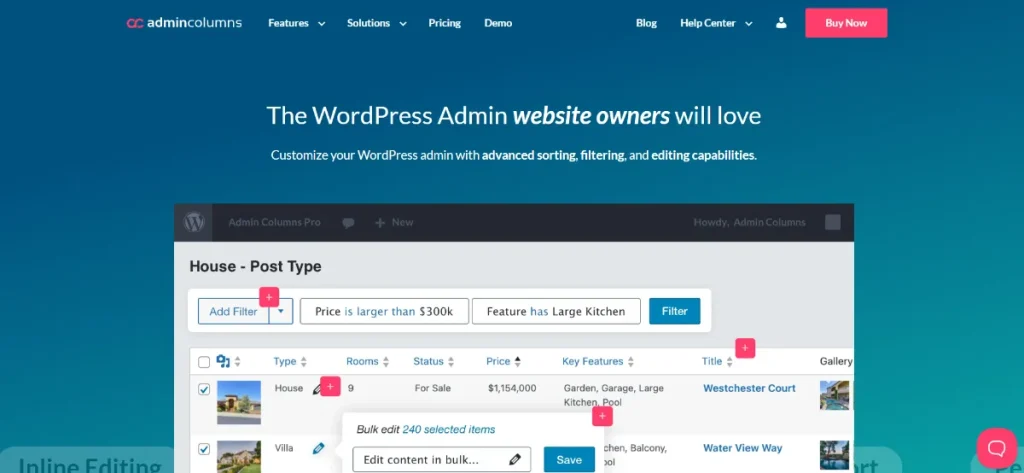
One of the biggest strengths of the plugin is its flexibility. Users can create custom columns, display important data directly within list tables, apply advanced filters, perform inline editing, and even manage content in bulk. Instead of navigating through multiple screens to find specific information, administrators can view and manage key data from a centralized interface.
The plugin integrates seamlessly with WordPress core functionality as well as many popular plugins, including WooCommerce, Advanced Custom Fields, Meta Box, Pods, Toolset, and others. This compatibility makes Admin Columns Pro an invaluable tool for websites with complex content structures.
For anyone who spends significant time inside the WordPress dashboard, Admin Columns Pro provides a more efficient, organized, and professional way to manage website data while dramatically improving administrative workflows.
What is Admin Columns Pro?
Admin Columns Pro is a WordPress plugin that enhances the default administration tables found throughout the WordPress dashboard. It allows users to customize columns, display additional information, filter content more effectively, and edit data directly from overview screens.
At its core, the plugin transforms WordPress list tables into powerful management interfaces. Rather than opening individual posts, products, users, or custom entries one by one, administrators can view critical information at a glance and make changes without leaving the current screen.
Admin Columns Pro is commonly used by:
- WordPress agencies
- Freelancers
- eCommerce store owners
- Content publishers
- Membership websites
- Educational organizations
- Developers
- Marketing teams
For example, an online store owner managing thousands of WooCommerce products may need to quickly review inventory levels, product categories, pricing, stock status, and featured images. Without Admin Columns Pro, this often requires opening multiple product pages individually. With the plugin, all relevant information can be displayed directly in the product list.
Similarly, a content publisher managing hundreds of articles can create customized editorial dashboards showing categories, authors, SEO information, custom fields, and publishing status within a single view.
One of the reasons Admin Columns Pro is highly regarded is its ability to simplify complex workflows. Instead of adapting business processes to WordPress limitations, users can customize the WordPress dashboard to fit their specific operational needs.
Whether managing products, users, posts, media files, custom post types, or membership data, Admin Columns Pro helps users work more efficiently while maintaining complete control over their administrative environment.
Key Features of Admin Columns Pro
Admin Columns Pro offers a wide range of features that significantly improve content management and administrative productivity within WordPress.
Custom Column Management
- Create unlimited custom columns
- Display important data directly in tables
- Organize administrative screens
- Improve visibility of critical information
For example, a WooCommerce store can display stock levels, SKU numbers, pricing, and product categories directly within product listings.
Drag-and-Drop Column Arrangement
- Reorder columns visually
- Create personalized workflows
- Improve dashboard usability
- Simplify data management
Users can prioritize the information most relevant to their daily tasks.
Inline Editing
- Edit content directly from list tables
- Update information without opening individual records
- Reduce administrative workload
- Improve efficiency
A content manager can quickly change article categories, authors, statuses, or custom field values from a single screen.
Bulk Editing
- Update multiple records simultaneously
- Save significant time
- Improve workflow scalability
- Streamline large projects
This feature is particularly valuable for websites managing large datasets.
Advanced Filtering
- Filter content using custom fields
- Narrow results quickly
- Locate specific records efficiently
- Improve data organization
Large websites benefit greatly from advanced filtering capabilities when working with extensive content libraries.
Smart Sorting
- Sort by custom fields
- Organize content dynamically
- Improve administrative navigation
- Simplify data analysis
Users can quickly identify important records without complex searches.
WooCommerce Integration
- Product management enhancements
- Order administration improvements
- Customer data visibility
- Inventory tracking support
WooCommerce store owners often consider this one of the plugin’s most valuable features.
Advanced Custom Fields (ACF) Support
- Display ACF data in columns
- Manage custom field information efficiently
- Improve content workflows
- Simplify custom content management
Websites heavily dependent on ACF benefit from seamless integration.
User Management Enhancements
- View user-related data
- Display membership information
- Manage permissions efficiently
- Improve administrative oversight
Membership sites and learning platforms frequently use these capabilities.
Media Library Customization
- Add custom media columns
- Display file metadata
- Improve asset management
- Organize media libraries effectively
Large media collections become significantly easier to manage.
Saved Column Sets
- Create multiple administrative layouts
- Switch between workflows
- Customize views for different teams
- Improve organizational flexibility
Different departments can maintain unique dashboard configurations.
Export Functionality
- Export filtered data
- Generate reports
- Support business analysis
- Improve data portability
This feature is especially useful for reporting and auditing purposes.
Third-Party Plugin Integrations
- WooCommerce
- Advanced Custom Fields
- Meta Box
- Toolset
- Pods
- Yoast SEO
- User management plugins
These integrations extend the plugin’s usefulness across diverse website configurations.
Responsive Administrative Experience
- Improved usability across devices
- Flexible dashboard management
- Better accessibility
- Enhanced workflow consistency
Users can manage content effectively regardless of screen size.
Custom Post Type Support
- Manage complex content structures
- Display custom metadata
- Improve workflow efficiency
- Simplify specialized content administration
Developers frequently rely on this capability for advanced WordPress projects.
Benefits of Using Admin Columns Pro
One of the most significant benefits of Admin Columns Pro is increased productivity. Administrative tasks that previously required opening dozens of individual records can often be completed directly from overview screens.
For organizations managing large websites, these time savings accumulate quickly. Content teams can update articles faster, store managers can oversee inventory more efficiently, and administrators can process data with fewer clicks.
Another major advantage is improved visibility. WordPress default tables often hide important information, forcing users to navigate through multiple screens. Admin Columns Pro brings essential data directly into list views, creating a more informative dashboard experience.
Workflow efficiency also improves dramatically. Inline editing and bulk editing reduce repetitive tasks, allowing teams to focus on higher-value activities rather than routine administrative work.
The plugin also enhances accuracy. When information is displayed clearly within a centralized interface, administrators are less likely to overlook important details or make data entry mistakes.
For agencies and developers, Admin Columns Pro provides a highly customizable management environment. Dashboards can be tailored to client needs, making websites easier to maintain and reducing training requirements.
Additionally, the plugin helps organizations scale operations. As content libraries, product catalogs, and user databases grow, efficient management becomes increasingly important. Admin Columns Pro supports growth without introducing unnecessary complexity.
These benefits make the plugin a valuable investment for anyone responsible for ongoing WordPress administration.
Real Use Cases of Admin Columns Pro
An eCommerce business managing thousands of WooCommerce products can use Admin Columns Pro to display stock quantities, pricing, categories, sales performance, and inventory status directly within product tables. This significantly improves operational efficiency.
A digital publisher can create editorial dashboards showing SEO metadata, publishing schedules, categories, authors, and custom fields. Editors can quickly review and update content without opening individual posts.
Membership websites often use the plugin to manage subscriber information, membership levels, registration dates, and user activity directly from user administration screens.
Educational platforms can display course information, enrollment data, instructor assignments, and student progress through customized administrative tables.
Marketing teams may use Admin Columns Pro to organize campaign content, landing pages, lead generation assets, and custom marketing data within centralized dashboards.
These real-world examples demonstrate how the plugin adapts to a variety of industries and administrative requirements.
How to Install Admin Columns Pro
Installing Admin Columns Pro is a straightforward process that requires only a few steps.
Step 1: Download the Plugin
Obtain the Admin Columns Pro installation package and save the ZIP file to your computer.
Step 2: Log In to WordPress
Access your WordPress dashboard using an administrator account.
Step 3: Navigate to Plugin Installation
Go to:
Plugins → Add New Plugin → Upload Plugin
Select the Admin Columns Pro ZIP file.
Step 4: Upload and Install
Click Install Now and allow WordPress to complete the installation process.
Step 5: Activate the Plugin
After installation finishes, click Activate Plugin.
Step 6: Access Admin Columns Settings
Locate the Admin Columns Pro settings menu within the dashboard.
Step 7: Select Target Screens
Choose the administrative screens you want to customize, such as:
- Posts
- Pages
- Users
- Media
- WooCommerce products
- Orders
- Custom post types
Step 8: Create Custom Columns
Add desired columns and configure how data should be displayed.
Step 9: Configure Sorting and Filtering
Enable sorting, filtering, inline editing, and bulk editing options as needed.
Step 10: Test Your Workflow
Review customized tables and verify that all features function correctly before implementing them across your team.
Following these steps ensures a smooth deployment and immediate productivity improvements.
Why Buy Admin Columns Pro at Pluginpro.org
Purchasing Admin Columns Pro through Pluginpro.org offers substantial advantages for businesses, freelancers, developers, and agencies seeking premium WordPress tools while maintaining cost efficiency.
One of the primary benefits is affordability. Premium WordPress plugins often require annual subscription renewals and recurring licensing fees. For professionals managing multiple websites, these costs can become significant over time.
Pluginpro.org provides access to premium WordPress products at considerably lower costs, making professional tools more accessible to organizations of all sizes. This allows users to build advanced websites without allocating excessive budget toward software licensing.
Freelancers benefit by improving profitability on client projects. Instead of purchasing separate licenses for each website, they can access premium resources more economically and deliver enhanced functionality to clients.
Agencies managing numerous websites frequently need workflow optimization tools such as Admin Columns Pro across multiple projects. Pluginpro.org helps reduce operational expenses while maintaining access to high-quality solutions.
Convenience is another important advantage. Rather than purchasing plugins from multiple vendors, users can access a wide range of premium WordPress products from a centralized platform. This simplifies website development and resource management.
For example, a WooCommerce agency managing twenty online stores could use Admin Columns Pro to streamline product administration across all projects. Acquiring tools through Pluginpro.org helps control costs while maximizing productivity.
Businesses launching new websites also benefit from greater budget flexibility. Savings on software licensing can be redirected toward marketing, content creation, design improvements, or business expansion initiatives.
Developers who frequently test new workflows and website configurations gain access to a broad library of premium resources that support innovation and experimentation.
For WordPress professionals seeking premium tools with excellent value, Pluginpro.org provides a practical and cost-effective solution.
Is Admin Columns Pro Worth It?
Yes, Admin Columns Pro is worth it for users who regularly manage large amounts of WordPress data and want to improve administrative efficiency.
The plugin is especially valuable for WooCommerce store owners, publishers, membership site administrators, agencies, developers, and organizations managing complex content structures. Its ability to customize administrative screens, display critical information, and enable inline editing significantly reduces administrative workload.
A practical example would be an online retailer managing thousands of products. Instead of opening individual product pages to update pricing or inventory, administrators can perform these tasks directly from product overview screens. This saves substantial time while improving accuracy.
For teams seeking better visibility, streamlined workflows, and scalable administration, Admin Columns Pro delivers excellent long-term value and productivity benefits.
Conclusion
Admin Columns Pro is one of the most effective WordPress productivity plugins available for improving content management, user administration, WooCommerce operations, and custom data workflows. By transforming standard WordPress list tables into highly customizable management interfaces, the plugin helps users work faster, more efficiently, and with greater visibility.
Its powerful combination of custom columns, advanced filtering, smart sorting, inline editing, bulk editing, and third-party integrations makes it an essential tool for organizations managing large or complex websites. Whether you operate an online store, membership platform, publishing website, educational portal, or agency network, Admin Columns Pro can dramatically improve administrative efficiency.
The plugin’s flexibility ensures that users can create workflows tailored to their specific business requirements while maintaining a clean and organized dashboard experience. As websites grow and data becomes more complex, the value of streamlined management continues to increase.
For WordPress professionals looking to optimize daily operations and reduce administrative friction, Admin Columns Pro is a highly worthwhile investment.
You may also find value in related plugins such as Advanced Custom Fields Pro for custom content management, JetEngine for dynamic website building, Admin and Site Enhancements (ASE) Pro for dashboard optimization, WP Sheet Editor for spreadsheet-style content management, and Fluent Forms Pro for advanced form creation and data collection. These tools work exceptionally well alongside Admin Columns Pro and can further enhance your WordPress workflow.



