
Admin and Site Enhancements (ASE) Pro is a powerful WordPress plugin designed to simplify website management by adding dozens of practical enhancements to both the WordPress admin area and the front-end experience. Instead of installing multiple small plugins to handle various administrative tasks, ASE Pro combines a wide range of productivity, security, customization, and performance features into a single lightweight solution. This approach helps website owners reduce plugin bloat while maintaining a cleaner and more efficient WordPress environment.
Many WordPress users eventually encounter limitations within the default administration dashboard. Tasks such as customizing login pages, managing user roles, disabling unnecessary features, optimizing workflows, improving security, and enhancing site functionality often require several separate plugins. Admin and Site Enhancements (ASE) Pro addresses this challenge by offering an extensive collection of modular tools that can be enabled or disabled based on specific needs.
The plugin is particularly valuable for freelancers, agencies, developers, and business owners who manage multiple websites. By consolidating essential administrative functions into one package, ASE Pro reduces maintenance complexity and minimizes potential plugin conflicts. Users can activate only the modules they need, keeping websites streamlined and optimized.
Another major advantage is flexibility. Whether you want to improve the admin interface, strengthen security, customize branding, enhance content management, or simplify user administration, ASE Pro provides practical solutions without requiring advanced technical expertise. Its modular design allows users to build a customized WordPress management experience tailored to their workflow.
For website owners seeking a more efficient and organized way to manage WordPress sites, Admin and Site Enhancements (ASE) Pro offers a comprehensive toolkit that delivers both convenience and long-term value.
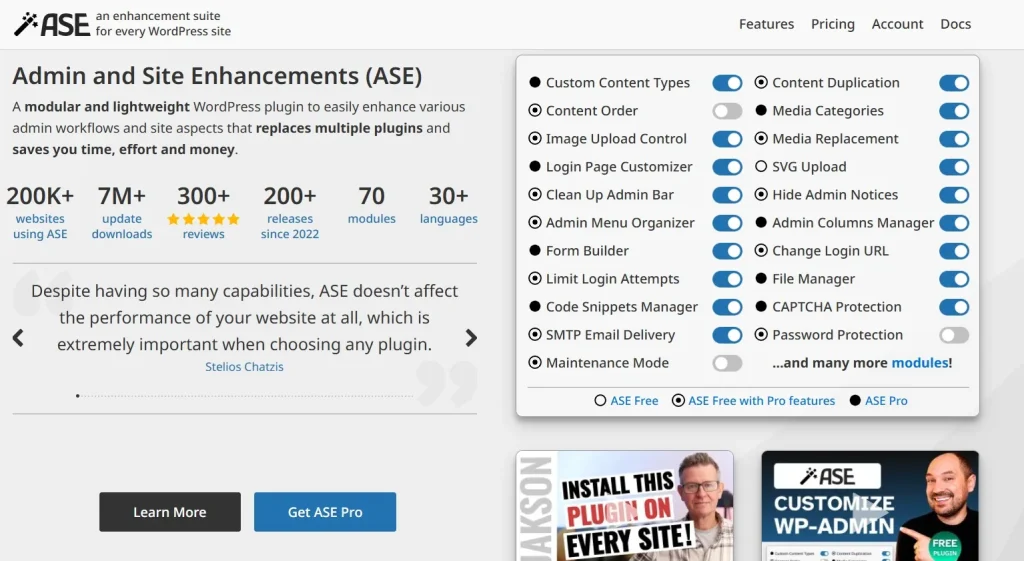
What is Admin and Site Enhancements (ASE) Pro?
Admin and Site Enhancements (ASE) Pro is a premium WordPress plugin that extends the functionality of WordPress by providing a collection of enhancements for both administrators and website visitors. Rather than focusing on a single feature, the plugin serves as an all-in-one management toolkit designed to improve usability, security, customization, and efficiency.
At its core, ASE Pro helps users streamline common administrative tasks while reducing reliance on multiple standalone plugins. The plugin follows a modular approach, meaning each feature can be enabled or disabled individually. This allows users to customize their setup without adding unnecessary functionality.
Admin and Site Enhancements (ASE) Pro is commonly used by:
- WordPress developers
- Freelancers
- Web design agencies
- Business owners
- eCommerce managers
- Content publishers
- Membership site operators
- Educational organizations
For example, a web agency managing dozens of client websites may use ASE Pro to customize admin dashboards, hide unnecessary menu items, strengthen login security, and improve user management. Instead of installing ten or more separate plugins, the agency can handle these tasks through a single solution.
A small business owner may use the plugin to create a branded login page, improve content management workflows, and simplify administration without hiring a developer. Meanwhile, eCommerce stores can leverage administrative enhancements to streamline backend operations and improve productivity.
One of the reasons ASE Pro has gained popularity is its focus on practical improvements. Rather than overwhelming users with complex settings, it provides straightforward enhancements that solve common WordPress management challenges. This balance between functionality and simplicity makes the plugin suitable for both beginners and experienced professionals.
In essence, Admin and Site Enhancements (ASE) Pro transforms WordPress into a more efficient and customizable platform while helping users maintain a cleaner and more organized website environment.
Key Features of Admin and Site Enhancements (ASE) Pro
The strength of Admin and Site Enhancements (ASE) Pro lies in its broad collection of useful modules. Each feature is designed to address specific WordPress management needs while remaining easy to configure.
Modular Feature Management
- Enable only the tools you need
- Disable unused modules
- Reduce unnecessary overhead
- Improve site organization
This approach allows users to maintain lean WordPress installations while still accessing powerful functionality.
Custom Admin Menu Management
- Hide menu items
- Reorganize dashboard navigation
- Simplify admin interfaces
- Improve usability for clients
For example, agencies can create cleaner dashboards for clients by removing advanced settings that are not relevant to daily tasks.
Login Page Customization
- Add custom logos
- Modify branding elements
- Customize login backgrounds
- Create professional login experiences
Businesses often use this feature to reinforce brand identity throughout the website management process.
User Role Enhancements
- Advanced permission control
- Improved user management
- Custom role configurations
- Better access control
This feature is especially useful for membership sites and organizations with multiple contributors.
Security Improvements
- Disable unnecessary WordPress features
- Restrict access to sensitive areas
- Strengthen login protection
- Reduce potential attack surfaces
Security enhancements help website owners maintain safer environments without installing multiple security plugins.
Custom Dashboard Widgets
- Personalized dashboard displays
- Important site information visibility
- Enhanced workflow management
- Better administrative oversight
A common use case is displaying company instructions or project-specific notes directly within the WordPress dashboard.
Content Management Enhancements
- Improved editing workflows
- Additional content controls
- Simplified content administration
- Enhanced productivity
Content-heavy websites benefit from tools that make publishing and management more efficient.
Admin Bar Customization
- Modify toolbar elements
- Remove unnecessary links
- Add custom shortcuts
- Improve navigation efficiency
Small workflow improvements can save significant time over the lifespan of a website.
Media Library Improvements
- Enhanced file management
- Better organization capabilities
- Simplified asset handling
- Improved content workflows
Sites that frequently manage images and downloadable files often benefit from these enhancements.
Maintenance and Utility Tools
- Site cleanup options
- Administrative shortcuts
- Utility enhancements
- Workflow automation features
These tools help streamline routine maintenance tasks and reduce administrative effort.
Custom Code Integration
- Insert custom CSS
- Add custom JavaScript
- Implement site-specific modifications
- Avoid theme file editing
Developers appreciate having a centralized location for code customizations.
White Label Features
- Remove WordPress branding
- Customize backend appearance
- Create client-friendly dashboards
- Improve professional presentation
Freelancers and agencies commonly use white-label tools when delivering websites to clients.
Redirect Management
- Create custom redirects
- Manage URL changes
- Improve user navigation
- Support SEO maintenance
Proper redirect management helps preserve traffic and user experience during site updates.
Front-End Enhancements
- Improve visitor experience
- Optimize site functionality
- Customize user interactions
- Enhance website usability
These improvements extend the plugin’s value beyond administrative features.
Performance-Oriented Modules
- Disable unnecessary WordPress functions
- Reduce administrative clutter
- Improve efficiency
- Support faster workflows
While not primarily a performance plugin, ASE Pro helps maintain cleaner and more optimized WordPress environments.
Benefits of Using Admin and Site Enhancements (ASE) Pro
One of the biggest benefits of Admin and Site Enhancements (ASE) Pro is plugin consolidation. Many website owners install numerous small plugins to achieve basic administrative improvements. Over time, this can increase maintenance complexity and create compatibility issues.
By replacing multiple plugins with a single modular solution, ASE Pro helps simplify website management. Fewer plugins often mean fewer updates, fewer conflicts, and easier troubleshooting.
Another major advantage is improved productivity. Administrative enhancements streamline workflows, reduce repetitive tasks, and make WordPress easier to navigate. Teams can spend less time managing websites and more time focusing on content, marketing, or business growth.
The plugin also contributes to better client experiences. Agencies frequently customize WordPress dashboards for non-technical clients, making websites easier to manage after project delivery. Cleaner interfaces reduce confusion and support requests.
Security benefits are another important consideration. By disabling unnecessary features and improving administrative controls, users can reduce potential vulnerabilities while maintaining a more secure environment.
ASE Pro also offers excellent flexibility. Since modules can be activated individually, users avoid the problem of loading features they do not need. This creates a more tailored WordPress experience.
For organizations managing multiple websites, these advantages translate into lower maintenance costs, improved consistency, and more efficient operations.
Real Use Cases of Admin and Site Enhancements (ASE) Pro
A web design agency managing dozens of client websites can use Admin and Site Enhancements (ASE) Pro to standardize dashboard layouts, customize branding, manage user permissions, and streamline administrative workflows across all projects.
An eCommerce business may use the plugin to simplify backend management, customize user roles, improve security settings, and optimize administrative efficiency for staff members handling products and orders.
A membership website can leverage advanced user role management to create customized access levels for subscribers, editors, moderators, and administrators.
Content publishers often benefit from dashboard improvements, media management enhancements, and workflow optimization tools that support large-scale content production.
Educational organizations can customize administrative interfaces for instructors, students, and administrators while maintaining clear permission structures and streamlined navigation.
These examples demonstrate the versatility of ASE Pro across different industries and website types.
How to Install Admin and Site Enhancements (ASE) Pro
Installing Admin and Site Enhancements (ASE) Pro is a simple process that can be completed within a few minutes.
Step 1: Download the Plugin
Obtain the ASE Pro plugin package and save the ZIP file to your computer.
Step 2: Access the WordPress Dashboard
Log in to your WordPress administration area using an administrator account.
Step 3: Navigate to Plugin Installation
Go to:
Plugins → Add New Plugin → Upload Plugin
Select the ASE Pro ZIP file.
Step 4: Upload and Install
Click Install Now and allow WordPress to complete the installation process.
Step 5: Activate the Plugin
After installation finishes, click Activate Plugin.
Step 6: Access ASE Pro Settings
Locate the ASE Pro menu within the WordPress dashboard.
The plugin dashboard displays available modules and configuration options.
Step 7: Enable Desired Features
Review the available modules and activate only the enhancements you require.
Examples include:
- Login customization
- User role management
- Dashboard customization
- Redirect management
- Security enhancements
Step 8: Configure Module Settings
Each module includes dedicated settings that can be customized according to project requirements.
Step 9: Test Functionality
Verify that enabled modules function correctly and do not conflict with existing plugins or themes.
Step 10: Maintain and Update
Regularly update ASE Pro to ensure compatibility, security, and access to new features.
Following these steps allows users to quickly implement a customized WordPress management environment.
Why Buy Admin and Site Enhancements (ASE) Pro at Pluginpro.org
Purchasing Admin and Site Enhancements (ASE) Pro through Pluginpro.org offers significant value for WordPress professionals, businesses, and agencies seeking premium tools at affordable prices.
One of the primary advantages is cost savings. Premium WordPress plugins often require annual subscriptions and recurring renewal fees. For users managing multiple websites, these costs can become substantial over time.
Pluginpro.org helps reduce expenses by providing access to premium WordPress products at a fraction of traditional licensing costs. This allows businesses and developers to maintain professional websites while staying within budget.
Freelancers particularly benefit from this model. Instead of purchasing individual licenses for every client project, they can access powerful tools more economically and improve project profitability.
Agencies managing dozens of websites frequently need solutions like Admin and Site Enhancements (ASE) Pro across multiple projects. Pluginpro.org makes it easier to standardize workflows without dramatically increasing software expenses.
Convenience is another important factor. Rather than sourcing plugins from multiple vendors, users can access a wide range of premium WordPress resources from a single platform. This simplifies purchasing, management, and future expansion.
A practical example would be a web agency responsible for twenty client websites. Using ASE Pro across those projects can streamline administration, improve security, and reduce plugin clutter. Acquiring tools through Pluginpro.org helps maximize operational efficiency while controlling costs.
Businesses launching new websites can also allocate more budget toward marketing, content creation, and growth initiatives rather than spending heavily on software licenses.
Developers who regularly experiment with new workflows and website configurations gain access to a broad library of premium tools that support innovation and project flexibility.
For anyone seeking premium WordPress solutions with strong value for money, Pluginpro.org provides an attractive and practical option.
Is Admin and Site Enhancements (ASE) Pro Worth It?
Yes, Admin and Site Enhancements (ASE) Pro is worth it for users who want to simplify WordPress management, reduce plugin clutter, and improve administrative efficiency.
The plugin is particularly valuable for agencies, freelancers, developers, eCommerce businesses, content publishers, and organizations managing multiple websites. Its modular structure allows users to activate only the features they need, creating a cleaner and more optimized WordPress environment.
A practical example is a web agency that currently uses numerous plugins for dashboard customization, login branding, user management, redirects, and administrative improvements. ASE Pro can consolidate many of these functions into a single solution, reducing maintenance effort and improving consistency.
For users seeking a more streamlined WordPress experience, ASE Pro delivers excellent value and long-term benefits.
Conclusion
Admin and Site Enhancements (ASE) Pro is a comprehensive WordPress management plugin that helps users improve efficiency, organization, customization, and security through a wide range of practical enhancements. By combining numerous administrative tools into a single modular solution, the plugin reduces dependency on multiple standalone plugins and simplifies website maintenance.
Its flexibility makes it suitable for freelancers, agencies, developers, business owners, eCommerce managers, and content publishers alike. Whether you need to customize the WordPress dashboard, manage user permissions, improve workflows, strengthen security, or create a more professional backend experience, ASE Pro provides the tools necessary to accomplish those goals efficiently.
The plugin’s modular architecture ensures that websites remain streamlined while still benefiting from powerful functionality. Users can build a tailored management environment that supports productivity without unnecessary complexity.
For WordPress professionals looking to optimize website administration and reduce plugin overload, Admin and Site Enhancements (ASE) Pro is certainly worth considering.
You may also find value in related plugins such as WPCode Pro for advanced code management, Fluent Forms Pro for powerful form creation, Perfmatters for WordPress performance optimization, User Role Editor Pro for advanced permission management, and MainWP Pro for centralized multi-site administration. These tools can complement ASE Pro and further enhance your WordPress workflow.



