If you’re searching for one of the best premium WordPress themes, you’ve probably come across Avada. For more than a decade, it has been one of the most popular choices for businesses, agencies, freelancers, and WooCommerce store owners thanks to its all-in-one website builder, extensive customization options, and large library of pre-built websites. However, popularity alone doesn’t necessarily mean it’s the right theme for every project.
Most people looking for a premium multipurpose theme are stuck between two frustrating problems: buying five different plugins that don’t talk to each other, or picking a “flexible” theme that turns out to be a stripped-down page builder with a fancy name. Avada was built to solve exactly that gap: one license, one builder, and a genuinely enormous library of ready-made layouts. In this guide, we’ll break down what Avada actually is, where it shines, where it falls short, and whether it deserves a spot on your next project.
For users searching for the best premium WordPress theme, Avada remains one of the strongest choices. It combines a powerful visual builder, extensive customization options, WooCommerce integration, and a large library of ready-made websites in a single package.
1. What Is the Avada WordPress Theme?
Avada is a premium WordPress theme developed by ThemeFusion, first released in 2012. It’s built around Avada Builder (formerly known as Fusion Builder), a drag-and-drop visual editor that lets you design pages, headers, footers, and even WooCommerce shop layouts without touching code.
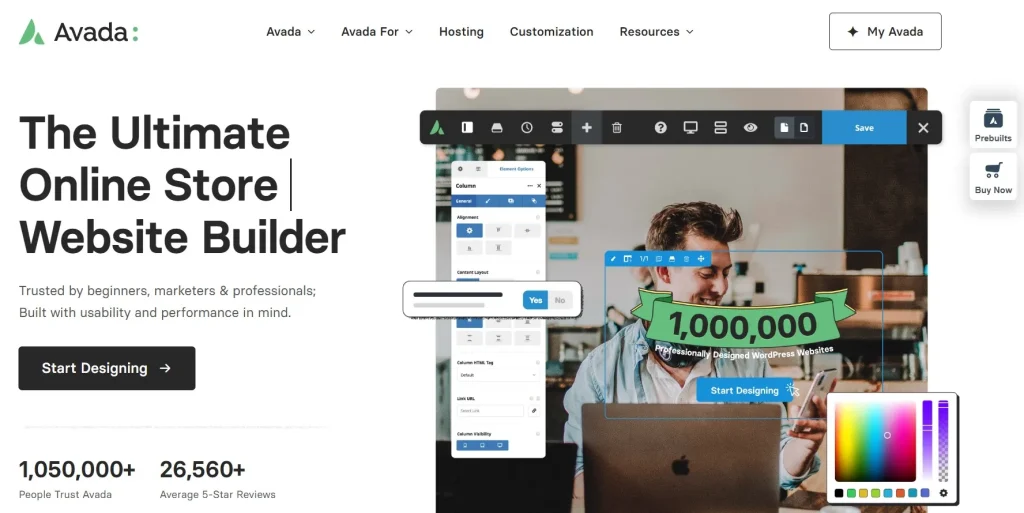
Unlike many themes that rely on third-party plugins to add functionality, Avada bundles nearly everything in-house: a mega menu system, a global options panel with hundreds of settings, a portfolio module, a forms builder, and a library of 100+ pre-built website demos you can import in a couple of clicks.
Who it’s for:
- Freelancers and agencies who need to launch varied client sites quickly
- Business owners who want a complete website builder without hiring a developer
- WooCommerce store owners who want built-in shop layout controls
- Beginners who want visual, no-code page building with a huge head start from templates
If your priority is total design freedom in a single package rather than a lightweight, minimalist setup, Avada is built for exactly that use case.
2. Why Is Avada Considered the Best Premium WordPress Theme for Businesses?
Strengths: Avada’s biggest selling point is sheer completeness. You get a page builder, a theme, and a demo library rolled into one license, and it genuinely reduces how many plugins you need to install. The demo library alone can save hours of setup time, and the visual builder is approachable even for non-developers.
Limitations: That completeness comes at a cost literally, in performance. Avada loads a large amount of CSS and JavaScript by default, and average page weight tends to run noticeably heavier than lean, single-purpose themes. There’s also a real learning curve if you’re used to a different builder like Elementor, since Avada does layout structure “its own way.”
Is it worth using? For agencies and users who value flexibility, a huge demo library, and a single one-time purchase over ongoing subscriptions, yes Avada remains one of the most complete multipurpose themes on the market. If your top priority is squeezing out the fastest possible page load with a minimal footprint, you’ll want to pair it with solid performance optimization, or consider it alongside lighter alternatives.
3. Avada Features and Performance
3.1 Key Features That Make Avada Stand Out
- Avada Builder (Fusion Builder): A drag-and-drop visual editor with both front-end and back-end modes, plus 85+ builder elements, sliders, tabs, pricing tables, forms, maps, testimonials, and WooCommerce-specific elements.
- 100+ pre-built websites: Fully customizable demo sites spanning restaurants, portfolios, law firms, agencies, and online stores, importable with a few clicks.
- Global Options Network: An extensive theme options panel covering typography, colors, header/footer layouts, and site-wide behavior, with dependency logic that only shows relevant settings.
- Mega menu builder: A flexible, no-plugin-needed mega menu system with adjustable columns, icons, and images.
- WooCommerce integration: Custom product page layouts, AJAX shop filtering, and category page column controls built directly into the theme.
- Regular updates: ThemeFusion ships major feature updates every couple of months, plus ongoing compatibility patches.
3.2 Performance and User Experience
Speed/performance: This is Avada’s most debated area. Because it bundles so much functionality, average page weight runs heavier than single-purpose themes, often several times larger than a minimalist theme with no builder attached. Avada does include built-in performance tools (CSS/JS minification, lazy loading, dynamic CSS generation) that meaningfully help, but they don’t fully offset the base weight of an all-in-one system. If page speed is your single highest priority, plan to invest some extra time in optimization caching, image compression, and disabling unused Avada modules all make a real difference.
Ease of use: The visual, front-end builder is intuitive once you get past the initial learning curve. Clicking an element opens direct editing controls, and changes preview instantly. That said, if you’re migrating from another builder, expect a short adjustment period. Avada structures rows, columns, and containers a bit differently than Elementor or Divi.
UI/UX: The admin experience has been refined over the years, with clearer settings groupings and dependency-based option visibility so you’re not overwhelmed by irrelevant fields.
Workflow: For agencies handling multiple client sites, the combination of demo imports, global styling controls, and reusable saved elements creates a genuinely efficient workflow; you can go from blank install to a styled draft site in under an hour.
These features help position Avada as one of the leading candidates for anyone looking for the best premium WordPress theme with built-in design and WooCommerce capabilities.
4. The Pros and Cons of Using Avada
4.1 Pros
- All-in-one package: theme + builder + 100+ demos in a single license
- One-time purchase with lifetime updates, no recurring theme fee
- Deep customization without writing code
- Strong WooCommerce support out of the box
- Large, active support team and extensive documentation/tutorials
- Frequent updates and long-term track record (in active development since 2012)
4.2 Cons
- Heavier page weight compared to lightweight themes, which can affect load times
- Learning curve for users coming from other builders
- Support beyond the included period requires an additional fee
- Standard license covers one site, so multi-site agencies pay per project
- Being locked into Avada Builder’s ecosystem makes switching themes later more work
5. Who Should Use Avada?
If you’re looking for the best premium WordPress theme for business websites, online stores, or client projects, Avada is designed to meet a wide range of needs. It delivers the greatest value to users who want a flexible, all-in-one website builder with powerful customization options. Whether you’re creating a personal website, managing client projects, or building an online store, Avada provides the tools to handle almost any type of project without relying on multiple third-party plugins.
5.1 Beginners
If you’re new to WordPress, Avada offers an accessible way to build professional websites without coding. Its drag-and-drop Avada Builder, combined with more than 100 pre-built website demos, allows beginners to launch a polished site quickly while learning the platform at their own pace.
5.2 Agencies and Freelancers
Avada is an excellent choice for agencies and freelancers who build websites for clients across different industries. Reusable design elements, global styling options, and an extensive demo library help streamline development, reduce project turnaround time, and maintain consistent branding across multiple websites.
5.3 WooCommerce Store Owners
For eCommerce businesses, Avada includes powerful WooCommerce integration with customizable shop pages, product layouts, AJAX filtering, and responsive store designs. These built-in features make it easy to create a professional online store without relying on numerous additional plugins.
5.4 Developers and Advanced Users
Although Avada is designed to be beginner-friendly, it also provides plenty of flexibility for experienced developers. Support for child themes, custom CSS, hooks, and advanced customization allows developers to build highly tailored websites while still benefiting from Avada’s visual design workflow.
6. Recommended Plugins and Tools for Avada
6.1 WP Rocket
WP Rocket is one of the best caching plugins to pair with Avada. It improves page loading speed through page caching, file optimization, lazy loading, and database cleanup, helping offset the additional CSS and JavaScript that come with a feature-rich theme like Avada.

6.2 Rank Math
Rank Math complements Avada by providing advanced SEO features such as schema markup, XML sitemaps, keyword optimization, and content analysis. Together, they help you build websites that are both visually appealing and search-engine friendly.
6.3 ShortPixel
ShortPixel automatically compresses and optimizes images without noticeably affecting quality. When used with Avada, it reduces page size and improves loading times, which can positively impact both user experience and Core Web Vitals.
6.4 WooCommerce
WooCommerce is the ideal eCommerce solution for Avada. The theme includes built-in shop layouts, product page customization, and WooCommerce-specific design elements, making it easy to create a professional online store.
6.5 Wordfence
Wordfence adds an extra layer of protection to Avada-powered websites with features like firewall protection, malware scanning, and login security. It’s a valuable addition for business websites and online stores that handle sensitive customer data.
7. FAQs
1. Is Avada still worth buying in 2026?
Yes. Among the best premium WordPress themes available today, Avada remains one of the most popular choices for users who want a complete, all-in-one website building solution. If your priority is a minimalist, ultra-fast setup, however, it’s worth considering lighter alternatives.
2. Does Avada slow down my website?
Avada does load more CSS and JavaScript than lightweight themes by default, which can affect load times. Using caching, image optimization, and disabling unused modules helps offset this.
3. Can I use Avada with WooCommerce?
Yes. Avada includes dedicated WooCommerce layout options, including product page customization and shop page filtering, without needing extra plugins.
4. Where can I download Avada and other premium WordPress themes at a lower cost?
If you’re looking for premium WordPress themes and plugins without purchasing each one individually, Pluginpro offers access through affordable plans, including a $4.5 per item option and membership packages for users who need multiple products.
5. Do I need coding skills to use Avada?
No. Avada Builder is designed as a visual, drag-and-drop editor, so most sites can be built without touching code. Developers can still extend it further with custom code if needed.
8. Conclusion
If you’re searching for the best premium WordPress theme, Avada continues to stand out thanks to its flexibility, powerful visual builder, and mature ecosystem. With its built-in visual builder, extensive customization options, WooCommerce integration, and large library of pre-built websites, it offers an all-in-one solution for agencies, freelancers, businesses, and anyone looking to build professional WordPress websites without extensive coding.
While it isn’t the lightest theme on the market, its flexibility, long-term support, and mature ecosystem make it a worthwhile investment for projects that require powerful design capabilities and scalability.
If you’re ready to build your next website with Avada, PluginPro makes it easy to access the premium WordPress themes and plugins you need in one place. Explore our collection to find trusted tools that help you create faster, more secure, and more professional WordPress websites with confidence.