Many WordPress website owners invest time in creating high-quality content but still struggle to rank on Google. In many cases, the problem isn’t always the content itself but the lack of proper SEO optimization. Without the right tools, tasks like writing optimized meta titles, generating XML sitemaps, adding schema markup, and managing technical SEO can quickly become time-consuming.
The best WordPress SEO plugin brings these essential tools directly into your WordPress dashboard. Whether you’re running a blog, a business website, or a WooCommerce store, the right plugin can help optimize your content, improve search visibility, and make your website easier for search engines to crawl and understand.
With so many SEO plugins available, choosing the right one can be challenging. Some focus on beginner-friendly optimization, while others provide advanced automation, technical SEO controls, or greater flexibility for experienced users.
In this guide, we’ll review eight of the best WordPress SEO plugin options, looking at their strengths, limitations, and ideal use cases to help you choose the right solution for your website.
1. What to Look for in the Best WordPress SEO Plugin
Not every WordPress SEO plugin offers the same level of optimization and control. While most plugins can handle basic tasks such as meta tags and XML sitemaps, the best WordPress SEO plugin should support both on-page and technical SEO without making your workflow unnecessarily complicated. It should also work well with your existing WordPress tools, remain lightweight, and provide enough flexibility to support your website as it grows.
Before choosing an SEO plugin, here are the most important features to consider.
1.1 Comprehensive On-Page SEO Features
On-page optimization is a core part of an effective SEO strategy. A good plugin should help you optimize page titles, meta descriptions, headings, URLs, image alt text, and canonical URLs while providing recommendations that make your content easier for both users and search engines to understand.
Many modern SEO plugins also provide readability analysis, keyword optimization, and internal linking suggestions, helping you improve content quality and on-page SEO without requiring advanced technical knowledge.
1.2 XML Sitemaps and Schema Markup
Technical SEO plays a major role in helping search engines crawl and index your website efficiently. Automatically generated XML sitemaps help search engines discover important pages on your website, while built-in schema markup helps them better understand different types of content, including articles, products, FAQs, reviews, and local business information.
These features can help search engines understand and process your content more effectively, while structured data may make eligible pages suitable for enhanced search results.
1.3 WooCommerce Compatibility
If you run a WooCommerce store, strong compatibility with WooCommerce should be an important factor when choosing an SEO plugin. Features such as product schema, optimized category pages, breadcrumb navigation, and customizable product metadata can help improve the visibility of your products in search engines.
Good WooCommerce integration can also save time by automatically applying SEO settings across hundreds or even thousands of product pages.
1.4 Ease of Use
The best SEO plugin should simplify optimization rather than make it more complicated. Beginners often benefit from setup wizards, guided recommendations, and clear dashboards, while experienced users may prefer advanced controls for schema, redirects, indexing, and custom metadata.
A plugin with a well-designed interface makes ongoing SEO management much faster, especially if you regularly publish new content.
1.5 Performance and Compatibility
SEO improvements shouldn’t come at the cost of website speed. A lightweight plugin with efficient code can help minimize unnecessary performance overhead and may also be easier to maintain over time.
It’s also important to choose a plugin that works well with popular WordPress themes, Elementor Pro, Gutenberg, WooCommerce, caching plugins such as WP Rocket, and other tools in your existing stack. Strong compatibility reduces the risk of conflicts and helps maintain a stable SEO workflow as your website grows.
With these criteria in mind, let’s compare the leading WordPress SEO plugins and see where each option stands out.
2. 8 Best WordPress SEO Plugins for 2026
2.1 Yoast SEO
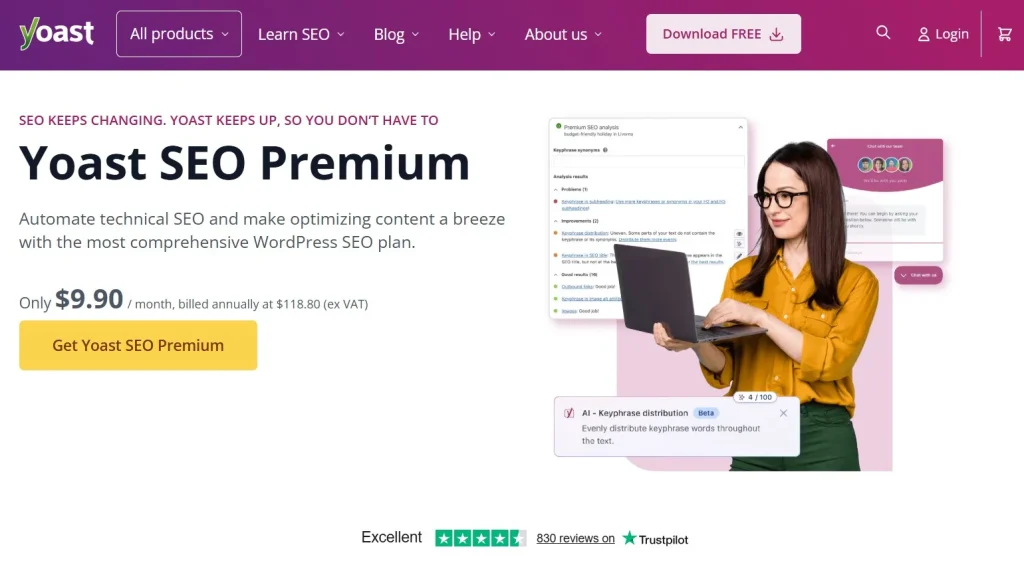
Yoast SEO is one of the most established WordPress SEO plugins, known for making SEO easier to manage for beginners and experienced users alike. Its biggest strength is its straightforward approach to on-page optimization, helping users improve content without navigating overly complex settings. Yoast provides practical tools for optimizing meta titles and descriptions, readability, keyword usage, internal links, XML sitemaps, and schema markup. It also integrates well with WooCommerce, Elementor Pro, Gutenberg, and most modern WordPress themes. Some advanced features are available only in Yoast SEO Premium. Overall, its balance of usability, functionality, and compatibility makes it a strong all-around SEO solution for WordPress websites.
2.2 Rank Math
Rank Math takes a more feature-rich approach to WordPress SEO, giving users greater control over optimization and technical settings. Its modular system allows you to enable or disable individual features, which can help keep the dashboard focused on the tools you actually need. The plugin includes features for meta optimization, XML sitemaps, schema markup, redirects, 404 monitoring, keyword tracking, and other technical SEO tasks. It also provides extensive controls for WooCommerce and supports popular WordPress tools and page builders. The main trade-off is its larger feature set, which can make the interface feel more complex than simpler SEO plugins. For users who want deeper control without relying on multiple separate plugins, Rank Math offers a comprehensive toolkit.
2.3 All in One SEO (AIOSEO)
All in One SEO (AIOSEO) combines a broad set of SEO features with a relatively straightforward interface. Its main strength is bringing essential on-page and technical SEO tools into one dashboard without overwhelming users with unnecessary configuration. AIOSEO includes meta title and description optimization, XML sitemaps, schema markup, SEO audits, local SEO tools, social media integration, and WooCommerce optimization. Its setup process is also designed to help users configure important settings without extensive technical knowledge. AIOSEO works well with the broader WordPress ecosystem, making it suitable for websites that need a flexible SEO workflow as they grow. Some advanced capabilities are reserved for paid plans, but the plugin still provides a solid foundation for managing WordPress SEO.

2.4 SEOPress
SEOPress stands out for its clean interface and streamlined approach to WordPress SEO management. Instead of filling the dashboard with promotional notices, it keeps the experience focused on the tools users need to optimize and maintain their websites. The plugin provides features for meta titles and descriptions, XML sitemaps, schema markup, redirects, breadcrumbs, Google Analytics integration, and WooCommerce SEO. Its white-label functionality is also useful for agencies that manage WordPress websites for clients and want greater control over branding. SEOPress is designed to work efficiently within a typical WordPress stack and supports common themes, plugins, and WooCommerce workflows. While its ecosystem and third-party resources are smaller than those of Yoast SEO, its focused interface makes everyday SEO management straightforward.
2.5 Slim SEO
Slim SEO takes a lightweight and highly automated approach to WordPress SEO. Instead of requiring users to configure numerous settings, it handles many technical SEO tasks automatically after installation, making the initial setup quick and uncomplicated. The plugin can generate meta tags, XML sitemaps, schema markup, Open Graph data, and canonical URLs while reducing the need for manual configuration. Its lightweight design is particularly appealing for websites that want essential SEO functionality without adding a large number of settings or unnecessary features. The trade-off is that Slim SEO provides less content analysis, keyword guidance, and advanced optimization controls than feature-heavy plugins such as Yoast SEO or Rank Math. Its simple workflow also makes it easy to maintain alongside other WordPress tools.
2.6 The SEO Framework
The SEO Framework focuses on automated technical SEO, clean implementation, and performance rather than extensive configuration. Its strength lies in handling essential tasks such as metadata generation, XML sitemaps, canonical URLs, and structured data with minimal manual input. The plugin also includes safeguards designed to reduce common SEO configuration issues, helping maintain consistent metadata and indexing settings across a website. Because it avoids many of the extra marketing and content-focused features found in larger SEO plugins, its interface remains lightweight and unobtrusive. This approach can be particularly useful for websites where performance and stability are important considerations. The SEO Framework also fits well into a WordPress stack where users prefer dedicated tools and automation over an all-in-one dashboard.
2.7 Squirrly SEO
Squirrly SEO focuses heavily on content optimization and guided SEO workflows. Rather than simply providing settings, it analyzes content as you write and offers recommendations related to keywords, headings, content structure, and other optimization factors. The plugin also combines these content tools with features such as keyword research, SEO audits, rank tracking, and competitor analysis, creating a broader workflow for content-focused SEO. This can make the optimization process easier to follow, particularly when publishing content regularly. Because the plugin provides a significant amount of guidance, some experienced SEO users may find its recommendations more detailed than necessary. Its broader feature set can also require more resources and configuration than lightweight alternatives, so compatibility and performance should be considered as part of the overall setup.
2.8 Schema Pro
Schema Pro takes a more specialized approach than the other plugins in this list by focusing primarily on structured data rather than serving as a complete SEO solution. It can complement general SEO plugins such as Yoast SEO, Rank Math, and AIOSEO by providing additional control over schema implementation. The plugin supports structured data for content types such as products, FAQs, reviews, recipes, courses, and local businesses without requiring users to manually create JSON-LD markup. This can simplify schema management for websites with more advanced structured data requirements. Because Schema Pro is designed as a companion tool rather than a full SEO plugin, it is best considered alongside a primary SEO solution. Its specialized functionality makes it useful when the built-in schema options of an SEO plugin are not sufficient.
3. Feature Comparison of the Best WordPress SEO Plugin Options
| Plugin | Free Version | WooCommerce Support | Main Strength |
| Yoast SEO | ✅ | ✅ | Ease of use |
| Rank Math | ✅ | ✅ | Advanced controls |
| AIOSEO | ✅ | ✅ | All-in-one SEO |
| SEOPress | ✅ | ✅ | Clean workflow |
| Slim SEO | ✅ | Limited | Lightweight automation |
| The SEO Framework | ✅ | Limited | Technical SEO & performance |
| Squirrly SEO | ✅ | ✅ | Content optimization |
| Schema Pro | ❌ | ✅ | Advanced schema |
While every plugin covers the core SEO essentials, they focus on different priorities. Yoast SEO offers the best balance between ease of use and functionality, Rank Math provides the most advanced features in its free version, and SEOPress stands out for agencies that prefer a cleaner workflow. If performance is your priority, Slim SEO and The SEO Framework are both excellent lightweight options, while Schema Pro is the best companion plugin for advanced structured data.
4. Building a Complete WordPress Toolkit
An SEO plugin is only one part of a complete WordPress setup. Depending on your website, you may also need page builders, performance plugins, security tools, WooCommerce extensions, and other premium solutions. PluginPro provides access to a broad selection of premium WordPress plugins and themes, making it easier to build a complete toolkit around your website.
5. Which Is the Best WordPress SEO Plugin for You?
Every plugin on this list can support a strong WordPress SEO strategy, but the right choice depends on your workflow, experience level, and the features your website actually needs. Instead of choosing the plugin with the longest feature list, consider which solution provides the right balance of functionality, usability, performance, and compatibility.
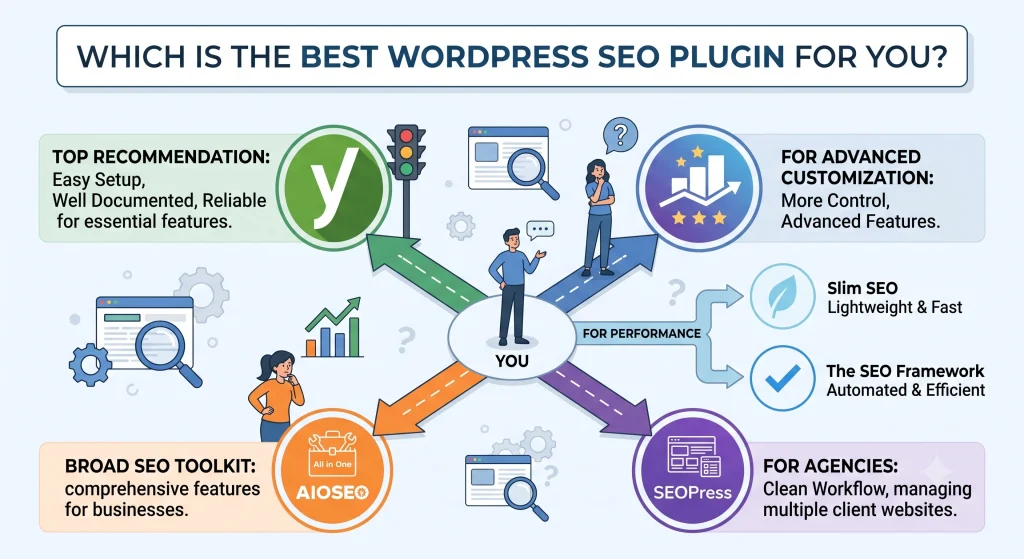
If you’re looking for a solution that’s easy to set up, well documented, and reliable over the long term, Yoast SEO remains our top recommendation. It covers the essential SEO features most WordPress websites need while maintaining an interface that’s easy for beginners to understand.
That said, Yoast isn’t the only strong option. Users who prefer more advanced customization may find Rank Math a better fit, while businesses looking for a broad SEO toolkit may prefer AIOSEO. Agencies managing multiple client websites often appreciate the clean workflow offered by SEOPress, while users focused on website performance may prefer lightweight options such as Slim SEO or The SEO Framework.
Ultimately, there’s no single plugin that’s perfect for every website. The best WordPress SEO plugin is the one that fits your workflow, your level of experience, and the goals of your website.
6. Frequently Asked Questions
1. What is the best WordPress SEO plugin?
For most users, Yoast SEO is the best WordPress SEO plugin because it combines powerful on-page SEO tools, XML sitemaps, schema markup, WooCommerce compatibility, and an intuitive interface suitable for both beginners and experienced users.
2. Is Yoast SEO free?
Yes. Yoast SEO offers a free version with essential SEO features such as metadata optimization, XML sitemaps, readability analysis, and schema support. Yoast SEO Premium adds advanced features including redirect management, multiple focus keywords, and AI-powered suggestions.
3. Does Yoast SEO work well with WordPress WooCommerce websites?
Yes. Yoast SEO for WordPress integrates with WooCommerce and helps optimize product pages, categories, breadcrumbs, and structured product data. Larger stores can also use the dedicated WooCommerce SEO extension for more specialized features.
4. Which is better: Yoast SEO or Rank Math?
Both are excellent plugins. Yoast SEO is generally easier for beginners and has a longer track record, while Rank Math offers more advanced features in its free version. The best choice depends on your experience level and website requirements.
5. Where can I download Yoast SEO Premium?
PluginPro offers GPL downloads of premium WordPress plugins, along with membership plans that provide access to a broader library of premium plugins and themes. If you’re looking for premium WordPress plugins such as Yoast SEO Premium or regularly manage multiple WordPress websites, you can choose the option that best fits your workflow.
7. Conclusion
There isn’t a single WordPress SEO plugin that works perfectly for every website. The right choice depends on your SEO goals, preferred workflow, technical experience, and the other tools you use to manage your website.
Yoast SEO remains a strong all-around option for users who value simplicity and reliable on-page optimization, while Rank Math provides greater control for users who want more advanced features. AIOSEO and SEOPress offer well-rounded solutions for business websites and professional workflows, while Slim SEO and The SEO Framework are strong choices for users who prefer lightweight and automated SEO management. Schema Pro can also complement a primary SEO plugin when more advanced structured data control is needed.
Once you’ve chosen the right SEO plugin, the rest of your WordPress stack can also play an important role in your website’s performance, design, and functionality. PluginPro provides access to a wide selection of premium WordPress plugins and themes, giving WordPress users a convenient way to find additional tools for building, optimizing, and growing their websites.