
Porto is a multipurpose WordPress theme with a particularly strong focus on WooCommerce. It gives you extensive control over headers, footers, product pages, shop layouts, archives, and other parts of your website. In this Porto theme review, we’ll look at its key features, WooCommerce capabilities, performance options, ease of use, pros and cons, and the types of websites that can benefit most from the theme.
1. What Is Porto Theme?

Developed by P-Themes, Porto is a multipurpose WordPress theme designed for a wide range of WordPress websites, including business sites, portfolios, blogs, and online stores.
WooCommerce is one of Porto’s strongest areas. Rather than providing only basic WooCommerce styling, the theme offers tools for customizing product pages, shop layouts, archives, and other parts of the shopping experience.
Porto also gives users extensive control over site layouts and structure. This flexibility can be useful for complex websites that require custom layouts, but it can also introduce a learning curve for users who only need a simple website.
Porto Theme at a Glance
| Area | Verdict |
| Best for | WooCommerce stores and complex WordPress websites |
| Page builders | Elementor, WPBakery, and Gutenberg |
| WooCommerce | Excellent |
| Customization | Very extensive |
| Performance | Good, but configuration matters |
| Ease of use | Easy to start, more complex to master |
| Overall | Best suited to users who need extensive control |
Porto is particularly compelling when WooCommerce is central to the website. For a small blog or simple business site, however, its large feature set may be more than you actually need.
2. Porto Theme Review: Key Features
Porto has a broad feature set, but several areas are particularly relevant when evaluating the theme: its Template Builder, WooCommerce tools, page builder support, performance controls, and responsive design options.
2.1. Site and Template Builder
Porto gives you control over areas of a WordPress site that may otherwise require additional customization. Its Template Builder can be used to create and edit:
- Headers
- Footers
- Single content templates
- Archives
- Popups
- Page layouts
- WooCommerce templates
For example, you can create a custom product page instead of relying entirely on the default WooCommerce layout. The same flexibility can be applied to archive pages, headers, and other parts of the site.
This makes Porto more suitable for projects that need layouts beyond the standard WordPress theme structure.
2.2. WooCommerce Features
WooCommerce is one of Porto’s main strengths. The theme provides tools that give store owners more control over how products are presented and how visitors browse a catalog.
Depending on the configuration, these include:
- Product swatches
- Ajax filtering
- Quick view
- Product comparison
- Product labels
- Product archives
- Custom product layouts
- Ecommerce-focused elements
These features go beyond basic visual styling. They can affect product presentation and catalog navigation, which can be particularly useful for stores with larger or more complex product catalogs.
Smaller stores may not need all of these options, but they give more demanding WooCommerce projects room to customize the shopping experience.
2.3. Page Builder Support
Porto works with Elementor, WPBakery, and Gutenberg, giving users several approaches to page creation.
Elementor and WPBakery are options for users who prefer visual page-building workflows, while Gutenberg provides a more WordPress-native approach. Porto also provides templates and elements for its supported builders.
Having multiple builder options can be useful if you already have a preferred workflow. For a new website, however, it is generally better to choose one builder early and use it consistently rather than switching between builders during development.
2.4. Performance and Optimization Tools
Porto includes controls designed to help manage the resources used by the theme and its associated features. Depending on the configuration, these include:
- CSS and JavaScript minification
- Lazy loading
- Critical CSS
- Icon optimization
- Resource management
- Builder asset optimization
These controls can be useful on websites that rely heavily on page builders or WooCommerce, where additional assets and functionality can increase the amount of resources a page needs.
However, these settings should be treated as optimization tools rather than a guarantee of fast page loads. The final performance of a Porto website also depends on factors such as hosting, caching, image sizes, plugins, third-party scripts, and how the site is configured.
2.5. Responsive Design and Compatibility
Porto provides responsive controls for desktop, tablet, and mobile layouts, allowing users to adjust parts of the design for different screen sizes.
The theme is also designed to work with a range of commonly used WordPress tools, including Elementor, WPBakery, Gutenberg, WooCommerce, WPML, Polylang, Yoast SEO, Rank Math, and various WooCommerce extensions.
For an existing WordPress website, this broad compatibility can make Porto easier to integrate into an established plugin stack. However, compatibility should still be tested in the actual site environment, particularly when multiple builders, WooCommerce extensions, and optimization plugins are involved.
3. Performance and User Experience
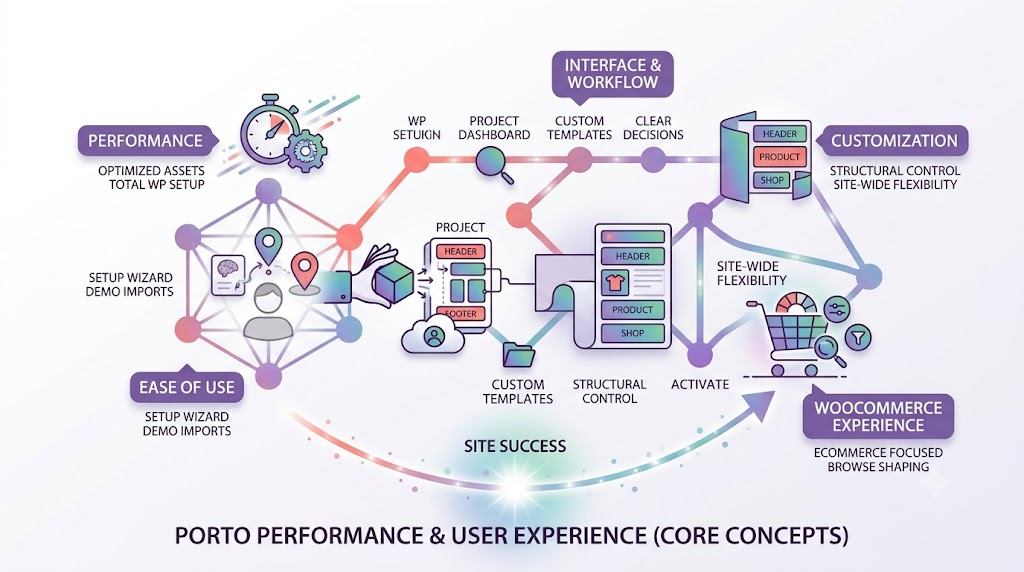
Porto’s large feature set affects more than the design options available to you. It also influences how the theme feels to configure and how carefully the site needs to be managed.
3.1. Performance
Porto provides several built-in options for managing assets and optimizing how the theme loads its resources. These controls can help reduce unnecessary resources when they are configured appropriately.
That does not mean every Porto website will automatically be fast. A WordPress site’s performance can still be affected by large images, excessive plugins, page-builder content, third-party scripts, hosting, caching, and WooCommerce configuration.
This is particularly important when using many of Porto’s features at once. More functionality gives you more options, but it also creates more settings and resources to manage.
For that reason, Porto’s performance should be evaluated as part of the complete WordPress setup rather than judged from the theme’s optimization settings alone.
3.2. Ease of Use
Porto is relatively easy to get started with, especially when using one of its demo sites as a foundation. The setup wizard brings key installation and configuration steps together, while demo imports can reduce the amount of work required to create the initial site structure.
The learning curve becomes more noticeable during customization. Settings can be spread across the theme, templates, page builder, WooCommerce, and individual pages, so finding a particular option may take some time.
Experienced WordPress users are likely to adapt more quickly, while beginners may need additional time to understand how Porto’s different customization areas fit together.
3.3. Interface and Workflow
Porto’s workflow is centered around giving users control over many different parts of the site. This is useful when a project needs custom headers, footers, product pages, archive layouts, or other specialized templates.
The trade-off is that there are more decisions to make during development. Choosing a page builder early and keeping the site’s customization approach consistent can help reduce unnecessary complexity.
3.4. Customization
Customization is one of Porto’s strongest advantages. Instead of limiting users to basic changes such as colors, fonts, and standard layouts, the theme provides more control over the structure of different parts of a website.
This becomes particularly useful when different pages or templates need different layouts. You can customize product pages, shop pages, archives, headers, and other areas rather than working entirely within a fixed theme structure.
The same flexibility can be unnecessary for a simple five-page business website. If a project requires little customization beyond basic design settings, a lighter theme may be easier to manage.
3.5. WooCommerce Experience
WooCommerce is where Porto makes its strongest case. The theme provides considerably more ecommerce-focused functionality than a theme that only adds basic WooCommerce styling.
Control over product presentation, shop layouts, filtering, swatches, quick view, comparison, and related ecommerce elements gives store owners more ways to shape the browsing and shopping experience.
For a smaller store, some of these features may be unnecessary. For a store where catalog browsing and product presentation are central to the website, however, the additional control can be valuable.
4. Pros and Cons
Pros
- Strong WooCommerce functionality.
- Extensive control over layouts and templates.
- Support for Elementor, WPBakery, and Gutenberg.
- A large collection of ready-made demos.
- Extensive customization options for product and shop pages.
- Built-in performance and optimization controls.
- Compatibility with many commonly used WordPress plugins and tools.
Cons
- The number of settings can take time to learn.
- Many features may be unnecessary for simple websites.
- Performance still depends on the overall WordPress setup.
- Switching page builders during a project can create unnecessary complications.
- Smaller stores may not need all of Porto’s ecommerce functionality.
Overall, Porto’s strengths are closely connected to its breadth. Users who need extensive control can benefit from the feature set, while users building simpler websites may find that the additional options add complexity without providing much practical value.
5. Recommended Plugins and Tools for Porto
Porto can handle a substantial amount of site presentation and WooCommerce-related functionality, but it does not replace specialized plugins for every WordPress task. The following tools can complement a Porto-based website when they address a specific need.
5.1. WP Rocket
WP Rocket can complement Porto’s built-in optimization controls with caching and additional performance features.
This can be useful for Porto websites that contain WooCommerce pages, large images, page-builder content, or third-party scripts.
The key is to avoid enabling overlapping optimization features without testing them. If both Porto and a performance plugin modify the same assets, configuration should be tested carefully to avoid conflicts or unexpected behavior.
5.2. Yoast SEO
Porto can work with Yoast SEO, but a theme should not be expected to replace a dedicated SEO plugin.
Yoast SEO can handle SEO-related functions such as metadata, XML sitemaps, breadcrumbs, and other search optimization settings, while Porto focuses primarily on presentation, layouts, and site structure.
Keeping these responsibilities separate can make the WordPress setup easier to manage.
5.3. WooCommerce
WooCommerce is the ecommerce foundation rather than simply an optional companion plugin for Porto.
WooCommerce manages core ecommerce functions such as products, orders, customers, payments, and other store operations, while Porto extends the presentation layer with features such as custom product layouts, filters, swatches, quick view, and product comparison.
This separation is important because the theme and ecommerce plugin have different responsibilities. Porto controls much of the store’s presentation, while WooCommerce provides the underlying ecommerce functionality.
5.4. WPML

WPML can be useful for Porto websites that need multiple languages, particularly international ecommerce stores.
Porto’s compatibility with WPML allows the multilingual functionality to be handled by a dedicated plugin while Porto remains responsible for the visual presentation and layout.
As with any combination of WordPress plugins, the specific site configuration should be tested to ensure that the theme, multilingual system, and other plugins work together as expected.
5.5. Contact Form 7
Contact Form 7 is a straightforward option for business websites that need contact, inquiry, quotation, or support forms.
Porto lists Contact Form 7 among its compatible plugins, allowing form functionality to remain separate from the theme’s design and layout responsibilities.
This can be useful when a website needs basic forms without relying on the theme to provide all form-related functionality.
6. Frequently Asked Questions
6.1. Is Porto a good WordPress theme for WooCommerce?
Yes. Porto is particularly well suited to WooCommerce because it provides more than basic store styling. It includes tools for product pages, shop layouts, filtering, product swatches, quick view, comparison, and other ecommerce features. This makes it a strong option for stores that need more control over the shopping experience.
6.2. Is Porto compatible with Elementor?
Yes. Porto supports Elementor, WPBakery, and Gutenberg. It also provides templates and elements designed for its supported page builders. If you are starting a new site, it is best to choose one builder early rather than switching between builders after development has started.
6.3. Is Porto good for beginners?
Porto is usable for beginners, but it is not one of the simplest WordPress themes to learn. The setup wizard and demo sites can make the initial setup easier, while the large number of theme, template, builder, and WooCommerce settings can take more time to understand.
Users who want extensive customization may find that learning curve worthwhile.
6.4. Can Porto work with other WordPress plugins?
Porto is designed to work with a range of commonly used WordPress tools, including WooCommerce, Elementor, WPBakery, Gutenberg, WPML, Polylang, Yoast SEO, Rank Math, and Contact Form 7.
However, compatibility should be evaluated in the context of the complete site. Using multiple builders, WooCommerce extensions, optimization plugins, and other third-party tools creates more combinations that may need testing.
6.5. How much does Porto cost?
Porto is available for $4.50 as a standalone purchase. If you need multiple premium plugins and themes, you can choose a PluginPro.org membership plan:
- Monthly: $14.50/month
- Quarterly: $39.50/3 months
- Yearly: $99.50/12 months
- Lifetime: $399.50
All plans include access to over 12,000 plugins and themes, original files, unlimited website usage, and regular updates. Choose a monthly plan for occasional downloads or a longer-term plan if you regularly need multiple products.
7. Conclusion
Porto is a strong WordPress theme for users who need extensive control over website design and WooCommerce functionality.
Its main advantage is depth. You can customize headers, footers, templates, product pages, shop layouts, archives, and other areas of a website while also using a substantial collection of ecommerce-focused features.
The trade-off is complexity. Porto can be more theme than necessary for a simple blog, landing page, or small business website with limited customization requirements. Its performance also depends on the broader WordPress setup, including hosting, caching, images, plugins, and site configuration.
For WooCommerce stores, agencies, freelancers, and users building more complex WordPress websites, Porto is a compelling option. If you manage multiple WordPress projects and regularly need premium plugins and themes, exploring PluginPro.org can also help you evaluate whether a broader product option fits your workflow.