When building a WordPress website, choosing the right page builder can significantly impact your workflow, website performance, and long-term flexibility. Among the many options available today, Divi and Elementor consistently rank as two of the most popular choices for beginners, freelancers, agencies, and business owners alike.
If you’ve been searching for Divi vs Elementor, you’re probably wondering which builder offers the better balance of ease of use, customization, speed, and value for money. While both tools allow users to create professional websites without writing code, they differ in several important areas, including interface design, theme compatibility, pricing models, and performance optimization.
This comprehensive comparison explores every major aspect of Divi vs Elementor, from design flexibility and templates to WooCommerce support and pricing. By the end of this guide, you’ll have a clear understanding of each builder’s strengths and weaknesses, making it much easier to choose the one that best fits your website goals.
1. What to Consider When Choosing Between Divi and Elementor
Although Divi and Elementor are often compared as direct competitors, they are built with slightly different approaches to website creation. Divi combines a premium theme with its own integrated visual builder, while Elementor is a standalone page builder plugin that works with a wide range of WordPress themes.
Rather than focusing on individual features, this comparison evaluates how each builder performs in the areas that matter most for creating and managing a WordPress website. These include ease of use, design flexibility, performance, WooCommerce capabilities, and the overall ecosystem, all of which influence how easy a website is to build, manage, and scale over time.
1.1 Ease of Use and Design Flexibility
A page builder should make it easy to create and customize websites without sacrificing creative control. We compared how intuitive each interface is, how quickly users can build pages, and the level of flexibility available for layouts, styling, responsive design, and reusable design elements. These factors are especially important for beginners, freelancers, and agencies that regularly build websites.
1.2 Performance and WooCommerce Support
Website speed affects both user experience and SEO, so we examined how efficiently each builder loads CSS and JavaScript, manages assets, and supports modern performance optimizations. Since many users build online stores with WordPress, we also compared each builder’s WooCommerce capabilities, including tools for customizing product pages, shop layouts, and other eCommerce templates.
1.3 Ecosystem and Long-Term Value
Beyond core features, a page builder’s ecosystem can significantly impact long-term usability. We considered the availability of templates, third-party add-ons, documentation, tutorials, community support, and ongoing updates, as these resources make it easier to extend functionality and maintain your website as your needs evolve.
2. Divi vs Elementor at a Glance
| Feature | Divi | Elementor |
| Developer | Elegant Themes | Elementor Ltd. |
| Type | Theme + Page Builder | WordPress Page Builder Plugin |
| Free Version | No | Yes |
| Premium Version | Yes | Yes |
| Visual Drag-and-Drop Builder | ✓ | ✓ |
| Theme Builder | ✓ | ✓ (Pro) |
| WooCommerce Builder | ✓ | ✓ (Pro) |
| Popup Builder | No native popup builder | ✓ |
| AI Features | Divi AI | Elementor AI |
| Lifetime License | ✓ | No |
| Third-Party Add-ons | Good | Excellent |
| Template Library | Large | Very Large |
| Learning Curve | Moderate | Easy |
| Best For | Designers & Agencies | Beginners, Freelancers & Businesses |
At first glance, the Divi vs Elementor comparison highlights two different approaches to building WordPress websites. Elementor stands out for its extensive ecosystem, beginner-friendly interface, and generous free version. Divi, on the other hand, offers exceptional value through its lifetime license and integrated website-building experience. The better choice ultimately depends on your workflow, website requirements, and long-term goals. To better understand these differences, let’s take a closer look at each builder before comparing which one is the better fit for different types of WordPress users.
2.1 Divi: A Complete Website Builder for WordPress
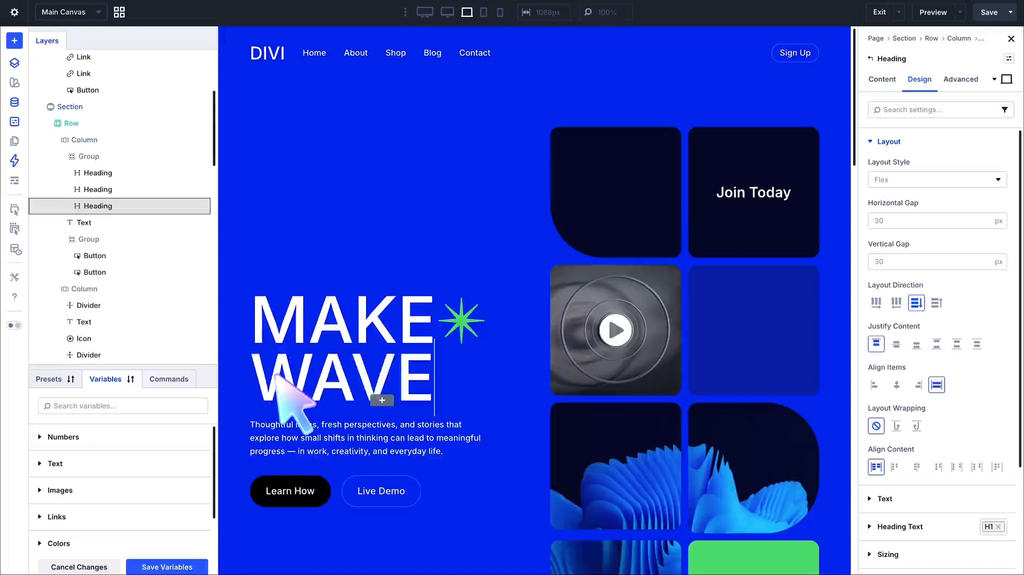
In the Divi vs Elementor comparison, Divi stands out as a complete website-building platform rather than just a page builder. Developed by Elegant Themes, Divi has evolved from a premium WordPress theme into a complete website-building platform. Instead of relying on separate tools for themes, page building, and design customization, Divi combines everything into a single ecosystem. Users can build and customize headers, footers, blog templates, archive pages, WooCommerce layouts, and individual pages through the same visual editing interface.
One of Divi’s biggest strengths is the consistency of its workflow. Because both the theme and builder are developed by the same team, every feature is designed to work seamlessly with the others. This integrated approach reduces compatibility issues and makes it easier to maintain a consistent design across the entire website. For agencies and businesses managing multiple projects, having a unified platform can also simplify long-term website maintenance.
This means users can manage most aspects of a website from a single interface instead of relying on multiple plugins. Beyond its visual editor, Divi includes many tools that reduce the need for additional design plugins. The built-in Theme Builder allows users to create custom templates for every part of a website without editing PHP files. At the same time, Global Presets help maintain consistent typography, spacing, buttons, and colors across multiple pages. For WooCommerce websites, dedicated modules make it easy to customize product pages and shopping experiences, and newer features such as Divi AI further streamline content creation and layout generation.
Divi has also improved considerably in terms of performance. Recent updates introduced dynamic CSS, optimized JavaScript loading, critical CSS generation, and more efficient asset management, helping reduce unnecessary resources and improve Core Web Vitals. In practice, overall website speed still depends heavily on hosting quality, caching, image optimization, and the number of installed plugins. When properly optimized, Divi can deliver strong performance for business websites, portfolios, and WooCommerce stores.
Pros & Cons
| Pros | Cons |
| – Comprehensive all-in-one website building platform – Powerful Theme Builder included by default – Excellent visual editing experience – Large collection of professionally designed templates – Lifetime licensing offers outstanding long-term value – Built-in AI tools and A/B testing features | – No free version for beginners to try – Slightly steeper learning curve than Elementor – Can generate heavier pages if layouts become overly complex – Migrating away from Divi may require additional cleanup |
2.2 Elementor: A Flexible Page Builder for WordPress
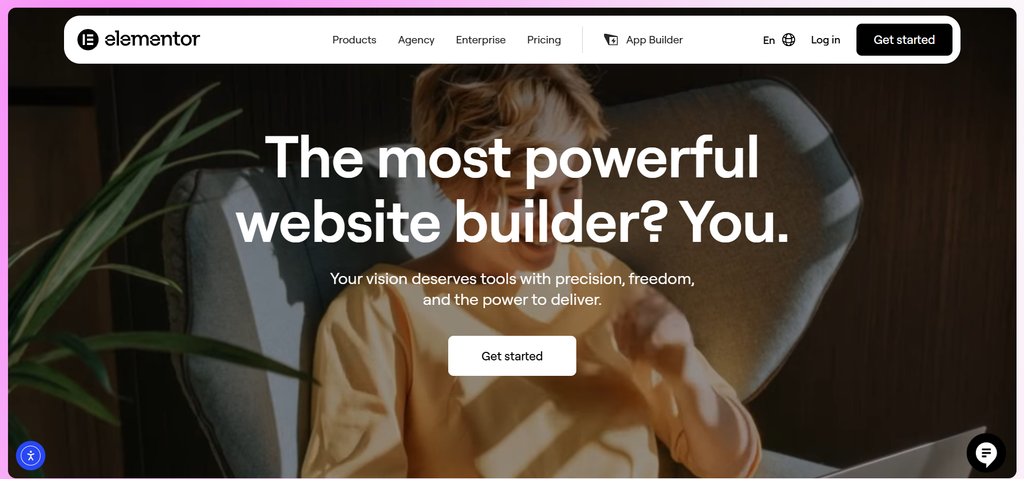
From a Divi vs Elementor perspective, Elementor’s biggest advantage is its flexibility and compatibility with almost any well-coded WordPress theme. Since its launch, Elementor has become one of the most widely used WordPress page builders, powering millions of websites across blogs, business websites, portfolios, and online stores. Unlike Divi, which is built around its own theme ecosystem, Elementor is designed to work with most well-coded WordPress themes. This flexibility allows users to choose the theme that best suits their project while still benefiting from a visual drag-and-drop editing experience.
One of Elementor’s biggest strengths is its accessibility. The interface is intuitive and easy to learn, making it a popular choice for beginners as well as experienced professionals. At the same time, its compatibility with a wide range of themes and plugins gives developers and agencies greater freedom when building websites with different requirements.
Beyond its beginner-friendly interface, Elementor offers a comprehensive set of website-building tools. Theme Builder allows users to customize headers, footers, blog templates, archive pages, and other site-wide elements. At the same time, WooCommerce Builder makes it easy to create custom shop and product layouts without editing code. Elementor Pro also includes features such as the Popup Builder, Form Builder, dynamic content support, and AI-powered tools, allowing users to build interactive, highly customized websites from a single interface.
This flexibility is one of the reasons Elementor has built such a large user community over the years. Another reason Elementor remains so popular is its extensive ecosystem. Hundreds of third-party add-ons, widgets, and template libraries are available, making it easy to extend the builder with new functionality as a website grows. For users who want maximum flexibility or frequently work with different WordPress themes, this large ecosystem is one of Elementor’s biggest advantages.
Elementor has also made noticeable progress in terms of performance. Features such as optimized asset loading, improved DOM output, container-based layouts, and lazy loading help reduce unnecessary resources and improve page speed compared to earlier versions. Like Divi, however, real-world performance depends on the overall website setup. Factors such as hosting quality, caching, image optimization, and the number of installed plugins often have a greater impact on loading speed than the page builder itself. When properly optimized, Elementor delivers excellent performance for most business websites and WooCommerce stores.
Pros & Cons
| Pros | Cons |
| – Beginner-friendly interfaceFree version available – Works with most WordPress themes – Large template libraryExcellent third-party ecosystem – Powerful WooCommerce and Popup Builder – Frequent feature updates | – Many advanced features require Elementor Pro – Third-party add-ons can impact performance – An annual subscription may become costly for long-term users |
3. Which Option Should You Choose?
After exploring every aspect of the Divi vs Elementor comparison, it’s clear that both builders are excellent choices for WordPress websites. Rather than asking which one is objectively better, the more important question is which builder best matches your workflow, experience level, and long-term website goals.
Divi is the stronger choice if you prefer an all-in-one website-building platform. Its integrated ecosystem, built-in Theme Builder, and lifetime licensing make it particularly appealing for agencies, freelancers, and businesses managing multiple websites. Since many advanced features are included by default, Divi also reduces the need to rely on multiple third-party tools when building or maintaining a website.
Elementor, on the other hand, is better suited to users who value flexibility and ease of use. Its intuitive interface makes it accessible to beginners. At the same time, its compatibility with most WordPress themes and an extensive ecosystem of templates and add-ons provide greater freedom to customize websites for different types of projects. The availability of a free version also makes it an easy starting point for users who want to explore the builder before upgrading to Elementor Pro.
For WooCommerce websites, both builders offer comprehensive tools for customizing product pages, shop layouts, and other eCommerce templates. Divi provides a more integrated experience with its built-in WooCommerce modules, whereas Elementor benefits from a broader ecosystem of third-party WooCommerce extensions. In practice, both can build professional online stores, so the better choice depends on your workflow and preferred level of flexibility.
Whichever builder you choose, using the latest premium version ensures access to new features, ongoing updates, and the best website-building experience. Once you’ve chosen between Divi and Elementor, you’ll want access to the latest features, updates, and premium functionality. At PluginPro, you’ll find Divi, Elementor Pro, and a wide selection of premium WordPress themes and plugins to support your next WordPress project.
4. FAQ
1. Is Divi better than Elementor for beginners?
Elementor is generally the better choice for beginners thanks to its intuitive drag-and-drop interface, extensive template library, and free version that allows users to get started without an upfront investment. Divi is also beginner-friendly, but its broader range of design settings and integrated features may take a little longer to master.
2. Which builder offers better performance?
Both Divi and Elementor have improved significantly in recent years. When paired with quality hosting, caching, and image optimization, either builder can achieve excellent loading speeds. In most cases, overall website performance depends more on your WordPress setup than on the page builder itself.
3. Can I build a WooCommerce store with Divi or Elementor?
Yes. Both builders include dedicated WooCommerce tools that let you customize product pages, shop layouts, and other store templates without writing code. Divi offers an integrated WooCommerce experience, while Elementor provides greater flexibility through its extensive ecosystem of third-party extensions.
4. Is Divi’s lifetime license worth it?
If you manage multiple WordPress websites or build sites for clients, Divi’s lifetime license can provide excellent long-term value by eliminating annual renewal costs. However, if you’re building your first website or prefer starting with a free version, Elementor may be the more practical choice.
5. Where can I get Divi or Elementor Pro?
If you’re looking for premium WordPress themes and plugins without paying full retail prices, PluginPro offers individual GPL downloads starting from just $4.5 per item, along with flexible membership plans that provide access to a large library of premium WordPress products. Whether you need Divi, Elementor Pro, or other premium WordPress tools, you can choose the option that best fits your workflow and budget.
5. Conclusion
The Divi vs Elementor comparison ultimately comes down to your website goals, preferred workflow, and long-term needs rather than a single “best” page builder. Both offer powerful visual editing, extensive customization options, and the tools needed to build professional WordPress websites.
If you prefer an integrated website-building platform with built-in features and long-term value, Divi is an excellent choice. If flexibility, ease of use, and compatibility with a wide range of WordPress themes are your priorities, Elementor is likely the better fit.
Whether you’re building your first WordPress website or managing multiple client projects, choosing the right page builder is only the first step. Keeping your tools up to date and using reliable premium products will help ensure better performance, security, and long-term stability. PluginPro offers Divi, Elementor Pro, and a wide range of premium WordPress themes and plugins to support your next project.